
SEO Content Optimization Tool Pricing: Free vs Paid Plans Compared (2026)
Choosing a SEO content optimization tool pricing plan is harder than it looks. Vendors price by seat, credit, query, page, or domain, so two tools with similar list prices can cost very different amounts for the same team. Free tiers vary just as much. A plan that appears generous on the pricing page may restrict your workflow within weeks.
This guide compares free and paid plans for SEO content optimization tools in US dollars, explains how usage is metered, and gives you a practical way to decide when a paid upgrade is worth the money. Our core argument is that for most small and mid-sized US content teams, the free tier is enough for the first 6 to 12 months. This is a planning heuristic rather than a vendor rule, so test it against your own publishing volume. Paying makes sense only once your publishing workflow reaches limits the free plan actually enforces.
Key Takeaways
- Most small and mid-sized US content teams can run on a free tier for six to twelve months. Treat this as a heuristic to test against your own volume. Paying earlier usually adds cost without adding output.
- Compare free plans on limits, not just price. Check monthly reports or scans, tracked keywords, users, briefs, and history retention before deciding. A seo content optimization tool pricing comparison is only useful once these limits sit beside the price.
- Use the Limit-Trigger Matrix to decide. Score each core limit as “not reached,” “reached occasionally,” or “reached weekly,” and upgrade only when two or more limits are reached weekly for three consecutive months. This threshold is a heuristic, not a published vendor rule, and it reflects a planning habit rather than a fixed standard.
- Estimate total cost of ownership, not the headline price. Seat counts, annual discounts, and add-ons such as extra credits, API access, or white-label reports can change the real monthly figure considerably.
- Confirm exit terms before you commit. Make sure historical reports, briefs, and keyword lists can be exported if you downgrade or switch tools.
Table of Contents
- Why Content Optimization Tool Pricing Is Hard to Compare
- How This Comparison Was Built
- Free Plans: What You Get for $0
- Paid Plan Tiers Explained
- Matching Plan to Publishing Volume: The Limit-Trigger Matrix
- Hidden Costs That Change the Math
- Our Thesis: Pay for Workflow Fit, Not Feature Count
- Action Checklist Before You Buy
- Conclusion and Summary
- Frequently Asked Questions
Why Content Optimization Tool Pricing Is Hard to Compare
Two vendors rarely measure the same thing. One sells a page allowance. Another sells credits, where a single scan may use three. A third charges per seat with a hard cap on reports. A headline price of $49 per month can cover ten articles or one hundred. The number on the pricing table means little until you know the unit underneath it.
A simple “free vs paid” comparison misleads buyers for this reason. Free tiers differ in scope as much as in price. They vary in how deep reports go, how many keywords you can track, how many days of history you keep, and whether you can export what you produce. Annual discounts and trial terms then shift the real monthly cost in ways that rarely appear on the first screen of a pricing page.
What “Free” Actually Includes
A free plan is best read as a bundle of limits, not a price of zero. Across common tools, the same categories recur:
- Monthly reports or scans: the number of full optimization analyses you can run before the allowance resets.
- Tracked keywords: how many terms the tool will monitor or score at once.
- Users: whether more than one person can log in, and whether a teammate needs a paid seat to see the same report.
- Content briefs: whether brief generation is included, limited, or locked behind a paid tier.
- History retention: how long past reports stay accessible. This matters when you compare a refreshed article against its earlier version.
- Export rules: whether you can download reports, keyword lists, or briefs in a usable format.
The practical test is simple. Pick the one limit your team would hit first in a normal month, then check whether the free plan blocks that task. A free plan with generous report counts but no export is a poor fit for a team that must share findings with a client. Vendor terms change, so confirm each limit on the live pricing page before you rely on it.
How Vendors Meter Usage
Metering is where the real cost hides. Vendors use four main units, and each behaves differently as volume grows.
| Metering unit | What it counts | How cost scales | What to check |
|---|---|---|---|
| Seats | Named user accounts | Linear with headcount | Whether viewers or guests need a paid seat |
| Credits | Points spent per action | Depends on credits per action | The credit cost of one full optimization and one refresh |
| Queries or scans | Each analysis or search run | Scales with how often you re-check content | Whether reruns of the same page count again |
| Pages or domains | Distinct URLs or sites under management | Scales with library size | Whether pages counted once stay counted every month |
Credits need particular caution. A large credit allowance can run out fast if each optimization consumes several credits. Some vendors let unused credits expire at month end, while others roll them over. Ask whether a hard stop halts publishing work or only blocks new analyses, because those outcomes have very different consequences for a working team.
Google’s ranking systems use many different signals to surface content that seems most helpful, as described in its ranking systems guide. Tool count is not one of those signals. That principle helps when you decide how much metered capacity you need: a tool that lets you check fewer pages thoroughly can serve a team better than one that scans many pages superficially.
How This Comparison Was Built
This section explains how the plan details were gathered, how current they are, and where the comparison stops. Treat every dollar figure as a snapshot, not a quote.
Prices are taken from each vendor’s public pricing page and recorded in US dollars. Record the list price for a single account on the monthly and annual options the vendor shows. Where a vendor prices per seat, show the figure per seat per month. Where it sells credits, query packs, or page allowances, state the unit so figures compare on the same basis. Prices shown only after contacting sales should be marked “confirmed on enquiry” and not estimated.
Each price carries the date it was read from the vendor’s site. Pricing pages change without notice, so a figure holds only for its stamped date. Before publication, check figures against live pages. Correct or remove any that no longer match.
The table below is the place to record current free and paid list prices for named tools in USD. Each row shows the date the figure was read from the vendor’s site. Fill in only the figures you have read from a live vendor page on that date, and mark any row you cannot verify as “confirmed on enquiry.”
| Tool | Free plan (USD) | Entry paid plan (USD) | Verified on |
|---|---|---|---|
| Tool name from vendor page | $0 | Price from vendor page | Date read from vendor page |
| Tool name from vendor page | $0 | Price from vendor page | Date read from vendor page |
| Tool name from vendor page | $0 | Price from vendor page | Date read from vendor page |
This article carries no affiliate links that change the price shown, and no vendor paid for placement or a favorable rating. Any affiliate or sponsorship arrangement added later must be disclosed here before publication.
The comparison cannot show several things:
- Negotiated enterprise contracts, which rarely match public list prices.
- Promotional discounts, trial terms, and regional tax or invoicing differences.
- How history is retained after a downgrade, unless the vendor documents it publicly.
- Real-world performance, recommendation accuracy, or ranking outcomes. Pricing is not a proxy for quality, and a more expensive plan does not guarantee better content.
Where a detail cannot be confirmed from a public source, this article says so rather than filling the gap with an estimate.
Free Plans: What You Get for $0
Many content optimization tools offer a free tier, and small teams often treat it as a trial to escape as quickly as possible. That instinct can cost money. A free plan is usually enough for the first six to twelve months of a content program, and paying makes sense only once a specific limit starts blocking real work. The right question for any seo content optimization tool pricing decision is which limit you actually hit, not which plan looks most serious.
Where Free Plans Break Down for Working Teams
Free plans tend to fail in predictable ways once a team publishes steadily:
- Collaboration. A single login forces writers to share credentials or pass reports by email. Two people editing the same brief is where this becomes obvious.
- Volume. A team publishing ten or more pages a month can exhaust a monthly scan allowance within two weeks.
- Tracking depth. Monitoring a handful of keywords suits a single blog. A program covering several product lines needs many more tracked terms.
- Exports and reporting. Free plans often restrict CSV or PDF exports, which blocks sharing results with clients or managers.
- Historical comparison. Short history retention prevents showing whether a refreshed article improved over time.
These breakpoints are signals, not verdicts. A team that hits one once a quarter is in a different position from a team that hits three every week. The Limit-Trigger Matrix, covered below, turns that distinction into a test.
When a Free Plan Is Enough
A free plan is enough when none of the core limits is reached regularly. That describes most solo operators, small in-house teams publishing a few articles a month, and agencies still testing whether a tool fits their process.
Ask three questions about your last three months of work:
- Did we run out of scans, briefs, or keyword slots before the month ended?
- Did a lack of seats cause someone to wait, share a login, or skip a review?
- Did we need an export, integration, or history we could not get on the free plan?
If the answer to all three is no, the free plan is doing its job, and paying would add cost without adding output. A single bad month proves little. A repeated shortfall across several months is the real signal.
Free plans also let you build habits a paid tier would later reward: a consistent brief template, a keyword list you review monthly, and a publishing calendar that shows where optimization time goes. Teams that build these habits on a free plan usually buy the right tier faster, because they know which limit they actually hit.
Google Search Console is fully free and gives teams search performance data that pairs well with any content optimization tool, so it is a practical baseline before any paid spend.
Paid Plan Tiers Explained
Paid plans usually fall into three bands, but the labels mean different things from vendor to vendor. One tool’s “Starter” may include more monthly reports than another’s “Professional.” Read what each tier meters before comparing prices: scans, briefs, tracked keywords, seats, and history retention. The exact figures for named tools should be confirmed on each vendor’s current pricing page before you decide, since list prices change.
Starter Plans
Starter plans sit just above the free tier. They usually raise report or scan limits, add a few seats, and extend history retention.
Who it suits: a solo writer or a two-person team publishing a handful of articles a month. For them, a Starter plan is often the first paid step that removes a real bottleneck.
Choose a Starter plan when the free tier blocks you on a predictable schedule, when you need one or two extra seats rather than a full team license, and when you do not yet need API access, CMS connectors, or white-label exports. It is a poor fit if you buy it only because it looks more serious than the free version. Apply the Limit-Trigger Matrix first. If none of your core limits is reached weekly, the Starter plan adds cost without adding output.
Mid-Tier Plans for Growing Teams
Mid-tier plans add collaboration and integration features. Vendors often label them Professional or Growth. Expect higher monthly allowances, shared workspaces, role-based permissions, brief templates, and in many cases a connector to your CMS or to Google Search Console.
Who it suits: a team of roughly three to ten contributors publishing on a regular schedule who need one shared source of truth.
The practical test is workflow. If writers, editors, and SEO leads duplicate work because they cannot see each other’s briefs or scores, the seat and sharing features justify the step up. If the team only shares a spreadsheet, a mid-tier plan may not change the outcome.
Check three things before committing:
- Seat pricing: many mid-tier plans charge per additional user, so a five-person team can cost more than the headline price suggests.
- Credit or report rollover: find out whether unused allowances carry forward or reset to zero monthly.
- Export rights: confirm you can download briefs, keyword lists, and historical reports in a usable format.
Enterprise Plans
Enterprise plans typically have no published price. They add single sign-on, audit logs, dedicated support, API access at volume, custom data retention, and sometimes white-label reporting for agencies. Pricing comes from a sales conversation and is usually tied to an annual contract.
Who it suits: content operations spanning several brands, regions, or client accounts, or organizations whose procurement requires features a lower tier lacks. For most US content teams it sits outside the decision until they publish several hundred pages a year under a formal approval process.
If you request a quote, these points tend to move the final figure:
- Term length: multi-year commitments usually earn larger discounts, but sign only after a pilot confirms your volume.
- Overage terms: ask for the rate applied above your allowance and whether it can be capped.
- Price protection: request a fixed renewal price so a list-price increase does not hit you mid-contract.
- Data exit clause: get written confirmation that you can export content, reports, and history if you cancel.
- Feature commitments: if a feature you depend on is on a roadmap, ask for it in writing.
An enterprise contract can look expensive next to a mid-tier plan, yet cost less per page for a large, steady publishing operation. Compare cost per optimized page at your actual volume before deciding a tier is too much.
Matching Plan to Publishing Volume: The Limit-Trigger Matrix
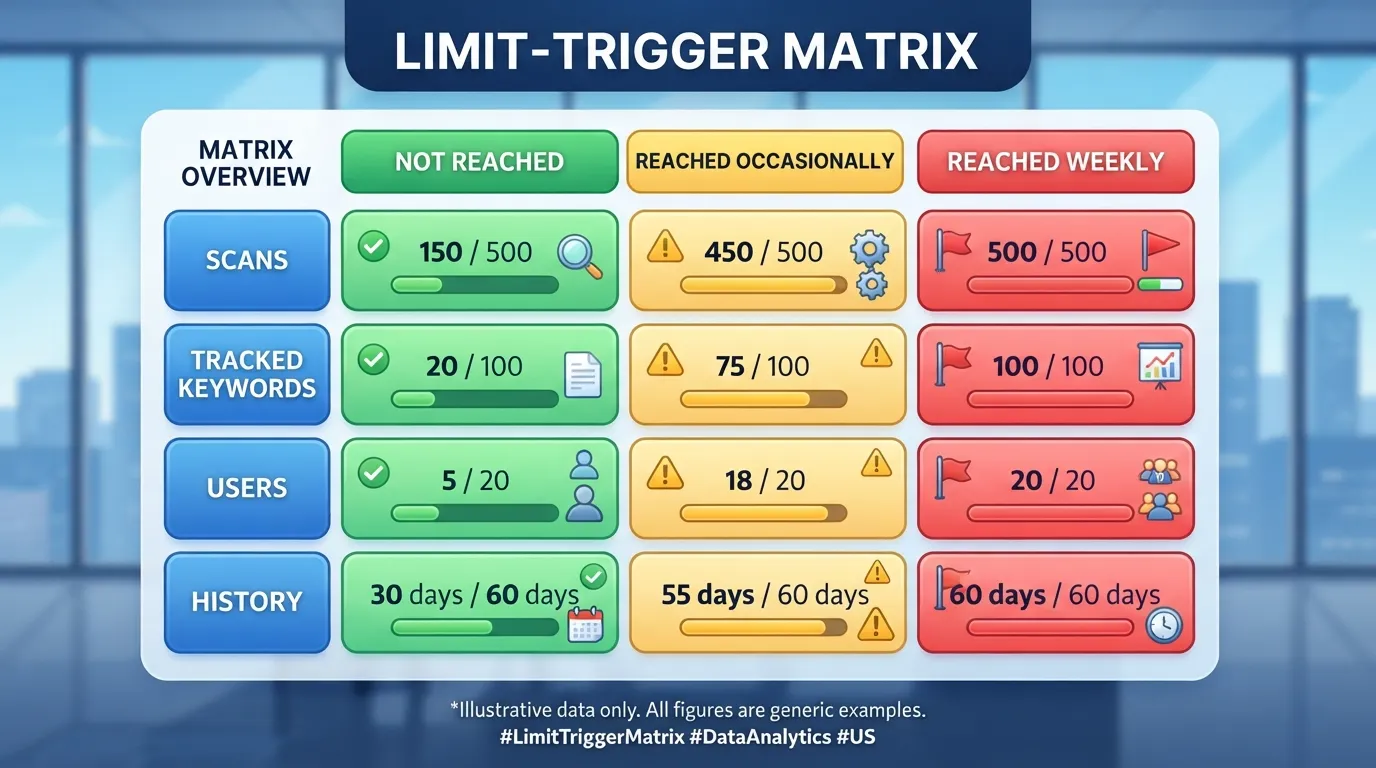
Price alone does not tell you when to upgrade. The Limit-Trigger Matrix maps your real monthly volume against each free-tier limit. It is a heuristic we use to decide when a plan change is worth discussing, not a rule any vendor publishes, and it should be tested against your own counts before you act on it.
Step 1: List the limits. In one column, record every tool’s free-tier limits: monthly reports or scans, tracked keywords, users, content briefs, and history retention.
Step 2: Measure your volume. Count how many scans, briefs, keyword checks, and seats your team used in each of the last three months.
Step 3: Score each limit. Mark each core limit as:
- Not reached: usage stayed comfortably under the cap.
- Reached occasionally: the cap was hit in some months but not most weeks.
- Reached weekly: the cap was hit in most weeks.
Step 4: Apply the rule. Upgrade only when two or more core limits are reached weekly for three consecutive months. One limit reached weekly can often be solved by changing workflow, such as batching scans. Two or more limits pointing to the same bottleneck signal that the plan no longer fits.
Why three months, and why two limits. The three-month window filters out seasonal spikes, such as a launch month, that would trigger an upgrade the team does not need. The two-limit condition reflects a practical judgment: one constraint is usually a workflow problem, while two or more is structural. This is our rule of thumb rather than an industry benchmark, and it can be wrong. A team with a single, heavy use case, such as a weekly scan of one large site, may hit one limit every week and still need a plan change. In that case, the single-limit exception should override the rule.
Worked scoring example. Suppose a three-person team publishes eight articles a month. Over three months, it scans about 60 pages a month against a free allowance of 40 scans, reaching that cap weekly. It tracks 25 keywords against a 20-keyword cap, reached occasionally. It needs two seats and has one, so the seat limit is reached weekly. Scans and seats are both reached weekly, and the team has hit two core limits for three consecutive months. The rule points to an upgrade. The team should still confirm the current price on each vendor’s pricing page before committing.
Use your own counts before you spend. The example uses assumed volumes, and your team’s answer depends on your publishing pattern, not on a generic benchmark. For how search systems evaluate page quality, which is the basis for optimizing pages at all, see Google’s ranking systems documentation.
Hidden Costs That Change the Math
The headline price is the start of the calculation, not the end. Four categories change the real monthly figure:
- Seats: if each contributor needs a paid seat, multiply the per-seat price by headcount, including reviewers who only read reports.
- Annual versus monthly billing: annual discounts lower the effective monthly rate but commit you to twelve months whether or not the tool fits.
- Add-ons: extra credits, API access, and white-label reports often sit outside the base price.
- Overage: usage above your allowance may be billed at a higher rate, or may stop work until the next cycle.
Calculate total cost of ownership by adding the base plan, the seats your real team needs, the add-ons you cannot work without, and expected overage over twelve months. Divide that total by the number of pages you optimize in the same period to get cost per optimized page. That figure is the one to compare across tools, and it is the figure to reproduce with live prices from each vendor’s pricing page.
Worked example. Take a five-person team on two hypothetical tools, each priced at a flat monthly base, with a per-seat charge for each user beyond one included seat. Tool A has a lower base price but charges for every seat, while Tool B has a higher base price with five seats included. With five users, Tool A’s seat charges can close most of the gap, and the annual commitment on either tool adds to the twelve-month total. Work through the same steps with the live prices from each vendor, record the date you checked them, then divide by the pages you optimize to reach the cost per optimized page. Replace the hypothetical figures with real vendor prices before you rely on the result.
US buyers commonly pay by a few methods, and the most common invoice payment methods include ACH transfers, ACH debit, credit card payments, wire transfers, checks, and digital payment platforms. Many teams need a finance or procurement approval step before an annual contract. Build that approval time into your timeline, since a plan you need next week cannot wait for a sign-off that has not yet started.
Buyers also tend to compare each tool against their existing stack: Google Search Console, Google Analytics, a CMS such as WordPress, and a project management tool. Ask directly whether the paid plan connects to those systems, and whether the integration needs a higher tier. A plan that looks cheaper but requires manual exports to reach your CMS can cost more in staff hours than the upgrade it avoided.
Our Thesis: Pay for Workflow Fit, Not Feature Count
Our view is that the feature list is the wrong thing to buy on. Most content optimization tools overlap heavily in what they analyze, so what differs is whether the plan fits how your team publishes. A tool can be strong at one job without covering all five, and a team that needs one thing done well gains more from it than from a long list of features it never uses.
This is why the belief that a paid plan is always the more professional choice does not hold up. Paid tiers are often the right answer, but a team that upgrades before its usage reaches the free limits pays for capacity it does not use. Free plans are often treated as a stage to escape rather than a tool to use well.
The thesis is a working position rather than a proven law. Its strongest support is buying outcomes: teams that upgraded when their limits were hit weekly generally reported that the paid plan removed a bottleneck, while teams that upgraded early often reported unused capacity. Test that against your own team, because we have not validated it across a named sample of tools and usage logs.
The argument has a limit. Once volume, collaboration, or reporting genuinely outgrow the free plan, delaying the upgrade costs real output. If your team is already blocked by seat limits or a missing CMS integration, the decision is straightforward. Let your workflow decide when to pay, measured through the usage limit rule above, not the feature list or the sales page.
Action Checklist Before You Buy
Work through these steps before committing to any paid plan:
- Record free-tier limits. List each limit for the tools you are considering in a single table, with the date you read them.
- Measure three months of usage. Count scans, briefs, tracked keywords, and seats used each month. Three months is the minimum window, because a single busy month can mislead you about normal demand.
- Score each limit. Mark each as “not reached,” “reached occasionally,” or “reached weekly.”
- Apply the rule. Upgrade only if two or more core limits are reached weekly for three consecutive months. The two-limit and three-month thresholds are a practical heuristic, not an official standard. They are a cautious starting point you can adjust once you have your own data.
- Calculate total cost. Add seats, billing terms, add-ons, and likely overage for twelve months, then divide by pages optimized.
- Verify live prices. Check each vendor’s pricing page on the day you buy and record the date. Plans change, so a figure you read last quarter may no longer apply.
- Confirm the exit terms. Confirm in writing that historical reports, briefs, and keyword lists can be exported if you downgrade or leave.
- Test integrations. Confirm the plan connects to Google Search Console, Google Analytics, your CMS, and your project tool, and check which tier that requires.
- Plan the approval step. If finance or procurement must sign off, build that time into the timeline.
Conclusion and Summary
For most small and mid-sized US content teams, the free tier of a content optimization tool will carry you through the first 6 to 12 months. Treat that window as a rough heuristic rather than a guarantee, since it depends on how much you publish. A paid plan earns its cost once your workflow runs into a limit the free plan actually enforces, and that limit blocks output you would otherwise produce.
The usage limit rule tests this against your own numbers: upgrade only when two or more core limits are reached weekly for three consecutive months. Anything less usually means you are paying for capacity you are not using.
Before you act, check the vendor’s own pricing page on the day you buy. Confirm the true monthly cost including seats and add-ons, whether limits reset or act as hard stops, and whether you can export your data if you downgrade or leave. Lock-in is the cost teams most often underestimate.
The strongest case for paying early is collaboration or reporting a free plan cannot support. If that is your situation, upgrade. Otherwise, let your workflow decide when to pay.
Frequently Asked Questions
Is there a truly free SEO content optimization tool?
Several tools offer a free plan, but “free” hides real limits. Free tiers typically cap monthly scans or reports, tracked keywords, users, and history retention. A team can use these plans productively for months. The practical test is whether those caps are hit every week or only occasionally. If you never reach a limit, you are not paying for anything you need. Vendor free-tier caps change, so check the current terms on each vendor’s pricing page before relying on them.
How much do paid SEO content optimization tools cost per month in the US?
Paid plans vary widely, so treat any single figure as a starting point. Entry tiers for individuals or small teams are often priced in the tens of US dollars per month, mid-tier plans rise once you add seats and credits, and enterprise plans are quoted on request. Add-ons such as extra credits, API access, or white-label reports can change the real monthly cost. Confirm current US dollar prices on each vendor’s pricing page and note the date you checked, since seo content optimization tool pricing is updated without notice.
Are annual plans worth the discount for content teams?
Usually only after a pilot. Annual plans lower the monthly price, but you commit to twelve months whether or not the tool fits your workflow. If you have not confirmed that your team hits free-tier limits weekly, an annual commitment buys capacity you may not use. Run a monthly plan or trial on real content first, confirm the limits you keep hitting, and then consider an annual contract if the savings justify it. Many finance teams will ask for this evidence anyway.
What usage limits should I check before choosing a plan?
Check monthly reports or scans, tracked keywords, user seats, content briefs, and history retention. Then find out how each behaves in practice: whether limits reset monthly or roll over, and whether hitting a limit blocks new work or only slows it. Confirm whether historical reports and keyword lists can be exported if you later downgrade or switch tools. A hard stop in the middle of a publishing week can cost far more than the price difference between two plans.
Do free plans include the features needed for team collaboration?
Often not fully. Free tiers commonly allow one user or a very small number of seats, and shared briefs, comment threads, role permissions, and shared dashboards are frequently reserved for paid plans. A solo writer or a two-person team working from one account may find a free plan sufficient. Once several editors, writers, and SEO specialists need to review the same content, check seat limits and sharing features on the vendor’s current plan comparison before assuming collaboration is covered.
How often do SEO content tool prices change?
Prices and plan structures can change at any time, sometimes with little notice, and vendors often revise tiers, limits, and add-on costs alongside product updates. There is no fixed schedule across the industry, so verify prices on the vendor’s site immediately before you buy and again at each renewal. Record the date you checked, and review your plan fit every few months, especially if publishing volume or team size has changed.
What happens to my content and reports if I downgrade or cancel?
This varies by vendor and is one of the most overlooked terms in a contract. Some tools keep historical reports visible but read-only after a downgrade, others remove access to history beyond the new plan’s retention window, and a few delete data after a grace period. Before you subscribe, look for the vendor’s documented data retention and export policy, and export your briefs, keyword lists, and reports regularly so you are not dependent on the tool’s continued access.
Is a more expensive plan always better for content quality?
No. Higher-priced plans generally add capacity, collaboration, and integrations, but they do not make an article rank better or read better on their own. Content quality depends on the research, expertise, and editing behind the page, and an optimization score is only one input. A team that pays for a larger allowance it never uses gains nothing in quality. Judge a plan by whether it removes a real bottleneck in your publishing process.
What should I do if I hit a usage limit in the middle of a busy month?
First, check whether the limit resets on a fixed date or on your billing anniversary, and whether the tool blocks new analyses or simply slows them. Second, prioritize the pages that matter most for the month and batch remaining scans into the next cycle. If the limit is hit repeatedly, that is the signal the usage limit rule is designed to catch. Avoid buying an emergency upgrade on impulse, since a short-term top-up often costs more per page than planned capacity.
Can I use a free plan for a client project, or does client work require a paid license?
Check the terms of service. Many free tiers restrict commercial use, client-facing reports, or white-label sharing, and some reserve those rights for paid plans. Agencies should confirm that their intended use, including sharing reports with clients and storing client domain data, is permitted on the tier they choose. If the terms are unclear, ask the vendor in writing before running client work through a free account.
Are there exceptions where paying from the start makes sense?
Yes, in a few situations. A team with a fixed, high-volume publishing schedule, a regulated industry requiring audit trails or single sign-on, or an agency that must deliver branded reports to clients from day one may justify a paid plan immediately. The common thread is that the free tier is known to block required work, not merely assumed to be insufficient. Test the limit against real work before you commit, even when the exception applies.
Disclosure: digitalmarketingtools.ai is sponsored by Digimetrics.ai. Sponsored Highlights are clearly labelled advertising. Our reviews, comparisons and guides are written to be useful and fair regardless of who sponsors the site. Read the full disclosure.

