
How to Create Social Media Graphics with AI Image Tools: An AI Image Generator for Social Media Guide
Create a social media graphic with an AI image generator in five steps: pick a tool that fits your team, write a structured prompt, size the image for each platform, verify commercial rights, then publish. The tool matters less than whether it keeps one campaign consistent across every format.
Most social media images in your feed are no longer shot or drawn by hand. According to Piktochart’s review of social media post generators, 71% of social media images are now AI-generated.
This guide is for small business owners, social media managers and solo creators publishing weekly on Instagram, Facebook, TikTok and LinkedIn. For most teams, the real gain is keeping a campaign on-brand across every format, not producing one striking image. Good content creation depends on that consistency, and help is available when a team’s output starts to drift between platforms.
Key Takeaways
- 71% of social media images are now AI-generated, per Piktochart.
- Judge tools by consistency and format coverage, not their best image.
- Score tools with the Platform Fit Scorecard, rating format coverage, asset reuse, team workflow, commercial rights and text handling from 1 to 5.
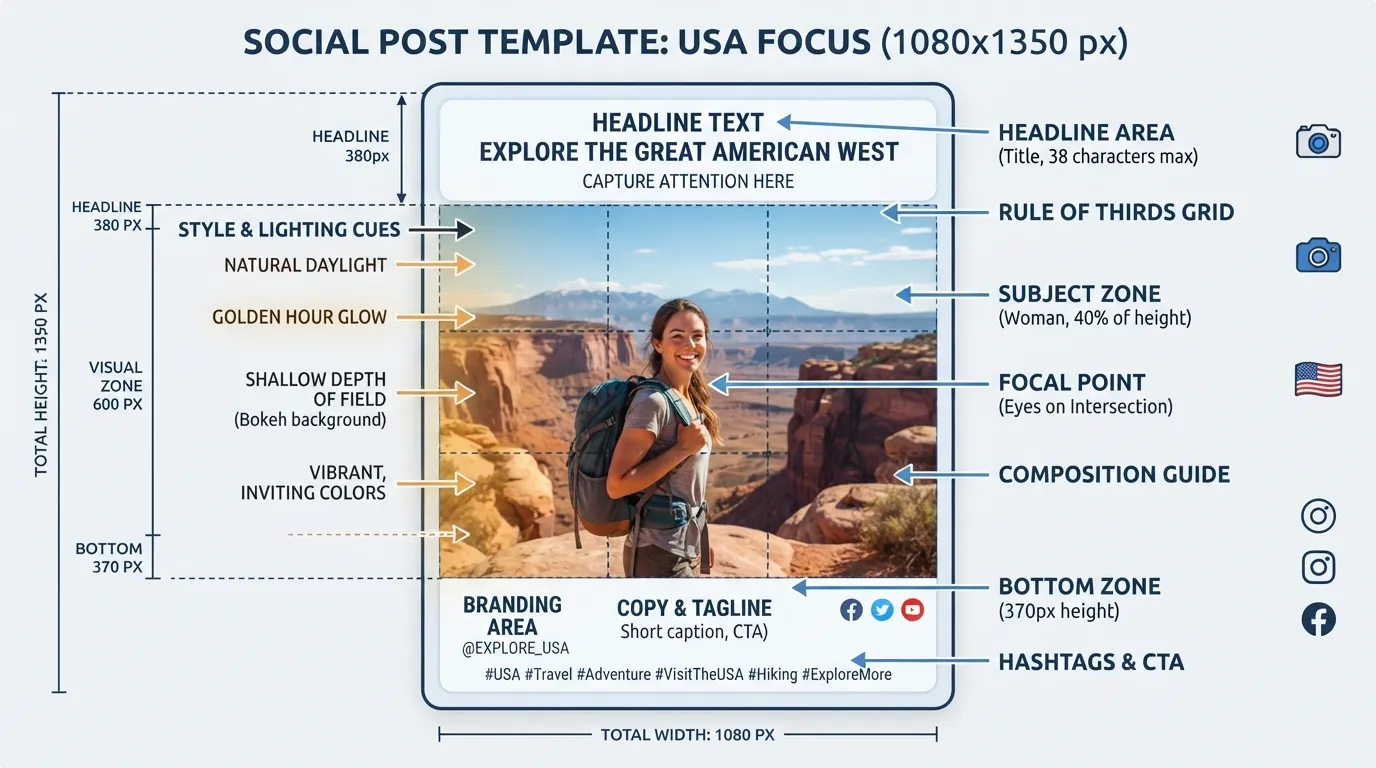
- Test headlines across crops, including 1080×1350 posts, 9:16 Stories and 16:9 banners.
- Verify commercial rights on your plan. getimg.ai includes them on every paid plan, from Entry at $15 per month.
Table of Contents
- Choosing and Comparing AI Image Generators for Social Media
- Creating Your First Graphic: A Step-by-Step Workflow
- Refining, Regenerating and Downloading Your Files
- Conclusion and Summary
- Frequently Asked Questions
Choosing and Comparing AI Image Generators for Social Media
Most social teams pick a tool by scrolling sample images. That is the wrong test. Output only helps if the content stays on-brand across every format you publish in. Score each tool against the Platform Fit Scorecard: format coverage, brand asset reuse, team workflow, commercial rights and in-tool text handling, each rated 1 to 5. Test this scoring on the features that matter for each media post, media content and post generator you plan to use. Media management, meaning how assets are stored, resized and reused across a team, is often the deciding factor.
Selection criteria: what actually matters for social teams
Resolution matters less than it seems. Midjourney V8.1 Alpha, launched April 2026, generates native 2K images by default, according to getimg.ai’s roundup. It is an alpha, so check its release notes before you plan around it. Confirm that your paid tier includes commercial rights before you publish client work, and check seat pricing and shared workspaces. Free tiers rarely cover commercial use.
Scoring the three tools: a worked test
Run one prompt, “a flat-lay of a ceramic coffee mug on a pale oak table, soft morning light, clear space in the top third for a headline”, through Canva AI, getimg.ai and DeepAI. Score each 1 to 5 on the five Scorecard criteria. These scores are illustrative, based on feature descriptions rather than measured output, so run the same test on your own shortlist.
- Canva AI: format coverage 4, asset reuse 4, team workflow 4, commercial rights 3, text handling 3. Its suggestions drop straight into designs, according to Fan Page Karma.
- getimg.ai: format coverage 5, asset reuse 5, team workflow 4, commercial rights 4, text handling 4. It offers 20+ models, resizing across eight aspect ratios and shared Elements for teams.
- DeepAI: format coverage 2, asset reuse 2, team workflow 2, commercial rights 3, text handling 3. It suits occasional, per-image use.
Decision rule: a team of three or more publishing across several formats should pick getimg.ai, whose Core plan at $25 per seat per month adds shared Elements and folders. A solo creator working inside a design file should start with Canva AI. A team generating a handful of images a month can consider DeepAI, after checking its current terms.
Top AI image generators for social media: product differences
- Canva with AI generation returns four suggestions from one prompt and places them directly into designs.
- getimg.ai offers 20+ models, resizing across eight aspect ratios and Team plans from $25 per seat per month.
- DeepAI charges per image beyond monthly allowances, with Super Genius 2K output available.
Comparison table
| Tool | Best for | Team pricing | Resize or templates | Commercial rights | Native resolution |
|---|---|---|---|---|---|
| Canva AI | Quick in-design visuals | Canva plan dependent | Templates included | Check Canva terms | Varies |
| getimg.ai | Multi-format brand teams | From $25/seat/month | AI resize, 8 ratios | Paid plans from $15/month | Midjourney V8.1 native 2K |
| DeepAI | Low-volume, per-image use | $9.99/month base | Not a focus | Check current terms | 2K and 4K in Super Genius |
Verify each price and licence term against the vendor’s current page before you buy. This article reflects vendor pages checked on 2026-10-19.
Benefits of AI-generated images vs. stock photos
AI images are fast, specific and avoid per-photo licensing fees. Stock still wins when you need real people, real locations or documentary credibility. Features such as in-tool resizing also help TikTok and Instagram Story crops stay consistent with the rest of your media content, and let your team create variants without redrawing each one.
Creating Your First Graphic: A Step-by-Step Workflow
Work through these steps in order. Each one removes a specific failure.
- Choose the tool. Score your shortlist and pick the highest total for your team type.
- [ ] Scorecard completed for at least three tools
- [ ] Seat limits and shared workspace confirmed
- Write the prompt. Use the subject, style, lighting, composition and clear space structure below.
- [ ] Subject and style named
- [ ] Space left for the headline
- Generate and select. Produce several options and keep the cleanest composition.
- [ ] Brand colours roughly match
- Resize. Convert to 1080×1350 for Instagram, 9:16 for Stories and 16:9 for LinkedIn.
- [ ] Headline legible in every crop
- Check the rights. Confirm your plan includes commercial use before any client work.
- [ ] Licence terms saved for the client file
- Publish. Add the copy and schedule the post.
- [ ] Each platform preview checked
Refining, Regenerating and Downloading Your Files
Change one variable at a time, such as lighting or subject position, then regenerate. Keep prompts that work so the next campaign starts from a proven base, especially when you build a reusable post generator for each social media platform.
Export each platform’s exact size from a high-resolution master file. Name files by campaign, platform and size. A repeatable file system matters more than any single tool feature when you publish a video or media post across several social platforms.
Adobe Firefly states its outputs are commercially safe because it trains on licensed and public-domain content. It is available through Adobe Creative Cloud. Still check the licence on the plan you buy.
Conclusion and Summary
Choose a tool that fits your team, write a structured prompt, size images for each platform, refine, verify commercial rights, then publish. Each step prevents a specific failure: wrong tools mean rebuilding files, vague prompts waste credits, and skipped rights checks create problems for client work.
Before committing, generate one product announcement, resize it to a 1080×1350 Instagram Post, a 9:16 Story and a 16:9 LinkedIn banner, and confirm the headline survives every crop.
Frequently Asked Questions
Are AI-generated images safe to use commercially on social media?
It depends on the tool’s terms and your plan tier, so check both before posting client work. getimg.ai states that commercial rights are included on every paid plan, starting at $15 per month. Free tiers often restrict commercial use.
Which AI image generator is best for social media teams?
It depends on how your team collaborates. Compare seat limits and shared workspaces. getimg.ai’s Core plan starts at $25 per seat per month, with shared workspaces.
What size should I use for Instagram AI graphics?
A 1080x1350px tall portrait is a reliable choice for feed posts. Piktochart lets you choose Instagram Post (Tall), 1080x1350px from its dropdown. Match the ratio to each platform, since Stories and banners differ.
How do I write a good prompt for a social media image?
Include the subject, style, lighting, composition and clear space for your headline. SocialBee offers over 1K social media prompts as a starting point.
Can AI image tools resize one design for multiple platforms?
Yes. getimg.ai’s AI resize feature covers all eight standard aspect ratios. Always check that headline text stays legible after resizing.
Does AI image generation cost much per image?
It depends on the model. DeepAI lists 1¢ per standard image, 8¢ per Genius Mode image and 25¢ per Super Genius 2K image, charged once monthly allowances run out.
Disclosure: digitalmarketingtools.ai is sponsored by Digimetrics.ai. Sponsored Highlights are clearly labelled advertising. Our reviews, comparisons and guides are written to be useful and fair regardless of who sponsors the site. Read the full disclosure.


