
How to Choose Digital Marketing Tools: A Weighted Scoring Framework for Building Your Stack

Many teams pick digital marketing tools from “best of 2026” lists, which puts features before budget and often leaves subscriptions unused within a year. Define the use case and budget ceiling first, weight your criteria second, and score candidate tools last. For a team of digital marketers, this order usually yields a smaller, cheaper and more durable stack.
Following this order usually yields a smaller, cheaper and more durable stack. This guide covers a five-step method, the traps in review sites and pricing pages, and a worked example.
The Five-Step Selection Method
- Define your jobs and set a US$ monthly ceiling for each. List every task the stack must handle, such as design in tools like Canva, content publishing across your social media channels and search reporting for your business.
- Weight your criteria (features, ease of use, integration, support, total cost) to total 100%.
- Shortlist tools by category, choosing candidates for each job separately.
- Score every tool on one sheet using identical criteria and recorded trial results.
- Verify prices and trial on a real task, checking the vendor’s pricing page and your platform’s reporting needs.
Key Takeaways
- Define jobs and budget first. List every task the stack must handle and set a US$ ceiling for each before reviewing products.
- Weight criteria before scoring. A 9 at 40% weight outranks a 6 at the same weight, so weighting decides the winner.
- Score every tool on one sheet. Use the same criteria and record trial results against them.
- Treat review averages with caution. A near-perfect score from a few reviews tells you less than a lower score from hundreds.
- Check prices on the vendor’s page. A rating that contradicts published pricing is likely out of date.
- Run a trial on a real task. Use your own account structure and reporting needs, not a demo dataset.
Table of Contents
- Digital Marketing Tools Overview and Definitions
- Criteria for Selecting Digital Marketing Tools
- Evaluating Tools by Category
- Understanding Digital Marketing Tool Costs and Pricing
- Conclusion
- Frequently Asked Questions
Digital Marketing Tools Overview and Definitions
What counts as a digital marketing tool
A digital marketing tool is any software or online service that helps you plan, run, measure or improve marketing activity, such as email platforms, social media scheduling apps, search analytics and landing page builders. The defining feature is the marketing job it performs, not its internet connection. A generic project management app is not a marketing tool, but a keyword research platform is, because it shapes content and paid spend. Many tools also let a customer interact with your business directly, which makes them central to how your website converts visitors.
Where tools fit in a marketing stack
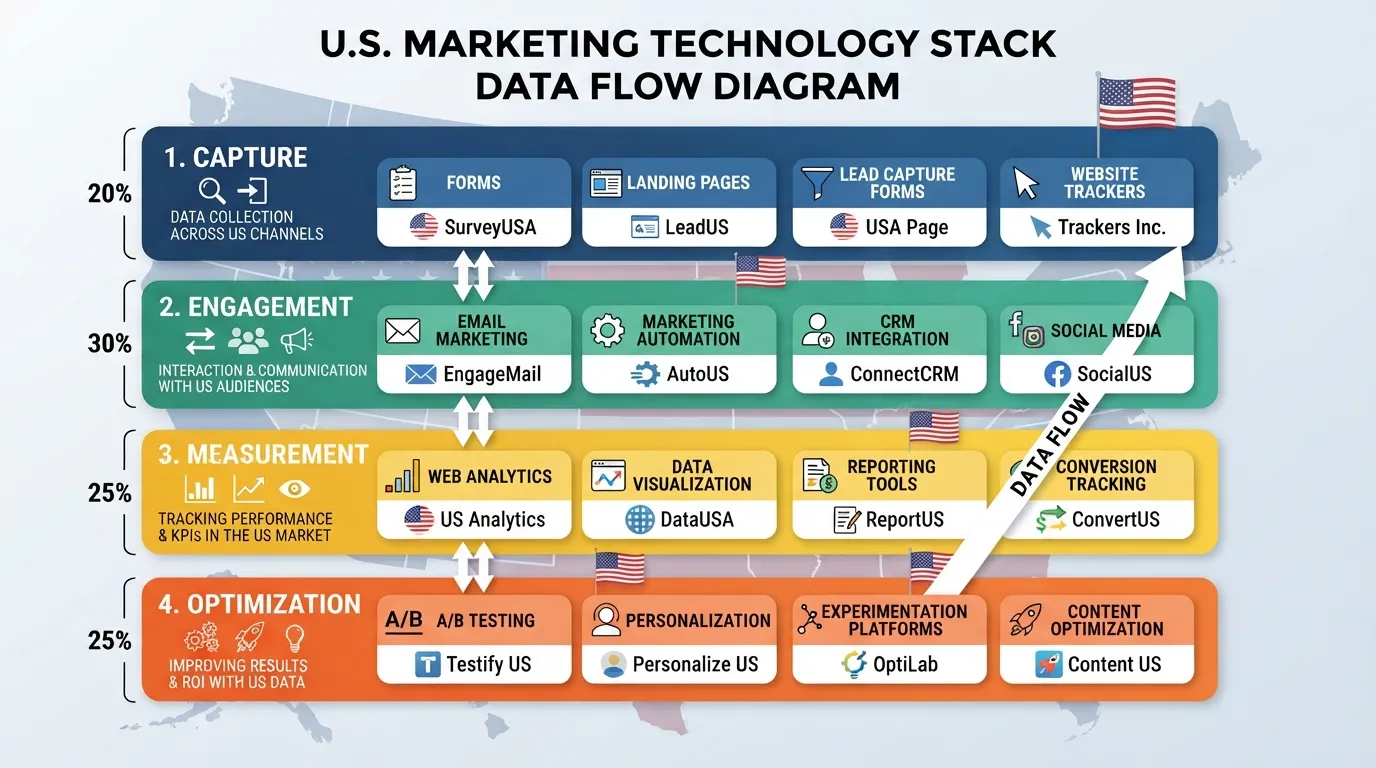
A marketing stack is the set of tools your business uses together, with data flowing between them. Most stacks sit in four layers: capture, engagement, measurement and optimization. Each layer should answer a specific question, such as “where do leads come from?” Overlap, such as two email tools, signals redundancy. A stack with no measurement layer, such as google analytics, is hard to defend in a budget review.
Tools for beginners versus established teams
Small teams usually need one tool per layer, low setup effort and a free or low-cost plan. Established teams need integration depth, user permissions, audit trails (logs of who changed what) and support for larger contact lists. Ask what you will do with the tool in the next 90 days, choose for your current workload, and note the trigger that would prompt an upgrade. A tool that allows you to scale without re-platforming is worth extra weight when you evaluate options for your next campaigns.
Criteria for Selecting Digital Marketing Tools
Define your use case and budget ceiling in US$
Before you open a vendor page, write down what the stack must do and how much you can spend. Teams that start with a shortlist tend to fit their needs to whatever a product offers. Defining the use case and a US$ budget ceiling first is also the first step in the Digital Marketing Tools rating methodology.
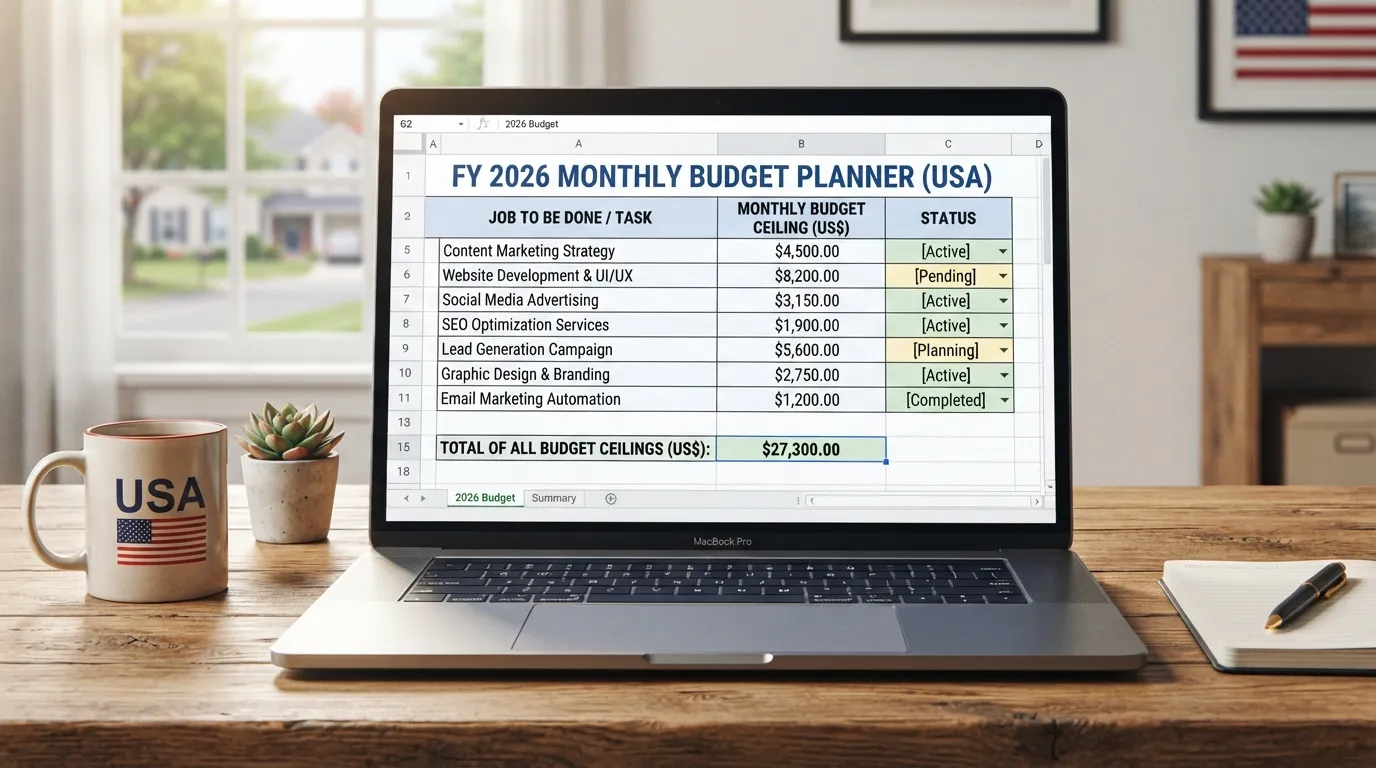
List the jobs the stack must perform, such as email, content scheduling, social media publishing, search engine optimization research, analytics and conversion testing. Next to each, write a monthly US$ ceiling. Pricing varies widely: email plans start at $9 a month and can reach $1,000, and keyword tools range from $100 to $1,000 a month. A single keyword subscription may consume most of a small team’s budget, so the ceiling governs every decision that follows. Tools for Google Ads and Canva should be listed as separate jobs with their own ceilings, and each job should be judged by how well it helps the team meet its goals.
Weight your criteria before you look at a single product
Once the jobs and ceilings are set, list your criteria (features, ease of use, integration, support, total cost) and give each a percentage weight totalling 100%. Only then score candidates from 1 to 10.
Scoring before weighting lets the weights end up justifying a product you already prefer. Set weights first. Weights should reflect real constraints: a team with no in-house developer should weight integration and setup effort heavily, and the weights should reflect the team’s overall marketing efforts, including how the tool supports the design of campaigns and the landing pages that customers see.
Worked example: scoring features against ease of use
Suppose a team is choosing a keyword research tool with a US$150 monthly ceiling, with features and ease of use each weighted at 40% and total cost at 20%.
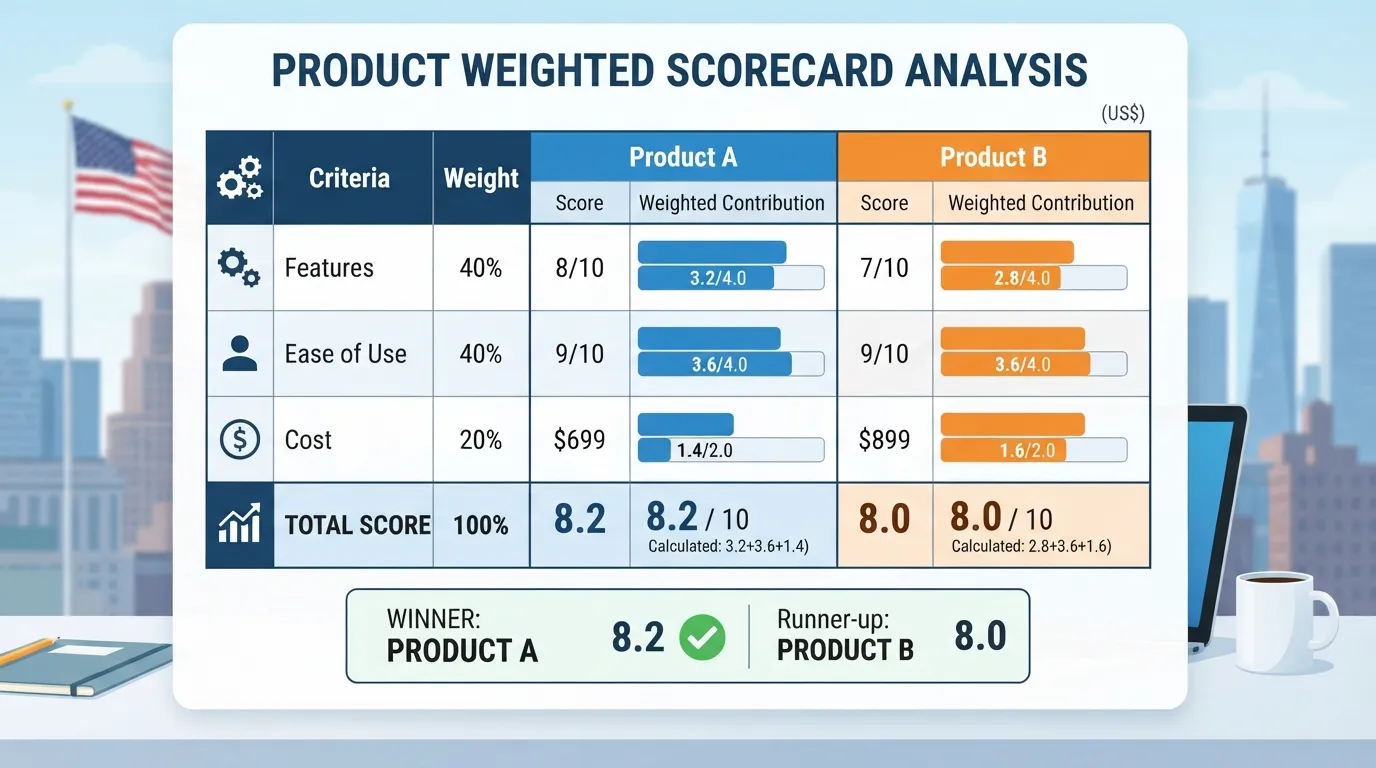
Product A scores 9 on features and 6 on ease of use. Product B scores 6 on features and 9 on ease of use. Product A’s features score contributes 3.6 points and its ease-of-use score 2.4 points. Product B’s features score contributes 2.4 points and its ease-of-use score 3.6 points. Each total then adds its cost score at 20%, so the final ranking depends on that third factor.
The same two products can rank in either order depending on the weights. A team with one part-time marketer will usually find the easier tool wins. Record the weights and scores on one sheet so the reasoning can be checked later.
Evaluating Tools by Category
Email and marketing automation tools
Email is the category most often over-bought. Email marketing sources report an average ROI of $36 for every dollar spent, but that depends on list quality and sending discipline.
Score email tools on deliverability controls, segmentation, automation depth and contact-based pricing. Reject any tool whose weighted score falls below your agreed minimum, or whose base plan exceeds your monthly ceiling once contact growth is included. Ask whether the vendor’s platform supports the customer journeys you need before comparing prices.
Content and social media management tools
These categories solve different problems. Social media management tools focus on scheduling, publishing and inbox handling. Social media marketing tools add campaign tracking and paid placement. Content marketing tools cover planning, drafting and editorial workflow, and some teams use Canva to produce the visual assets these tools distribute.
Score each subcategory against its own criteria: publishing reliability for scheduling tools, reporting depth for campaign tools, and collaboration and approval workflow for content tools. Reject any option that cannot export to the channels you actually publish on.
SEO and digital marketing analytics tools
Google Analytics is a common free starting point for measurement. Paid keyword tools add search volume, competitor and difficulty data, and their prices rise with the number of keywords and domains tracked. Shortlisting the best digital marketing analytics platform for your team starts with confirming which reports your stakeholders actually use.
Score analytics tools on data accuracy, cross-channel tracking and reporting speed. Set a maximum monthly US$ figure for keyword tools, and reject any plan that exceeds it before you have confirmed you need the extra depth.
Conversion rate optimization (CRO) tools
CRO tools test landing pages and forms, and their value depends on traffic volume. Score them on test setup effort, statistical reliability (how confident you can be that a result is real) and integration with your analytics.
Reject any CRO tool you cannot run on pages that already get meaningful traffic. A high-end testing suite is rarely justified for a site with few visitors, and a simpler tool often serves a customer-facing team better.
Understanding Digital Marketing Tool Costs and Pricing
Reading pricing pages: free tiers, plans and contact-based billing
Pricing pages vary. Some tools offer a free plan to start, with paid plans rising to $4,000 a month. Others offer paid tiers from $14 to $150 a month. Check whether a price is per user, per contact or per feature set. Contact-based billing in email tools can rise as your customer list grows, so a plan that suits a small list may cost far more once your social media and content marketing campaigns reach more people. Confirm the exact tier on the vendor’s pricing page, and date the figure when you record it.
Hidden costs: onboarding, integrations and add-ons
The list price is rarely the full cost. Onboarding, data migration, integration setup and add-ons can add to the total. A low monthly fee can cost more over a year than a higher-priced tool that allows your team to connect to your existing systems. Estimate the internal hours each tool needs for setup and training, and add that to the subscription figure before you compare options. Vendor support teams can help you estimate these costs for your specific setup.
Conclusion
Choosing digital marketing tools is a sequencing problem before it is a feature problem. Define your jobs and US$ ceilings, score candidates on one sheet, and verify prices on vendor pages. Test each shortlisted tool on a real task, then choose the smaller stack you can justify.
Frequently Asked Questions
How many digital marketing tools does a small business need?
Most small teams can cover capture, engagement, measurement and optimization with one tool each. Add a second only when the first cannot do a specific job well.
What should I prioritize first when choosing a tool?
Set the job the tool must do and its US$ ceiling first, then weight your criteria and score candidates.
Are free digital marketing tools good enough to start with?
Free tiers can test a workflow, but check their contact, feature and reporting limits against your workload first.
How do I know if a review site can be trusted?
Look for disclosure of commission links and paid placement, and separate editorial and sales teams. Treat a rating that contradicts a vendor’s published pricing as outdated.
How long should a free trial run?
Run it long enough to finish one real task, such as building a campaign or pulling a report. Check the trial terms on the vendor’s own page.
Evaluating Tools by Category
Judge each category against the job it has to do before comparing vendors. The sections below cover four common categories and the thresholds that separate a good fit from an expensive mistake. For a wider list of tools to test, see the best digital marketing tools overview. Working professionals and digital marketers can use these checks to shortlist tools that help their marketing campaigns deliver measurable results.
Email and marketing automation tools
Email platforms are usually priced by contact count, so cost grows with your list. One email software’s plans start at $9 a month and rise to about $1,000 a month, depending on contacts and features. Confirm which contact count the quoted price covers and whether automation and reporting sit in the plan you are pricing.
Email is often cited as returning $36 for every dollar spent, according to Google’s marketing resources, so test the return on your own list. Set a threshold before you buy: reject a tool if its twelve-month cost exceeds your US$ ceiling or cannot run the automation workflows your marketing campaigns need.
Content and social media management tools
For these tools, the questions are about workflow rather than reach. Check whether the tool supports your publishing channels, whether scheduling and approvals fit your team’s sign-off process, and whether assets can be created in the tool. Design tools such as Canva often cover asset creation but do not replace a scheduler, so digital marketers should test both halves of the workflow.
A free plan can suffice for a small team posting a few times a week, but it often caps accounts, users or scheduled posts. If it cannot handle your weekly volume, a paid plan is required and must fit your ceiling.
SEO and digital marketing analytics tools
These tools differ most in data coverage and cost. Keyword tools in the category run from about $100 to $1,000 a month, and cheaper plans often limit searches or projects. Ask which search engines and regions the data covers, how often rankings refresh, and whether the tool connects to your Google Analytics account. Reject a tool whose entry plan cannot cover the regions your customers use.
If local search matters, see our guide to the best local seo tools for how that criterion plays out across products.
Conversion rate optimization (CRO) tools
CRO tools change how pages look and behave, so test their effect on site speed, tracking and data quality. Check how the tool installs on your site, whether it can split test pages without breaking analytics, and how it reports statistical confidence (the likelihood a result is not chance). Many tools sit behind paid plans with traffic thresholds, so confirm your traffic before you commit. Decide what you will test before you buy, since a CRO tool is only as useful as the test backlog behind it.
Understanding Digital Marketing Tool Costs and Pricing
The sticker price of a digital marketing tool is rarely the price you pay. Before you score any product, check what the pricing page includes, since the same headline number can mean different things across vendors. Use the vendor’s own pricing page as the primary source. Track how each tool supports your social media, marketing campaigns, search engine visibility and wider marketing efforts, and check which offers are actually included in the plan you are quoted.
Reading pricing pages: free tiers, plans and contact-based billing
Most tools sell in one of three ways: a free tier with limited features, a paid plan with a fixed rate, or contact-based billing that rises as your list grows. A free tier suits testing whether a tool fits your workflow.
Published pricing reviewed for this guide shows these category ranges, dated to the month they were checked against each vendor’s current pricing page:
- Email platforms: from about $9 a month to roughly $1,000 a month as contact volume rises.
- Keyword research tools: commonly $100 to $1,000 a month.
- Content and social tools: plans start at $14 a month and reach up to $150.
These are category ranges, not guarantees. Confirm each figure on the vendor’s pricing page before you budget.
Three questions show what a quoted price covers:
- Which contact, domain or user count is included? A $9 plan may cap contacts below your current list size.
- Which features sit behind the tier boundary? Automation, reporting and integrations are often reserved for higher plans.
- Is the price monthly or annual? Annual billing lowers the effective rate but locks you in longer.
Record the answers in US$ next to your budget ceiling.
Hidden costs: onboarding, integrations and add-ons
The subscription fee is the visible cost. Less visible costs often decide whether a tool stays within budget over a year.
- Onboarding: Some vendors charge for migration, template building or training, and staff time for configuration is a cost too.
- Integrations: A tool that does not connect to your website, CRM or analytics may need a paid connector or manual exports.
- Add-ons: Extra contacts, seats, advanced reporting and SMS are often sold separately.
Total the subscription, onboarding, integration and add-on costs for 12 months, then compare that figure with your US$ ceiling for each job in the stack. Reject any tool whose twelve-month total exceeds the ceiling, even if its features score well. For teams building a local search stack, the best local seo tools guide shows how pricing differences play out across specific categories.
How to Choose Digital Marketing Tools: Trust Signals and Rating Checks
Most teams judge a tool by the list it appears on, but the method behind that list is rarely visible. Check what a rating measures, how many people produced it, and whether it still matches what the vendor sells today.
Ask what the label is built from. An efficacy claim such as “the best advertising software of 2026” can rest on a user-review average, an editorial composite score, a category position, or a mix of these. A review average shows user satisfaction, an editorial composite shows how a reviewer weighed features, and a category position may reflect paid placement. Unless the page explains its method, treat the ranking as a starting list, not a verdict.
Check the evidence beneath the number. A near-perfect average from a handful of reviews tells you less than a slightly lower average from hundreds. Review age matters too. One review platform states that reviews decay to roughly 3% of original weight after about three years and excludes reviews older than 24 months entirely (according to Digital Marketing Tools’ rating methodology).
Confirm disclosure. A trustworthy review site states which links earn commission, whether vendors paid for placement, and whether its editorial team is separate from its sales team.
Finally, test the rating against the vendor’s current pricing and terms. A tool shown with a free plan that the pricing page no longer offers signals an out-of-date rating. Treat any rating that contradicts current pricing as stale until corrected.
Conclusion
Choosing a digital marketing tool stack is a weighting problem before it is a feature problem. Set your weights first, so scores cannot justify a product you already like. Teams that define their use case and US$ budget ceiling first, then score each candidate against weighted criteria, usually end up with a smaller, cheaper and more durable stack.
Start with a scorecard. List each job the stack must do, set a ceiling for it, and score each tool from 1 to 10 on the criteria that matter to you. Record every trial result on the same sheet. Use the best local seo tools guide as a shortlist source, then let your scorecard make the final call.
Frequently Asked Questions
How many digital marketing tools does a small business need?
Fewer than most businesses start with. Map each job the business must do (email, content, social, SEO, analytics, conversion testing) and assign one tool to each job that matters this quarter. Jobs with no owner or measurable outcome do not need a tool yet. Teams that buy a platform for every job often pay for software nobody opens, a problem covered in the tool limitations and drawbacks section.
What should I prioritize first when choosing a tool?
Start with the use case and the budget ceiling in US$, then weight your criteria before reviewing any vendor page. Once the weights are set, score each candidate on the same sheet, as the weighted scoring method explains.
Are free digital marketing tools good enough to start with?
Often yes, for a single job at low volume. Check the cap that matters most, such as contacts, users or reporting history, and confirm the plan will still work in six months.
How do I know if a review site can be trusted?
Look at the number of reviews behind each score, their age, how the ranking is built, and whether the site discloses its commercial relationships. A high average from a few reviews tells you little. The same publisher’s method notes describe the disclosures to expect.
How long should a free trial run?
Long enough to complete one real task from start to finish, usually one to two weeks, on your own account and data rather than a demo dataset. A trial that ends before your first real report or campaign tells you about the sign-up flow, not the tool.
Disclosure: digitalmarketingtools.ai is sponsored by Digimetrics.ai. Sponsored Highlights are clearly labelled advertising. Our reviews, comparisons and guides are written to be useful and fair regardless of who sponsors the site. Read the full disclosure.


