
AI Writing Tool Pricing: What Each Plan Actually Includes
Compare AI writing tool pricing beyond the sticker price. See how credits, seats, add-ons and exit terms change your real monthly cost.

AI writing tool pricing rarely matches the number on the pricing page. The real monthly cost depends on how usage is metered, which seats a plan allows, and the add-ons needed to finish a publishable piece.
This guide compares WRITER, Jasper and Claude on total cost, covering plan tiers and exit terms.
Key Takeaways
- Sticker prices mislead. Tools list from $9 to $249 a month. Most vendors charge more for month-to-month billing than for an annual commitment, though the gap varies by vendor.
- Credits decide the real bill. WRITER’s $299 monthly tier includes 500 credits, and one credit covers one task of any length, so task volume matters more than the headline fee.
- Metered usage adds fees. Pass-through billing adds a 10% WRITER fee on provider usage, per WRITER’s developer pricing.
- Price the full workflow. Publishing often needs four to six extra services, so compare total cost, not the writing tool alone.
- Check exit terms first. Paid features and their data are lost when a subscription expires.
- Ask about discounts. WRITER offers 20% off its Starter and Enterprise plans to nonprofits and educational institutions.
Headline prices in this category run from about $9 to $249 a month, but a team rarely pays the number on the pricing page. Compare the same billing cadence, not the lowest figure shown.
Headline prices versus real monthly cost
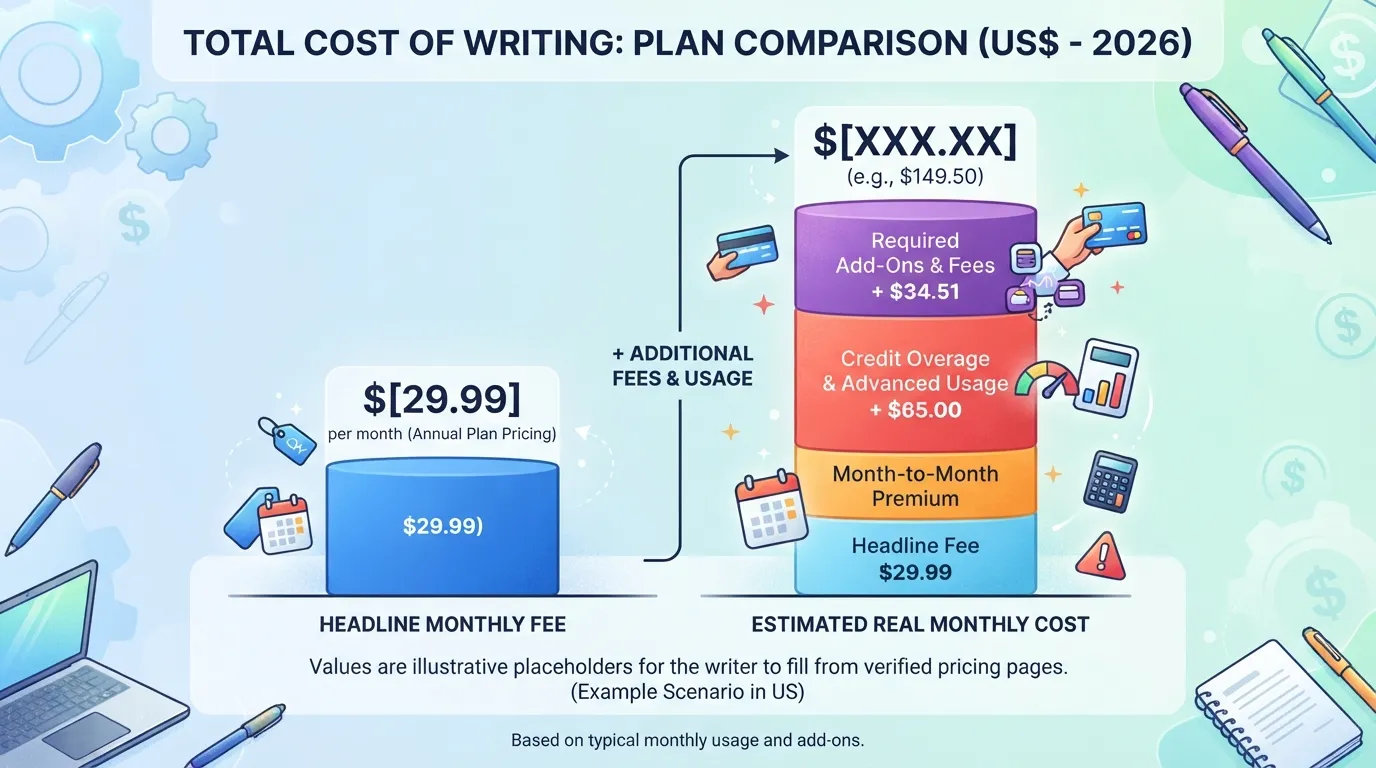
The sticker price covers the base fee only. Use a “Total Cost of Writing” check: base fee, expected usage per task, seat rules, required add-ons and exit terms. Multiply monthly task volume by the per-task cost, then add the extras.
Billing cadence and the month-to-month premium
Annual billing usually lowers the monthly rate but locks you in. Month-to-month keeps flexibility at a higher price, which may be worth paying until usage is proven.
Why pricing has fallen since 2024
Some industry reviews report that pricing across the category has dropped since 2024, citing competition from open-weight models and pressure from OpenAI’s own pricing, per The Stacc. Credits and seat rules still decide what you pay.
Plan Tiers Compared: Free, Starter, Team, and Enterprise
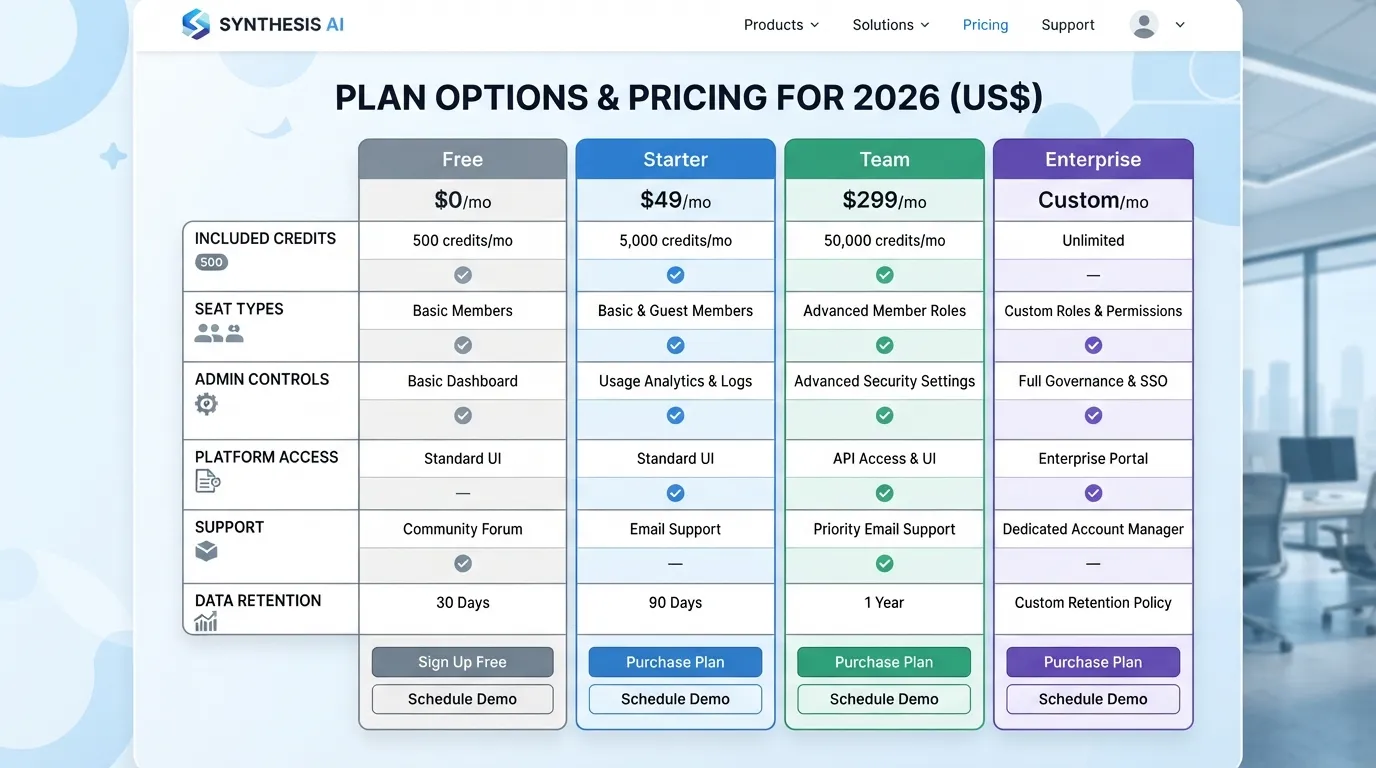
Vendors use different tier names, so compare plans by what each includes. WRITER offers a free entry point with 100 credits and no card required. Its paid plans start at $299 per month for 500 credits, with no per-seat fee. Other vendors price per seat, so the same “Starter” label can mean very different things. Check the allowance, not the label. Some vendors advertise unlimited access, so read the usage terms before deciding. Marketing pages often headline the tier name, so the credit allowance and usage terms are where the real comparison sits.
| Feature | Free | Paid entry tier | Team or Enterprise |
|---|---|---|---|
| Access | Limited, no card needed | Full core features | Admin controls, custom terms |
| Usage | Small credit allotment | Fixed monthly credits | Negotiated volume |
| Seats | Single user | Varies by vendor | Pooled or per-seat |
Free tiers, free trials, and usage limits
A free tier suits testing, not production work, since its credit allowance runs out after several drafts. A free trial usually unlocks the paid feature set for a fixed window. Confirm which you are getting, and check regional availability.
Paid tiers and what each one includes
Paid tiers differ in credit volume, seat rules and access to admin features such as brand voice settings and shared workspaces. A knowledge graph of your brand terms, when offered, can be a useful admin feature to check for. Compare included credits with your expected monthly task count before choosing.
Feature comparison: what changes between plans
The biggest change between tiers is usually the credit cap, not the feature list. Higher tiers add pooled seats and governance controls, and the best choice depends on how many people will run each text generation task.
Seats, Credits, and Usage: How Writer AI and Similar Tools Bill You
Most writing tools advertise a per-seat price, but the bill is shaped by how seats are typed and how usage is metered. WRITER’s plans page shows how these parts combine.
Seat types: Pro versus Lite
Seat type decides what a user can do, so it changes the cost per person. Pro seats suit people who draft and edit daily. Lite seats suit occasional reviewers. Assign Pro seats only where workload justifies them, and where a sales team is needed, the contact sales route can clarify options.
Credit packs and per-task consumption
Credits turn a monthly fee into a task count. Per eesel’s review of WRITER’s pricing, one credit covers one ticket or chat regardless of length. The paid tier starts at $299 per month for 500 credits.
Worked example: 1,000 tasks a month at 1 credit each needs 1,000 credits, which is two 500-credit allowances. Budget about $598 in base fees before add-ons. Map each workflow to credits and run a sample month of real tasks to test fit before committing, and check which credit allowances are available on your plan.
API and pass-through billing
Bring-your-own-model usage is billed differently. Per WRITER’s developer pricing page, usage is charged at the provider’s rate card, such as Claude or ChatGPT, plus a 10% WRITER pass-through fee, paid via credits. Treat it as a variable cost that rises with usage, not with the subscription.
Monthly cost model: a $299 base plan with 500 credits, plus extra tasks requiring a second allotment, plus a 10% pass-through fee on provider usage. Recalculate for your own task count before you buy.
Enterprise Contracts, Billing Changes, and Exit Terms
On enterprise plans, the sticker price matters least. What counts is what happens when headcount changes, when you leave, and when your data goes with the subscription.
Negotiating enterprise billing terms
Get the seat count, usage allowance and renewal cap in writing. Confirm whether metered usage is billed at cost or with a markup. WRITER’s plans page describes its enterprise tier, but billing details still need agreeing in the order form. Use the contact sales route to confirm them, and ask whether your marketing and content teams can share one unlimited pool of usage, so that help from the writer agent and other models is not split across separate budgets.
Adding and removing seats mid-term
Confirm how added seats are prorated and whether you can drop seats without penalty. A contract that only lets you add seats locks you into paying for capacity you no longer use, so ask for the best terms on reductions.
Cancellation, refunds, and data retention
Cancelling before renewal keeps paid access until the period ends. On expiry, you lose paid features and the data tied to them, according to WRITER’s plans page. Export your text, output and knowledge graph before the final day, including any blog drafts and Claude-generated content you need to keep.
Discounts and Hidden Costs: Nonprofit Pricing and the Full Workflow Budget
Before you sign, check whether you qualify for a discount. ChatGPT Enterprise offers up to 75% off for larger nonprofits through OpenAI sales, and ChatGPT Business costs $8 per user per month billed yearly for verified nonprofits. WRITER offers a 20% discount on its Starter and Enterprise plans to non-profits and educational institutions, according to WRITER’s plans page. The real savings come from choosing the right vendor and plan, not from the headline price.
Nonprofit and education discounts
Ask each vendor directly whether your organisation qualifies, and request any discount on the quote, not after the invoice arrives. Confirm which plans the discount covers, then compare the discounted price against cheaper alternatives. Teams with a custom plan should ask whether the discount applies to that tier as well.
Budgeting the full writing workflow
The writing tool is rarely the whole bill. Publishing a finished piece usually means editing, formatting, design and distribution software, and a blog post may need a copy editor or a separate writing assistant such as Jasper or Claude. One guide to AI-assisted book production notes that the full workflow from idea to published book typically requires four to six additional services. Add those costs to your totals before comparing plans, including any writer agent or knowledge graph add-on. Generation of a draft is only one part of the spend, so budget for the editing, formatting and distribution that turn raw content into a finished piece.
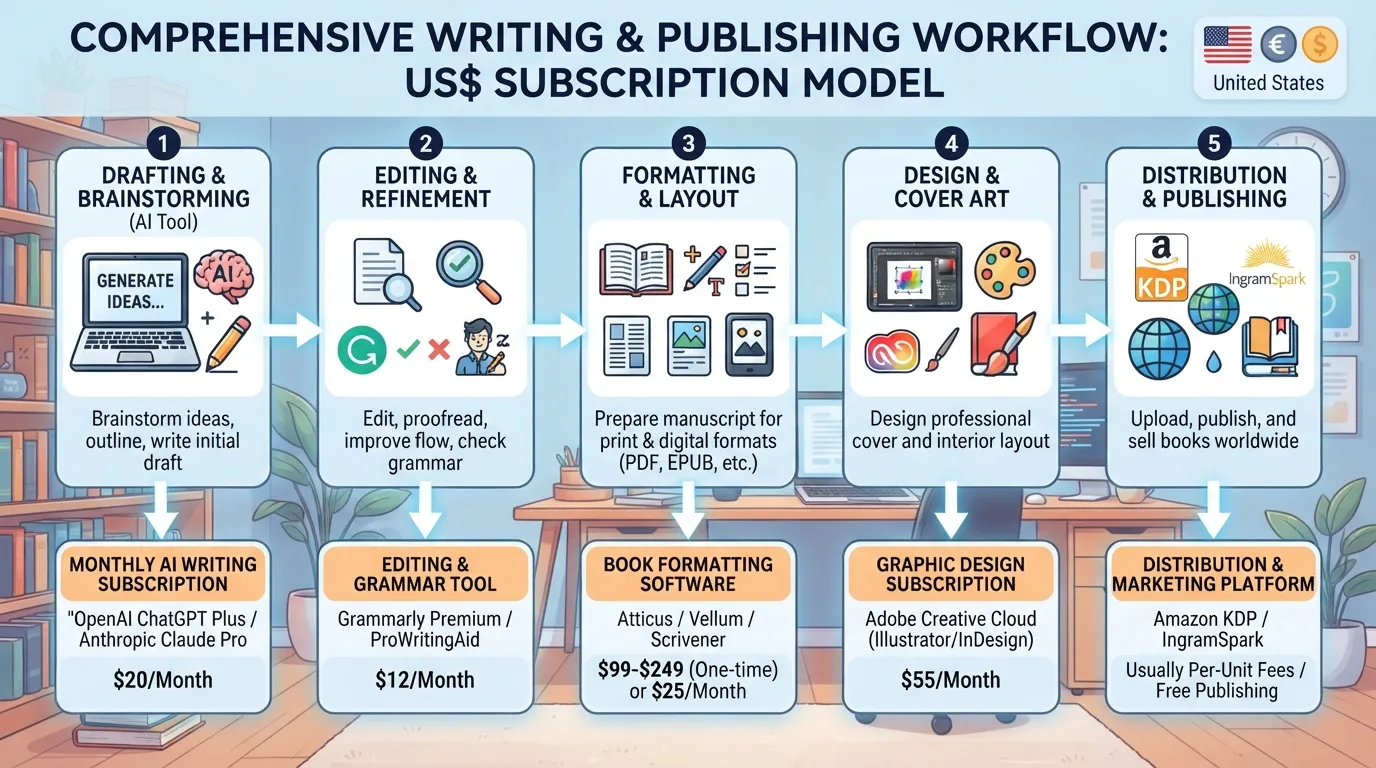
Before you commit, run the same check on every tool. Write down the base fee, the expected usage cost for a typical task, any seat-type or team-size rule that changes the price, the complementary services you will still need, and the exit terms. Multiply your expected monthly task volume by the per-task cost and add the extras. Ask each vendor which models power the platform, since model choice can change per-task cost.
Seat count, usage volume, billing cadence and exit terms decide that total. Month-to-month billing often costs more per month than an annual commitment. WRITER’s pricing page shows why exit terms matter: if you cancel early, you keep paid access only to the end of the current period, after which paid features and their data are lost.
Calculate projected annual cost before you sign, using real task counts and budgeting for post-draft tools. The best option is the one whose total fits your workflow, not the one with the lowest headline price.
Is there a free AI writing tool plan?
Yes, most major tools offer one, but the allotment is small. WRITER gives 100 free credits with no card required, then moves to paid tiers from $299 per month for 500 credits. Free plans suit testing a tool on a handful of tasks, not a working schedule.
Do AI writing tools offer free trials?
Usually, yes, but a trial rarely unlocks everything. Trials often cap usage, restrict seat types or exclude enterprise features such as shared brand voice and admin controls. Test the features you will actually depend on, and time the trial against your real task volume.
What happens to my data if I cancel an AI writing tool subscription?
It depends on when you cancel. According to WRITER’s plans page, cancelling before renewal keeps paid access until the end of the current period. When the subscription expires, you lose access to paid features and the data tied to them. Export anything you need before the final day.
Do nonprofits or schools get a discount on AI writing tools?
Some vendors do. ChatGPT Enterprise offers up to 75% off for larger nonprofits, and ChatGPT Business is available at $8 per user per month billed yearly for verified nonprofits. WRITER offers a 20% discount on Starter and Enterprise to non-profits and educational institutions, per WRITER’s plans page. Eligibility rules vary, so confirm documentation requirements before assuming a discount applies.
Why do AI writing tool prices differ so much?
Vendors price for different buyers and usage patterns. Some charge per seat, others per credit or per task, and others pass through provider model costs plus a fee. Compare totals for your expected workload, not list prices.
How is API usage billed on top of a subscription?
Metered API usage is often billed separately. WRITER’s developer pricing states that usage is billed at the provider’s rate card plus a 10% pass-through fee, paid via credits. Palmyra X4 and X5 are scheduled for deprecation on December 14, 2026, with Palmyra X6 as the migration path, which offers a 1M token context window against X4’s 128k. Budget for this layer on top of any subscription.
Disclosure: digitalmarketingtools.ai is sponsored by Digimetrics.ai. Sponsored Highlights are clearly labelled advertising. Our reviews, comparisons and guides are written to be useful and fair regardless of who sponsors the site. Read the full disclosure.


