
Building a Lean Marketing Tool Stack for a Small B2B Team: A Practical Build Guide for 2026
Build a lean marketing tool stack for your small B2B team. Learn to audit spend, score tasks, map data and set a 30-day plan for 2026.

Most small B2B teams do not plan their marketing stack. They accumulate it. A CRM gets bought during a busy quarter, an email platform arrives with a new hire, and a scheduling tool is added because a founder saw it recommended.
Within two years, a team of six may pay for fourteen subscriptions and maintain integrations nobody fully understands. This guide builds a marketing tool stack for a small B2B team from the other direction. It starts with one revenue bottleneck, then adds only the tools that remove it. You will audit your current spend, score each weekly task, map where contact data lives, and follow a 30-day plan to clean up or rebuild. All amounts are in US$.
Key Takeaways
- Build the stack backward from one revenue bottleneck. Find the slowest step in your pipeline, the one that leaks the most leads or costs the most staff hours, then buy only what removes it.
- Score every recurring marketing task before you buy anything. Rate each task on frequency, cost of delay and weekly manual effort. A tool earns its place only if it cuts manual effort on a high-cost-of-delay task.
- Name a single system of record for contacts and deals. Most small teams lose data at the handoffs between tools, so decide early which tool owns each field.
- Price tools on annual total cost, not the monthly list price. Include setup, training, admin hours, data cleanup and the cost of leaving.
- Assign one named owner to each tool and plan its admin hours. A stack with no owner decays quietly.
- Keep a stop-list of tools you will not buy yet. Deferring suite-wide purchases keeps a lean team lean.
Most small B2B teams overbuy because each tool looks sensible on its own. A $99 monthly email tool, a $79 landing page builder and a $150 scheduling platform each seem modest. Together they can reach a four-figure monthly bill that nobody has reviewed as a whole.
Table of Contents
- Why Most Small B2B Teams Overbuy Marketing Software and How to Avoid It
- The Hidden Cost of Each Additional Tool
- Symptoms That Your Stack Has Outgrown Your Team
- Start With Revenue Jobs, Not Tool Categories
- The Core Stack: Five Layers Every Lean B2B Team Needs
- How to Evaluate and Score Any Marketing Tool Before You Buy
- Integrations, Data Flow and Keeping the Stack Connected
- Budgeting and Team Ownership for a Lean Stack
- Conclusion: A Lean Stack Is a Working System, Not a Shopping List
- Frequently Asked Questions
Why Most Small B2B Teams Overbuy Marketing Software and How to Avoid It
Diagnose the Sprawl With a Three-Column Audit
Start with a one-hour audit. Open a spreadsheet and list every tool your team pays for or logs into, including tools bought on a personal card. For each one, record the monthly and annual cost, the number of active users in the last 30 days (check the admin panel, not memory), and the function it performs.
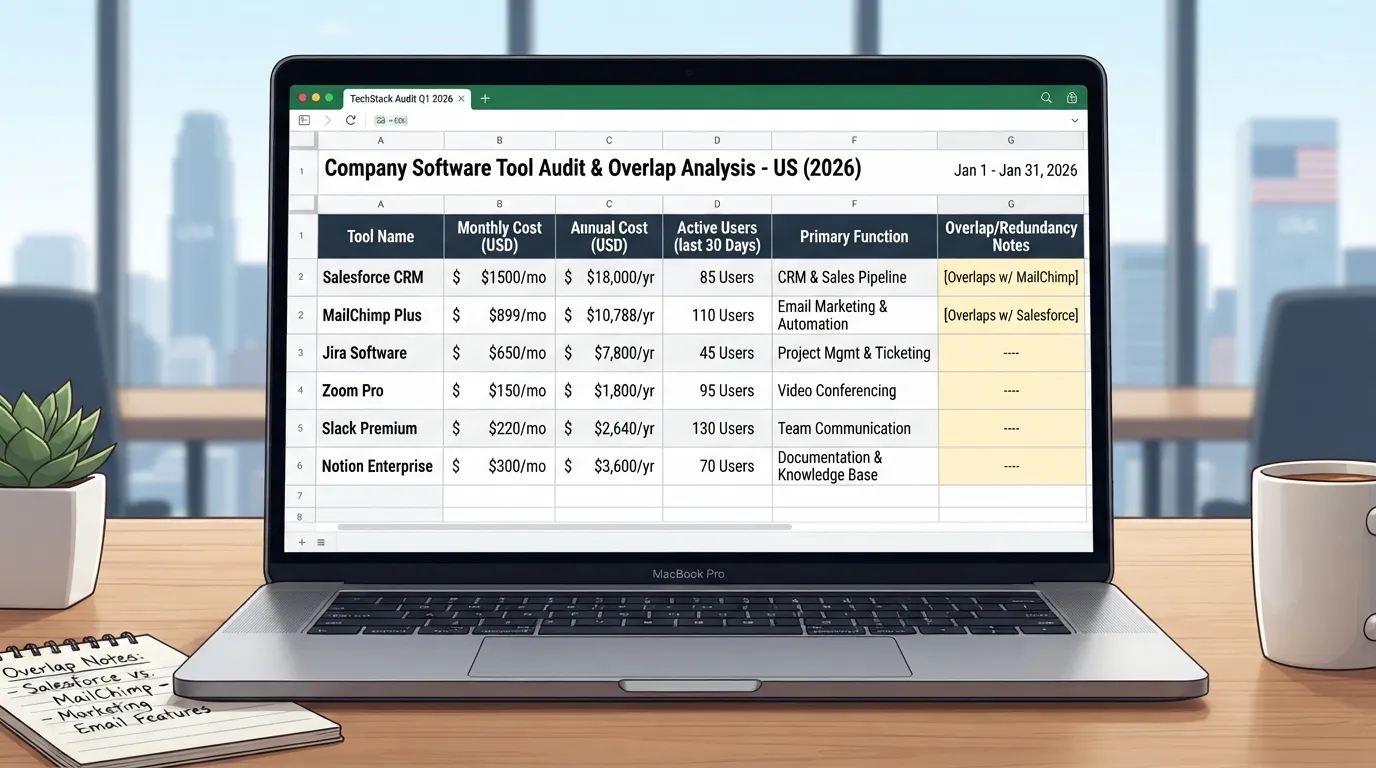
Sort by function. Overlap appears quickly. A CRM with built-in email sits next to a separate email platform. A scheduling tool duplicates a feature inside the social tool. Each overlap is a candidate for consolidation.
Add one more column: who owns the login. If the answer is “the founder’s old account” or “nobody remembers,” that tool is already a liability.
The Cost of Subscription Creep, Integration Debt and Low Adoption
On a team of three to ten people, three problems compound.
- Subscription creep. Price rises, seat additions and add-on modules build up without anyone approving them. A tool bought for two users can grow to ten seats within a year or two, so check the seat count at each renewal.
- Integration debt. Every sync between two systems can break, and someone has to notice when it does. When the person who built an automation leaves, it may keep running until it silently stops.
- Low adoption. You pay for capacity nobody uses. If one person logs in each week, the subscription is a fixed fee for a task a spreadsheet could handle.
Together, these turn a stack meant to save time into one that consumes it.
The Thesis: Jobs, Not Tool Counts
A lean stack is defined by the jobs it does to move revenue, not by how many tools it contains. A team can run well on four tools or fourteen. What matters is whether each tool removes a named bottleneck in the pipeline.
Most teams begin with the features vendors advertise. A lean team begins with its pipeline, finds the step where deals stall or leads leak, and buys for that step. The rest of this guide applies that rule.
The Hidden Cost of Each Additional Tool
Subscription Price Versus Total Cost of Ownership
The subscription fee is the visible cost. The total cost of ownership includes everything else:
| Cost item | What it looks like in practice |
|---|---|
| Setup | Configuring pipeline stages, fields, templates and permissions |
| Training | Onboarding each new hire, plus relearning after updates |
| Admin hours | Managing users, permissions, billing and vendor support tickets |
| Data cleanup | Deduplicating contacts and fixing mismatched fields between tools |
| Integration upkeep | Monitoring syncs and repairing broken mappings |
| Exit cost | Exporting data and migrating to a replacement |
For a small team, admin and cleanup often exceed the subscription. Estimate them honestly. A tool at $120 a month that needs three hours of admin each month, at a staff time value of $60 an hour, has a true monthly cost of $300. This is a hypothetical example to show the method, not market pricing.
Context Switching and the Attention Tax
Each login, notification and dashboard asks for a few seconds of focus and a decision about whether it matters. Task switching costs attention, and the cost is most visible in small teams where one person handles several jobs.
The attention tax shows up as missed follow-ups, ignored notifications and time lost deciding which system holds the answer. A stack with fewer, well-connected tools reduces this load. Many loosely connected tools increase it, even when each one works well.
Symptoms That Your Stack Has Outgrown Your Team
Warning Signs to Watch For
Some symptoms are easy to recognize:
- The same prospect appears as three contact records in three systems.
- Two dashboards report different pipeline totals for the same month.
- A meeting begins with “which dashboard is right?”
- A sales rep asks which tool to update, and the answer changes depending on who you ask.
- A new hire needs a week to learn the stack before doing any marketing work.
- Nobody can explain what a particular subscription does.
Each symptom has a likely cause. Duplicate records usually mean no agreed system of record. Conflicting reports usually mean tools calculate the same metric differently. Slow onboarding usually means overlapping logic across too many tools.
Diagnostic Checklist: Score Your Stack
Answer each question with 0 (no), 1 (sometimes) or 2 (yes). Add up the total.
- Can you name the one system that holds the master record for every contact?
- Do all dashboards report pipeline value using the same definition?
- Has every tool been used by someone in the last 30 days?
- Can you name an owner for every tool, including who handles billing?
- Do you know the annual total of all marketing subscriptions?
- Could a new hire complete a basic campaign task within two days?
- Have you removed or downgraded a tool in the last 12 months?
- Do you know how you would export your data from each tool?
Scoring:
- 14 to 16: Your stack is in good shape. Review it quarterly.
- 8 to 13: You have early sprawl. Run the audit in this section within the next month.
- 0 to 7: Your stack has outgrown your team. Pause new purchases until you complete the audit and the scorecard below.
Start With Revenue Jobs, Not Tool Categories
Most small B2B teams start their stack search by browsing categories such as CRM, email, analytics and social scheduling. That order invites buying. A better order starts with the revenue jobs the team must fund, then asks which capabilities those jobs require, and only then which tools provide them.
The method is simple: name the revenue job, list the weekly work it needs, then buy only what that work requires. The useful question is “which pipeline bottleneck are we removing this quarter?” rather than “which tools do we need?”
Mapping the Buyer Journey to Required Capabilities
Every B2B buyer moves through four jobs a marketing function has to fund: awareness, consideration, conversion and retention. Each job needs a small set of recurring activities. Naming those activities turns a vague wish list into something a team can count.
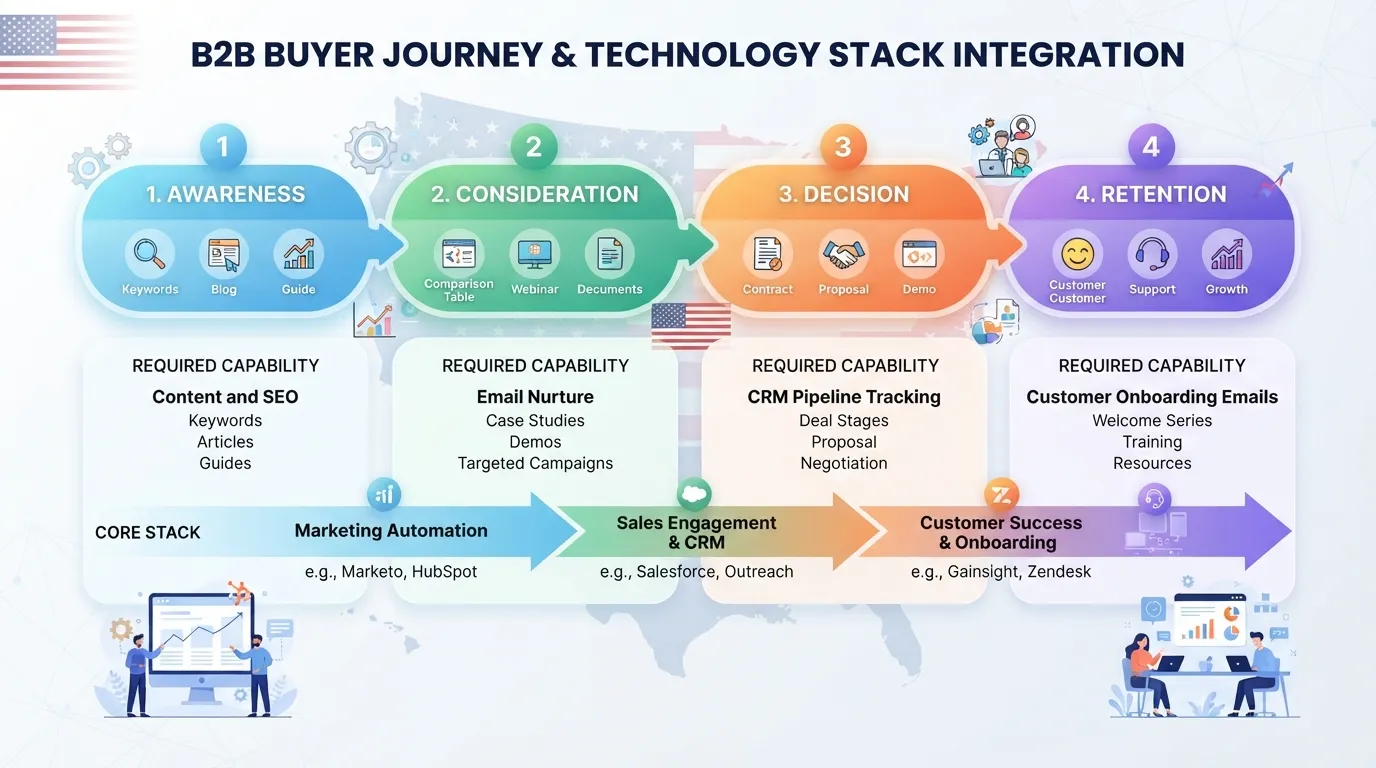
| Revenue job | Weekly activities the team must perform | Capability required |
|---|---|---|
| Awareness | Publish content, respond to inbound interest, run outreach to target accounts | Publishing, outreach sequencing, basic traffic measurement |
| Consideration | Send follow-ups to engaged visitors, share case material, book discovery calls | Contact history, timed follow-up, asset sharing |
| Conversion | Track deal stages, log proposals, forecast closes | Pipeline stages, deal records, owner accountability |
| Retention | Trigger onboarding messages, identify expansion or churn signals | Lifecycle stages, renewal reminders, account-level notes |
Write activities as weekly actions, not annual goals. “Improve awareness” cannot be audited. “Publish two articles and send 40 outreach emails to named accounts each week” can. If a stage has no recurring activity, the team does not yet need a tool for it.
Defining Your Minimum Viable Stack Requirements
Put the requirements on one page with three columns: must-have, should-have and nice-to-have. A must-have is a capability the team cannot run a revenue job without. A should-have saves noticeable time but has a workaround. A nice-to-have is anything else.
Apply a simple threshold to each capability:
- Tool needed: the activity runs more than five times a week, involves more than one person, and a missed or slow step loses a lead or deal.
- Spreadsheet is enough: the activity runs less than weekly, one person owns it, and the data stays under a few hundred rows.
- Defer: the capability serves a stage the team does not yet fund, such as lead scoring before there are enough leads to score.
Worked example. Consider one candidate, an account-based marketing platform, scored against the threshold. The team reviews 12 target accounts each week, in a shared sheet, with one person responsible. The activity runs weekly rather than more than five times, one person owns it, and the data fits on one screen. The score points to a spreadsheet, so the platform is deferred. In one documented case, a team of six planned the same purchase, kept the sheet for another two quarters, and avoided an annual licence and a training session for a workload that fit on one screen.
Choosing the Single Source of Truth
Every contact and deal needs one owner. In most small B2B teams that owner should be the CRM, the system built around the relationship between a person, a company and a deal. Other tools can hold copies of that data for their own purposes, but they should not be the authority.
Delegate the following to other systems, with the CRM as the reference:
- Email sending and engagement to the email platform, with opens and clicks written back to the CRM contact.
- Web behaviour and traffic to analytics, with form submissions creating or updating CRM records.
- Content and asset files to a shared drive or asset library, linked from the CRM rather than duplicated.
- Scheduling and meetings to the calendar, synced to the deal record.
Ownership rules prevent silent divergence. Divergence happens when two tools hold a different job title or lifecycle stage for the same person and nobody notices. Write four rules and enforce them:
- Each field has exactly one system that can edit it. Everywhere else it is read-only.
- Lifecycle stage is set only in the CRM, never in the email tool.
- New contacts are created in the CRM first, and other tools receive them by sync or import.
- Once a month, one person compares a sample of 20 records across the two most-used tools and fixes any mismatch at its source.
These four rules matter more than the choice of CRM. A team with a modest CRM and disciplined ownership will report more accurate pipeline than a team with an expensive platform and no rules.
The Core Stack: Five Layers Every Lean B2B Team Needs
A lean stack has five layers. Each layer should exist because a specific revenue task depends on it. Before you read the layer details, run the bottleneck scorecard described earlier: list the marketing tasks your team performs each week, then score each one on frequency, cost of delay and manual effort. A layer earns its place only if it removes manual effort from a high-delay task.
Treat these layers as a starting structure, not a shopping list. Many small teams need only one or two tools per layer. Some layers can be covered by a tool you already pay for.
Layer 1: CRM and Pipeline Management
The CRM is the system of record for contacts, companies and deals. Every other layer reads from it or writes to it. Get this decision right first.
Selection criteria for small teams:
- Price per seat, annual total: Compare the annual cost for your actual headcount, including any minimum seat count. Vendors often quote US$ per user per month billed annually. Multiply that figure by your seats, and check whether useful features sit behind a higher plan.
- Native email and calendar sync: If your team uses Google Workspace or Microsoft 365, choose a CRM that syncs with that suite without middleware. Manual logging is a common reason CRM data goes stale within two months.
- Reporting depth: You need pipeline by stage, conversion between stages and deal age. Forecasting modules and custom report builders can wait until deal volume justifies them.
Setup essentials:
- Define pipeline stages with a written entry and exit rule for each one. For example, “Qualified” requires a named decision-maker and a stated problem, not just a booked meeting.
- Set required fields only where a report or routing rule depends on them: company size, source, owner and deal value. Each extra required field lowers entry quality.
- Write the minimum hygiene rules: one owner per contact, no duplicate company records, a lifecycle stage on every contact and a monthly cleanup of deals with no activity in 30 days.
Layer 2: Website, Landing Pages and Forms
This layer captures demand. It publishes pages, hosts conversion forms and passes each submission to the CRM with its source attached.
Choosing the right tool:
| Option | Best fit | Watch out for |
|---|---|---|
| Website builder | Brochure sites with a few pages and a blog | Limited control over tracking scripts and form routing |
| Content management system (CMS) | Teams publishing often, with several contributors | Ongoing plugin maintenance and hosting work |
| Dedicated landing page tool | Paid campaigns that need many fast-changing pages | Duplicate form logic that must be routed to the CRM separately |
For most small B2B teams, a builder or CMS handles the core site. A landing page tool makes sense once paid campaigns run several pages a month. Adding one to a site with little paid traffic is an overbuy.
Form-to-CRM routing and hidden UTM fields:
Each form should write submissions directly to the CRM, not to a spreadsheet or an inbox. Add hidden fields that capture UTM parameters (source, medium, campaign, content and term) from the landing URL. Without them, you cannot tell which campaign produced a lead after the visitor leaves the site. Hidden fields are the cheapest attribution upgrade available, and they cost only setup time.
Layer 3: Email and Marketing Automation
Email has two distinct jobs. Mixing them causes deliverability problems and confusing reports.
Separate transactional from nurture email:
- Transactional email covers receipts, password resets, meeting confirmations and direct replies. A single action triggers it, and it should be sent from the product or the CRM’s native sending.
- Nurture email covers sequences sent to people who opted in to marketing content. Run it from a dedicated marketing email tool or the marketing module of your CRM, with its own sending domain and unsubscribe handling.
Keeping these apart protects the sending reputation of the transactional stream, which your customers depend on.
Automation depth: drip sequence or lead scoring:
A simple drip sequence works for a small team that follows one buying path and can review replies by hand. The volume that justifies it depends on your list and sales process, so treat any single threshold as a starting point to test. Lead scoring pays off only when a rep cannot judge each lead individually, and when you have enough closed deals to know which behaviors predict a win. Before you buy scoring, check that you can name three behaviors that preceded closed deals in your own history. Without them, a score is a guess.
Compliance for US commercial email: The CAN-SPAM Act applies to commercial messages sent to business contacts as well as consumers. For the FTC’s plain-language guidance, see the FTC’s business guidance on CAN-SPAM. Every marketing email needs a working unsubscribe link, a valid physical postal address and honest subject lines. Your automation tool should process opt-outs within the time you commit to. Those suppressions must sync back to the CRM, so an unsubscribed contact is never re-enrolled by mistake.
Layer 4: Analytics and Attribution
Analytics answers two questions: where did visitors come from, and which of them became pipeline? Most small teams need only a web analytics tool, configured correctly, plus a simple attribution rule.
Configuration essentials:
- Set up conversion events for form submissions, demo bookings and key page views, not just pageviews.
- Connect UTM parameters so each campaign appears under its own source.
- Confirm the tracking script fires once per page. Double-counting is a frequent setup error.
Consent considerations: US privacy expectations come from a patchwork of state laws and platform policies, not one federal rule. The practical approach is to disclose tracking in your privacy policy, honor opt-out requests and avoid collecting data you do not use. If you run tracking pixels from advertising platforms, review each platform’s data policy, because those policies change.
Attribution models a small team can maintain:
Choose one model and write it down. Three work well at small scale:
- First touch: credits the first recorded source. Useful for judging which channels create awareness.
- Last touch: credits the final source before conversion. Useful for judging which channels close deals.
- Position-based (40/20/40): credits the first and last touch heavily and splits the rest. Useful when you want both views without a complex model.
For a team of three to ten people, last-touch reporting combined with a “how did you hear about us” field on every form is usually enough to make budget decisions. Multi-touch models need data volume and maintenance time that a small team rarely has.
Layer 5: Content, Social and Outreach Tools
This layer is where tool sprawl is most common, because each channel seems to demand its own product. The discipline here is deciding which channels deserve tooling at all.
Decide what to run manually: Adopt tooling for a channel only when it produces pipeline you can trace, or when manual effort is measurably high. A team posting to one social network twice a week can schedule natively and needs no scheduling tool. A team sending 100 personalized outreach emails a week may need several warmed mailboxes. A warmed mailbox on a dedicated sending domain can carry roughly 20 to 30 cold emails a day, so volume depends on how many mailboxes you run. Let the scorecard decide, not the feature list.
Tools that usually earn their cost:
- Scheduling: a single scheduling tool for social posts, once you publish across three or more networks on a fixed calendar.
- Asset management: a shared folder with naming conventions, or a digital asset manager once you have several contributors and recurring brand requests.
- Prospecting and outreach: a sequencing or data tool when outbound is a defined motion with a measurable reply rate. Track replies, meetings booked and pipeline created before deciding whether the tool pays back.
Common trap: buying a prospecting tool before outbound has a documented process. The tool then sets the process, and the team sends volume without a targeting rule. Write the target account definition and messaging first, then select the tool that executes them.
How to Evaluate and Score Any Marketing Tool Before You Buy
Most small B2B teams pick software by watching a demo and deciding whether it looks useful. That rewards polish, not fit. A better method is to score each candidate against the bottleneck it must remove, test it on real work for two weeks, and negotiate the contract with the exit already in mind. Done in that order, a purchase decision takes an afternoon of structured work instead of a quarter of regret.
This method applies to any marketing tool stack for a small B2B team, whether you are adding a first tool or replacing an existing one.
The Five-Question Tool Scorecard
Before any trial, put the candidate through five questions. Score each one from 1 (poor) to 5 (strong).
- Job fit: Does the tool remove the specific task that sits at your pipeline bottleneck? Or is it a general capability you might use someday?
- Integration depth: Does it sync natively with your CRM, email platform and Google Workspace or Microsoft 365 account? Or will someone need to build and maintain a connector?
- Time to value: How long until the team completes a real task in it? A tool that needs weeks of setup before its first useful output is a cost, not an asset.
- Total cost over 24 months: Add the subscription, the seats you will need in year two, onboarding fees and admin hours at your internal rate. Compare annual totals. Vendors often quote monthly list prices that hide the real commitment.
- Exit cost: How hard is it to export your contacts, history, automations and reports if you leave after 18 months?
Weight the questions to fit your situation. A team with no marketing operations person will usually weight time to value and integration depth higher than a team with a dedicated admin.
| Question | Weight | Pass threshold (weighted score out of 5) |
|---|---|---|
| Job fit | 30% | Must score 4 or higher, or the tool is rejected outright |
| Integration depth | 20% | 3 or higher |
| Time to value | 15% | 3 or higher |
| Total cost over 24 months | 20% | 3 or higher |
| Exit cost | 15% | 3 or higher |
A candidate passes at a weighted total of 3.8 or higher and clears every individual threshold. A tool that fails the job-fit gate is cut regardless of its overall score. A well-integrated tool that does not solve your bottleneck is still an unnecessary expense.
Worked example. Suppose a team evaluates a landing page builder to fix a slow lead capture step. It scores job fit 5, integration depth 4, time to value 4, total cost 3 and exit cost 3. The weighted total is (5×0.30) + (4×0.20) + (4×0.15) + (3×0.20) + (3×0.15) = 1.5 + 0.8 + 0.6 + 0.6 + 0.45 = 3.95. It clears 3.8 and every threshold, so it passes. Change only the exit cost to 2, and the total drops to 3.65. The tool then fails, even though it still scores well everywhere else. That is the point of setting the threshold: small weaknesses in exit terms can decide the outcome.
Running a Structured Trial
Free trials fail when they become open-ended browsing. Give every trial a fixed two-week window and a written task list agreed before sign-up. A sensible plan looks like this:
- Days 1 to 2: Connect the tool to your CRM and email, then import a sample of 200 to 500 real contacts. Record how long the import and field mapping took.
- Days 3 to 5: Complete the one revenue task the tool was bought for, end to end, such as building and sending a nurture sequence to a real segment.
- Days 6 to 8: Have two people who will use the tool daily run it without help. Note every question they ask.
- Days 9 to 11: Check data accuracy. Compare the tool’s contact counts, open or click figures and deal attribution against the source system for the same segment.
- Days 12 to 14: Make the decision, using the scorecard and the adoption measures below.
Measure adoption with three questions. Who logged in more than twice? For which specific task? Did the numbers match the source system? If the numbers do not match beyond a small margin, the tool fails, however pleasant it is to use.
Negotiating and Buying Smarter
Annual versus monthly billing. Annual contracts usually carry a discount, often in the range of 10 to 20 percent. That range varies by vendor, so check it against each quote. The trade-off is commitment. An annual contract locks you in for a year even if the tool fails your 90-day review. Choose annual billing only for tools that have passed a trial and have a clear owner. Use monthly billing for anything still being tested.
Seat minimums. Many vendors set a minimum number of seats or a minimum annual spend. Ask whether you can start with fewer seats and add more at the same unit price. Ask whether that unit price is locked for the contract term.
Startup and nonprofit discounts. Ask directly. Many vendors offer reduced pricing for early-stage companies or registered nonprofits, but these programs are rarely advertised on the pricing page. Ask on the sales call before you accept the standard quote.
Contract clauses that matter more than the discount.
- Data export rights: The contract should state that you can export all your data, in a standard format such as CSV, at any time and at no extra cost. That right should survive termination.
- Price caps: Ask for a cap on annual renewal increases, either a fixed percentage or a link to a published index. Without one, a modest starting price can rise sharply at renewal. Vendors commonly raise prices at renewal, so check this clause every time.
- Termination terms: Confirm the notice period, whether any fee applies to early exit, and how long the vendor keeps your data after you leave.
A useful rule: if a vendor will not put export rights and a renewal cap in writing, treat that refusal as a warning about the exit cost you will pay later.
Integrations, Data Flow and Keeping the Stack Connected
A lean stack usually fails at the seams between tools, not inside them. Each connection is a place where a lead can be duplicated, a field overwritten, or a report quietly stop updating. This section covers how to choose the right type of connection, map where data lives, and catch failures before they reach a sales call.
Integration Options: Native, Middleware and Custom
Most small teams have three ways to connect two tools. Each carries a different cost, reliability profile and maintenance burden.
| Option | Typical upfront cost | Reliability | Maintenance burden | Best used when |
|---|---|---|---|---|
| Native connector (built into both vendors’ products) | Usually included in the subscription | High for standard fields, weak for custom logic | Low, but breaks when either vendor changes its API | The data is simple and both tools are already in use |
| Automation platform (middleware such as Zapier, Make or Workato) | Monthly fee that scales with task volume | Moderate, depends on the trigger and error handling you configure | Medium, workflows need periodic review | You need to move data between tools that have no native link |
| Custom API work (a developer builds and hosts the connection) | Developer time, often several days or more | High if built and documented well | High, someone must own the code indefinitely | Volume is high or the logic is too specific for middleware |
A practical rule: start with a native connector, move to an automation platform only when a specific workflow is blocked, and avoid custom code until one workflow justifies a developer’s ongoing time. Most teams under ten people never need the third option. Those that build it often find the code outlasts the person who wrote it.
Check the vendor’s documentation before you assume a native connector covers what you need. Connectors often sync contacts but not deal stages, or sync in one direction only. Verify each field you depend on during the trial period described in the evaluation process above.
Designing Your Data Flow Map
A data flow map shows where each important field is created, updated and read. It takes about an hour to draw and prevents most “which number is right?” meetings.
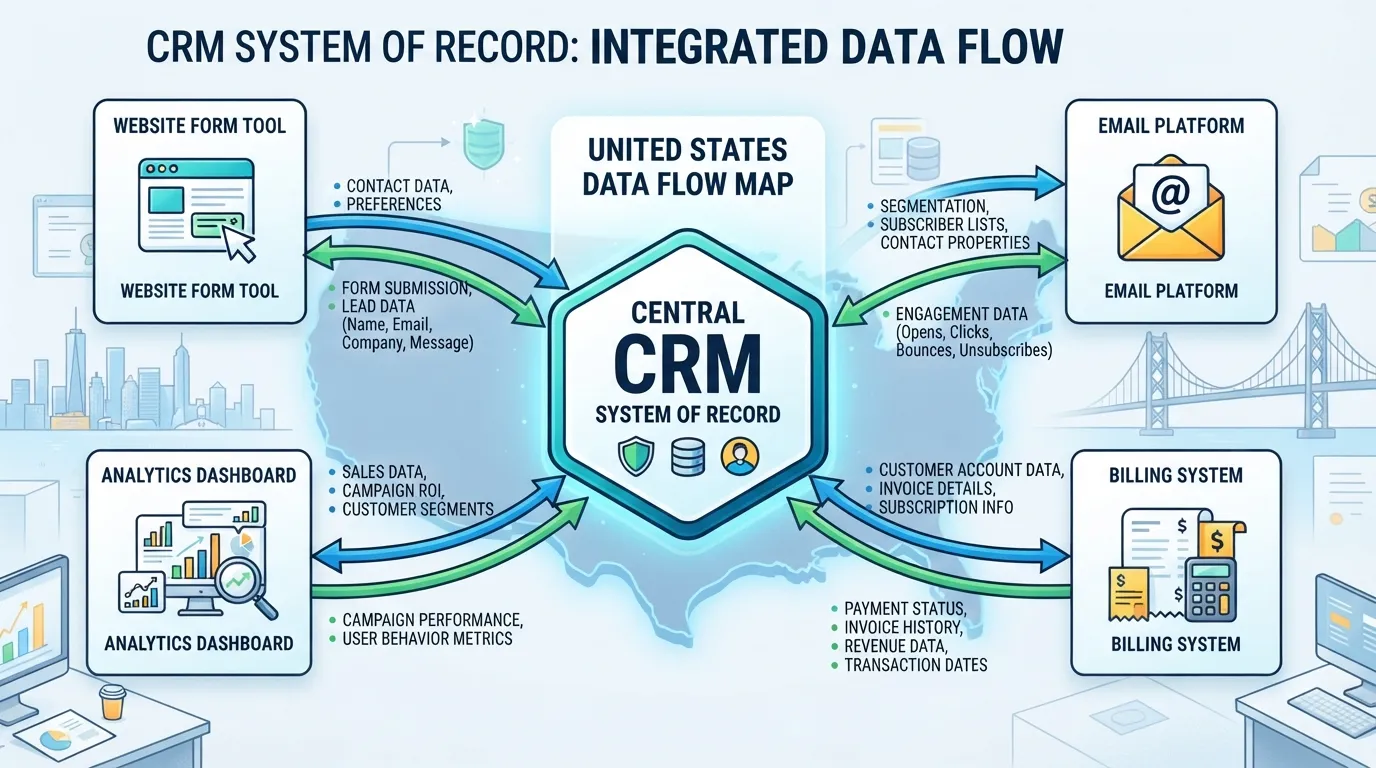
Build it in four steps:
- List the core objects. Usually contacts, companies, deals, campaigns and form submissions.
- Name the system of record for each object. One tool owns each object. For most teams this is the CRM for contacts and deals, and the website or form tool for raw submissions.
- For each important field, record three things: the tool where it is created, every tool where it is updated, and every tool or report where it is read. Lifecycle stage, lead source and deal value are the usual starting fields.
- Mark every arrow that crosses a tool boundary. These are your integration points. Each one needs an owner and a failure check.
Draw the result as a simple box-and-arrow diagram on one page. A diagram that needs zooming to read is too complicated to maintain.
Naming and definition rules keep the map usable over time. Write them down and enforce them:
- UTM standard. Use lowercase, separate words with hyphens, and fix the source and medium values in a shared list. For example, utm_source=linkedin and utm_medium=paid-social, never a mix of LinkedIn, linkedin_ads and li.
- Lifecycle stage definitions. Write one sentence per stage saying what must be true to enter it. “Marketing qualified lead: the contact has downloaded a gated asset and matches the target company profile” can be enforced. “Engaged prospect” cannot.
- Field naming. Use the same label across tools where possible, and record any mismatch in the map so no one assumes two fields are identical because they share a name.
- Single owner per field. Only one tool and one role may change a given field. If the website and the CRM can both overwrite lead source, the report will eventually show the wrong source.
Common Integration Failures and How to Prevent Them
Three failure types cause most of the damage in small stacks. Each stays hidden long enough to do real harm.
Duplicate syncs. A contact is created in two tools with slightly different email addresses or capitalization, and both records then sync back and forth. Prevention: match on a normalized email key, set the CRM to deduplicate on import, and run a duplicate report monthly.
Broken field mappings. A field is renamed in one tool, or a dropdown value changes, and the sync quietly stops populating it. Prevention: whenever a field or picklist changes, update the data flow map and test one record end to end.
Silent failures. The connection still runs but drops records, often because of a permission change, an expired token or a rate limit. Nothing errors visibly, so the gap only shows when a report looks wrong. Prevention requires a monitoring routine, not a one-off setup.
Sync-failure examples to watch for:
- A form tool sends 40 new leads in a week, but the CRM shows 31. The gap points to an expired token or a blocked field.
- Lead source reads “Organic” for contacts that came through a paid campaign. A second tool is overwriting the field.
- Duplicate contacts rise from two to nine in a month after a form was rebuilt with a new field name.
Use this monitoring checklist every month:
- Confirm the connection’s authentication is still valid. Check for expired tokens or revoked access after any staff change.
- Compare record counts between source and destination for one object, such as new contacts created last week in the form tool versus the CRM. A gap above a few percent needs investigation.
- Spot-check five recent records end to end, from form submission to CRM field to report.
- Review any error or failed-task log the automation platform provides, and fix recurring errors.
- Compare the duplicate contact count with last month’s figure. A rising trend points to a sync problem.
- Re-read the data flow map and confirm it still matches how the team works.
- Record the date and the name of the person who ran the check, so ownership is visible.
Assign one named owner to this checklist. Whoever runs the stack day to day is usually the right person. The check should take under an hour a month for a stack of five to eight tools. If nobody has time for it, the stack has more connections than the team can maintain, and one should be removed.
Budgeting and Team Ownership for a Lean Stack
A lean stack fails most often on budget and ownership, not features. Teams approve a tool, nobody is named to run it, and months later the license renews without anyone remembering why it was bought. This section gives you spend bands in US$, a way to assign owners and admin hours, and clear triggers for adding or cutting a tool.
Typical Monthly Spend Ranges by Team Size
No verified industry benchmark was supplied for this article, so the bands below are planning ranges, not published survey figures. Treat them as a starting point and replace them with your own invoices after a month of tracking.
| Team size | Working monthly stack spend (US$) | Typical tool count |
|---|---|---|
| 2 to 5 people | roughly 300 to 900 | 3 to 5 |
| 5 to 10 people | roughly 900 to 2,500 | 5 to 8 |
| 10 to 20 people | roughly 2,500 to 6,000 | 7 to 11 |
Two numbers matter more than the band. First, compare annual totals, because many vendors discount annual billing and a monthly list price hides that. Second, add a 15 to 20 percent allowance for seat growth and price rises, since per-user pricing scales with headcount. A team spending at the top of its band with fewer than three tools is usually paying for seats or tiers it does not use.
Worked budget example. The table below shows how subscription and admin hours combine. Figures are illustrative and use the planning bands above, with admin time valued at US$60 an hour as a hypothetical internal rate.
| Team size | Subscriptions (US$/month) | Admin hours/month | Admin cost (US$/month, illustrative) | Total annual cost (US$, illustrative) |
|---|---|---|---|---|
| 3 people | roughly 400 | 6 to 8 | roughly 360 to 480 | roughly 9,700 to 10,600 |
| 6 people | roughly 1,200 | 10 to 12 | roughly 600 to 720 | roughly 21,600 to 23,300 |
| 10 people | roughly 2,500 | 14 to 18 | roughly 840 to 1,080 | roughly 40,000 to 42,700 |
The admin column is often the one teams miss. A stack that looks cheap on invoices can cost more in staff time than in licenses.
Assigning Tool Owners and Admin Time
Every tool needs one named owner: the person who holds the admin login, approves changes and answers when a sync breaks. A second person should hold backup admin access so the stack does not stall during holidays or departures.
Plan admin time per tool each month:
- CRM: 3 to 5 hours (field hygiene, pipeline review, user changes).
- Email and automation: 2 to 4 hours (list hygiene, suppression checks, sequence reviews).
- Website and forms: 1 to 2 hours (form routing, tracking checks).
- Analytics: 1 to 2 hours (event checks, dashboard review).
- Content and social scheduling: 1 to 2 hours.
A team of five might budget 10 to 15 admin hours a month across the stack. If those hours are not in anyone’s calendar, the stack runs on goodwill.
Decide early what to outsource. Routine work such as a one-off automation or a data migration is often cheaper to buy as a project than to hire for. Ongoing ownership, including unsubscribe handling, should stay in-house.
When to Consolidate and When to Add
Use two lists of triggers so decisions rest on evidence rather than enthusiasm.
Add a tool when all of these are true:
- A task scores high on cost of delay in your scorecard.
- The task consumes measurable manual hours each week.
- An existing tool cannot perform it, even after you have checked its add-ons.
- You have a named owner and a budget line for the next 12 months.
Remove or consolidate a tool when any of these apply:
- Two tools hold the same contact or deal data, creating duplicate records.
- Nobody has logged in for 30 days, or fewer than a quarter of seats are active.
- The tool’s main job is now done by the CRM or email platform.
- The annual renewal exceeds the hours it saves, measured against your scorecard.
Before cancelling, export the data you need and confirm the exit terms. A tool you cannot leave cleanly keeps costing money after the decision to stop using it.
Conclusion: A Lean Stack Is a Working System, Not a Shopping List
A marketing tool stack is finished the day it stops growing. It is never finished the day it is bought. The teams that get the most from their tools treat the stack as a working system with owners, data rules and a regular review. They do not treat it as a set of logins that piled up one trial at a time.
Build the stack backward from one measurable revenue question. Do not build it forward from vendor feature lists. Find the pipeline bottleneck. Score each weekly marketing task on frequency, cost of delay and manual effort. Keep only the tools that remove effort from the tasks that matter most. Any tool you cannot trace to a scored task is a candidate for removal.
Three habits keep a lean stack lean after the initial build:
- Name an owner for every tool. If the person who set up a tool leaves, someone else should already know how it is configured, who administers it and what it feeds.
- Protect the system of record. Decide which tool owns contact and deal data. Check periodically that other tools read from it rather than creating their own copies.
- Review on a fixed schedule. Set a quarterly check where each tool must still justify its annual cost against the scorecard. Cancel anything that cannot.
A small team does not need to be the most sophisticated marketer in its category. It needs a stack its people can operate, trust and explain. When the reports agree, the data flows where it should, and every subscription maps to a task someone performs, the stack has done its job. Revisit the scorecard before the next purchase. Let the bottleneck, not the vendor, decide what comes next.
How many marketing tools does a small B2B team actually need?
Most small B2B teams do well with four to seven marketing tools. The exact number matters less than whether each tool maps to a scored task on the team’s weekly list. That usually means a CRM, a website and form builder, an email platform, an analytics setup and a small set of workflow or scheduling tools. The warning sign is rarely the count itself. It is a tool nobody can explain, or two tools that both store contact records. Count your tools by asking which ones your team would miss within a week if they disappeared. If the list is longer than that, start your cuts there.
What is the most important tool to buy first?
The CRM is the right first purchase for almost every small B2B team. It owns the contact and deal records that every other tool depends on. Buy it once your team has agreed on pipeline stages and a single definition of a qualified lead. Without those definitions, even a well-chosen CRM becomes a second spreadsheet. Before you pay for anything, check whether your existing Google Workspace or Microsoft 365 account already covers your sending and calendar needs. Native sync reduces setup work considerably.
Should a small B2B team use an all-in-one platform or separate best-of-breed tools?
Start with an all-in-one platform only if one vendor clearly covers the two or three jobs your scorecard ranks highest. You must also accept weaker features in the rest. Separate best-of-breed tools give more depth but add integration upkeep and another login for every hire. The deciding question is who will maintain the connections. If nobody has time to watch field mappings and sync failures, a single platform with fewer seams is the safer choice, even if one module is less capable than a specialist product.
How much should a small B2B team spend on its marketing stack each month?
There is no reliable universal figure. Pricing depends on seat counts, contact volumes and whether vendors bill annually. Compare annual totals in US$ rather than monthly list prices, since annual billing often changes the effective rate. Vendor minimums can also inflate small-team costs. Add the hidden costs too: setup hours, training and the administrator time each tool consumes every month. A useful internal test is whether total spend, including time, stays below the value of the pipeline the stack helps generate. If you cannot estimate that value, that gap is the first thing to fix.
How do I know when to cancel a marketing tool?
Cancel a tool when it fails the scorecard test. It no longer lowers manual effort on a task that carries real cost of delay, or its data is no longer trusted. Other clear triggers include two tools storing the same records, a tool only one person ever logs into, and a renewal price that rises faster than the value it delivers. Before cancelling, export your data and confirm you can read it elsewhere. Teams that skip this step often find, months later, that their historical records are locked inside a platform they no longer pay for.
Do I need a dedicated marketing operations person to manage the stack?
Not at the start, but someone must own the stack explicitly. This can be a part-time responsibility added to an existing role. Assign one named owner to each tool and a single owner for the data flow between them. For a team of three to ten people, this often means a few hours per week of administration, which is manageable if the scope is clear. Consider hiring dedicated operations support once the stack has more than about six connected tools, or once reporting disputes start consuming regular meeting time.
Frequently Asked Questions
Answers to these questions are kept in the FAQ section of this article.
Disclosure: digitalmarketingtools.ai is sponsored by Digimetrics.ai. Sponsored Highlights are clearly labelled advertising. Our reviews, comparisons and guides are written to be useful and fair regardless of who sponsors the site. Read the full disclosure.


