
6 AI Image Tools for Consistent Brand Visuals in 2026
Consistency, not raw quality, is the bottleneck. Reference-locking and style training are what to evaluate.
Generating one beautiful image with AI is no longer particularly difficult.
Generating 200 images that look like they belong to the same brand? That’s a different problem.
You can create an excellent campaign illustration using Midjourney, Adobe Firefly, Recraft, or another image generator. The colours look right, the composition feels professional, and the artwork matches your creative brief.
Then you generate another image.
The lighting changes slightly. The illustration style becomes more detailed. The characters have different proportions. The colours are close, but not quite right.
By the time you’ve produced 50 assets, the images may look as though they came from several different designers.
This is where AI image generation becomes a production problem rather than a creative experiment.
The real test of an AI image tool isn’t whether it can produce one impressive result. It’s whether your team can use it to produce a consistent collection of images without correcting every output.
That’s particularly important for marketing teams creating blog illustrations, social media graphics, advertising assets, email campaigns, and website visuals.
A single inconsistent image might go unnoticed. A campaign containing dozens of slightly different illustration styles can weaken the visual identity you’re trying to establish.
Several AI image platforms now offer features specifically intended to improve consistency, including style references, reusable style codes, custom models, trained elements, and brand kits.
But these features work differently, and none should be treated as a guarantee of perfect results.
In this guide, we’ll compare six AI image tools, explain their brand-consistency capabilities, and show how to evaluate them using a controlled creative brief.
We’ll also examine common problems involving typography, product accuracy, visual drift, and the real cost of producing publishable assets.
Our goal is to answer a practical question: Could a designer put the generated images into a real campaign without having to rebuild them?
Editorial disclosure: DigitalMarketingTools.ai is sponsored by Digimetrics.ai, developed by MediaOne. This article evaluates publicly documented AI image generation features and proposes a reproducible brand-consistency test. We have not independently completed a 200-asset comparison across all six products. No vendor is assigned a fabricated consistency score or presented as a verified benchmark winner.
What Does Brand Consistency Actually Mean for AI Images?
Brand consistency is more than using the same colours.
A recognisable visual identity usually combines several elements: colour, typography, composition, lighting, illustration style, shapes, spacing, and the way subjects are represented.
For example, imagine a fictional sustainability brand called Northline.
Its visual identity uses a muted forest-green palette, warm cream backgrounds, soft natural lighting, and illustrations with simple geometric shapes and consistent line thickness.
The brand needs imagery for blog articles, product announcements, social media posts, and email campaigns.
Each asset should communicate a different message, but the collection should feel connected.
A product-launch illustration doesn’t need the same composition as a blog header. However, both should follow the same visual language.
That’s the difference between brand consistency and visual repetition.
A generator that produces the same layout with minor changes may seem consistent, but it can make every marketing asset feel interchangeable.
A more useful system preserves the brand’s defining characteristics while allowing different subjects, compositions, and formats.
The Five Elements Worth Evaluating
| Visual Element | What Consistency Looks Like | Example of Failure |
|---|---|---|
| Colour palette | Approved colours remain recognisable across assets | Muted greens gradually become neon teal |
| Illustration style | Similar line weight, textures, shapes, and rendering conventions | Flat illustrations become detailed 3D artwork |
| Lighting and atmosphere | A coherent treatment of shadows, contrast, and highlights | Soft daylight becomes dramatic cinematic lighting |
| Composition | Layouts follow shared design principles while accommodating different subjects | Every output uses a different visual hierarchy |
| Brand-specific details | Recurring objects, characters, and approved elements remain accurate | Products, mascots, or identifying details change between images |
Not every tool offers equal control over these characteristics.
Some use existing images to guide new generations. Others support reusable codes or models trained on approved examples.
The most suitable method depends on what you need to keep consistent.
Six AI Image Tools for Maintaining Brand Consistency
These are six platforms worth evaluating when visual consistency matters more than isolated image quality.
| AI Image Tool | Main Style-Control Capability | Best Use Case | Important Limitation |
|---|---|---|---|
| Midjourney | Style References, style codes, Style Creator, Moodboards | Consistent editorial illustration and creative campaigns | Style references don’t guarantee exact objects, logos, or layouts |
| Recraft | Reusable custom styles built from reference images | Brand illustrations, vectors, icons, and design assets | Commercial rights depend on subscription terms |
| Adobe Firefly | Custom Models trained on brand examples | Campaign production using approved visual references | Custom model access, training, and governance require planning |
| Ideogram | Style Codes, structured prompts, custom brand models | Branded graphics, posters, and text-forward designs | Typography and layout still require quality assurance |
| Leonardo.Ai | Trained Elements and image references | Recurring illustration styles, subjects, and asset collections | Training quality and model compatibility affect results |
| Canva AI | Brand Kits, Brand Templates, on-brand image generation | Marketing teams creating finished social and campaign designs | Template consistency doesn’t automatically ensure every generated illustration matches |
This comparison describes documented capabilities rather than independently measured consistency rates. Features may depend on model versions and subscriptions.
Let’s examine where each tool fits into a real production workflow.
1. Midjourney: Best for Consistent Editorial Art Direction
Best suited for: Creative teams, designers, publishers, and marketers producing distinctive conceptual images.
Midjourney is widely used for generating stylised illustrations, conceptual artwork, and creative campaign imagery.
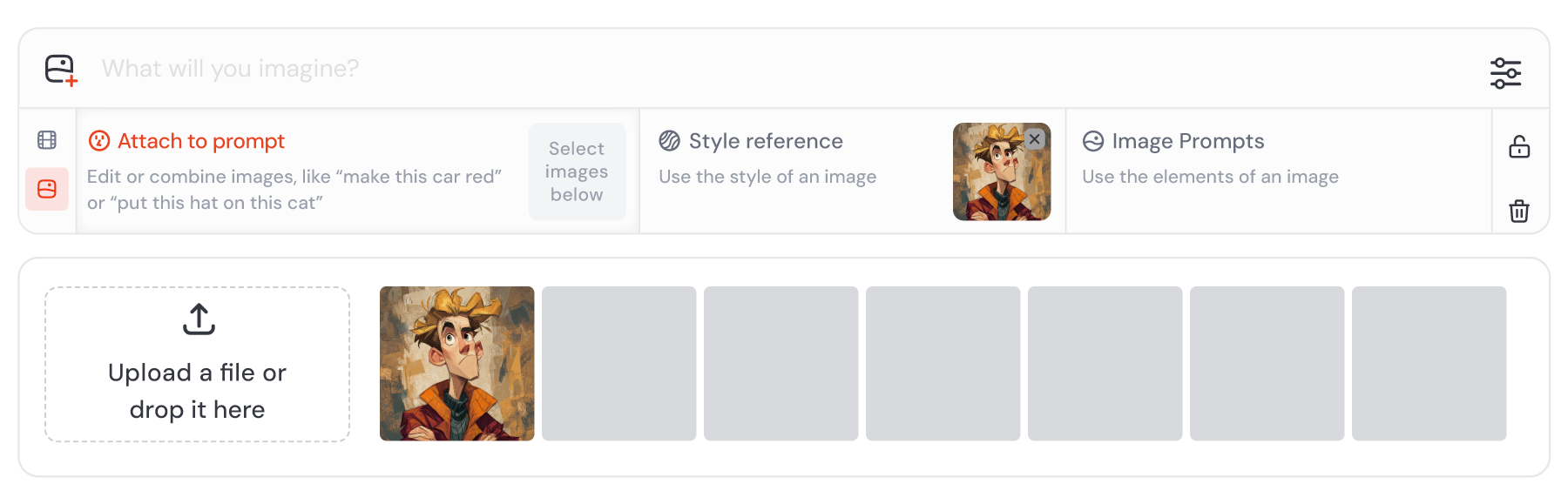
For brand consistency, its most relevant capabilities are Style References, reusable style codes, Style Creator, and Moodboards.
These features allow designers to guide the visual appearance of generated images using something more specific than a text description.
How Midjourney Style References Work
A style reference uses an existing image to influence the appearance of a new generation.
For example, suppose your brand uses editorial illustrations with muted colours, geometric characters, and subtle paper textures.
You can provide an approved image as a style reference and generate new subjects with a similar visual treatment.
Midjourney’s documentation describes the --sref parameter for applying style references and the --sw parameter for controlling style-reference influence in supported modes.
That is more controllable than repeatedly typing “minimal editorial illustration with muted colours” and hoping the generator interprets the words consistently.
However, style references guide aesthetic characteristics. They don’t automatically reproduce exact objects, layouts, or branded elements.
Style Codes and Style Creator
Midjourney also supports reusable Style Reference codes.
Its Style Creator allows users to develop a visual style and save a code that can guide future generations.
This can be useful when several content creators need to work within one aesthetic.
For example, your team might use a particular style code for all conceptual blog illustrations, then change the subjects according to each article.
The result should be evaluated across a collection, not just by examining one generation.
Where Midjourney Can Struggle
A consistent illustration style doesn’t guarantee accurate product representation.
If your campaign requires a particular smartphone, motorcycle, cosmetic product, or branded package, you shouldn’t assume a style reference will reproduce the exact item.
Similarly, recurring characters may require additional subject-reference controls.
Midjourney’s Moodboards and Style References also have different compatibility rules. Its documentation notes that Moodboards are not used simultaneously with certain Style Reference version and weight parameters.
For a controlled test, document which reference method and model version you’re using.
Our assessment: Midjourney is worth evaluating when your main priority is a distinctive editorial aesthetic. Its style controls provide a repeatable creative direction, but real brand assets and final layout elements should still be verified separately.
2. Recraft: Best for Brand Illustrations, Icons, and Vector Assets
Best suited for: Graphic designers, marketing teams, and businesses that need reusable illustration styles across different formats.
Recraft focuses on AI-generated design assets, including illustrations, graphics, icons, and vector-based output.
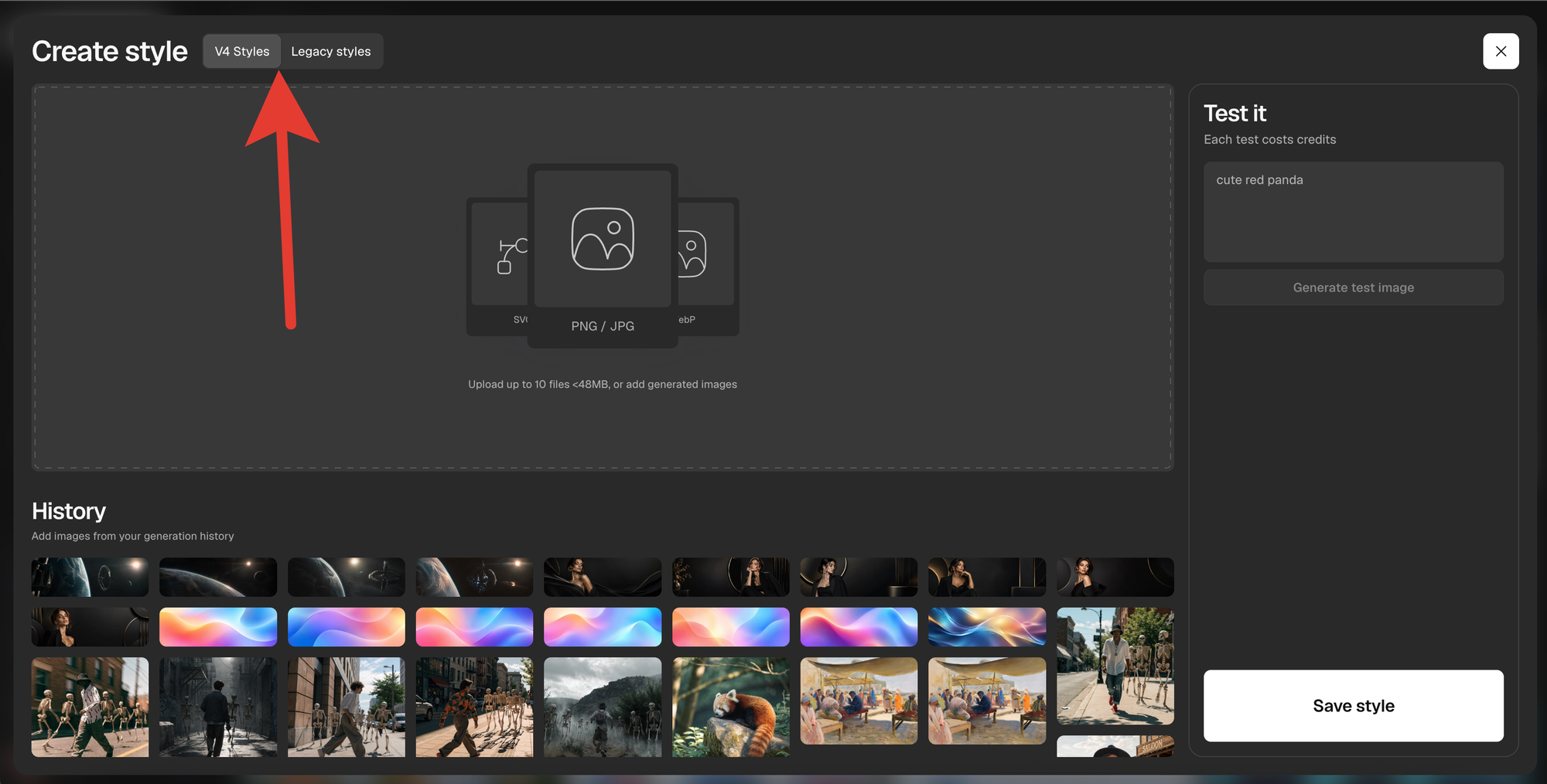
One of its particularly relevant capabilities is creating reusable custom styles from reference images.
Recraft’s public documentation describes a workflow that can use up to ten reference images to establish a style.
This allows designers to supply approved examples rather than describing every visual characteristic from scratch.
Why Recraft’s Custom Styles Matter
Imagine a software company uses simple, flat illustrations in its marketing materials.
Its visuals share a limited palette, rounded geometric shapes, and consistent outlines.
The company needs new illustrations showing automation, analytics, customer support, and project management.
Instead of manually recreating the aesthetic for each topic, the designer can use reference images to guide the generator.
Recraft also supports vector-oriented workflows, which can be valuable when assets need to remain suitable for resizing or further editing.
That makes it relevant for icon systems, supporting illustrations, and marketing graphics.
What to Test
Start by generating a small group of icons or illustrations using the same custom style.
Then change the subjects considerably.
For example, generate a customer-service illustration, a cloud-infrastructure illustration, an outdoor scene, and an abstract product benefit.
Check whether the colours, shapes, line weights, and overall visual treatment stay consistent across those very different requests.
Don’t judge the tool only on images that closely resemble the original references.
A production workflow needs to support new subjects without losing the brand identity.
Commercial Licensing Is an Important Consideration
Recraft’s published terms distinguish between free and paid generations.
Under its current terms, images generated on the Free tier are not licensed for commercial use. Paid-plan generations have different ownership and commercial-use rights.
This matters because a free trial image that looks perfect for your campaign may not be suitable for commercial publication under the free licence.
Read the current Recraft terms before using generated assets for business purposes.
Our assessment: Recraft is particularly relevant for reusable design styles and vector-oriented artwork. Its custom-style capabilities are worth testing, but commercial rights and editability should be checked before production.
3. Adobe Firefly: Best for Custom Brand Models and Professional Workflows
Best suited for: Established marketing teams, agencies, and businesses with approved visual libraries and repeatable creative production requirements.
Adobe Firefly provides image generation and editing features, including custom models designed to reproduce specific visual styles or subjects.
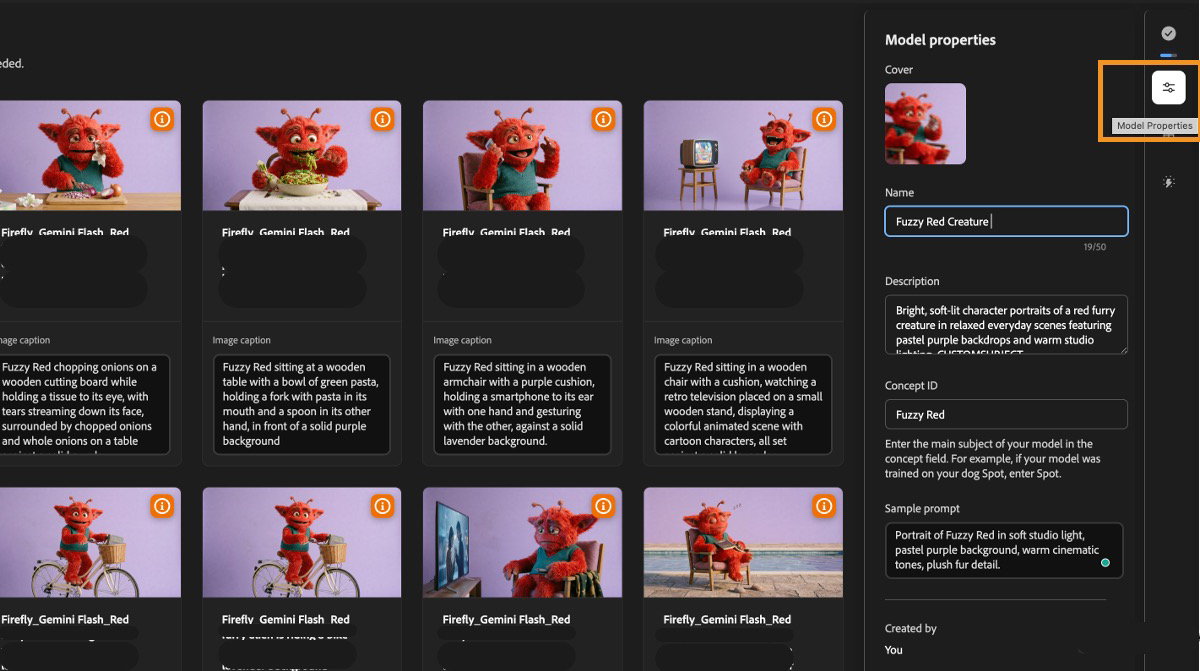
Adobe’s September and October 2026 documentation describes how users can train a custom model using their own reference images.
The resulting model can be used to generate new content that reflects the supplied visual identity.
This approach differs from applying one temporary style reference to a single prompt.
How Custom Models Work
Suppose a brand already has a collection of approved illustrations created by professional designers.
These images share distinctive colours, textures, proportions, and lighting.
Instead of trying to describe the entire aesthetic in a lengthy prompt, the team can use suitable examples as training material for a custom model.
Adobe’s documentation recommends selecting images that clearly represent the intended style or subject.
After training, the model can guide future generations across different topics.
The underlying training dataset becomes an important part of the creative process.
Why Firefly May Be Useful for Larger Teams
Adobe’s custom model documentation describes workflows involving Firefly and other Adobe applications, including Photoshop, Illustrator, and Express.
For organisations already working within Adobe’s ecosystem, this can help connect generation with familiar editing and design processes.
A creative team might generate a background or conceptual illustration, then use Photoshop or Illustrator to refine the result.
Another team member could apply approved fonts and logos using existing brand templates.
This separation between generated artwork and controlled design elements can improve consistency.
Limitations to Consider
Custom models still depend on the quality of the reference images.
If the training collection contains conflicting visual styles, the model may not reproduce the intended aesthetic reliably.
Access also depends on the relevant product and subscription arrangements.
Before investing in training, confirm the current availability of custom models, data-use requirements, licensing conditions, and approval process.
Our assessment: Adobe Firefly is worth evaluating when your team has an established visual identity and wants to train a more repeatable generation workflow using approved brand material.
4. Ideogram: Best for Branded Graphics and Text-Forward Designs
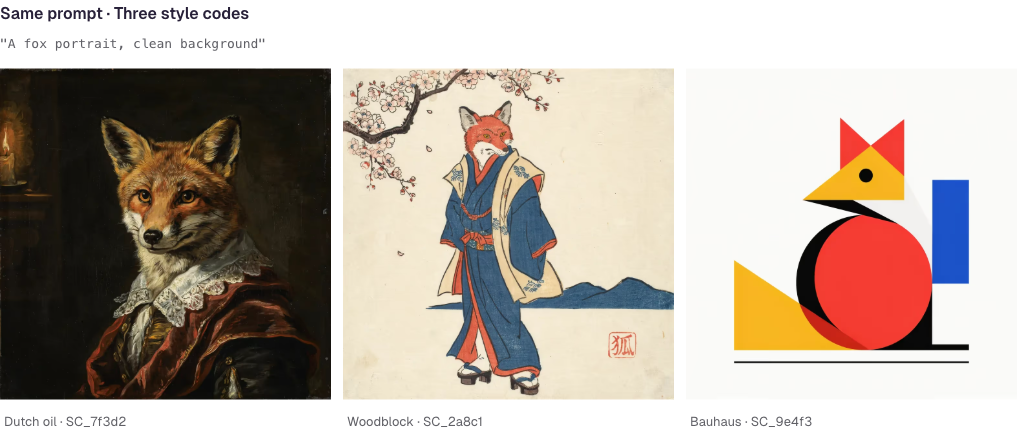
Best suited for: Marketing graphics, promotional artwork, posters, and content that requires more deliberate layout and typography.
Ideogram focuses on image and graphic generation, with features designed to improve text rendering, layout control, and visual styling.
Its newer generation workflows include reusable Style Codes and structured prompting.
In its Ideogram 4.0 documentation, the company explains how Style Codes can be extracted from a generated image and reused to guide later outputs.
This is useful when your campaign needs multiple compositions that share a recognisable design language.
How Ideogram Style Codes Work
Imagine you create a hero image for a product launch.
It features a clean editorial layout, a specific colour treatment, and a recognisable illustration style.
Once you’re satisfied with that artwork, you can use its Style Code when generating related images.
For example, the same style could guide a launch announcement, a blog graphic, and a promotional illustration.
Ideogram’s structured prompting capabilities also allow more deliberate control over design elements and composition.
That makes it relevant for teams that need generated graphics rather than isolated illustrations.
Does Better AI Typography Mean You Can Skip Design Review?
No.
AI-generated text has improved, and Ideogram’s tools specifically address typography and design.
However, a production campaign still requires accurate wording, approved fonts, correct legal disclaimers, and consistent placement.
A generated advertisement might contain the correct headline but use a slightly different font treatment or spacing from the brand guidelines.
Small variations become noticeable when dozens of assets are placed side by side.
For important marketing campaigns, it’s safer to keep final typography in a controlled design layer unless the generated output has been thoroughly checked.
Custom Brand Models
Ideogram also advertises enterprise custom models trained on sets of approved brand images.
That may be particularly relevant for organisations requiring more tailored visual consistency.
However, these custom arrangements should be evaluated separately from standard Style Code functionality.
Our assessment: Ideogram is worth considering for campaigns requiring stylised graphics, repeatable visual direction, and more structured design control. Typography still needs review before publication.
5. Leonardo.Ai: Best for Trained Styles and Recurring Visual Subjects
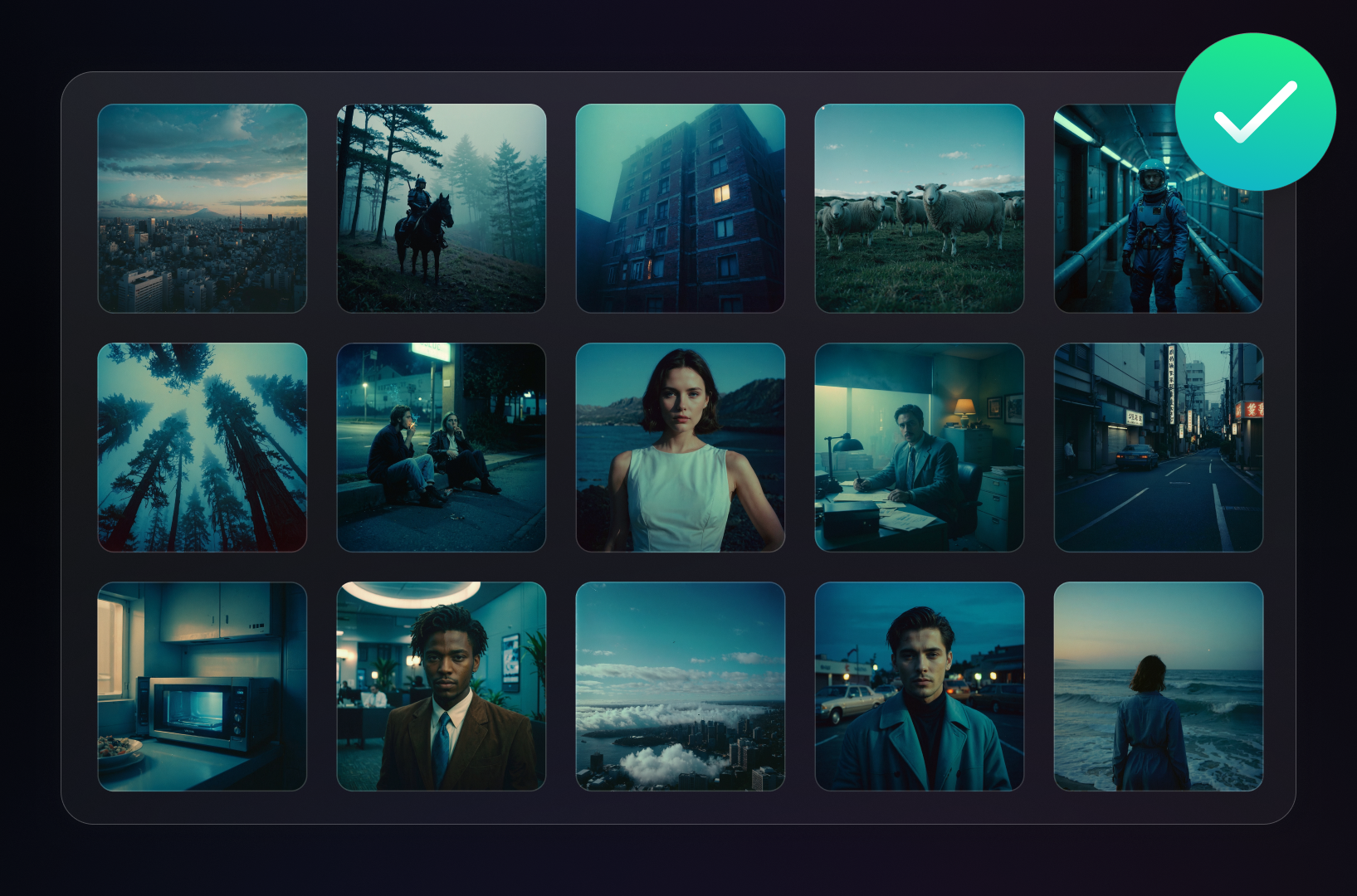
Best suited for: Creative teams producing illustration collections, recurring characters, and detailed visual assets.
Leonardo.Ai offers image generation and editing features, including custom Elements.
Elements use a form of model adaptation known as Low-Rank Adaptation, or LoRA, to help reproduce particular subjects, styles, or visual characteristics.
Leonardo’s documentation describes training custom Elements using reference images.
This makes Elements relevant when a brand needs repeated variations in a recognisable aesthetic.
How Elements Support Brand Consistency
Imagine you’re producing a series of educational articles featuring a consistent illustrated mascot.
The mascot appears in different environments and performs different actions, but its core appearance should remain recognisable.
A text-only prompt can describe the character’s clothing, colours, and proportions, but the results may vary.
A trained Element gives the generator an additional learned reference.
That may improve consistency across a series, although it doesn’t guarantee that every detail remains identical.
The same approach can also help maintain particular illustration styles.
Where Leonardo Requires More Planning
Training quality depends on the selected images and configuration.
If your references contain inconsistent poses, lighting, details, or styles, the results may not match the intended brand identity.
You also need to check which image models support the relevant Elements and reference workflows.
A strong result from one configuration doesn’t necessarily transfer unchanged to another model.
What to Test
Generate the same recurring subject in several settings.
For example, place a mascot in an office, outdoors, beside a product, and within an abstract scene.
Check whether its identifying characteristics remain stable.
Then evaluate whether the surrounding imagery follows the broader brand style.
A consistent mascot inside inconsistent artwork may still require substantial design work.
Our assessment: Leonardo is worth evaluating when the brand uses recurring illustration styles or subjects. Its trained Elements can support repeatability, but the training dataset and model configuration need careful attention.
6. Canva AI: Best for Brand Templates and Finished Marketing Assets
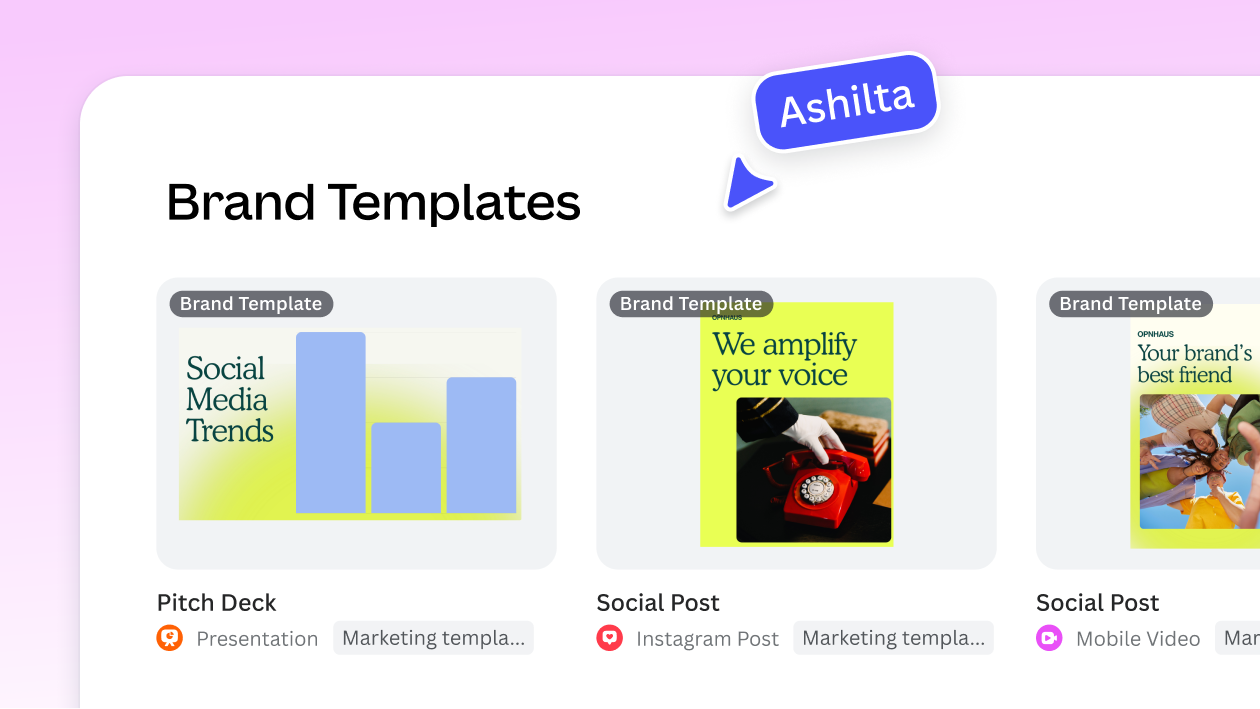
Best suited for: Social media teams, small businesses, agencies, and organisations producing branded content at scale.
Canva takes a different approach from specialist image generators.
Its value isn’t limited to producing standalone images.
It combines AI-assisted generation with templates, typography, logos, brand colours, reusable layouts, and team-oriented design workflows.
Canva’s documentation also describes on-brand image generation using Brand Kit assets as style references.
Why Canva’s Workflow Is Different
Suppose your team needs 100 social media posts.
Each graphic must use approved colours, typography, a logo, and a consistent layout structure.
Even if another image generator produces more distinctive artwork, your team still needs to assemble the finished graphics.
Canva can support both generated imagery and the surrounding design process.
Its Brand Kits and Brand Templates can guide visual consistency across repeated work.
For example, you could create several approved template families: one for educational posts, another for announcements, and another for promotional offers.
The generated image becomes one part of a larger controlled design.
On-Brand Image Generation
Canva’s documentation distinguishes general image generation in Dream Lab from on-brand image generation guided by Brand Kit references.
It also describes how approved Brand Templates can provide additional context for Canva AI.
This can be useful for teams that don’t want every employee to write complicated style prompts.
However, the resulting designs still need review.
A correct brand colour doesn’t make an illustration relevant, and a consistent template doesn’t guarantee that every generated image has the same visual character.
What to Watch Out For
If your main requirement is highly specialised concept art, a dedicated image generator may provide more artistic control.
If your requirement is producing finished, branded marketing assets efficiently, Canva’s broader workflow may be more useful.
Also check the current subscription’s Brand Kit, AI-generation, and team features.
Our assessment: Canva is particularly useful when consistent brand execution matters as much as image generation. It can help keep typography, layouts, and identity assets under control while AI supplies supporting visuals.
Reference Images, Style Codes, and Custom Models: What’s the Difference?
These terms are often used interchangeably in marketing materials, but they describe different approaches.
| Method | How It Works | Main Advantage | Main Limitation |
|---|---|---|---|
| Text prompt | Describes the desired appearance using words | Flexible and accessible | Style interpretation may vary |
| Style reference | Uses an approved image to guide aesthetic characteristics | Provides a concrete visual example | Doesn’t guarantee exact subjects or composition |
| Style code | Reuses a style representation through a saved code | Easier to repeat and share a visual direction | Version compatibility and generation variation still matter |
| Custom style collection | Uses several reference images to define a visual direction | Can capture more than one example of the desired aesthetic | Inconsistent reference images can weaken the result |
| Trained Element or custom model | Adapts generation using approved training images | Useful for distinctive styles and recurring subjects | Requires dataset preparation and compatible features |
| Brand Kit and templates | Controls colours, logos, typography, and layout elements | Helps produce consistent finished designs | Doesn’t eliminate variation in generated artwork |
The important distinction is that style consistency and subject accuracy are separate problems.
A tool might maintain the same lighting and illustration style while drawing a product incorrectly.
Another may reproduce the product reasonably well but alter the background and overall brand treatment.
Your test should examine these outcomes independently.
How to Test Brand Consistency Across 200 AI Images
The original premise of this article is worth keeping: a meaningful test should evaluate an entire asset collection, not one promotional example.
However, claiming that two of six products passed a 200-asset test requires the generated assets, settings, reviewer records, and scoring results.
Without those records, the appropriate approach is to document a benchmark that readers can reproduce.
Here’s how I’d structure it.
Step 1: Create One Fictional Brand
Use a fictional brand to avoid relying on existing trademarked products or protected visual material.
For this example, we’ll use Northline, a sustainable lifestyle brand.
Its visual identity includes:
| Brand Element | Defined Requirement |
|---|---|
| Primary colour | Muted forest green, #416B58 |
| Secondary colour | Warm cream, #F3EFE5 |
| Accent colour | Clay orange, #C77D58 |
| Illustration style | Soft geometric forms with consistent medium-weight outlines |
| Lighting | Gentle daylight, low contrast, minimal dramatic shadows |
| Texture | Subtle paper grain |
| Composition | Clear focal point, deliberate negative space |
| Overall mood | Calm, practical, contemporary, approachable |
These are hypothetical brand requirements for the test.
The identity should be agreed upon before generating any images.
This prevents reviewers from changing their definition of “on-brand” to favour the results from a particular tool.
Step 2: Create Four Content Categories
A 200-asset campaign should contain different types of visual work.
Otherwise, a generator might perform well simply because every image is similar.
For example:
| Content Category | Number of Assets | Main Challenge |
|---|---|---|
| Blog featured illustrations | 50 | Different topics while maintaining a shared aesthetic |
| Social media graphics | 50 | Varied layouts and formats without stylistic drift |
| Email campaign artwork | 50 | Consistent colour, lighting, and composition at smaller sizes |
| Product-supporting visuals | 50 | Accurate integration of approved product imagery |
| Total | 200 |
Importantly, the product-supporting images should use approved real product references or composited product photography when exact accuracy is required.
The test shouldn’t reward a generator for inventing a product that happens to look attractive.
Step 3: Build a Fixed Prompt Library
Prepare the content briefs before using the platforms.
For example, one blog image might explain sustainable packaging. Another could illustrate logistics, while a third concerns customer support.
Each prompt should communicate the required subject, composition, and output format.
Keep those requirements comparable across tools, while allowing necessary platform-specific syntax.
A generic master brief could look like this:
Create an editorial illustration for Northline, a sustainable lifestyle brand. Use the approved muted forest-green, warm cream, and clay-orange palette. Maintain soft geometric shapes, medium-weight outlines, subtle paper texture, and gentle daylight. The subject should communicate [specific topic]. Use a clean composition with one clear focal point and appropriate negative space. Do not invent logos, product details, or typography.
The exact prompt will need to be adapted to the subject.
For platforms supporting style references or custom models, apply the relevant approved brand materials as well.
Step 4: Run a 40-Asset Pilot
Before committing to all 200 assets, produce a smaller evaluation set.
For example:
- Ten blog illustrations.
- Ten social graphics.
- Ten email visuals.
- Ten product-supporting images.
This gives you 40 outputs covering all four content types.
Review them together, preferably in a shuffled contact sheet without vendor names.
The purpose is to determine whether the visual identity remains recognisable when subjects and formats change.
If the results are inconsistent during this pilot, there’s little reason to commit to a larger production run before adjusting the setup.
Step 5: Evaluate the Remaining 160 Assets
If the initial results justify further testing, continue production under documented conditions.
Keep the selected model version, reference method, brand brief, and relevant generation settings as consistent as practical.
Record changes when they are necessary.
For example, if a tool switches models or you increase reference strength halfway through production, note the change.
Otherwise, you may incorrectly attribute an improvement to the software when it actually resulted from a different configuration.
Step 6: Compare Early, Middle, and Late Outputs
A useful consistency check compares images from different stages of production.
For example, examine assets 1, 40, 90, 150, and 200.
Then create shuffled contact sheets containing images from all stages.
Ask reviewers whether the images belong to the same brand and whether any characteristics have changed.
This helps identify variation that may be less obvious when reviewing assets one at a time.
However, avoid assuming that a model necessarily becomes less consistent because it has generated more images.
Unless the tool changes its settings, references, or model state, later generation numbers do not inherently cause cumulative drift.
What often happens is that varied prompts, changing references, manual adjustments, and model updates create inconsistencies across the collection.
The test should identify those causes rather than simply blame image number 90.
A 100-Point Brand Consistency Scorecard
Once the images are generated, use a consistent scoring framework.
I recommend five weighted criteria.
| Criterion | Suggested Weight | What Reviewers Should Check |
|---|---|---|
| Visual identity consistency | 30% | Palette, line weight, texture, lighting, and overall aesthetic |
| Subject and composition accuracy | 20% | Whether the image communicates the brief correctly |
| Consistency across formats | 20% | Whether the style works across different asset categories |
| Editing and correction effort | 15% | How much manual work is required before approval |
| Production usability | 15% | Suitable export quality, rights, and ability to complete the workflow |
| Total | 100% |
For the scored criteria, reviewers can use a consistent five-point scale.
The weighted score can be calculated as:
Weighted Score = Σ (Criterion Rating ÷ 5 × Criterion Weight)
However, some requirements should be treated as mandatory approval conditions rather than scoring opportunities.
For example, an asset containing an incorrect product, unlicensed image, misleading representation, or unapproved branding shouldn’t pass simply because it looks stylistically consistent.
Use More Than One Reviewer
For a meaningful benchmark, ask at least two people familiar with the brand guidelines to review the assets independently.
Give them the same scoring instructions and examples of acceptable and unacceptable outputs.
Then investigate substantial disagreements.
This is important because visual consistency is partly subjective.
One reviewer may consider a minor lighting variation acceptable, while another may see it as inconsistent with the campaign.
Documenting the disagreement is more credible than hiding it inside a precise-looking average score.
The Consistency Problem Most Teams Actually Encounter
A campaign can drift even when every individual image looks professional.
Imagine the first ten illustrations use muted colours and simple shapes.
The next ten contain more detailed shadows.
Later, the generator introduces more realistic textures and stronger lighting.
Each image might look good in isolation.
But placing them side by side reveals that they don’t share the same visual language.
This is why reviewing every image individually is insufficient.
Three Common Sources of Inconsistency
Prompt variation. Different team members may describe the same style using different language. One asks for minimal geometric artwork while another requests a cinematic editorial illustration. The results naturally diverge.
Reference variation. A team may use several reference images that don’t actually belong to the same visual system. The generator receives conflicting guidance.
Workflow variation. Different model versions, image settings, edits, and post-processing methods can change the final appearance even when the creative brief remains similar.
These factors can make it difficult to determine whether the inconsistency comes from the generator or the team’s production process.
A reliable evaluation should record both.
Where AI Image Tools Still Need Human Oversight
Even with strong style-control features, several production tasks require careful review.
1. Exact Product Representation
This is one of the most important limitations for commercial imagery.
Suppose a retailer sells a particular electric bike.
The generated image might preserve the general colour and silhouette but change the headlight, wheel design, body panels, or proportions.
That is unacceptable if the image is presented as an accurate representation of the product.
The safest approach is to use genuine product photography and place it within a generated background or designed layout.
AI-generated creative direction should not override product accuracy.
For an article about conceptual sustainability, a generated illustration may be appropriate.
For a product listing showing an actual vehicle, the real photograph should remain the authoritative visual.
2. Logos and Brand Identity Assets
A logo needs to remain exact.
Generating a logo-like symbol is not the same as placing the official logo.
Even a small change in lettering, spacing, or icon geometry can create an inconsistent brand asset.
Keep approved logo files outside the generative process whenever exact reproduction is required.
Use a design tool to position the real logo after generation.
3. Typography
Some image generators now produce readable text much more reliably than earlier systems.
Ideogram, in particular, offers features intended for typography and structured layout.
However, final marketing copy must still be checked.
A campaign may require a specific font, weight, size, and positioning across dozens of assets.
For reliable brand control, using actual text layers in Canva, Photoshop, Illustrator, or another design application remains a strong approach.
4. People and Recurring Characters
Reference and training features can help improve character consistency.
However, recurring subjects may still vary in clothing details, facial characteristics, proportions, or other identifying features.
If your brand uses a fictional mascot, test it across multiple poses and environments before committing to production.
If you’re representing a real person, use approved original photography rather than assuming a generated likeness will be exact.
5. Layout and Mobile Readability
A beautiful generated background may look excellent in a large preview but fail when cropped for Instagram, a mobile advertisement, or an email banner.
Important subjects may be cut off, and negative space may disappear.
Always evaluate the intended final dimensions rather than judging the source generation alone.
For more on preparing generated images for different channels, see our guide to creating social media graphics with AI image tools.
The Production Workflow We’d Recommend for 200 Brand Assets
For most marketing teams, the most reliable approach isn’t asking one generator to produce every finished asset in a single operation.
Instead, separate creative generation from controlled brand elements.
Step 1: Create the Brand System
Start with approved colours, typography, logos, illustration examples, and layout principles.
Document what can change and what must stay fixed.
For example, subjects and compositions may vary, but the official logo and product details must remain unchanged.
Step 2: Prepare Style References or Training Materials
Choose a small group of high-quality reference images that clearly represent the intended aesthetic.
Avoid mixing unrelated styles.
If the chosen platform supports custom models, determine whether the available training material is suitable and whether you have permission to use it.
Step 3: Generate Supporting Artwork
Use AI to create backgrounds, decorative illustrations, abstract compositions, or other appropriate supporting visual content.
Avoid relying on generation for elements requiring exact reproduction.
Step 4: Composite Real Brand Assets
Import approved product photographs, logos, icons, and text into the design.
Use the real assets rather than generated approximations.
For example, a product campaign could use an AI-generated illustrated environment around a real cutout photograph of the product.
This allows creative flexibility without misrepresenting the item.
Step 5: Apply Controlled Templates
Use templates to maintain spacing, headlines, logo placement, dimensions, and other repetitive design elements.
A consistent template family can reduce manual corrections and help different team members produce coherent work.
Step 6: Review in Batches
Don’t approve images only one at a time.
Review batches of 20–40 assets together.
Look for colour differences, inconsistent textures, recurring mistakes, and changes in visual style.
A shuffled contact sheet makes these problems easier to identify.
Step 7: Export and Check the Final Asset
Verify dimensions, image quality, text, logos, product details, accessibility, and usage rights.
For print or large-format assets, check whether the resolution is appropriate.
If you need to enlarge existing artwork, our comparison of image upscaling tools explains why larger pixel dimensions don’t always mean more accurate details.
The advantage of this workflow is that AI handles creative variation while your design system controls brand-critical elements.
How Much Does It Cost to Produce 200 Consistent AI Images?
The advertised subscription price is only one part of the cost.
You also need to account for generation credits, rejected outputs, design corrections, and final production work.
An inexpensive generator may become expensive if the team must regenerate most of its outputs.
A more expensive platform may be better value if it produces a higher proportion of approved artwork.
The useful metric is cost per approved asset, not cost per generated image.
Example: A 200-Asset Campaign
Suppose a team needs 200 approved images.
It generates 260 candidates to produce the required collection.
Assume the following costs:
| Cost Component | Hypothetical Amount |
|---|---|
| AI subscription and generation costs | $90 |
| Initial style setup and templates | $120 |
| Human review and corrections | $240 |
| Final export and quality assurance | $80 |
| Total production cost | $530 |
| Approved assets | 200 |
| Cost per approved asset | $2.65 |
Illustrative calculation, not a measured result from any of the six vendors.
Now suppose a different workflow costs $150 in software and generation fees but reduces the human labour expense by $100.
Even though the software is more expensive, the total cost may be lower.
This is why comparing subscription prices alone doesn’t tell you which tool is more economical.
Track the Approval Rate
Use this calculation:
Approval Rate = Approved Assets ÷ Generated Assets × 100
In the example above:
200 ÷ 260 × 100 = 76.9%
That means approximately 77% of the generated candidates were ultimately approved.
However, an approval should mean that the image is suitable for its intended use, not merely that it looks attractive.
The team should record why assets are rejected.
Common reasons may include incorrect colours, inconsistent illustration styles, inaccurate products, unusable compositions, and difficult-to-correct details.
Over time, these records can identify which tool or configuration produces the least additional work.
Which AI Image Tool Should You Choose for Your Brand?
The right tool depends on what you’re trying to keep consistent.
| Your Main Requirement | Tools Worth Testing First | Why |
|---|---|---|
| Distinctive editorial illustrations | Midjourney, Recraft | Reusable style controls and artistic generation |
| Branded icons and vector-style assets | Recraft | Custom styles and vector-oriented design workflows |
| Custom visual identity trained from approved material | Adobe Firefly, Leonardo | Custom models and Elements |
| Text-forward promotional graphics | Ideogram, Canva | Layout, typography, and design capabilities |
| Social media campaigns managed by several people | Canva | Brand Kits, templates, and collaborative workflows |
| Recurring illustrated subjects | Leonardo, Midjourney | Dedicated reference and subject-control capabilities |
| Large campaigns involving real products | AI generator plus a conventional design tool | Keeps authentic product and identity assets under control |
These are recommendations based on the products’ documented features, not the results of identical hands-on testing.
A platform that works well for abstract illustrations may not be the best option for product advertising.
Likewise, a platform designed for reusable templates may be more valuable operationally than one producing visually impressive standalone images.
The right purchasing decision starts with the asset requirements, not the popularity of the generator.
Why Brand Consistency Doesn’t Mean Every Image Should Look the Same
There’s a separate problem worth addressing.
Once a team discovers an effective AI image prompt, it can be tempting to reuse the same composition repeatedly.
For example, every blog image might contain two illustrated marketers standing beside a floating dashboard.
The backgrounds change. The colours remain consistent. The headline is different.
But the images become repetitive because the visual idea never changes.
This is not strong art direction.
A mature brand system keeps certain characteristics recognisable while allowing the imagery to respond to the topic.
A cybersecurity article could use an abstract network illustration.
A pricing article could use a carefully designed cost comparison.
A technical tutorial might be better served by a genuine annotated screenshot.
All three can belong to the same brand without using identical compositions.
Consistency should come from visual principles, not from repeating one image template hundreds of times.
For more approaches to creating distinctive visuals, see our guide to stock photo alternatives.
Commercial Rights and Brand Safety: What to Check Before Scaling
Commercial licensing becomes especially important when you’re generating hundreds of assets.
Different providers have different rules covering free generations, paid subscriptions, image ownership, shared galleries, confidential inputs, and commercial use.
For example, Recraft’s current terms do not permit commercial use of images generated under its Free tier.
That doesn’t mean every free AI image service has the same restriction.
It means you need to verify the conditions of the specific platform and plan.
Before starting a large campaign, confirm:
- Whether the selected subscription permits your intended commercial use.
- Whether the tool can use your uploaded brand assets for model training or other purposes.
- Whether outputs or prompts may appear in public galleries.
- Whether your organisation has permission to use the reference material.
- Whether generated images require additional review for misleading product representations.
- Whether ownership, licensing, and confidentiality terms fit the project.
For regulated products, public figures, sensitive subjects, or advertising involving real-world claims, additional review may be needed.
A commercially licensed image isn’t automatically accurate or compliant with advertising requirements.
Our guide to disclosing AI-generated images in ads explains why labels and transparency don’t replace the need for truthful visuals.
How We Would Review AI Image Brand Consistency
Our proposed evaluation framework uses one fictional brand, four content categories, and a 200-asset production scenario.
However, the 200-asset benchmark described here has not been completed across all six products.
A published comparison claiming that a specific number of tools maintained consistency would require the actual outputs and supporting records.
A completed study should document the following:
| Evidence Required | Why It Matters |
|---|---|
| Approved brand guidelines | Establishes the expected visual identity |
| Source reference images | Shows what each generator received |
| Prompt library | Makes the creative requirements reproducible |
| Model and tool versions | Helps explain changes in output |
| Style settings and reference controls | Documents how consistency features were configured |
| Full generation inventory | Prevents selective reporting of only the best outputs |
| Reviewer scores and disagreements | Shows how consistency was evaluated |
| Editing and approval time | Measures the real operational value |
| Rejection reasons | Explains which failures created additional work |
Where a tool’s feature is available only under a particular subscription, the review should identify that limitation.
If a capability wasn’t tested, it should be marked as not evaluated rather than assigned a score.
This approach produces more useful information than a ranking based on a handful of impressive promotional images.
Final Verdict: Judge the Fortieth Image, Not the First
AI image generation has become powerful enough to support substantial marketing production.
Tools such as Midjourney, Recraft, Adobe Firefly, Ideogram, Leonardo, and Canva now offer different ways to guide visual style and repeat creative decisions.
But an impressive first image doesn’t establish that a tool can support a complete brand campaign.
The meaningful test is whether it can produce a varied collection that follows the same visual identity while preserving subject accuracy and reducing production effort.
Before buying, define your brand guidelines, prepare approved references, and generate a representative sample across the content formats you actually use.
Review the images together. Record what needs correcting. Calculate the cost per approved asset.
And don’t expect AI to handle every brand-critical element.
For most marketing teams, the more dependable production system is to generate supporting imagery with AI, then apply real product photography, approved logos, and controlled typography in a design tool.
That workflow preserves creative flexibility while reducing avoidable inconsistencies.
The best AI image tool for brand work isn’t the one that creates the most impressive individual picture. It’s the one that helps your team produce a recognisable, accurate, and publishable collection at a sustainable cost.
Frequently Asked Questions
What Is the Best AI Image Generator for Brand Consistency?
There isn’t one universally best tool.
Midjourney offers Style References and reusable style codes. Recraft supports custom styles, Adobe Firefly offers custom models, Leonardo supports trained Elements, Ideogram provides Style Codes and structured design controls, and Canva combines AI creation with Brand Kits and templates.
The right option depends on whether you need consistent illustrations, exact brand layouts, recurring characters, or finished marketing graphics.
How Do You Make AI-Generated Images Look Consistent?
Start with approved visual guidelines covering colours, illustration style, lighting, typography, and composition.
Use reference images, style codes, custom models, or templates where supported.
Then review the outputs as a collection rather than judging each image individually.
Can AI Generate 200 Images in the Same Style?
AI platforms can support large production runs, but consistent results are not guaranteed.
The outcome depends on the chosen model, reference controls, prompt library, asset types, and review process.
A 40-asset pilot can help identify problems before scaling to a 200-asset campaign.
What Is Style Drift in AI Images?
Style drift refers to inconsistencies in visual characteristics across a collection of generated images.
For example, illustrations may use different lighting, textures, colours, or line weights despite sharing a general creative brief.
Drift can result from varied prompts, inconsistent references, different settings, model updates, or generation variability.
Are Style References Better Than Text Prompts?
Style references can provide more concrete visual guidance than a written description alone.
However, they don’t guarantee exact results and may not control every subject or layout detail.
For brand work, a combination of well-defined prompts, approved references, and final quality assurance is usually more useful.
Can AI Image Generators Reproduce an Exact Product?
Not reliably enough to assume accuracy without verification.
A generated image may change small but important product features.
For commercial product advertising, using approved original product photography within a designed or AI-generated environment is generally safer.
Which AI Image Tools Support Custom Models?
Adobe Firefly offers custom models designed to reproduce visual identities and styles. Leonardo supports custom Elements using LoRA training, and Ideogram advertises enterprise custom brand models.
Availability and training requirements depend on the provider and selected service.
Is Canva Good for Consistent AI Marketing Graphics?
Canva can be useful because it combines AI-assisted image generation with Brand Kits, typography, logos, templates, and team workflows.
It is particularly relevant when the final asset requires more than a generated illustration.
However, generated imagery still needs to be reviewed for style and factual accuracy.
How Do You Measure AI Image Consistency?
You can define a brand scorecard covering colours, illustration style, lighting, subject accuracy, composition, and production usability.
Have reviewers evaluate a mixed sample of generated assets, record disagreements, and measure how many images are approved without extensive corrections.
The findings will be most useful when the original prompts and settings are documented.
Are AI-Generated Images Safe for Commercial Branding?
They can be used commercially when the relevant licence permits it and the intended use is appropriate.
However, commercial rights vary between providers and subscription tiers.
You should also review product accuracy, reference-image permissions, confidentiality, and applicable advertising requirements before publishing.
Disclosure: digitalmarketingtools.ai is sponsored by Digimetrics.ai. Sponsored Highlights are clearly labelled advertising. Our reviews, comparisons and guides are written to be useful and fair regardless of who sponsors the site. Read the full disclosure.


