
Best SEO Tools for B2B Teams: Feature and Pricing Comparison (2026)
Compare the best SEO tools for B2B teams on workflow fit, CRM reporting and total cost, with a weighted matrix to pick the right platform.

Choosing SEO software for a B2B business is harder than it looks. Most vendor rankings are written for solo bloggers or ecommerce stores, and they reward long feature lists that rarely match how a B2B team works. For most B2B teams, the best SEO tool is the one that fits their workflow and reporting needs, not the one with the most features. This guide gives you a weighted decision matrix to apply to your own priorities, and it shows where the headline price understates what you will pay. Figures are indicative and change often, so confirm current pricing on each vendor’s official page before you buy.
Key Takeaways
- Fit beats feature count. The best SEO tools for B2B teams match the team’s workflow and reporting needs. A longer feature list is not a reason to buy.
- Weight criteria by role. Content marketers, technical SEOs and demand-gen leads need different things from the same platform. Score each tool against the priorities of the people who use it daily.
- Use a five-criterion matrix. Score workflow fit, keyword and competitor data depth, technical audit capability, reporting and CRM integration, and total annual cost, each on a 1 to 5 scale.
- Budget for total cost of ownership. Seats, usage caps, add-on modules, export limits and onboarding time often matter more than the headline price. Check each vendor’s pricing page before you buy.
- Check pipeline reporting before you sign. If leadership reviews pipeline, confirm the tool can connect organic search data to CRM records in Salesforce or HubSpot, and to Google Analytics and Google Search Console.
- A smaller tool is often enough. Teams tracking a limited set of target keywords with one CRM integration often get more value from a simpler tool. Pay for enterprise features only when your team will use them.
Table of Contents
- Why B2B SEO Tool Selection Differs From Consumer Marketing
- How We Evaluated the Tools
- Core Feature Categories Every B2B SEO Stack Needs
- Head-to-Head Feature and Pricing Comparison
- Conclusion and Summary
- Frequently Asked Questions
Why B2B SEO Tool Selection Differs From Consumer Marketing
Consumer SEO tends to chase large volumes of cheap, transactional queries. B2B works differently, and four differences change what a tool needs to do.
- Long sales cycles. A B2B buyer may research a software category for months before filling in a demo form. Teams need tools that keep rank and traffic history over long windows and can join that data to account or opportunity records.
- Buying committees. A marketing lead, a finance approver, a product manager and a chief revenue officer may all review one content decision. Each reads reports differently. A tool that exports only a raw keyword table forces the SEO lead to rebuild the story by hand every month.
- Thin keyword volumes. Many B2B queries show low monthly search volume, sometimes a few dozen searches. Each one can still influence a large contract. Volume-led tools often rank these terms as unimportant, so B2B teams need research that classifies intent and reads the commercial value of a query.
- CRM and automation links. The most useful SEO data sits next to the customer record. If organic traffic cannot be linked to form fills and opportunities in Salesforce or HubSpot, the SEO function will struggle to justify its budget.
How B2B search demand creates different tooling needs
These differences produce specific tooling needs. B2B teams generally need deeper keyword research around intent and competitive topics. They need careful technical auditing, because complex sites often include gated resources, subdomains and multiple product lines. They also need reporting that separates branded from non-branded demand and shows organic contribution to pipeline. Google’s documentation on how search works explains that ranking systems evaluate relevance and quality for each query. For a narrow audience, intent matters more than raw volume.
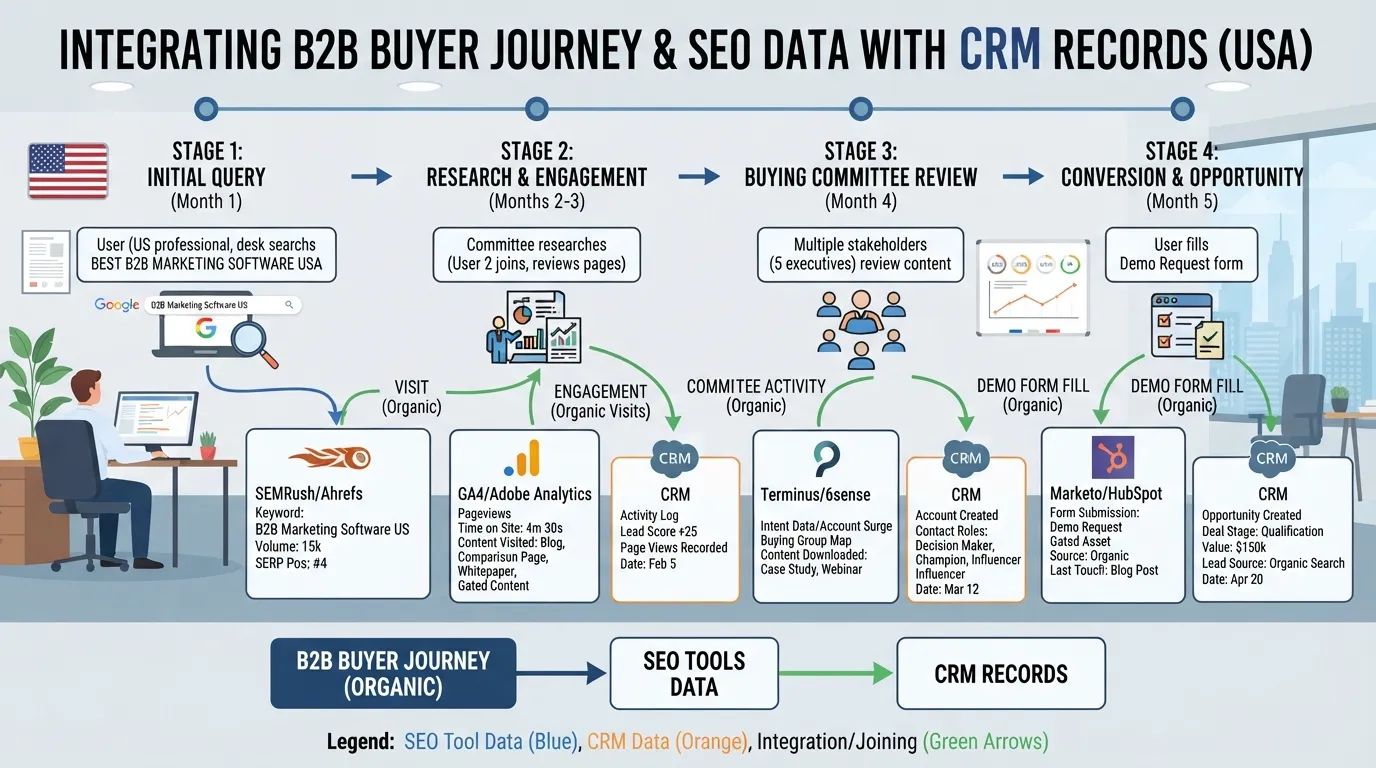
A practical test: list the five queries that would produce your best customer. Check whether your current tool reports their intent, difficulty and the pages that rank for them. If it cannot do this for a query with a few dozen monthly searches, the tool was built for a different market.
Where generic SEO tool rankings fall short for B2B
Most ranking articles score tools on a shared checklist: keywords tracked, crawl limits, backlink index size and monthly price. Those measures matter, but they do not show whether a tool will change a B2B team’s decisions. A tool can score well on every generic metric and still fail. Its reports may not join to CRM records, its seat pricing may make adding a sales engineer expensive, or its content briefs may suit blog posts rather than solution pages.
In our view, breadth can mislead buyers. A suite with thirty modules looks stronger than a focused tool with five, yet a B2B team may use only two of those modules in practice. The useful question is how many features your team will use each week and how well they connect to the revenue reporting leadership reviews.
For the publisher’s own approach, see how we review seo tools.
Generic metrics still matter for large sites. Crawl capacity and data freshness affect results. Semrush and Ahrefs publish plan tiers, and Ahrefs lists Enterprise at $1,499 a month. A site below about 500,000 pages probably does not need to worry about crawl budget, while a much larger domain should weigh crawl capacity heavily. The mistake is treating a generic leaderboard as a substitute for a decision made against your own workflow, team roles and reporting needs.
How We Evaluated the Tools
Most SEO tool roundups rank products by feature count or polished marketing sites. That approach misleads B2B buyers. A tool built for a consumer brand selling high-volume products rarely fits a team selling a six-figure service to a buying committee of five. Our evaluation starts from the buyer’s situation and works outward to the software. The question we ask is simple: which tool fits this team’s work, not which tool has the longest feature list.
Criteria weighting for B2B teams
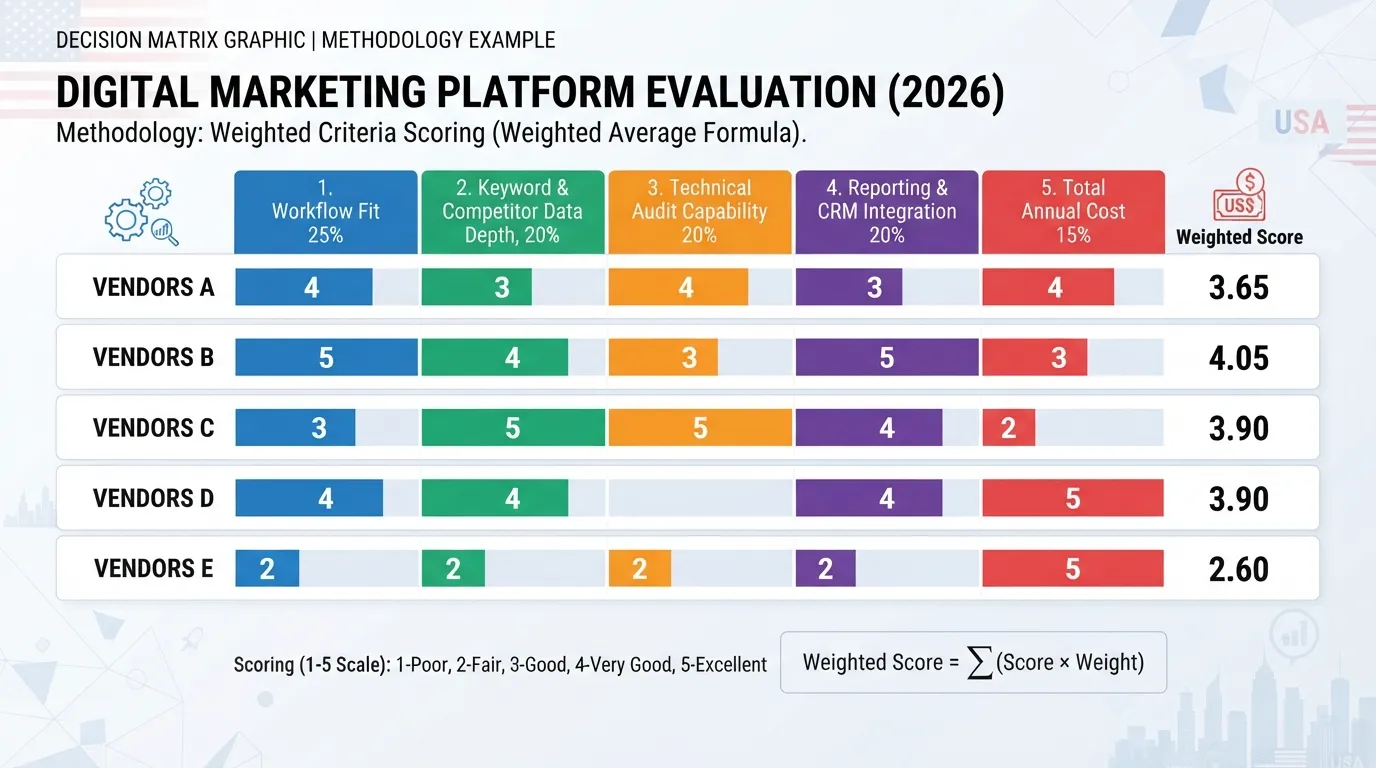
We score every tool on five criteria. Each is weighted to reflect how B2B teams spend their time:
| Criterion | Weight | Why it matters for B2B |
|---|---|---|
| Workflow fit | 25% | Content, technical and demand-generation roles need different things from the same platform |
| Keyword and competitor data depth | 20% | B2B queries have thin volumes, so the tool must show intent and difficulty, not just search volume |
| Technical audit capability | 20% | Large B2B sites, often with gated resources and complex subfolders, need crawl control at scale |
| Reporting and CRM or analytics integration | 20% | Leadership reviews pipeline and revenue, not rankings |
| Total annual cost | 15% | Seats, add-ons and usage caps often cost more than the headline subscription |
The weights are a starting point. A team with a strong technical SEO function might raise the audit weight and lower workflow fit. Before scoring, each buyer should adjust the weights against their own documented priorities.
Consider two teams. A five-person content team at a software company might set workflow fit at 35% and cut the audit weight to 10%. A B2B marketplace with a 200,000-URL catalogue would do the reverse. Same tools, different winners. The best SEO tools for B2B teams are rarely the same for both.
Testing methodology and data sources
We assess each tool through a structured review rather than a single demo. We recommend the following steps as the evaluation procedure for any B2B team:
- Set up a test project on a representative B2B site, or a sandbox where a live site is not available.
- Run keyword research for 30 to 50 high-intent B2B queries. Then check whether the tool’s intent labels match the actual search results.
- Run a full crawl and compare the reported issues against a manual check of sampled flagged URLs.
- Build a content brief for one target page. Judge whether it gave a writer enough direction to produce a usable draft.
- Build one stakeholder report and test whether it can be read without a walkthrough.
Data sources include hands-on trial accounts, vendor documentation and public help-centre articles. Where a vendor’s claims could not be verified, we say so in the review. We do not quote third-party statistics about tool adoption unless the originating source is named and linked. Where a figure comes from a vendor page, we attach the page to the claim.
Pricing verification and review dates
Vendor pricing changes often, sometimes within a single quarter. We record prices in US dollars from each vendor’s public pricing page at the time of review. We note the seat, credit or project basis, and we flag any figure that required a sales conversation to confirm. All prices here are indicative. Before buying, check the current pricing page or request a written quote, since annual-contract discounts and promotions change the effective cost.
Scoring framework
Each tool receives a score from 1 to 5 against four feature groups. The scores are weighted and combined with the cost criterion:
- Keyword research (1 to 5): Does the tool classify intent accurately, show difficulty that reflects niche B2B competition, and export data cleanly?
- Crawl and technical audit (1 to 5): Can it handle large sites, control crawl scope and rate, and separate real issues from noise?
- Content optimization (1 to 5): Do the briefs and scoring recommendations give a writer specific, usable direction?
- Reporting (1 to 5): Can you build a dashboard a non-SEO executive can read, schedule it, and connect it to analytics or CRM data?
A score of 5 means the feature works well for a B2B team without workarounds. A score of 3 means it works but needs manual steps. A score of 1 means the feature is missing or unreliable for this use case.
Disclosure of affiliations
We do not accept payment for rankings, and no vendor influences scores or wording. Our affiliate position is set out per tool on each review page. Where a tool has an affiliate or referral arrangement with this publisher, we say so there. Where none applies, the page says that too. Sponsored placements, if any, are labeled as sponsored and kept separate from editorial comparisons.
Readers can use our SEO tools guide to see how the editorial process is organized across our SEO coverage. Our how we review SEO tools page explains the scoring in more detail.
Core Feature Categories Every B2B SEO Stack Needs
A B2B SEO stack covers six jobs: finding the right queries, auditing the site, understanding competitors and links, producing content, tracking rankings, and proving results to the business. Most teams do not need a separate product for each job, but they do need coverage of all six. The sections below explain what each category should do, so you can check any platform against them. The same checks apply whether you are assessing a suite or a single product, which is how we judge the best SEO tools for B2B teams.
Keyword research for niche, high-intent B2B queries
B2B search volumes are small. A query like “contract lifecycle management for mid-market law firms” may show only a few dozen searches a month. One converted opportunity can still be worth more than thousands of consumer visits, so your keyword tool must go beyond volume. Look for three capabilities:
- Intent classification. The tool labels each query as informational, commercial or transactional. This tells you which page type should answer it.
- Long-tail and modifier discovery. Good tools surface qualifiers such as industry, company size, integration names and compliance terms that B2B buyers often use.
- Business-value estimation. Some platforms estimate cost-per-click. This works as a rough proxy for how commercially valuable a query is.
Test each tool on ten queries your sales team hears on calls. If the tool returns few or no results, its database will not serve your niche.
Keyword difficulty is useful but limited. Most tools estimate it from how many strong domains rank for a term. That estimate breaks down on low-volume B2B queries. A term with only a few hundred searches a year may show low difficulty because few pages compete for it, even when the ones that rank are very strong. Treat difficulty as a relative signal and check the actual results page before deciding.
Technical auditing at enterprise site scale
B2B websites often have large product catalogues, documentation libraries, gated resource hubs and multiple subdomains. A crawler that handles a 500-page brochure site may stall or miss issues at 200,000 URLs. When you assess audit capability, check four things:
- Crawl limits and speed. Confirm the page cap on your plan and whether crawling is throttled or queued.
- JavaScript rendering. Many B2B sites run on modern frameworks. The crawler should render pages the way search engines do, or it will report false errors.
- Crawl budget management. The tool should flag parameter URLs, redirect chains, orphaned pages and duplicate content that waste crawl activity. Crawl budget matters most on very large sites. A site of around 500,000 pages or fewer usually has less cause for concern.
- Scheduled monitoring. Recurring audits, with alerts when indexation or status codes change, matter more than one-off reports.
Ask vendors how their crawler handles your platform. Google’s Search Central documentation is a useful reference for the technical requirements the crawler should check against.
Backlink and competitor intelligence
In B2B markets, links usually come from industry publications, analyst sites, partner directories and trade associations rather than high-volume consumer sites. Backlink data should show referring-domain quality and topical relevance, not just a raw count. A useful competitor module answers three questions: which domains link to competitors but not to you, which pages earn the most links, and which keywords competitors rank for that you do not.
Check how often the link index updates and how far back the historical data goes. Backlink indexes differ in coverage, so run a sample of your own known links through each candidate tool before you rely on its numbers.
Content briefing and optimization workflows
For B2B teams, content briefs are where SEO meets subject-matter expertise. A good brief names the target query and the search intent. It lists the questions the page must answer, the competitor headings to cover and the entities a search engine expects to see. Optimization tools that score a draft against these signals help writers and editors agree on what “done” means.
The workflow matters as much as the feature list. Ask whether briefs can be assigned, commented on and approved inside the tool, or whether they must be copied into a document. Teams that publish through a content management system should also check whether drafts can be pushed directly or must be pasted in.
Reporting dashboards for stakeholders and executives
Reporting is where B2B SEO most often fails. Rankings and traffic matter to the SEO team. Leadership reviews pipeline, lead volume and acquisition cost. Your stack needs a way to connect organic visits to form fills, demo requests and opportunities in the CRM. Native connectors to Google Search Console and Google Analytics are the baseline. For deeper tracking of which visits lead to sales, check whether the tool can feed Salesforce or HubSpot data into one view.
Measured sync failure rates by CRM are not published in a source we can cite, so test each integration yourself before you buy. For each CRM, run a short checklist:
- Can the tool match organic sessions to contact or account records?
- Does it sync opportunity stage and value, or only lead counts?
- How often does the sync refresh, and does it handle deleted or merged records?
- Can you filter the report by market, product line or content type?
A common failure mode is the dashboard that shows a healthy organic trend but cannot link that trend to pipeline. Run a sample of ten recent closed deals through the tool. If you cannot trace at least most of them back to an organic session, the reporting link is weak, however good the dashboard looks.
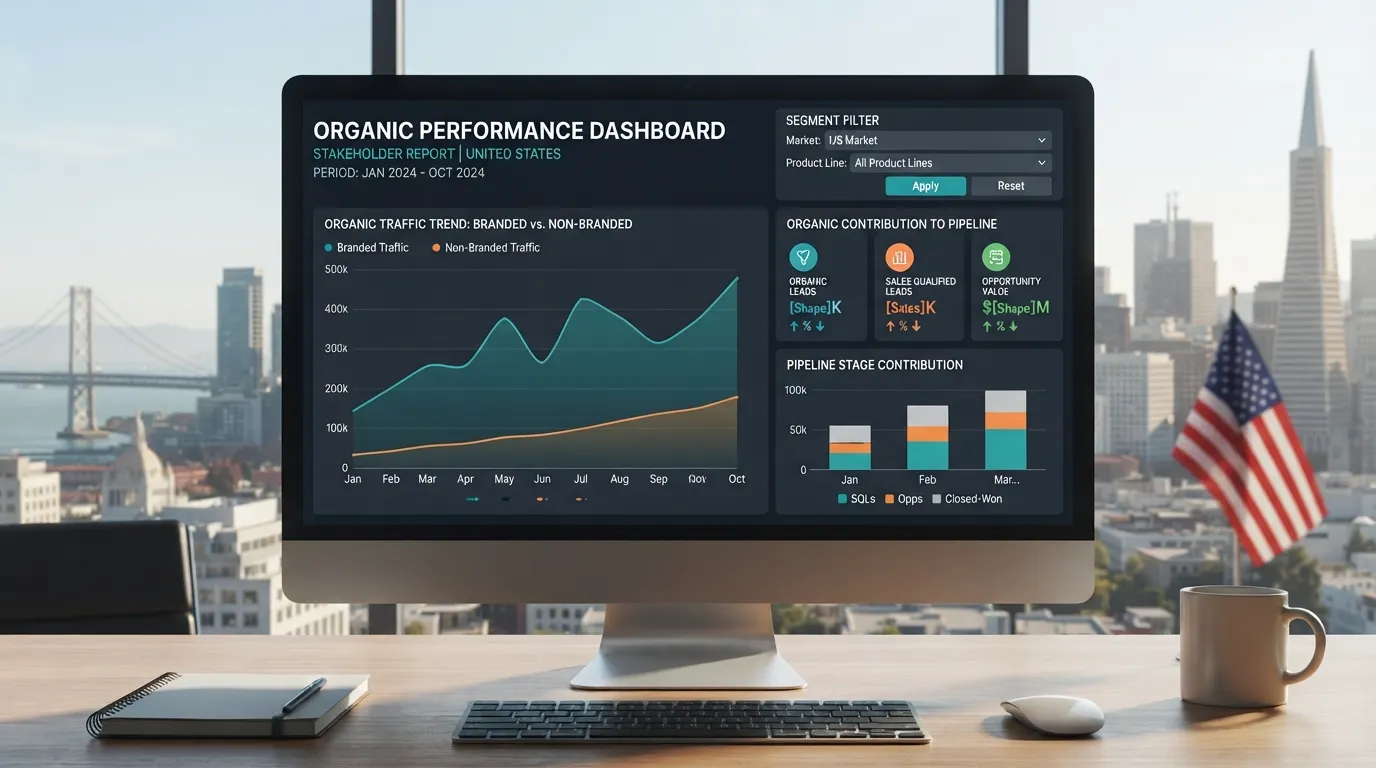
Design the dashboard around the questions executives ask. How much pipeline came from organic search this quarter? Which content influenced deals? Which pages are losing ground? If a platform cannot answer those questions without a manual export, budget for the extra work or choose a different tool.
Head-to-Head Feature and Pricing Comparison
This section compares the best SEO tools for B2B teams on the criteria that matter most to B2B organizations. The right tool fits your workflow and reporting needs. It is not simply the one with the longest feature list. Check every price on the vendor’s current pricing page before you commit, because pricing changes and annual and monthly billing often differ.
Comparison table: tools, key features and pricing tiers
The table groups tools by the category they serve. Pricing is indicative and expressed in US$, so treat it as a planning range rather than a quote. The Ahrefs Enterprise figure comes from the draft and should be confirmed on the vendor’s pricing page.
| Tool category | Typical examples | Key B2B features | Seat and usage limits | Free trial |
|---|---|---|---|---|
| Enterprise suites | Semrush, Ahrefs (Enterprise at $1,499 a month) | Keyword and competitor research, site audits, backlink data, content tools, reporting | Set by the vendor per plan; confirm on the pricing page | Usually available on request or via a short trial |
| Mid-market platforms | Semrush Pro-tier plans, Ahrefs Standard-tier plans | Core research, audits, rank tracking, content briefs | Set by the vendor per plan; confirm on the pricing page | Commonly offered as a trial or limited free plan |
| Specialist tools | Screaming Frog (crawling), Google Search Console (search data), Google Analytics (behavior and conversions) | Single-function depth such as crawling, query data or site analytics | Crawl limits or none, depending on the tool and plan | Often free or with a limited free tier |
Before you buy, check three things on each vendor’s site: the seat count in each tier, the number of tracked keywords or projects, and whether API access or data export costs extra. Pricing and seat limits differ by vendor and by region, and they change over time. Confirm them on the pricing page, not in a comparison article.
How to read pricing: seats, credits, projects and usage caps
Most SEO pricing rests on four units. They determine what you pay as the team grows.
- Seats: the number of named users who can log in. A four-person team on a two-seat plan needs an upgrade or extra seats.
- Credits: a pool of units spent on actions such as certain reports, AI features or data pulls. Heavy use can use up credits before the billing period ends.
- Projects: each tracked website or domain, often with its own crawl and rank-tracking allowance. Teams running several product sites or regional domains can reach project caps quickly.
- Usage caps: limits on tracked keywords, crawled URLs per audit, or monthly data queries. These caps are where costs rise unexpectedly.
Write down your expected numbers for each unit: seats, domains, tracked keywords and audited URLs. Then check each plan against that list, not against the headline price.
Enterprise platforms: broad suites for large B2B organizations
Enterprise suites bundle keyword research, competitive analysis, technical auditing, content tools and reporting in one place. For a large B2B organization with several content teams and multiple domains, that consolidation can reduce tool sprawl and simplify procurement.
The trade-off is cost and complexity. Enterprise tiers typically carry higher seat counts and usage limits, and you may pay for modules nobody opens. Choose an enterprise suite when at least three of these apply: several teams need shared access, you manage many domains, leadership needs consolidated reporting, and someone on your team administers the platform.
Mid-market tools: strong value for growing teams
Mid-market plans suit teams of roughly five to fifteen people who need reliable research, audits and rank tracking without enterprise overhead. These tiers usually cover the core workflow: finding B2B keywords, auditing a main site, tracking a defined set of terms and briefing content.
Mid-market plans often give the best value for growing teams. Check two limits before you buy. The first is the number of tracked keywords. B2B niches can be narrow, so a modest cap may be enough. The second is the number of seats. If you need only one or two extra users, buying seats on a mid-market plan is often cheaper than moving up to an enterprise tier.
Specialist tools: best-in-class for a single function
Specialist tools do one job well. Screaming Frog is a widely used desktop crawler for technical audits. Google Search Console shows how your pages appear in Google search results at no cost. Google Analytics measures on-site behavior and conversions, which lets you connect organic traffic to leads.
Specialist tools suit teams with strong analysts, or teams that need a precise capability a suite handles poorly, such as crawling a very large site. The downside is integration work. You combine outputs manually or through a reporting layer. Pair specialists with a reporting dashboard so leadership sees one picture rather than several disconnected exports.
Free and entry-level options and their limits
Free options are useful for B2B teams, but they have clear ceilings.
- Google Search Console: data on queries, impressions and clicks for your own site. It does not show competitor data or keyword difficulty.
- Google Keyword Planner: free search volume ranges within a Google Ads account. It is built for advertisers, so volumes for niche B2B terms are often broad or missing.
- Free crawler tiers: typically cap the number of URLs per crawl, which can be too small for a large B2B site.
- Free trials and entry plans: useful for a structured proof of concept, but limited on tracked keywords, seats and export options.
A free stack can cover a small team with a short list of target keywords and a single CRM connection. It becomes a constraint when you need competitor intelligence, large-scale audits or monthly reporting for leadership. Work out which of those needs applies to you before you decide whether to upgrade.
For a broader view of how tool categories fit together, see our seo tools guide. For smaller budgets, our seo tools for small businesses review covers entry-level options in more depth.
Conclusion and Summary
For most B2B teams, the best SEO tool is the one that fits how the team works and reports, not the one with the longest feature list. A platform earns its place when it supports your content, technical and measurement tasks, and when its total annual cost, including seats, add-ons and onboarding, stays proportionate to the pipeline it helps you influence.
How the weighted scoring works
Score each tool from 1 to 5 against five criteria, then multiply each score by its weight and add the results. The weights below are an example for a content-led B2B team. Adjust them to your own priorities.
| Criterion | Weight | Tool A score | Tool B score | Tool C score |
|---|---|---|---|---|
| Workflow fit | 25% | 4 | 3 | 5 |
| Keyword and competitor data depth | 20% | 5 | 4 | 2 |
| Technical audit capability | 20% | 4 | 5 | 3 |
| Reporting and CRM integration | 20% | 3 | 4 | 4 |
| Total annual cost | 15% | 2 | 3 | 5 |
The scores above are a worked example that shows the method only. They are not measured results for any named vendor, and no weighted total is given because the figures are illustrative. Your own scores will produce their own order.
Recommended shortlists by team profile
The profiles below name one tool to start with and the reason it tends to win for that team on the weighted matrix. Confirm the figures on each vendor’s current pricing page before you act on them.
| Team profile | What to prioritize | Recommended starting tool | Why it wins on the matrix |
|---|---|---|---|
| Solo marketer or small team | Low seat cost, clear keyword research, simple reporting | A mid-market platform | It scores well on workflow fit and cost, which carry most of the weight for a team that cannot justify enterprise spend |
| Growing in-house team with an agency partner | Shared access, reporting the agency can export, CRM connection | A mid-market platform with flexible user access | Reporting and CRM integration scores high, and seat flexibility keeps total cost in line |
| Enterprise team with multiple stakeholders | Governance, technical audit at scale, executive dashboards, data security | An enterprise suite, if its modules will be used | Technical audit capability and reporting depth carry the score, but only when the team uses those modules |
The enterprise row needs the most caution. Enterprise suites are worth their price only when your team uses the advanced modules. A feature that sits unused is paid-for shelfware.
Final next steps
- Document your priorities. Write down the two or three outcomes the SEO program must deliver, such as organic lead volume, pipeline influence or technical health.
- Score your shortlist. Rate three to five tools against the five criteria and record the reasons for each score so stakeholders can review them.
- Run a structured trial. Test the top two tools on the same keyword set and the same site section, and confirm the CRM connection works with your own data.
- Calculate total cost of ownership. Add seats, add-ons, data-export limits and onboarding time for the full contract term, not just the monthly headline price.
- Choose the simplest tool that meets your score threshold. If a mid-tier tool scores as well as an enterprise platform on your weighted criteria, the mid-tier tool is the better buy.
If you are still deciding how much to invest, our guide on how much should you spend on seo tools walks through budget bands by team size. For a broader look at the category, the seo tools guide explains the main tool types before you commit to a platform.
Frequently Asked Questions
What is the best SEO tool for a small B2B team on a limited budget?
For a small B2B team, the best SEO tool is usually the one that covers your highest-value keywords and reporting needs at the lowest seat cost. Start by listing the five to ten commercial queries that bring in pipeline. Then check whether a candidate tool tracks those queries, audits your site, and exports data to the dashboard your leadership already uses. A focused mid-tier or entry plan often beats an enterprise suite your team uses only a fraction of. If the choice is still unclear, weigh the options on the five criteria described earlier in this guide.
How much should a B2B company expect to spend on SEO tools per year in USD?
There is no single figure. Spend depends on how many people need seats, how many domains and keywords you track, and whether you buy add-ons. Many small B2B teams run on a combined budget of a few thousand US dollars a year. Larger organizations with several specialists and integrations can spend considerably more. Work out the total annual cost, not just the headline monthly price. Add seats, add-on modules, data-export or API charges, and onboarding time. Vendor prices change often, so confirm current figures on each vendor’s pricing page before you request budget approval.
Do B2B SEO tools need CRM integration to be useful?
They do not need it to be useful. CRM integration becomes important once leadership asks which organic visits turned into pipeline. Tracing visits to sales requires a connection to a CRM such as Salesforce or HubSpot. Without it, you can report rankings and traffic but not revenue influence, which is the metric most B2B buyers ultimately need. Early on, a consistent UTM policy and a shared spreadsheet may be enough. Once organic leads feed sales decisions, a supported integration saves hours of manual matching and reduces reporting errors.
Is a free SEO tool enough for B2B keyword research?
A free tool can be enough for initial keyword discovery, especially in a niche market with a short list of target terms. Free options typically limit daily queries, competitor data depth, tracked keywords, and history. These limits matter in B2B because high-intent queries often have low search volume. You need reliable intent and difficulty signals to separate a valuable term from a weak one. Use free tools to validate your initial list, then move to a paid plan when you need consistent tracking, team access, or exportable reports.
How long does it take to see return from a new SEO tool?
Returns usually appear in stages. The first few weeks go to setup, crawl fixes, and building a keyword map, with little visible change. Ranking movements for targeted commercial pages often take several months, because search engines need time to index and reassess content. Set a 90-day review with agreed metrics, such as indexed pages, priority keyword positions, and organic-sourced opportunities. Avoid judging the tool on traffic alone.
Should B2B teams buy an all-in-one suite or separate specialist tools?
An all-in-one suite suits teams that want one login, shared reporting, and fewer vendor relationships. It is often the simpler choice for a team of two or three people. Separate specialist tools make sense when one function, such as technical auditing or backlink analysis, is a clear bottleneck that a suite handles weakly. Compare each option against five criteria: workflow fit, keyword and competitor depth, technical audit capability, reporting and CRM connection, and total annual cost. If a suite scores well on most criteria and covers your bottleneck, buy the suite. If a gap remains on a top-weighted criterion, add a specialist tool for that function only.
Disclosure: digitalmarketingtools.ai is sponsored by Digimetrics.ai. Sponsored Highlights are clearly labelled advertising. Our reviews, comparisons and guides are written to be useful and fair regardless of who sponsors the site. Read the full disclosure.


