
How to Choose a Keyword Research Tool: 5 Steps to Finding the Right Fit
Choosing a keyword research tool sounds straightforward until you start comparing platforms. One generates thousands of suggestions, another reports completely different search volumes, and a third costs twice as much despite offering similar features.
Which one should you actually pay for?
The answer depends on your business, budget, and SEO workflow. The best keyword research tool is the one that helps you identify valuable search opportunities, understand the competition, and decide what content to create or improve. A larger database or longer feature list doesn’t automatically make a platform more useful.
At MediaOne, our SEO team has over a decade of experience working with keyword research, competitor analysis, and organic search performance. We’ve used platforms such as Semrush, Ahrefs, Google Search Console, Google Analytics, and Screaming Frog to support SEO research and reporting.
This guide explains how to choose a keyword research tool in five practical steps, which features deserve your attention, and how to compare free and paid options before committing to a subscription.
Key Takeaways
- Choose based on your workflow. A freelancer researching a few websites needs different features from an agency handling dozens of clients.
- Prioritise useful data over database size. Search volume, Keyword Difficulty, search intent, and SERP analysis matter more than the number of suggestions a platform generates.
- Treat Keyword Difficulty as a starting point. A low score doesn’t guarantee rankings, and a high score doesn’t automatically make a keyword impossible.
- Test tools using identical keywords. Comparing the same queries, markets, and research tasks reveals more than a feature comparison.
- Consider total subscription costs. Research credits, exports, user seats, geographic coverage, and additional features can affect what you actually pay.
- Free tools may be sufficient. Google Keyword Planner and Google Search Console provide valuable data without requiring a premium SEO subscription.
How to Choose a Keyword Research Tool in 5 Steps
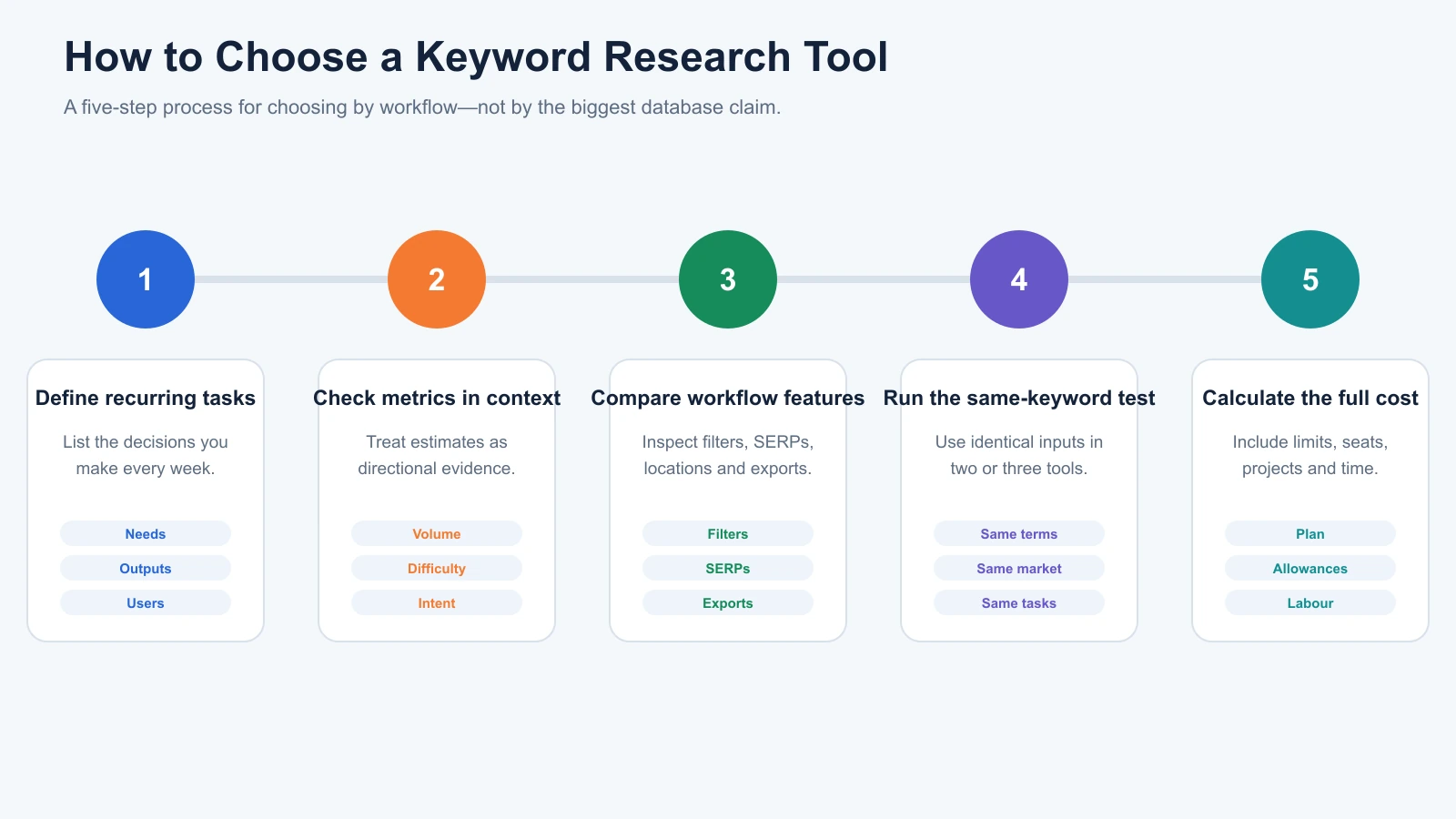
Before comparing software subscriptions, identify what you actually need the tool to accomplish.
A platform may perform well for keyword discovery but offer limited competitor research. Another may provide detailed SERP data while restricting the number of reports you can generate.
The following five-step framework helps you evaluate these differences without paying for unnecessary features.
Step 1: Identify What You Need the Tool to Do
Start by defining the SEO tasks you perform regularly.
Keyword research involves several activities, and not every business needs all of them.
For example, a small local business may only need to identify service-related searches in its area. A content publisher might need thousands of related keyword suggestions for planning topic clusters.
An agency managing several websites may require competitor research, bulk exports, shared projects, and consistent reporting.
Consider these common requirements:
| Your SEO Task | Features to Prioritise |
|---|---|
| Finding blog topics | Related keywords, questions, search volume |
| Researching commercial keywords | Search intent, CPC, SERP analysis |
| Identifying competitor opportunities | Domain research, keyword gaps |
| Planning content clusters | Keyword grouping, clustering, traffic potential |
| Researching local demand | Geographic targeting, local keyword data |
| Managing multiple clients | Projects, exports, collaboration |
| Improving existing content | Search Console integration, competitor analysis |
The key is identifying which decisions you need to make each month.
Suppose you’re managing an ecommerce website. Your recurring tasks might include identifying product categories worth expanding, finding informational topics that support purchases, and discovering keywords competitors rank for.
In that case, detailed competitor research and search intent analysis may be more valuable than advanced reporting or AI-assisted content generation.
Our recommendation: Write down your three most important keyword research tasks before opening any pricing page. Use them as the starting point for evaluating software.
If you’re still deciding which SEO functions belong in your workflow, our complete guide to SEO tools explains how keyword research connects with audits, competitor intelligence, rank tracking, and content optimisation.
Step 2: Evaluate the Keyword Metrics That Actually Matter
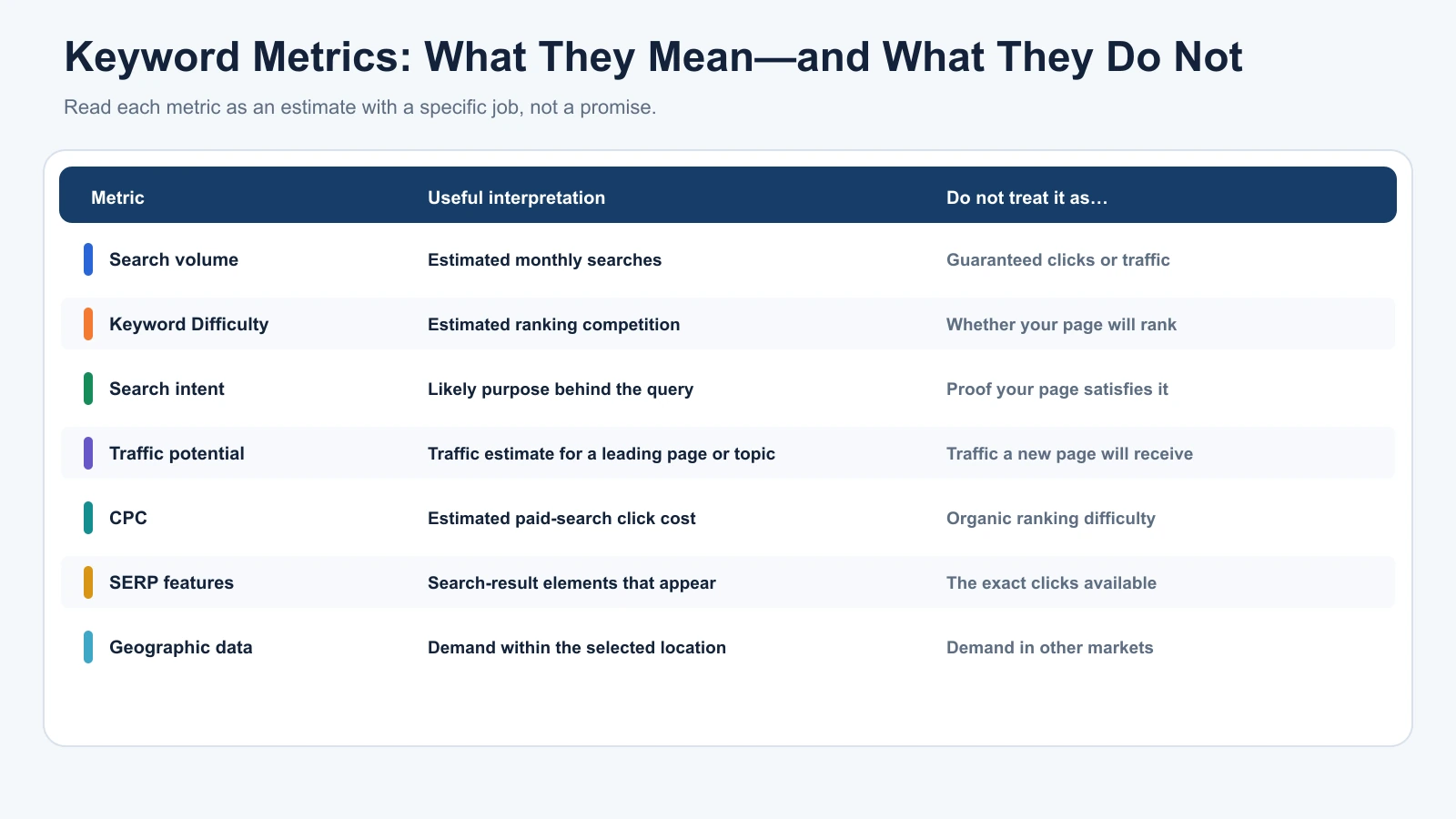
Most keyword research tools display similar-looking metrics. However, these numbers measure different things and shouldn’t be interpreted interchangeably.
| Metric | What It Measures | What It Doesn’t Tell You |
|---|---|---|
| Search volume | Estimated monthly searches in a selected market | Guaranteed clicks or website traffic |
| Keyword Difficulty | Estimated organic ranking competition | Whether your page will rank |
| Search intent | Likely purpose behind a search | Whether your proposed page satisfies that intent |
| Traffic potential | Estimated traffic associated with a leading ranking page or topic | Traffic your new page will automatically receive |
| CPC | Estimated cost of paid advertising clicks | Organic ranking difficulty |
| SERP features | Search elements appearing for the query | Exactly how many clicks your page will attract |
| Geographic data | Search demand within a selected location | Demand in other markets |
Understanding these differences prevents several common keyword research mistakes.
Search Volume
Search volume estimates how often people search for a particular phrase over a defined period.
For example, a keyword with 2,000 estimated monthly searches might appear more attractive than one with 200.
However, the larger keyword isn’t necessarily more valuable.
A broad informational query may attract readers with little interest in purchasing anything. A more specific commercial query could bring fewer visitors but more qualified enquiries.
Search volume is useful for understanding demand, not determining commercial value on its own.
Keyword Difficulty
Keyword Difficulty estimates how challenging it may be to rank organically for a search query.
Different platforms calculate this metric differently.
Ahrefs explains that its Keyword Difficulty score primarily considers the number of referring domains linking to pages ranking in the top ten results.
Other providers use their own models.
A difficulty score of 25 in Ahrefs therefore shouldn’t automatically be treated as equivalent to a score of 25 in Semrush or SE Ranking.
More importantly, no single score can fully account for search intent, content quality, brand relevance, and your website’s existing competitive position.
Traffic Potential
Search volume and traffic potential are related, but they aren’t identical.
Ahrefs’ Traffic Potential metric considers the estimated organic traffic received by the current top-ranking page across the keywords it ranks for.
Imagine researching a keyword with 500 monthly searches.
The leading page might also rank for dozens of closely related searches and receive substantially more estimated organic traffic overall.
That makes the broader topic potentially attractive, but it doesn’t guarantee your new page will achieve the same result.
Search Intent
Search intent describes what someone wants to accomplish with a query.
The four common categories are informational, commercial, transactional, and navigational.
For example, someone searching for “what is keyword research” probably wants an explanation.
Someone searching for “best keyword research tools for agencies” is comparing products.
A user searching for “Semrush pricing” may be closer to choosing a subscription.
A useful keyword research tool should make these differences easier to identify.
Our recommendation: Prioritise search intent, realistic organic competition, and business relevance alongside search volume. These factors usually contribute more to a useful content decision than volume alone.
Step 3: Compare the Features That Affect Your Daily Workflow
A platform can provide excellent keyword data but still be frustrating to use.
You might discover relevant keywords, only to find that exporting them requires another subscription. Another tool may offer advanced filtering but restrict how many reports you can generate.
These limitations become more important when keyword research is a recurring responsibility.
Keyword Discovery and Filtering
A useful platform should generate relevant keyword variations from a seed term.
Look for question-based suggestions, long-tail keywords, related terms, phrase matching, and useful filtering.
The number of suggestions matters less than their relevance.
A tool returning 500 useful keywords can be more valuable than another returning 10,000 loosely related phrases.
Competitor Research
Competitor keyword research allows you to investigate which queries other websites rank for.
Tools such as Semrush Keyword Magic Tool and Ahrefs Keywords Explorer support different types of keyword discovery and organic research.
For a competitive market, the ability to investigate competing domains and ranking pages can be especially useful.
You can identify content gaps, discover opportunities, and understand which page types already perform well.
SERP Analysis
SERP analysis helps you examine the actual pages appearing in search results.
It allows you to investigate the kinds of websites ranking, their content formats, and the search features surrounding them.
This becomes essential when a keyword’s difficulty score doesn’t reflect how competitive the results actually appear.
A keyword may have modest estimated difficulty while the results are dominated by established brands or pages that perfectly satisfy the query.
Keyword Grouping and Clustering
A good keyword research workflow should help you avoid creating multiple pages for essentially the same search intent.
For example:
- best keyword research tool
- best keyword research tools
- top keyword research software
These phrases may belong to one comparison article rather than three nearly identical pages.
Grouping and clustering capabilities help organise large keyword lists around meaningful topics.
Geographic Targeting
Keyword data must reflect the locations where your audience actually searches.
A business targeting customers in Singapore has different requirements from one operating exclusively in the United States.
International agencies may also need country-specific research across several markets and languages.
Verify whether the platform supports your locations and provides useful data for them rather than assuming global coverage is equally detailed everywhere.
Exports, Credits, and Integrations
Finally, check the operational limits.
Can you save keyword lists? Export data into spreadsheets? Share projects with team members? Connect research with Google Search Console or your reporting workflow?
Also distinguish between keyword research requests and tracked keywords.
A research request involves generating or analysing keyword information. A tracked keyword is monitored for ranking movements over time.
These allowances are not interchangeable.
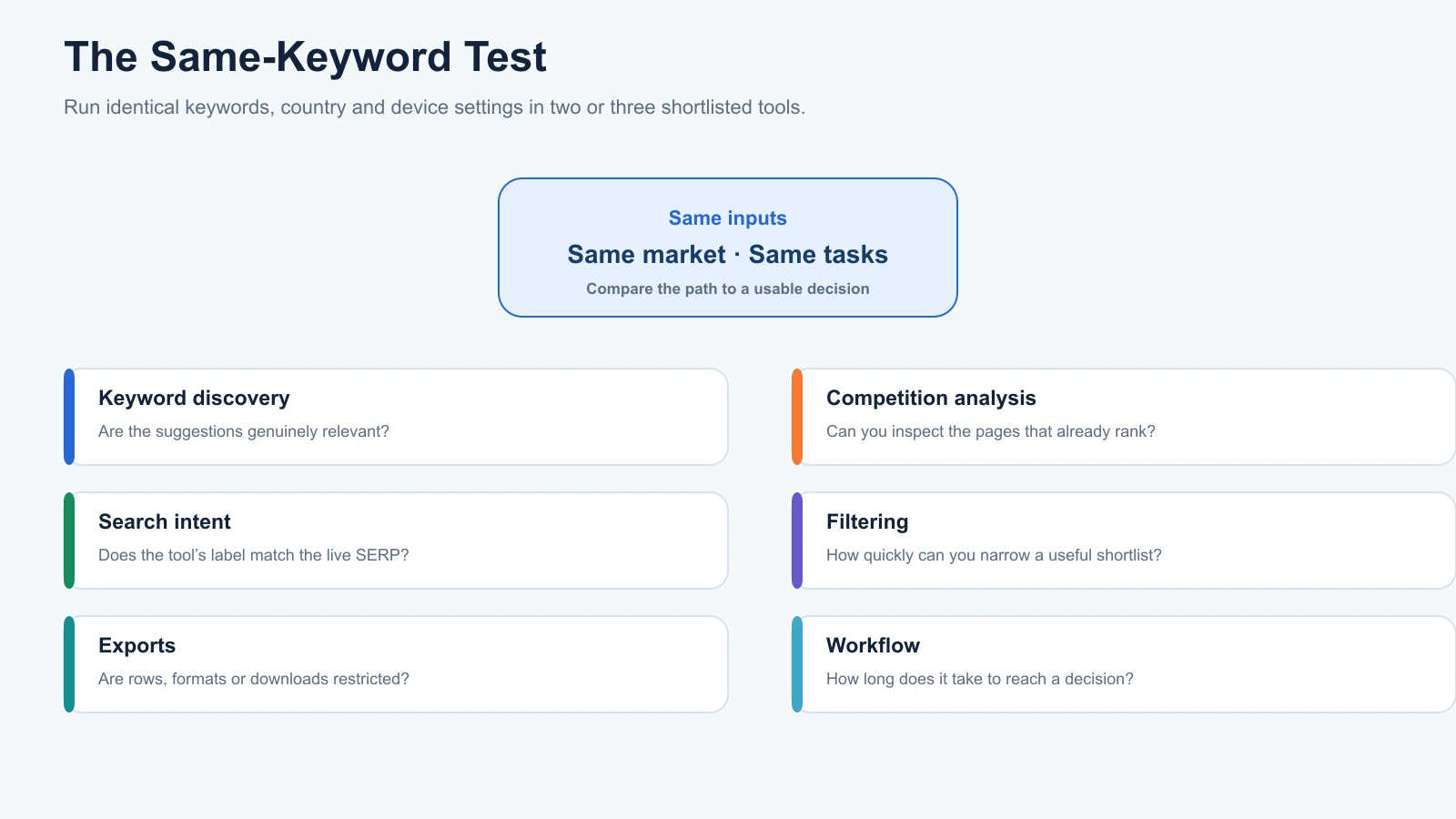
Step 4: Test Two or Three Tools Using the Same Keywords
Feature descriptions only tell you what a platform claims to offer.
A better way to choose is to compare how different tools handle the same research task.
We recommend creating a list of 10–20 seed keywords relevant to your website.
Include a mixture of informational, commercial, and transactional queries.
For example, a business selling office furniture could investigate:
- ergonomic office chair
- best ergonomic chair for back support
- standing desk vs sitting desk
- affordable standing desks
- buy office chair online
Run these through two or three shortlisted platforms using the same country and search engine wherever possible.
Then compare the results.
| Test | What to Evaluate |
|---|---|
| Keyword discovery | Relevance of suggested terms |
| Competition analysis | Ability to investigate ranking pages |
| Search intent | Whether classifications match the actual SERP |
| Filtering | Ease of narrowing large lists |
| Exports | Restrictions on saving and downloading results |
| Workflow | Time required to reach a useful content decision |
Don’t automatically disqualify a platform because it reports a different search volume from a competitor.
Each provider uses its own methodology and sources. What matters is whether the available information helps you make a better decision.
For instance, if two platforms disagree on estimated volume but both identify the same commercially relevant topic, the difference may not affect your strategy.
On the other hand, if one platform regularly omits relevant queries in your target market, that gap deserves attention.
The goal isn’t to find the tool with the most impressive numbers. It’s to find the tool that makes research easier to interpret and act on.
Step 5: Calculate the Total Cost Before Subscribing
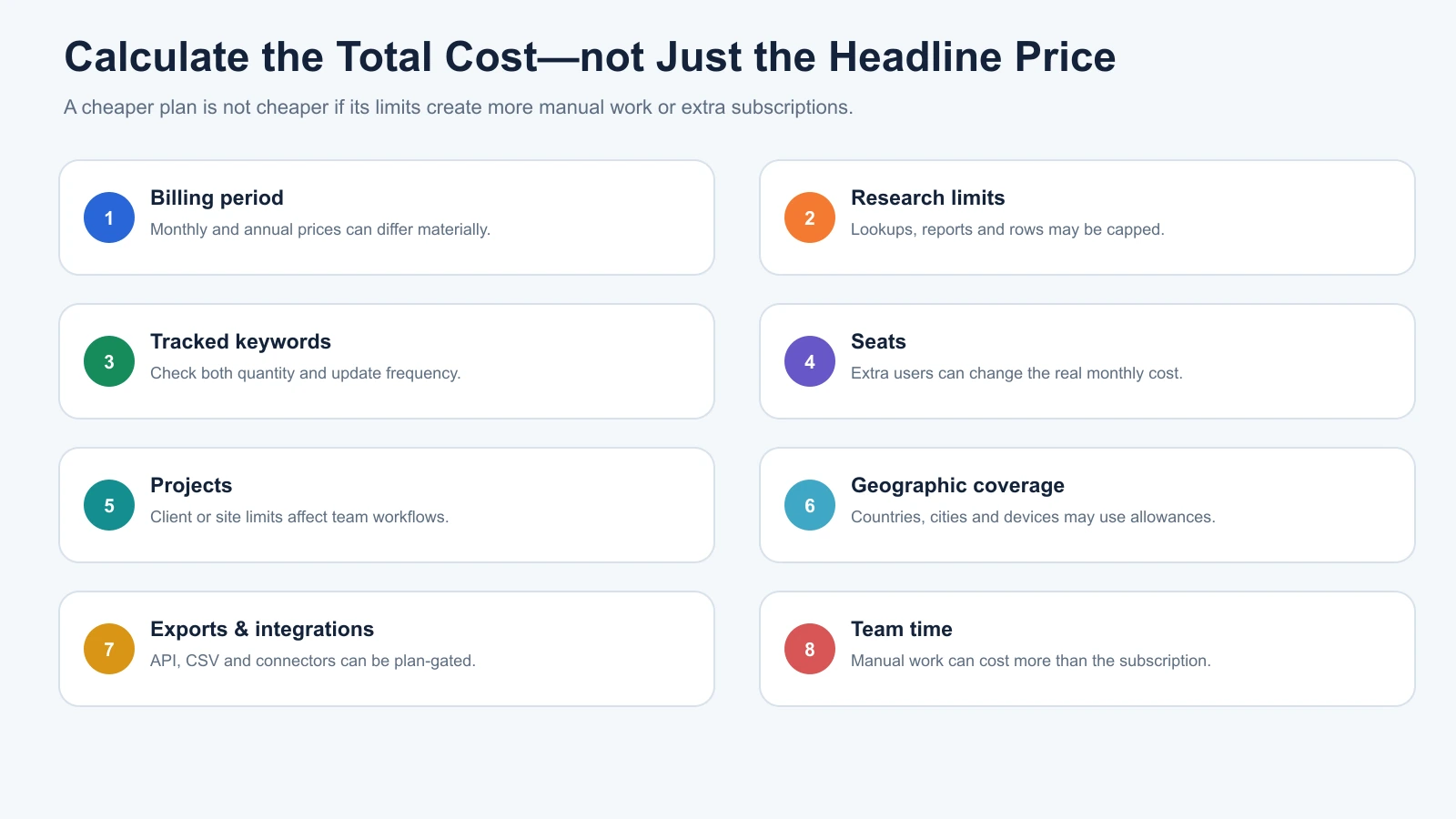
The advertised monthly price is only part of the cost of keyword research software.
Two platforms with similar subscription fees may provide completely different allowances.
Before purchasing, review:
| Cost Factor | What to Check |
|---|---|
| Billing period | Monthly versus annual commitment |
| Research limits | Requests or reports included |
| Tracked keywords | Ranking-monitoring capacity |
| User seats | Number of team members supported |
| Projects | Number of websites or workspaces |
| Geographic coverage | Availability of required markets |
| Exports | Limits on downloading keyword data |
| Integrations | Included functionality or paid add-ons |
For freelancers, predictable research limits and affordable pricing may be the biggest priorities.
Agencies should also consider collaboration, user permissions, client reporting, and research capacity.
A less expensive subscription can become poor value if the team repeatedly runs into usage restrictions.
Before buying, estimate your typical monthly workload and choose a plan that comfortably supports it.
What Features Should a Good Keyword Research Tool Have?
Most platforms advertise search volume, Keyword Difficulty, keyword suggestions, and competitor analysis.
The important differences become clearer when you examine how these capabilities support actual SEO decisions.
Relevant Keyword Suggestions
A good keyword discovery tool should identify variations that reflect how your audience searches.
For example, someone researching “coffee machines” might need separate ideas for buying guides, troubleshooting content, product categories, and comparisons.
A useful platform should help distinguish those opportunities rather than simply displaying them in one enormous list.
When comparing tools, examine the first 50–100 suggestions for the same seed keyword.
Count how many are genuinely relevant to your website and audience.
This simple exercise provides a practical way to judge suggestion quality.
Clear Organic Competition Data
Keyword Difficulty can help narrow a list, but the ranking pages provide important additional context.
Look for tools that make it easy to investigate the current search results, competing URLs, and relevant backlink information.
A strong research workflow should allow you to move from a keyword estimate to the actual pages you’re competing against.
Useful Competitor Keyword Research
Entering a competing website’s domain can reveal keywords and pages you haven’t considered.
However, competitor keyword lists still require interpretation.
A competitor might rank for topics unrelated to your products, services, or business goals.
Filter opportunities based on relevance, search intent, and whether your website can offer a useful competing page.
Geographic and Historical Data
A keyword’s popularity can change across markets and over time.
Some queries are seasonal. Others reflect emerging technologies, changing terminology, or local preferences.
For these situations, country-specific data and historical trends are more important than global search-volume totals.
A platform with a smaller database but stronger information for your target market may provide better value than a much larger general database.
Free vs Paid Keyword Research Tools: Which Should You Choose?
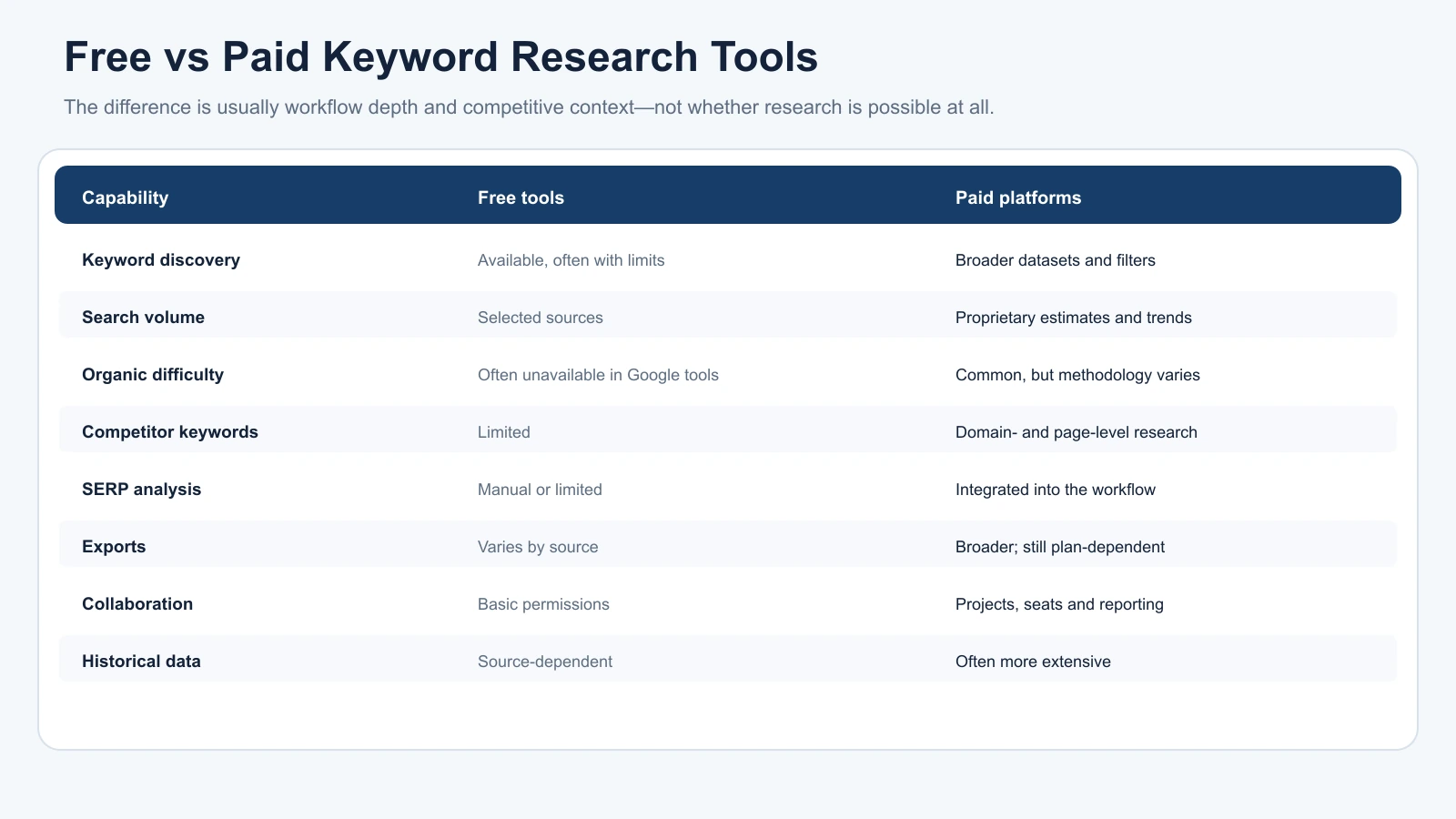
Free keyword research tools can support a substantial amount of SEO work, particularly for smaller websites.
Google Keyword Planner provides keyword suggestions and estimated demand, while Google Search Console shows how your own pages perform in Google Search.
Paid platforms typically add broader competitor intelligence, proprietary SEO metrics, extensive filtering, and higher-capacity workflows.
| Feature | Free Tools | Paid Platforms |
|---|---|---|
| Keyword discovery | Available, with tool-specific limits | Usually broader research options |
| Search volume | Available through selected sources | Proprietary estimates and trends |
| Organic Keyword Difficulty | Often unavailable in Google’s free tools | Commonly included |
| Competitor keywords | Limited | Domain-level research |
| SERP analysis | Mostly manual or limited | Integrated analysis |
| Exports | Varies by platform | Often broader, but plan-dependent |
| Collaboration | Basic permissions | Shared projects and user seats |
| Historical data | Depends on the source | Often more extensive |
When Free Tools Are Enough
Free tools make sense when you’re validating initial ideas, researching a relatively small website, or investigating keywords already generating impressions.
For example, a local service business may begin with Google Keyword Planner to identify searches related to its services.
Once the website earns visibility, Search Console can reveal actual queries, impressions, and clicks.
Google Trends can provide additional context around seasonality or changing interest.
Together, these sources can support useful research without requiring an expensive subscription.
For a detailed comparison, see our best free keyword research tools guide.
When Paid Tools Become Worthwhile
Paid subscriptions become easier to justify when research requirements grow.
Common reasons include:
- Regularly investigating competing websites.
- Building large content calendars.
- Grouping hundreds or thousands of keywords.
- Managing research for multiple clients.
- Requiring advanced SERP filters or historical data.
- Needing shared projects and exports.
There isn’t a universal point when every website needs to upgrade.
Instead, identify whether limitations are causing meaningful delays or preventing important decisions.
If your free workflow already provides enough information to plan and improve content, there’s no need to replace it solely because another platform offers more features.
Keyword Research Tools Compared: Which One Fits Your Workflow?
Different keyword research platforms specialise in different types of information.
Rather than ranking them solely by feature count, it’s more useful to compare their strengths and limitations.
| Tool | Main Strength | Best For | Main Limitation |
|---|---|---|---|
| Google Keyword Planner | Search demand and advertising context | Beginners, local businesses | No organic Keyword Difficulty |
| Google Search Console | First-party search performance | Existing website owners | No competitor keyword database |
| Semrush | Keyword discovery and competitor research | Agencies, content teams | Subscription and usage costs |
| Ahrefs | SERP research and traffic potential | SEO professionals, publishers | Proprietary metrics and plan limits |
| SE Ranking | Integrated keyword and SEO workflows | Small businesses, agencies | Plan-dependent allowances |
| Mangools KWFinder | Focused keyword discovery | Freelancers, smaller websites | Less extensive suite functionality |
Google Keyword Planner
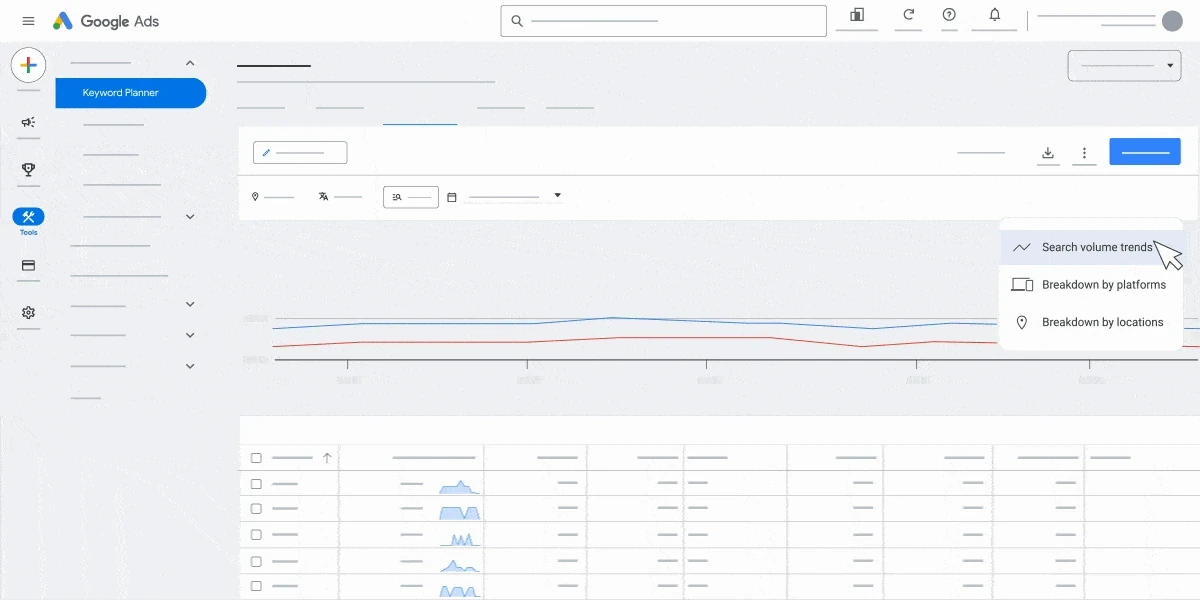
Google Keyword Planner helps users discover keyword ideas and examine estimated search demand through Google Ads.
It supports geographic filtering, historical demand research, and advertising-related metrics.
However, its Competition metric reflects advertiser competition rather than organic ranking difficulty.
This distinction is important because a keyword with low advertiser competition can still be challenging to rank for organically.
Keyword Planner works best for investigating search demand and commercial context, particularly when combined with manual SERP research.
Our Google Keyword Planner for SEO guide explains which metrics are useful for organic research and which require additional context.
Google Search Console
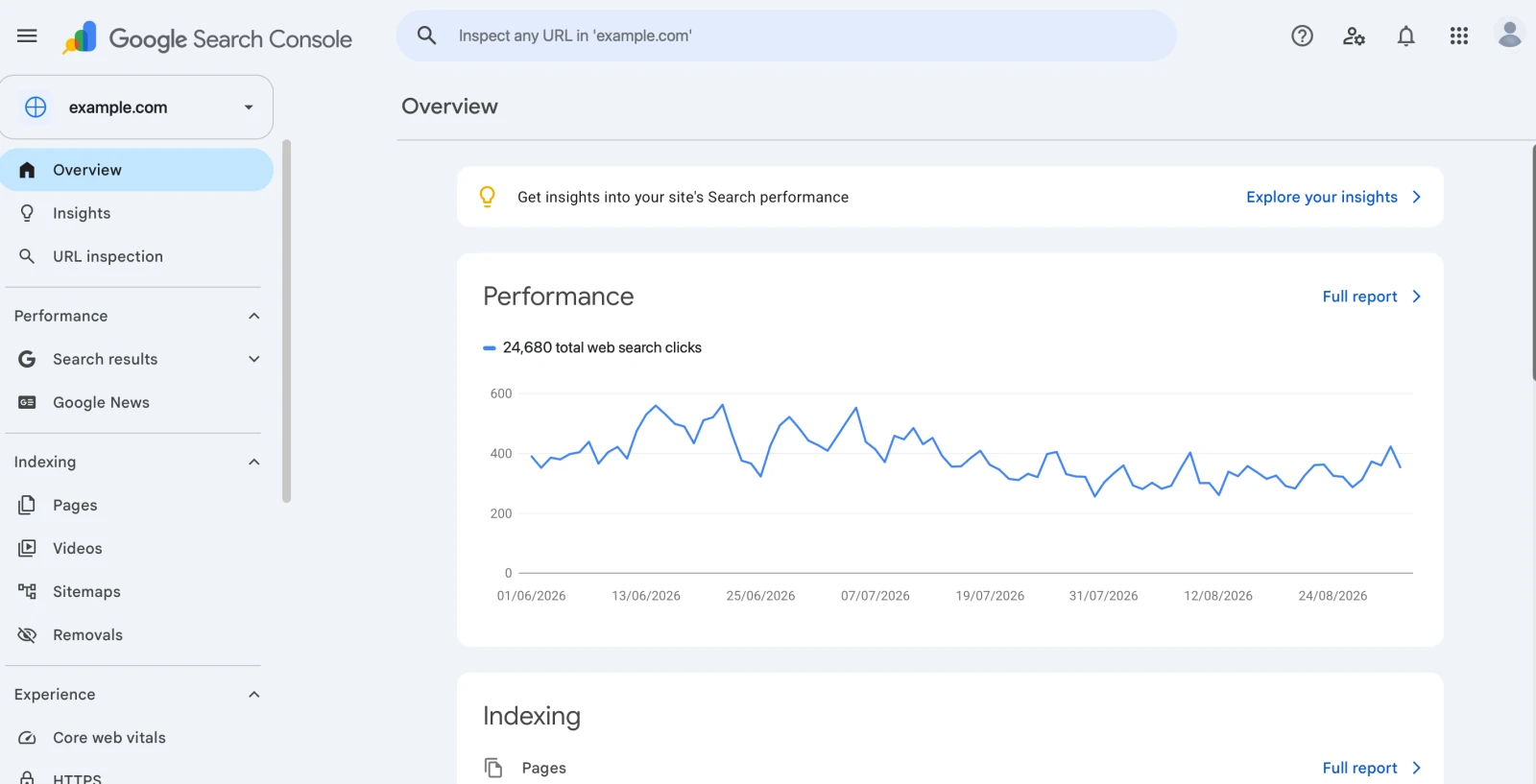
Google Search Console provides information about your website’s actual visibility in Google Search.
Its Performance report includes queries, clicks, impressions, click-through rate, and average position.
This makes Search Console valuable when improving existing content.
For example, a page attracting impressions for relevant queries but few clicks may deserve closer investigation.
Search Console doesn’t provide a complete keyword database for competing websites, however.
Use it alongside third-party research tools rather than expecting it to replace competitor intelligence.
Semrush
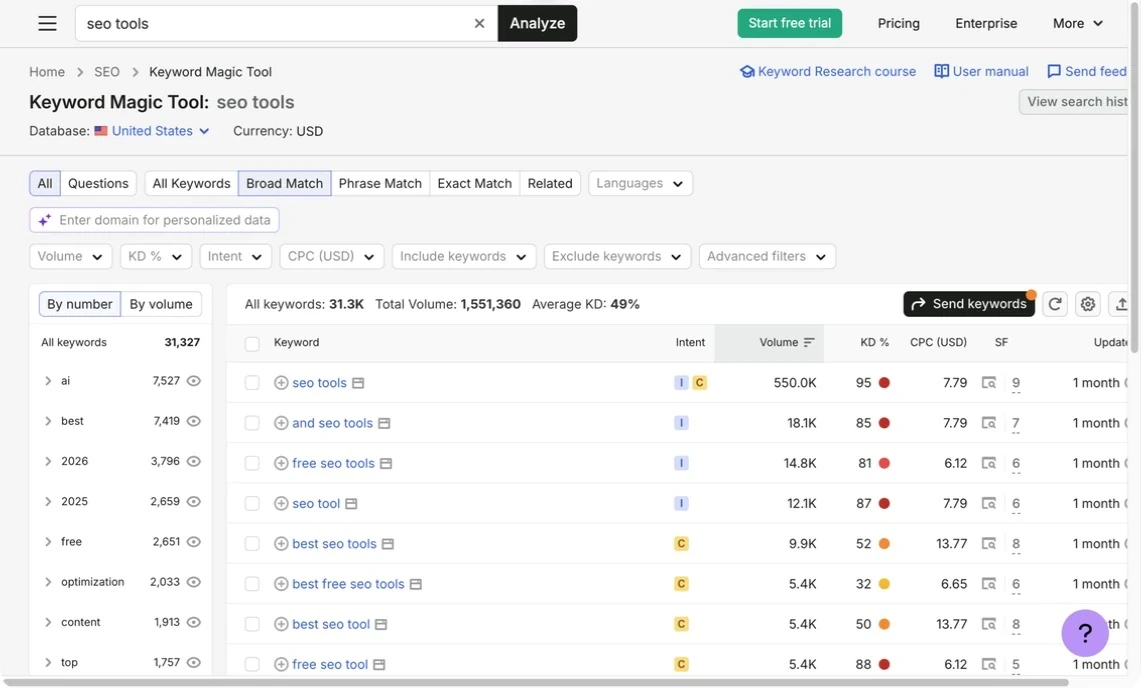
Semrush Keyword Magic Tool supports keyword discovery, grouping, filtering, and search intent analysis.
It is useful for teams planning content around multiple topics or conducting regular research.
Semrush also provides broader competitor and SEO functionality through its platform.
Its extensive keyword database can help uncover additional variations, but size alone doesn’t establish whether those suggestions are useful for your target audience.
For businesses conducting only occasional research, the subscription may provide more functionality than necessary.
Ahrefs
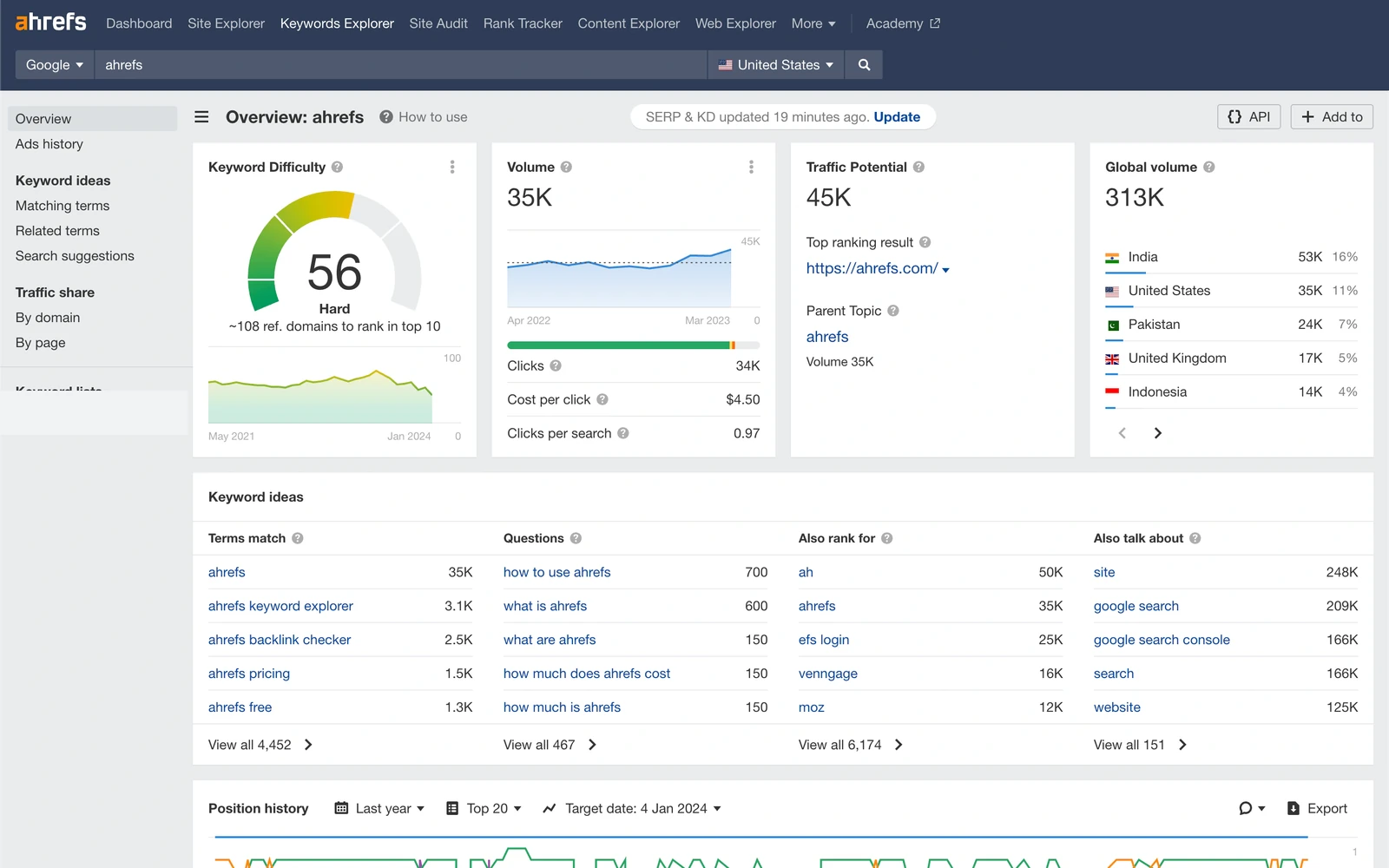
Ahrefs Keywords Explorer combines keyword suggestions with organic competition analysis, SERP information, and Traffic Potential.
Its ability to examine ranking pages and competing websites is useful when evaluating content opportunities.
Ahrefs’ Keyword Difficulty score focuses heavily on referring domains, making it a useful backlink-oriented competition signal.
However, it shouldn’t be treated as a comprehensive prediction of rankings.
Ahrefs is especially relevant for content publishers, SEO professionals, and businesses conducting detailed competitor research.
SE Ranking
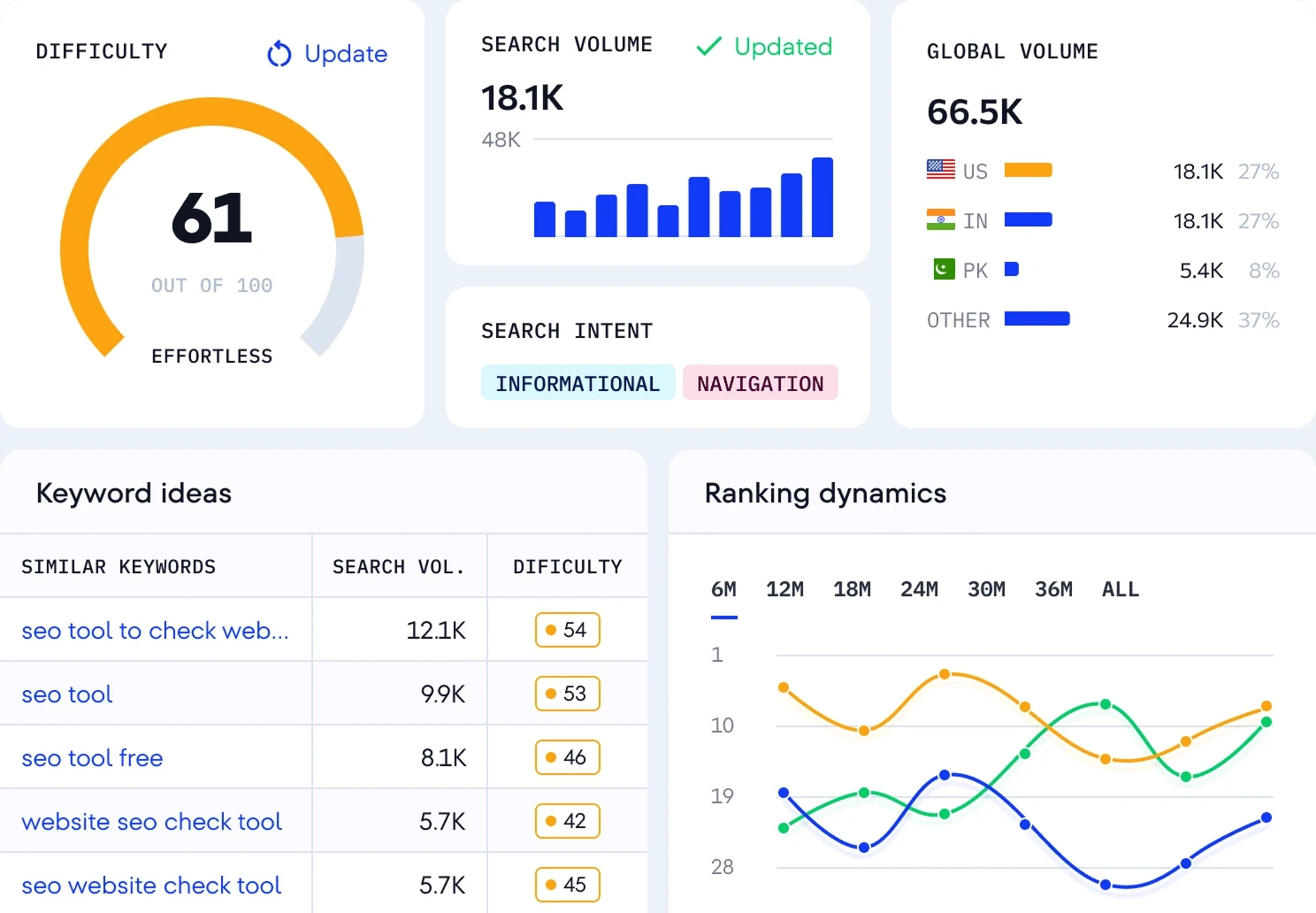
SE Ranking combines keyword research with broader SEO functionality, including rank tracking, competitor analysis, website auditing, and reporting.
Its research tools support search volume, difficulty, intent analysis, and keyword suggestions.
For businesses preferring one integrated environment, this can reduce the need to move between multiple platforms.
However, keyword research allowances and rank-tracking limits should be evaluated separately.
A plan offering sufficient research access may still have different restrictions on the number of keywords monitored over time.
Mangools KWFinder
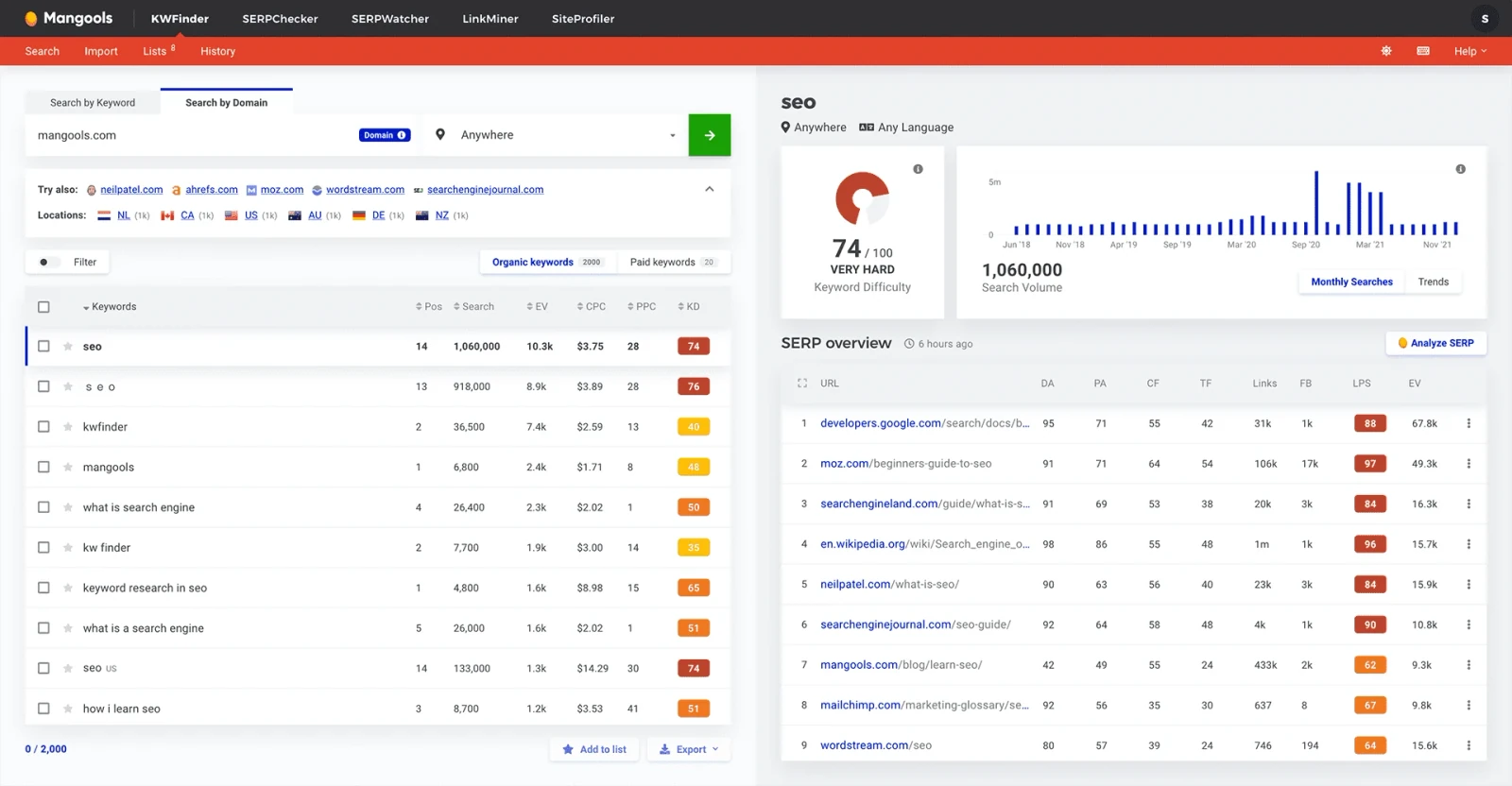
Mangools KWFinder focuses on keyword suggestions, long-tail research, search volume trends, competitor keywords, and difficulty analysis.
Its relatively straightforward interface makes it suitable for freelancers and smaller websites.
Mangools also includes related tools for SERP analysis, rank tracking, backlinks, and website metrics.
However, research requests and tracked-keyword allowances vary by subscription.
For larger agencies or businesses requiring extensive technical auditing, additional software may still be necessary.
Which Keyword Research Tool Fits Your Business?
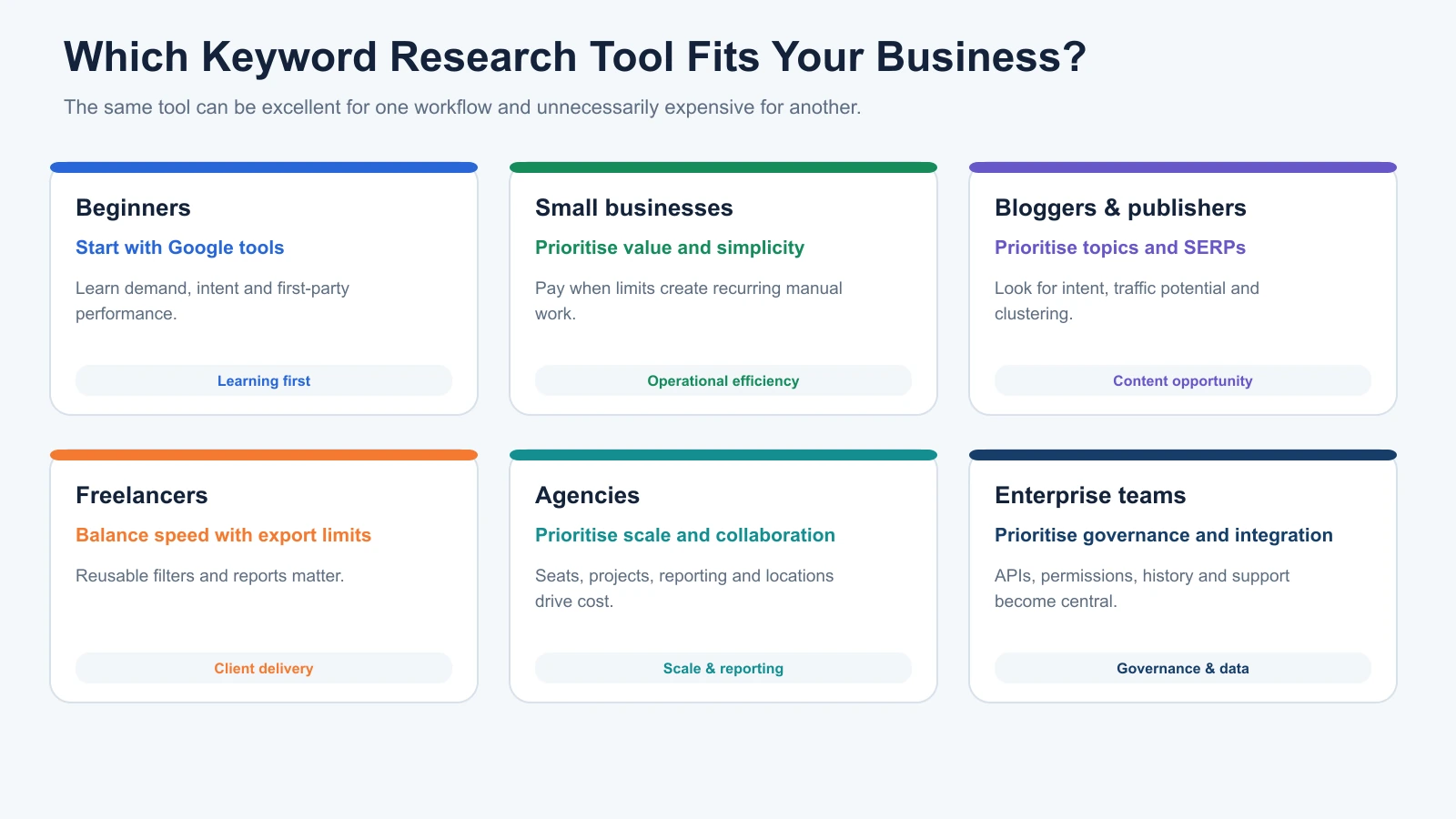
The same platform can be excellent value for one business and unnecessary spending for another.
The following recommendations reflect different working requirements rather than universal product rankings.
Beginners: Start with Free Research
For beginners, the most important task is understanding what people search for.
Google Keyword Planner provides a useful starting point for demand research, while Search Console becomes valuable once a website has relevant performance data.
Begin with a simple routine: collect seed keywords, investigate search demand, examine ranking pages, and organise relevant topics.
Consider paid software when competitor analysis or research limitations become a recurring problem.
Small Businesses: Prioritise Commercial Relevance
Small businesses should focus on keywords related to their actual services and customers.
A local plumber, for example, may find that service-specific searches deserve more attention than broad informational topics.
Search intent and geographic relevance are especially important here.
Google Keyword Planner, KWFinder, and SE Ranking are reasonable options to evaluate depending on budget and requirements.
The right choice is the platform that helps identify commercially relevant opportunities without unnecessary complexity.
Bloggers and Publishers: Look Beyond Individual Keywords
Content publishers often need to plan clusters of related articles and supporting pages.
For this work, keyword suggestions, related questions, grouping, competitor research, and traffic potential are particularly useful.
Ahrefs and Semrush can support these workflows.
However, publishers should avoid treating every related keyword as a separate article opportunity.
Where search intent and competing pages overlap, one comprehensive piece may be more appropriate.
Freelancers: Pay Attention to Research Limits
Freelancers may manage several websites with relatively different keyword requirements.
Research requests, exports, project allowances, and pricing become important when switching between clients throughout the week.
A simpler platform may provide enough functionality for a handful of projects, while larger portfolios can justify more extensive research capabilities.
Estimate your typical weekly workload before purchasing.
SEO Agencies: Prioritise Collaboration and Workflow
Agencies need tools that support research across multiple clients without creating unnecessary manual work.
At MediaOne, our SEO team has worked with Semrush, Ahrefs, Search Console, Analytics, and Screaming Frog for different parts of the search optimisation process.
Our approach is to consider how keyword research connects with competitor analysis, content planning, ranking reports, and other SEO responsibilities.
For agencies, project capacity, shared access, exports, and integrations can matter as much as any individual keyword metric.
Enterprise Teams: Consider Scale and Integration
Larger organisations may require API access, bulk processing, consistent geographic coverage, advanced permissions, and integration with reporting systems.
These requirements should be assessed against actual workflows.
A platform with extensive keyword coverage may still be unsuitable if it cannot support the organisation’s data handling and collaboration needs.
How to Score Keyword Research Tools Before You Pay
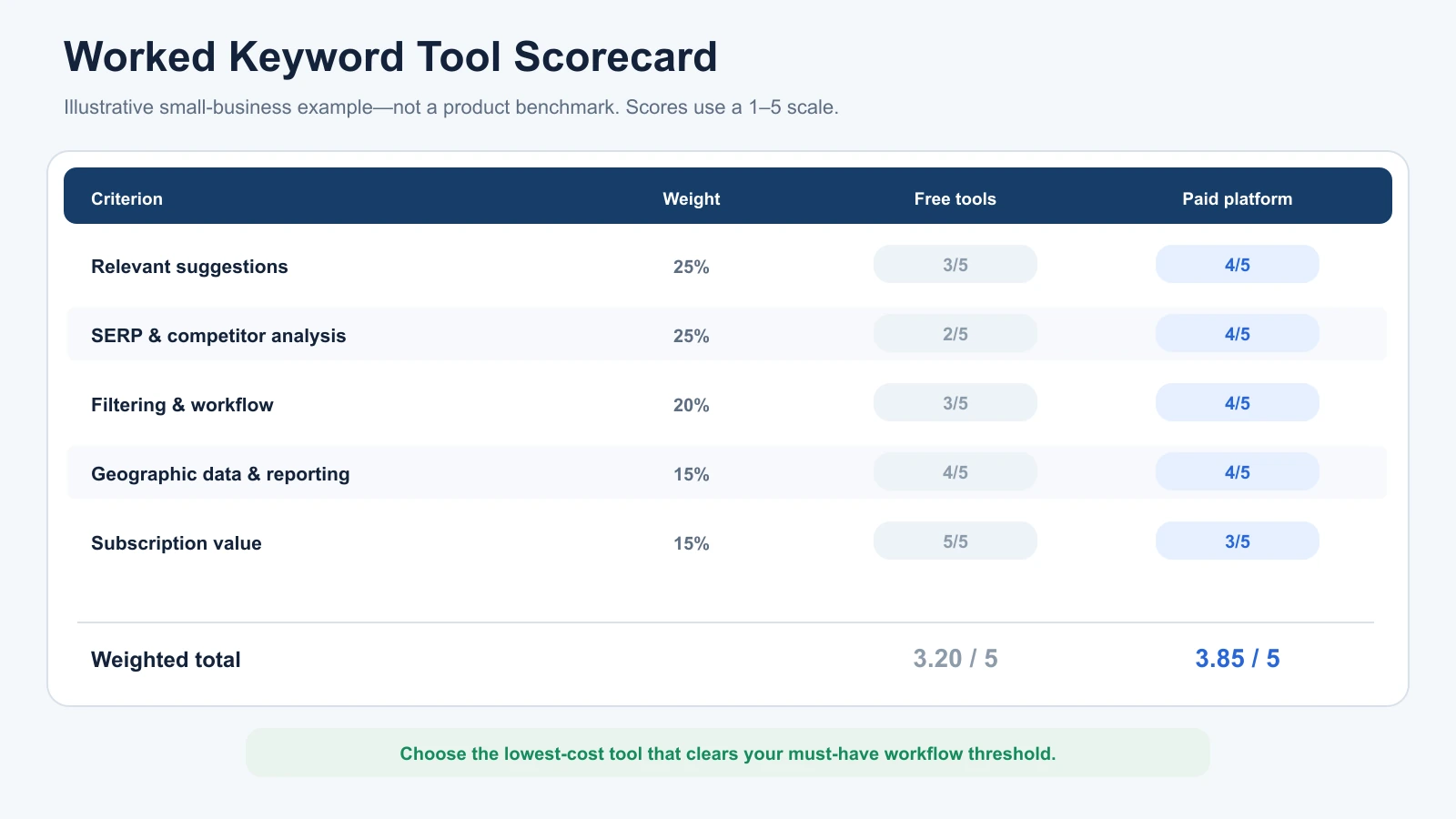
A simple scorecard can help make the selection process more objective.
Rate each shortlisted tool from one to five against the criteria below.
The weights are suggested editorial priorities, not scientifically validated performance measures. Adjust them to suit your requirements.
| Criterion | Weight | What to Evaluate |
|---|---|---|
| Relevant keyword suggestions | 25% | Quality and usefulness of ideas |
| SERP and competitor analysis | 25% | Ability to investigate organic competition |
| Filtering and workflow | 20% | Organisation, exports, and usability |
| Geographic coverage and reporting | 15% | Availability of required markets |
| Subscription value | 15% | Features and usage limits relative to cost |
Multiply each score by its weight and add the results.
The maximum weighted score is five.
Worked Example: A Small Business Comparing Free and Paid Tools
Consider a hypothetical business selling home-office furniture.
It has one website, a part-time marketer, and a limited software budget.
The business is comparing a free combination of Google Keyword Planner and Search Console with a paid keyword research platform.
The following scores are illustrative, not actual product benchmarks.
| Criterion | Weight | Free Tools | Paid Platform |
|---|---|---|---|
| Relevant suggestions | 25% | 3 | 4 |
| SERP and competitor analysis | 25% | 2 | 4 |
| Filtering and workflow | 20% | 3 | 4 |
| Geographic coverage and reporting | 15% | 4 | 4 |
| Subscription value | 15% | 5 | 3 |
| Weighted Total | 100% | 3.20/5 | 3.85/5 |
The paid platform scores higher because it offers stronger competitor research and workflow capabilities in this hypothetical scenario.
However, the higher score doesn’t automatically make it the better purchase.
If the business only researches a few topics each quarter, the free combination might be entirely sufficient.
The paid subscription becomes more attractive when deeper competitor intelligence and regular research are needed.
Use the scorecard to identify meaningful advantages, not simply crown the highest-scoring product.
Why Database Size Shouldn’t Decide Which Tool You Buy
SEO vendors often advertise the size of their keyword databases.
Semrush, for example, currently describes its Keyword Magic Tool database as containing more than 27 billion keywords.
That is an impressive measure of coverage, but it doesn’t prove every query is relevant to your business or that every market receives the same level of detail.
Suppose your website serves customers in one city.
A platform’s global database may contain billions of searches you will never target.
For your business, the more important considerations are whether it provides relevant local suggestions, usable demand estimates, and insight into competing pages.
Database size becomes more important when working across several markets, languages, or specialised industries.
Even then, judge the quality of information for your actual requirements.
A smaller database containing relevant opportunities can be more useful than a much larger database dominated by irrelevant suggestions.
Common Keyword Research Tool Problems and How to Solve Them
Choosing the right software doesn’t eliminate every challenge.
Several common problems arise from how keyword metrics are interpreted and applied.
The Tool Finds Keywords, but They Don’t Convert
A keyword can generate traffic without attracting qualified customers.
This often happens when a business targets broad informational searches while expecting immediate purchases or enquiries.
For example, someone searching “what is an ergonomic chair” may only want an explanation.
Someone searching “best ergonomic office chair under $300” may be closer to comparing products.
Both searches can be useful, but they serve different purposes.
Review search intent and analyse what visitors do after reaching the website.
Use Search Console for search performance and analytics or conversion data to investigate business outcomes.
A Keyword Has Low Difficulty, but My Page Still Doesn’t Rank
Low Keyword Difficulty doesn’t guarantee an easy ranking opportunity.
The search results may contain established brands, highly relevant pages, or competitors whose content better matches user intent.
Technical problems can also prevent a page from performing as expected.
Before changing targets, inspect the live SERP.
Compare your content against ranking pages, check whether your page satisfies the same intent, and investigate any technical or indexing issues.
The difficulty score is only one piece of evidence.
Two Tools Show Different Search Volumes
Different keyword platforms use different data sources, sampling techniques, and estimation models.
It’s normal for their search-volume figures to differ.
Rather than searching for one supposedly perfect number, consider whether the difference materially changes your decision.
A keyword reported at 1,500 searches by one tool and 1,900 by another may still represent similar demand.
If the market, search intent, and competing pages suggest a worthwhile opportunity, the discrepancy may not justify abandoning the keyword.
Free Tools Feel Too Limited
Free platforms may not provide the competitor information, organic difficulty metrics, or bulk exports you need.
Before subscribing, identify which missing function actually affects your work.
You can often combine Google Keyword Planner for demand, Search Console for first-party visibility, Google Trends for interest over time, and manual SERP research.
Upgrade when the limitations become recurring and materially affect productivity or decisions.
The Tool Generates Too Many Irrelevant Keywords
Large keyword databases can produce extensive lists containing unrelated searches, branded terms, and near-duplicates.
Start with more specific seed keywords.
Then apply intent filters, word-count requirements, exclusions, and topic grouping.
A smaller, well-organised list of relevant opportunities is more useful than exporting thousands of terms without a clear content strategy.
How Digimetrics Fits Into Keyword Research
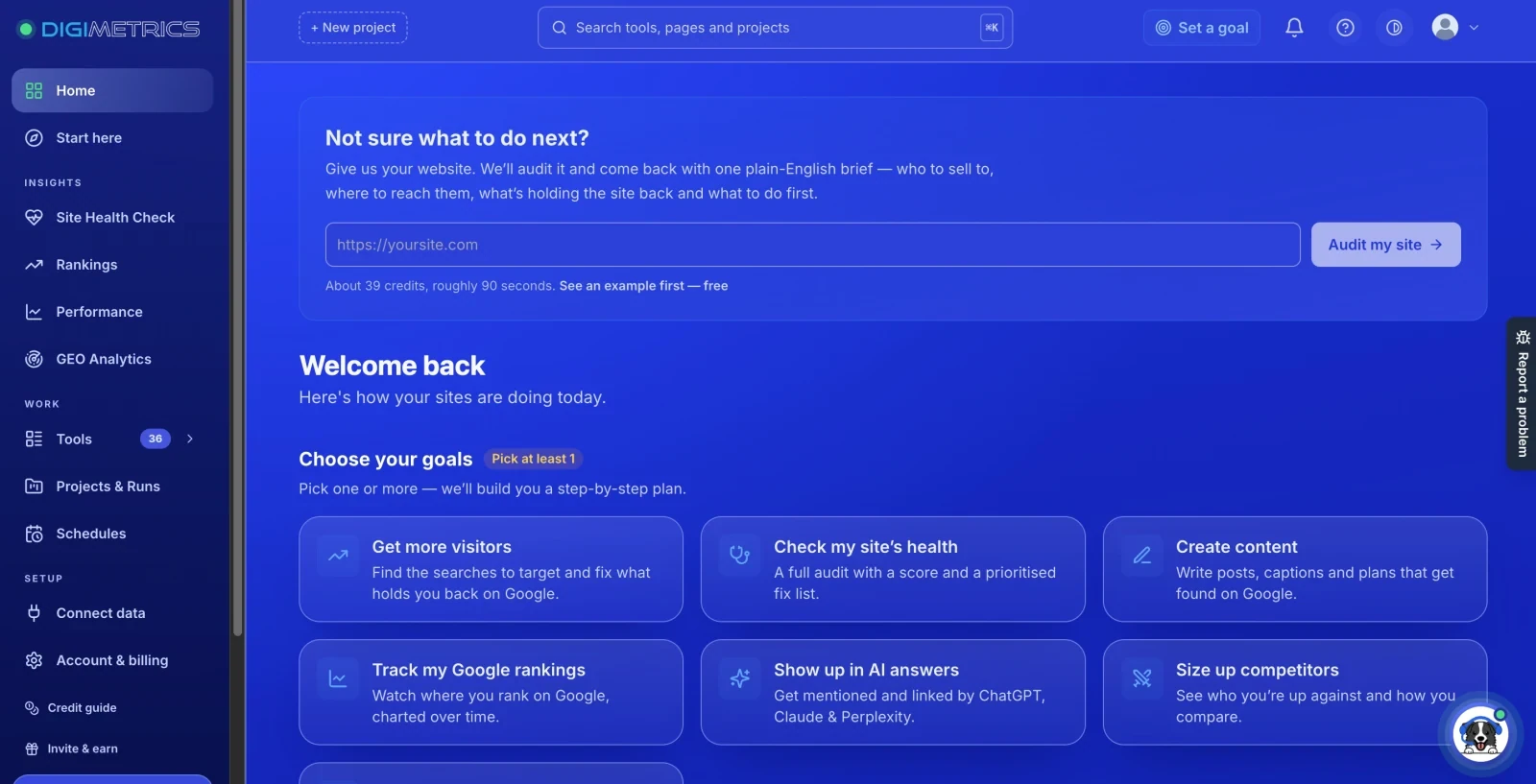
Disclosure: Digimetrics is developed by MediaOne.
Keyword research is only one stage of SEO planning.
After identifying a promising opportunity, teams still need to examine competitors, decide which pages to improve, monitor rankings, and assess performance.
Digimetrics connects keyword analysis with related SEO, content, and AI-search visibility tools.
Its Keyword Analysis functionality helps users investigate keywords by intent, difficulty, and opportunity, while other available tools support competitor research, rank checking, diagnostics, and content optimisation.
The benefit of an integrated workflow is reducing the need to move information between several disconnected platforms.
However, integration alone doesn’t make a platform better than specialist research software.
Businesses should evaluate Digimetrics against the same criteria used for other tools, including data usefulness, research limits, workflow efficiency, and subscription value.
Final Verdict: How to Choose the Right Keyword Research Tool
A useful keyword research tool should make SEO decisions easier, not simply produce more data.
Start by identifying the jobs you need the platform to perform. Then evaluate its metrics, research features, workflow limitations, and total cost.
For beginners and smaller websites, free tools may provide enough information to plan useful content.
Freelancers and agencies conducting regular competitor research may benefit from paid platforms offering broader organic data and more efficient workflows.
At MediaOne, our approach is to use keyword information as evidence for strategic decisions rather than treating proprietary metrics as instructions.
Search volume can reveal demand. Keyword Difficulty can provide an initial view of competition. SERP analysis helps explain what currently ranks. Search Console and analytics help show what happens after your content becomes visible.
The best keyword research tool is ultimately the one that helps you connect those signals and make better decisions at a cost your business can justify.
Before subscribing, shortlist two or three platforms, compare them using the same keyword list, and assess which one best supports the work you actually do.
Frequently Asked Questions
What Should I Look for in a Keyword Research Tool?
Look for relevant keyword suggestions, useful search-volume estimates, Keyword Difficulty, search intent, and SERP analysis. Also consider geographic targeting, competitor research, exports, and usage limits. The most important features depend on your business and how frequently you perform keyword research.
Which Keyword Research Tool Is Best for Beginners?
Google Keyword Planner is a useful starting point for exploring keyword ideas and demand. Pair it with Google Search Console once your website begins generating search visibility. Paid platforms become more useful when you need broader competitor research or advanced filtering.
Is Google Keyword Planner Enough for SEO?
Google Keyword Planner can support keyword discovery and demand validation, but it doesn’t provide comprehensive organic competitor analysis. Its Competition metric describes advertiser competition, not organic ranking difficulty. Use it alongside SERP research and Search Console for a more complete picture.
How Accurate Are Keyword Difficulty Scores?
Keyword Difficulty scores are proprietary estimates, not ranking guarantees. Different platforms use different calculations, so scores aren’t directly comparable. They are useful for initial screening, but you should examine the current search results before deciding whether a keyword is realistically competitive.
Are Paid Keyword Research Tools Worth It?
Paid tools are worthwhile when their additional capabilities solve recurring problems. Competitor intelligence, bulk research, keyword grouping, and workflow automation can save time for teams managing larger projects. For smaller websites with limited requirements, free tools may remain sufficient.
Can I Use Multiple Keyword Research Tools Together?
Yes. Different platforms provide complementary information. Google Keyword Planner can support demand research, Search Console provides first-party performance data, and tools such as Semrush or Ahrefs add competitor and SERP research. Avoid paying for overlapping features that don’t improve your decisions.
Does Choosing a Better Keyword Research Tool Improve Rankings?
A better tool can help you identify relevant opportunities and evaluate competition more effectively, but it doesn’t directly improve rankings. Search performance still depends on your content, website accessibility, relevance, competitive environment, and other factors. The tool supports better decisions; it doesn’t replace execution.
Disclosure: digitalmarketingtools.ai is sponsored by Digimetrics.ai. Sponsored Highlights are clearly labelled advertising. Our reviews, comparisons and guides are written to be useful and fair regardless of who sponsors the site. Read the full disclosure.


