
Local SEO Tool Pricing in 2026: What You Will Pay and How to Choose

This guide explains how local SEO tool pricing is structured, what each tier usually includes, and how to work out the real monthly cost before you commit. The most useful measure is cost per tracked location, not the headline plan fee. Use the scorecard and worked example later in this guide to compare tools on that basis.
Local SEO tools often list between $20 and $30 per location, but your total depends on how many locations, keywords and users you need. Vendor pricing pages and plan limits change, so confirm current figures before buying. Every price in this guide is indicative, not a verified quote, and it can change without notice.
Key Takeaways
- Judge the price by coverage, not the headline fee. Divide the monthly cost by the locations and keywords you need to track. A cheaper plan can cost more per location than a dearer plan with broader coverage.
- Check plan caps before you check the price. Entry tiers often limit locations, tracked keywords or user seats. Once you pass a cap, you pay for an upgrade or a second subscription.
- Count the add-ons you will certainly use. Citation cleanup, review requests and grid rank tracking are often sold separately. Add them to the base fee before you compare tools.
- Annual billing lowers the monthly rate but raises the commitment. Read the refund and cancellation terms before you prepay.
- Agency plans price by client and seat, not just by location. White-labeling requires the Pro Report add-on at $20 a month, and extra client seats add fees that do not appear in the headline table.
Table of Contents
- How Local SEO Tools Are Priced
- What Local SEO Tools Typically Cost in 2026
- How to Calculate the True Cost for Your Business
- How to Choose the Right Plan
- Common Pricing Mistakes and How to Avoid Them
- Conclusion
How Local SEO Tools Are Priced
A vendor’s homepage shows one monthly figure beside a “Start free trial” button. That figure is the least reliable guide to what you will pay. What matters is coverage: how many locations, keywords and users the plan includes.
The base fee covers only the flat monthly charge. Per-location fees and scan credits are added on top, so the cheapest plan on the page is often not the cheapest option for your business.
The Main Pricing Models
Most local SEO platforms use one of four pricing models, and many combine two of them.
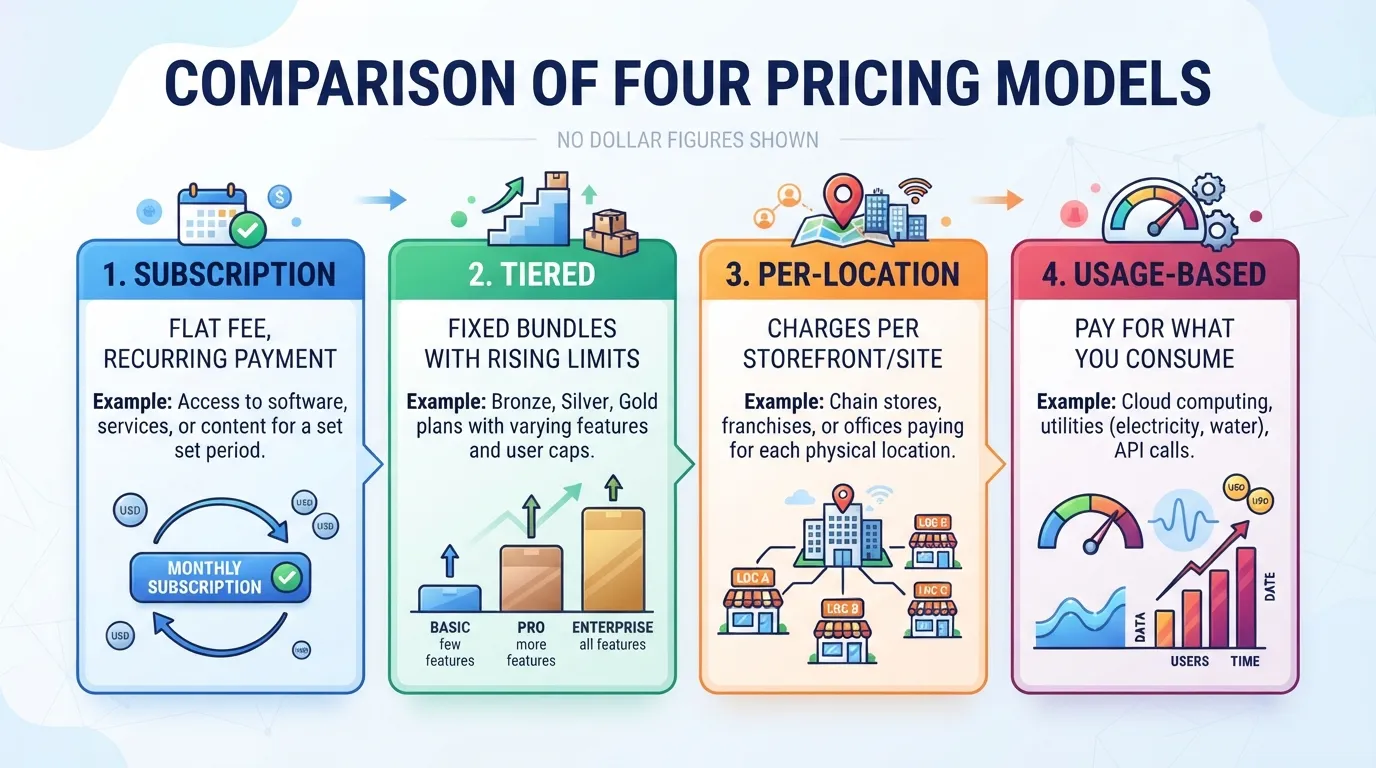
| Model | How you are charged | Where it tends to appear |
|---|---|---|
| Subscription | A flat recurring fee, billed monthly or annually | Single-business plans and simple dashboards |
| Tiered | Fixed bundles (for example Starter, Growth, Agency) with rising limits | Many mid-market local SEO products |
| Per-location | A fee for each storefront or service area you add | Multi-location brands, franchises and agencies |
| Usage-based | Charges that scale with consumption, such as API calls, reports or extra keywords | Enterprise contracts and some data-heavy add-ons |
A subscription is the simplest model to budget. Tiered pricing is common because vendors set limits that encourage upgrades as you grow. Per-location pricing looks fair for one business but compounds as you add storefronts.
Usage-based pricing can be cheap at low volume and hard to predict at high volume. Ask for the full rate card before you commit.
What Drives the Monthly Number Up
Four variables explain most of the gap between a low and a high quote:
- Locations: Each tracked location uses part of your plan’s allowance. Some vendors charge per listing rather than per brand.
- Users: Seat limits restrict how many team members can log in. Extra seats are often sold separately.
- Keywords: Rank tracking is priced by the number of queries you monitor. Local rank tracking uses grid checks, which sample rankings from several points across a service area. Each grid point counts as a separate check, so these tools are often metered more tightly than standard rank tracking.
- Reports: Scheduled reports, white-label exports and historical data retention can sit behind higher tiers or in add-on packages.
Locations and keywords have the biggest effect because they multiply. Tracking 20 keywords across 3 locations means 60 keyword-location pairs. A plan that looks generous can run out quickly, so count these units for your own business before you compare prices.
Why Agency Plans Cost More
Agency plans are built for managing other people’s listings. The extra price usually covers client workspaces, higher location and keyword allowances, multiple user seats, and white-label reporting that carries your agency’s branding.
Some vendors charge separately for each client account. An agency with 15 clients may pay far more than the advertised agency tier suggests.
If you run one business, an agency plan is rarely worth it. If you manage several clients, compare the per-client cost against a single-business plan multiplied by your client count. The agency tier is often more economical once you pass a handful of accounts, but test this with each vendor you consider rather than assuming it.
What Local SEO Tools Typically Cost in 2026
Local SEO tool pricing in 2026 usually falls into a few common bands. The band you land in depends more on how many locations and users you manage than on any single feature. The figures below are vendor-published and indicative, not verified quotes, and prices change without notice. All figures are in US dollars. Confirm current pricing on each vendor’s website before you buy.
Entry-Level Plans for Single-Location Businesses
For a single storefront, such as a plumber, dentist or independent café, entry-level plans sit at the lower end of the market. These plans usually cover one location, a modest keyword set and one or two user logins. Vendors often include core rank tracking for local pack positions, basic listing monitoring and standard reports. Bulk citation management, grid-based rank tracking and white-label exports are often left out.
If your goal is to watch where you appear for a handful of “near me” terms, this tier may be enough. Check the keyword cap. A plan that looks inexpensive can run out of room once you add service-area terms.
Mid-Tier Plans for Multi-Location Brands and Small Agencies
Mid-tier plans suit many multi-location brands and small agencies. These plans generally add more locations, a larger keyword allowance, extra user seats and fuller reporting. Some also bundle review monitoring and Google Business Profile management, which matters because profile health is central to local visibility.
The price step from entry-level is often steeper than the feature step. A plan that adds only a few locations can cost noticeably more.
Agencies should check whether client seats and white-label reports are included. Vendors often bill these as add-ons, and those charges are where mid-tier totals tend to climb.
Enterprise and Custom Pricing for Large Networks
Large networks with dozens or hundreds of locations usually move off published prices and onto custom quotes. These contracts often bundle pooled locations, API access, dedicated onboarding and service-level commitments.
Pricing is negotiated around location volume, contract length and the integrations you need. Two buyers of similar size can pay very different amounts. When you request a quote, ask for the cost per location at your target volume. Also ask what happens when you add or close stores mid-contract.
Annual Versus Monthly Billing
Many local SEO vendors offer a discount for paying annually, though the saving varies by vendor and plan. The real difference is the commitment the discount creates. Annual contracts can carry cancellation windows, non-refundable terms and renewal price increases. A lower effective monthly rate can hide a locked-in cost if the tool stops fitting your needs.
Monthly billing costs more per month but keeps you flexible while you test coverage. Pay annually only after you have confirmed the tool’s location and keyword limits, reporting and add-ons against your real workload. Check the renewal terms in writing before you sign.
Rank Tracking and Local Pack Monitoring
Rank tracking is the feature most buyers compare first, and it is where price tiers differ most. The key question is how many locations and keywords a tool covers at each price. For a single storefront, a low-tier plan usually handles a short keyword list. For a business with several locations, the same plan can run out of tracked keywords early.
Local pack monitoring adds a second layer. A standard rank tracker records one position per keyword for one location. A local pack tracker checks map results from several points around the business, which shows how rankings change across a service area.
Grid-based tracking, which samples rankings from a grid of points around a location, is often sold as an add-on or appears only on higher tiers. Check whether it is included before you assume it is.
Entry plans generally track a limited number of keywords and do not include grid views. Mid-tier plans add more keywords and locations, and often include local pack or grid tracking. Enterprise plans usually offer high or custom keyword limits. Read the keyword cap and the refresh frequency together. A daily refresh on 50 keywords can cost more than a weekly refresh on 200.
Citation Management, Listings Sync and Review Monitoring
Citation management covers the business name, address and phone number listed across directories. Listings sync pushes one set of business details to many directories at once. Review monitoring gathers reviews from Google and other platforms into one inbox and sends alerts when a new review arrives.
These features are where pricing becomes uneven:
- Some tools include a citation audit in the base fee.
- Others charge a separate one-off or recurring fee for each directory batch.
- Listings sync may be capped at a fixed number of directories per location.
- Review monitoring may be limited by the number of connected review sources.
A plan that looks inexpensive can carry several paid add-ons once you need all three functions.
Review monitoring deserves particular attention because Google Business Profile management sits at the center of local search. If your reviews and profile edits happen in the same platform, you may avoid paying for a separate review tool. Compare each plan’s list of supported review sites against the sites your customers use.
| Feature | What to check | Where it usually sits |
|---|---|---|
| Citation audit | Number of directories scanned | Base plan or paid add-on |
| Listings sync | Directories per location, batch limits | Mid-tier and above |
| Review monitoring | Review sources connected, alert settings | Base plan, with caps |
| Profile management | Edits per location, owner access | Often included |
Reporting, White-Label Options and API Access
Reporting is the feature that most often decides whether a cheaper plan stays cheap. Basic dashboards show rankings and review counts. Scheduled reports, multi-location roll-ups and exportable files usually require a higher tier. If you present results to clients or a leadership team, check whether you can export and schedule reports without an extra fee.
White-labeling, which replaces the vendor’s branding with yours, is often sold separately. Agencies rely on it. Single-business owners rarely need it, so paying for it is wasted spend unless you resell the reports.
API access lets you pull data into other systems, such as a business intelligence dashboard or a custom client portal. Vendors usually reserve it for higher tiers, and some meter calls. Heavy use can trigger overage charges. If you do not have a developer in mind, leave API access out of your calculation.
Before you buy, confirm three things: whether reports can be scheduled, whether branding can be changed, and whether data export is included at your chosen tier. These limits are rarely obvious on the pricing page, and they are often why buyers upgrade within months.
How to Calculate the True Cost for Your Business
The sticker price tells you very little about what you will pay. Two plans with the same monthly fee can differ by hundreds of dollars a year once you count the locations they cover, the keywords they track, the seats they allow and the add-ons you end up buying. The method below gives you the true figure before you commit.
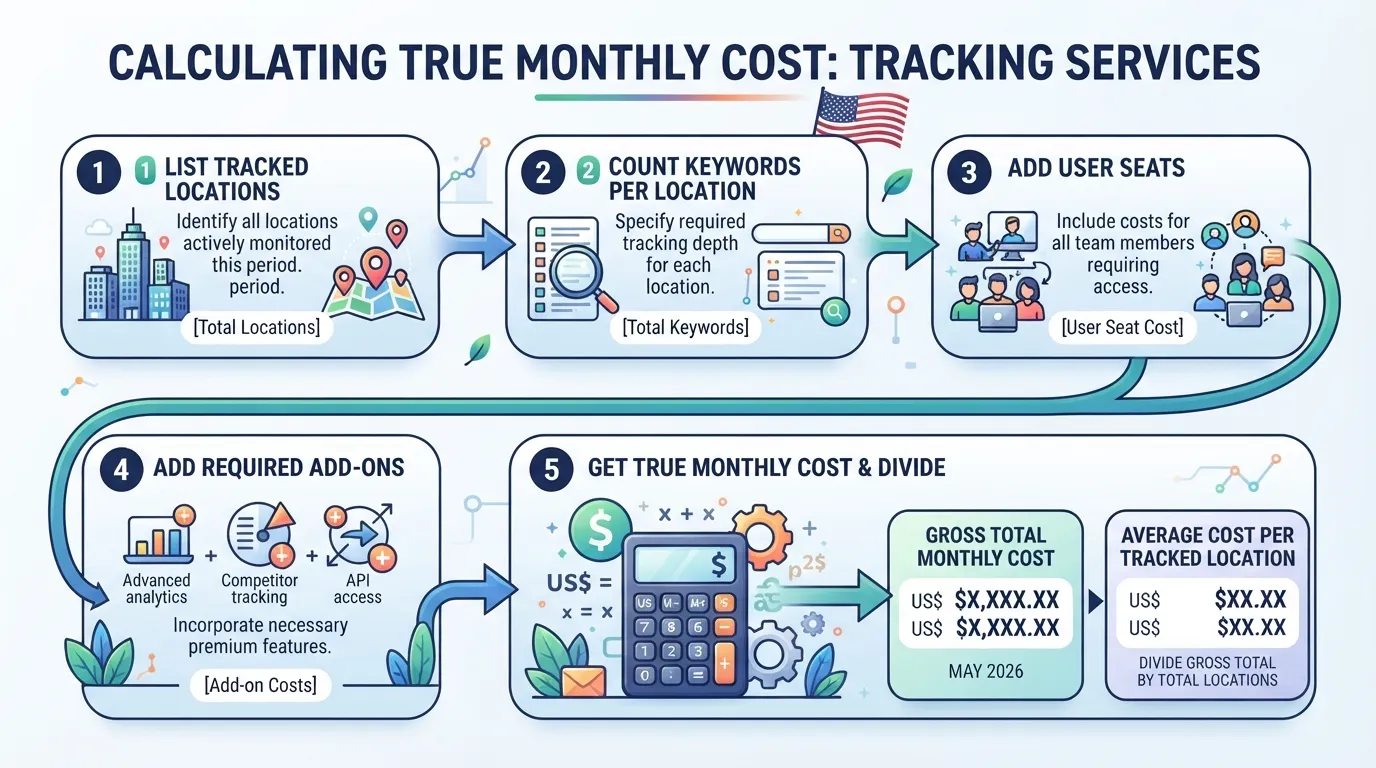
A Step-by-Step Budgeting Framework
Work through these steps in order for each tool you are considering.
- Count what you need to cover. List every Google Business Profile you manage, the number of search terms you want to track per location, and how many people need logins. Plan for the next 12 months, not just today.
- Record the base monthly fee. Use the price for the billing period you intend to use. Note whether the plan is priced per account, per location or per seat.
- Confirm what is included. Check how many locations, keywords and users the base price covers. Many tools cap these at a level a growing business will exceed within a year.
- List the paid add-ons you will certainly use. Citation audits, review management and grid rank tracking are often sold separately. Include only the ones you need in your first year.
- Calculate the monthly total. Add the base fee to the add-on costs.
- Calculate cost per tracked location. Divide the monthly total by the number of locations you actually track. This figure lets you compare tools fairly.
- Annualise and check the billing discount. Multiply by 12 for monthly billing, or use the annual price for annual billing, then compare the two.
Repeat the exercise for at least three tools so the numbers can be compared on equal terms. Confirm each figure on the vendor’s pricing page before you buy, and record the date you captured it.
Hidden Costs: Onboarding, Add-Ons, Overage Fees and Data Limits
The advertised price rarely captures the full outlay. Four categories commonly add to the bill.
| Cost type | What it looks like | How to check |
|---|---|---|
| Onboarding or setup | One-off fees for account migration, listing import or training | Ask the vendor whether setup is charged separately |
| Add-ons | Citation cleanup, review requests, grid rank tracking sold as extras | Compare the plan inclusions with your required feature list |
| Overage fees | Extra charges when you exceed a location, keyword or user limit | Read the limits section of the plan terms |
| Data limits | Caps on historical data retention or report exports | Confirm how long data is kept and whether exports are unlimited |
Overage fees need close attention. A plan’s base fee covers only the flat monthly charge. Per-location fees and scan credits are added on top, so a plan can look affordable until those charges arrive. Ask for the overage rate in writing before you sign.
Onboarding fees are a smaller risk but still matter for a trial decision. If a vendor charges for setup, factor that into the first-year cost, and check whether the fee is refundable if you cancel early.
Sales tax also varies. Software is taxed differently from state to state across the US, so the amount billed at checkout may differ from the list price. Check the vendor’s terms or your state tax authority’s guidance before you compare totals.
A Worked Example for a Three-Location Service Business
Consider a service business with three storefronts. The owner wants to track 15 search terms per location and give two staff members access to the platform. The example uses placeholder figures, so replace them with numbers from current vendor pages.
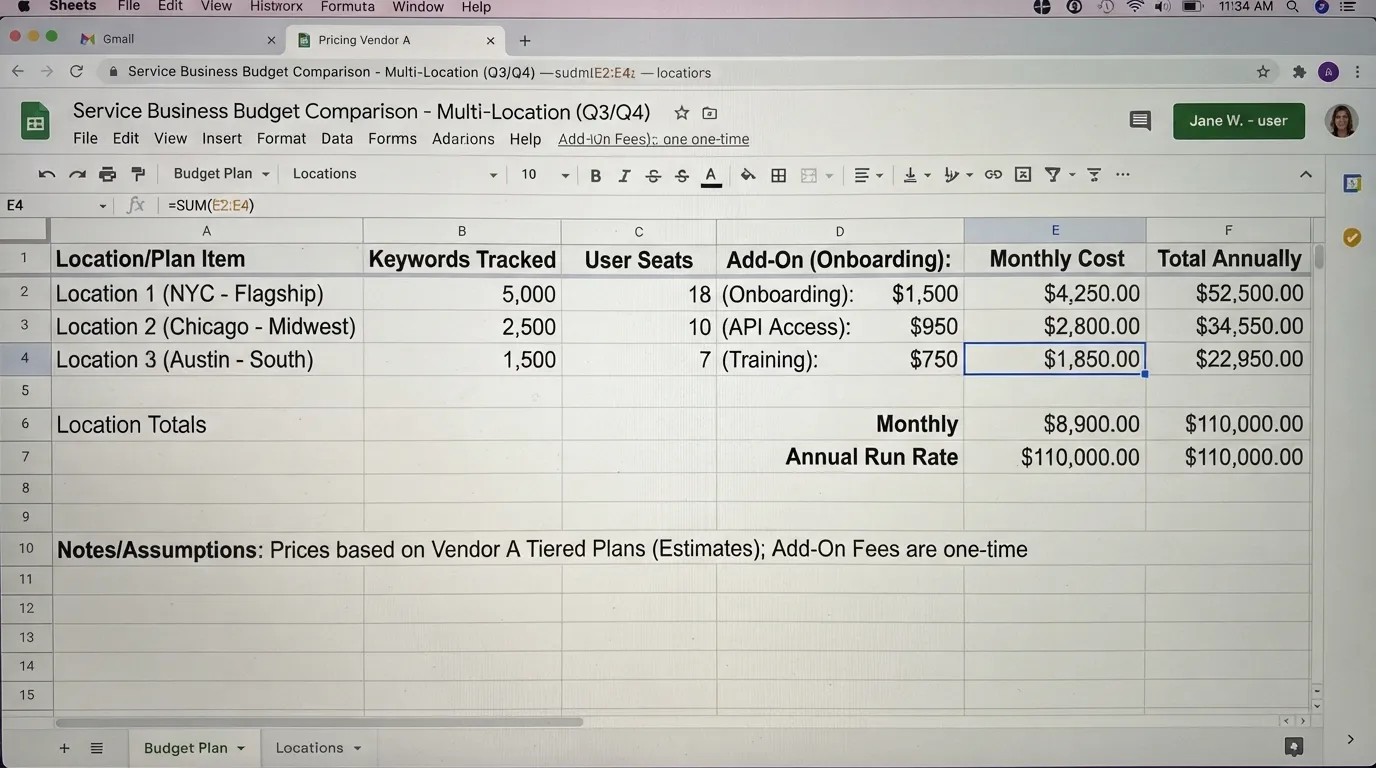
Tool A charges a base fee for up to three locations, includes 10 keywords per location and allows two users. The owner needs grid rank tracking, which is available as a paid add-on, so the total cost depends on that add-on’s price.
Tool B charges a base fee for up to five locations, includes 25 keywords per location and allows unlimited users. Grid tracking is included, so no add-on is required.
Calculate each tool’s cost per tracked location with this formula:
Cost per tracked location = (Monthly plan price + Monthly add-on costs) ÷ Number of locations tracked
For Tool A, the monthly total is the base fee plus the grid tracking add-on, divided across 3 locations. For Tool B, the monthly total is the base fee, divided across 3 locations.
Two points usually emerge from this comparison. First, the tool with the lower base fee often carries higher add-on costs, which can narrow or reverse the gap. Second, Tool A’s cap of 10 keywords per location may force an upgrade once the owner adds a fourth service line. That upgrade would push its cost per location sharply upward, so Tool B’s higher base price can be the cheaper option over a 12-month horizon.
The method works for any number of locations. Enter your own counts and add your own add-ons, and the cost per tracked location shows which tool gives you the most coverage for each dollar.
How to Choose the Right Plan
Choosing a plan depends less on the cheapest price and more on how many locations, keywords and users you need. Count those three things first. Then compare plans on cost per tracked location, not on the headline monthly fee.
A Scoring Table to Match Your Needs to a Tier
Score your business on five cost drivers before you look at any pricing page. Each driver shows how much coverage you need and where a plan may start to cost more than it is worth.
| Cost driver | What to count | Low need (score 1) | Medium need (score 2) | High need (score 3) |
|---|---|---|---|---|
| Locations | Storefronts or service areas you must track | 1 | 2 to 5 | 6 or more |
| Tracked keywords | Local terms you rank for across all locations | Under 25 | 25 to 150 | Over 150 |
| User seats | People who log in and act on data | 1 | 2 to 4 | 5 or more |
| Reporting needs | Client or internal reports you produce each month | None or basic | Monthly, one format | White-label, multiple formats |
| Add-on use | Paid extras you will certainly buy (citations, reviews, grid rank) | None | One add-on | Two or more add-ons |
Add up your scores. A total of 5 to 7 often points to an entry-level plan, 8 to 11 to a mid-tier plan, and 12 or more to an enterprise or custom plan. Treat these bands as a starting point, and check them against the plan limits on each vendor’s page.
Next, calculate the cost per tracked location for each shortlisted tool:
Cost per tracked location = (monthly plan price + monthly add-on costs) ÷ number of locations you track
A tool with a low monthly fee can still cost more per location than a higher-priced plan that includes more locations and unlimited keywords. Run the sum for each plan using your own numbers, then rank the results. Confirm prices and limits on the vendor’s current pricing page before you decide.
Questions to Ask Vendors Before You Sign
A pricing page rarely tells the full story. Put these questions to every vendor, in writing where possible:
- What is the location limit on this plan, and what happens when I go over it? Some vendors block new locations. Others bill an extra fee per location.
- Which features are included, and which are sold as add-ons? Ask specifically about citation audits, review requests, review monitoring and grid rank tracking.
- Is the price per location, per account or per user? This changes the total sharply as you grow.
- How many user seats are included, and what does an extra seat cost?
- Can I export my reports, and do they carry my own branding? White-label reporting is often limited to higher tiers.
- What is the cancellation window, and is there a refund for annual plans? Find out before you commit to a year.
- How much can the price rise at renewal, and how much notice do I get?
- Is there an onboarding or setup fee? Some vendors charge one even on monthly plans.
- Can I change tiers mid-term, and is the change prorated?
- Does the price include sales tax? Tax treatment varies by vendor and by state, so ask how tax appears on your invoice. Your state’s tax authority or the vendor’s terms will confirm the rules that apply to you.
Keep the answers in one document so you can compare vendors side by side.
When Free Tools Are Enough, and When They Are Not
Free tools can do real work for a single-location business with a small keyword set and no client reporting. Google Business Profile gives you free insights on how people find and contact your listing. For a single storefront that mainly needs listing accuracy and a few review responses, a free setup may cover the job.
Free tools stop being enough when any of the following applies:
- You track more than one location, because free dashboards rarely bring several listings into one view.
- You need to show ranking history over time, since most free options show limited historical data.
- You manage citations across many directories and need to find and fix inconsistencies at scale.
- You produce reports for clients or stakeholders and need branded, repeatable exports.
- You need several people working in the same account, with separate logins and permissions.
If two or more of these apply, a paid plan will often cost less in staff time than piecing together free tools by hand. Use the scoring table above to see where your business sits.
Common Pricing Mistakes and How to Avoid Them
Most buyers who overpay for local SEO tools do not overpay because of the sticker price. They overpay because they buy coverage they never use, or because they sign terms that lock them in when their needs change. Both mistakes are predictable, and a short check before you commit avoids them.
Paying for Locations or Keywords You Do Not Use
Vendors price around the capacity they sell. A plan covering 25 locations and 500 tracked keywords looks reasonable on a pricing page. The real question is whether you use that capacity. A three-location business on a 25-location tier pays for 22 unused slots every month.
Size your plan to the next 12 months, not to your ambitions for five years. Count the locations you operate today and the keywords you will track in each one, then add a small buffer for growth. Divide the monthly cost by the number of locations and keywords you actually track. That cost per tracked location shows whether a higher tier earns its price.
Two checks catch most over-buying:
- Count active use, not capacity. Log into the tool and note how many locations and keywords produced a report in the last 90 days.
- Compare the cost per tracked location across tiers. If moving up a tier raises the price but adds only unused slots, stay on the lower tier.
Keyword limits deserve the same scrutiny. Tracking 300 keywords across three locations sounds thorough. Many of those terms, however, will be near-duplicates that never move. Trim the list to the terms that drive calls, bookings or visits, and a lower tier may cover your real needs.
Ignoring Contract Terms, Cancellation Windows and Price Increases
The second mistake is treating the monthly price as fixed for the life of the subscription. Contract terms often change the real cost more than the plan itself. Check three areas before you pay.
Billing commitment. Annual plans often discount the monthly rate, but they usually lock you in for twelve months. If the tool does not meet your needs by month four, you may still owe the rest of the year. Monthly billing costs more per month but keeps your options open. Choose annual only when you are confident the tool fits, or when the discount is large enough to justify the lock-in.
Cancellation windows. Many subscriptions renew automatically unless you cancel a set number of days before the renewal date. Missing that window can renew you for another full term. Write the notice deadline into your calendar the day you sign up.
Price increases. Software vendors can often raise prices at renewal, and some terms allow changes on short notice. Look for language on how much notice the vendor must give and whether your rate is protected for a fixed period. Ask the vendor directly whether your renewal price is guaranteed, and get the answer in writing.
Refund policy matters too. Some vendors offer a free trial but charge in full if you do not cancel before it ends. Some do not refund partial months. Read the refund clause, not only the trial headline.
A practical habit helps here. When you sign, record the plan name, the monthly or annual price, the renewal date, the cancellation deadline and the price-protection terms in one place. Review that record every quarter. This takes about ten minutes and prevents most unwanted renewals.
For a broader view of how plan tiers differ, see our guide to the best local seo tools before you finalise your shortlist.
Conclusion
Local SEO tool pricing is easiest to judge by what each plan covers, not the headline monthly fee. The useful question is how much each tracked location and keyword costs you. A low monthly fee can still be the most expensive option once locations are capped, add-ons are billed separately, and reporting requires an upgrade.
Three factors usually drive the decision for small and mid-sized US businesses:
- The number of locations you manage now and expect to add.
- The number of keywords you need to monitor in each market.
- Whether you will definitely use add-ons such as citation audits, review management or grid rank tracking.
Score each tool on these factors before you look at the price. Then check current pricing on each vendor’s own page, because plan limits and add-on prices change. Run the calculation with your own numbers. If you are still narrowing the field, the best local SEO tools guide is a useful place to start your shortlist.
How much does a local SEO tool cost per month?
Costs vary by tier, location count and add-ons, so no single figure applies to every business. Locations, tracked keywords and user seats matter more than the headline price. Divide the monthly price by the number of locations you need covered to find your real cost per location. Confirm current figures on each vendor’s pricing page before you commit, since list prices change often and are quoted in US dollars.
Is an annual plan cheaper than paying monthly?
Often, yes. Annual billing can lower the effective monthly rate, but the saving only matters if you will use the tool for the full term. Check the cancellation and refund terms before paying a year upfront, because some vendors do not refund unused months. If you are still testing whether a tool fits, a monthly plan costs more per month but keeps your exit simple.
What is the difference between per-location and per-user pricing?
Per-location pricing charges for each business profile or storefront the tool monitors. Per-user pricing charges for each person who can log in and work in the account. A single owner with one storefront may pay little under either model. A multi-location brand with a small team can see very different totals, so calculate both using your own counts.
Are there free local SEO tools worth using?
Free tools can handle basic jobs such as checking your Google Business Profile details, reviewing your listing, or running a one-off citation check. They generally lack scheduled rank tracking, multi-location dashboards and exportable reports. A free tool may be enough if you manage one location, check rankings occasionally and do not need client-ready reporting. Once you need ongoing monitoring across several locations, paid coverage usually saves time that would otherwise go on manual checks.
Do local SEO tools charge setup or onboarding fees?
Some do and some do not. Setup or onboarding fees are more common on enterprise and custom-priced plans, where the vendor helps import locations and configure reporting. Many self-serve plans have no setup fee but may sell citation cleanup, review requests or grid rank tracking as separate add-ons. Ask the vendor to list every one-off and recurring charge in writing before you sign.
How often do local SEO tool prices change?
Prices can change at renewal, when vendors revise plan tiers, or when they add or remove features. Some vendors honour the price you signed up at for the current term, but increases at renewal are common. Review your renewal date, read the price-change clause in the terms, and recheck the pricing page at least once a year.
Disclosure: digitalmarketingtools.ai is sponsored by Digimetrics.ai. Sponsored Highlights are clearly labelled advertising. Our reviews, comparisons and guides are written to be useful and fair regardless of who sponsors the site. Read the full disclosure.


