
Local SEO Tools for Multiple Locations: Single-Location vs Multi-Location Stacks
Local SEO tools for multiple locations should be chosen by location count and by who edits the listings. A single-store tool usually breaks at scale, and a multi-location platform is wasted on two locations.
Local search drives customer decisions. Google’s own figures show that 46% of searches have local intent, a figure first reported in 2018. Each location needs accurate, active and visible local listings, and consistent brand information across every one of them.
This guide covers the owner of one location weighing a paid tool and the marketing lead managing dozens or hundreds. The deciding factor is governance: how many locations you run, how often listing data changes, and who needs to edit it.
Recommendation by Location Count
1 to 2 locations: a single-location tool or shared spreadsheet is enough. 3 to 10: choose a mid-tier multi-location tool with bulk editing and shared dashboards. More than 10, or frequent listing changes: choose an enterprise platform with role-based permissions and approval workflows.
Key Takeaways
- Score your operation on four axes: location count, how often listing data changes, how many people edit listings and review volume per location. Scoring high on two or more axes points to the higher tier.
- One copied error can spread to every profile that inherits it, so governance matters more than feature lists.
- Enterprise platforms such as Yext do not publish pricing. Request a quotation directly from the vendor.
- Keep grid-based rank tracking separate from listing control, because the two fail for different reasons.
- Treat reviews as a workflow: decide who responds and within what window.
- Audit listing accuracy at every location before you choose a tool.
The core jobs local SEO tools perform
Most local SEO tools manage business listings, keep citations (name, address and phone details published across directories) consistent, track local rankings, monitor reviews and report on all of it. The difficulty appears when these jobs must run across dozens of locations at once.
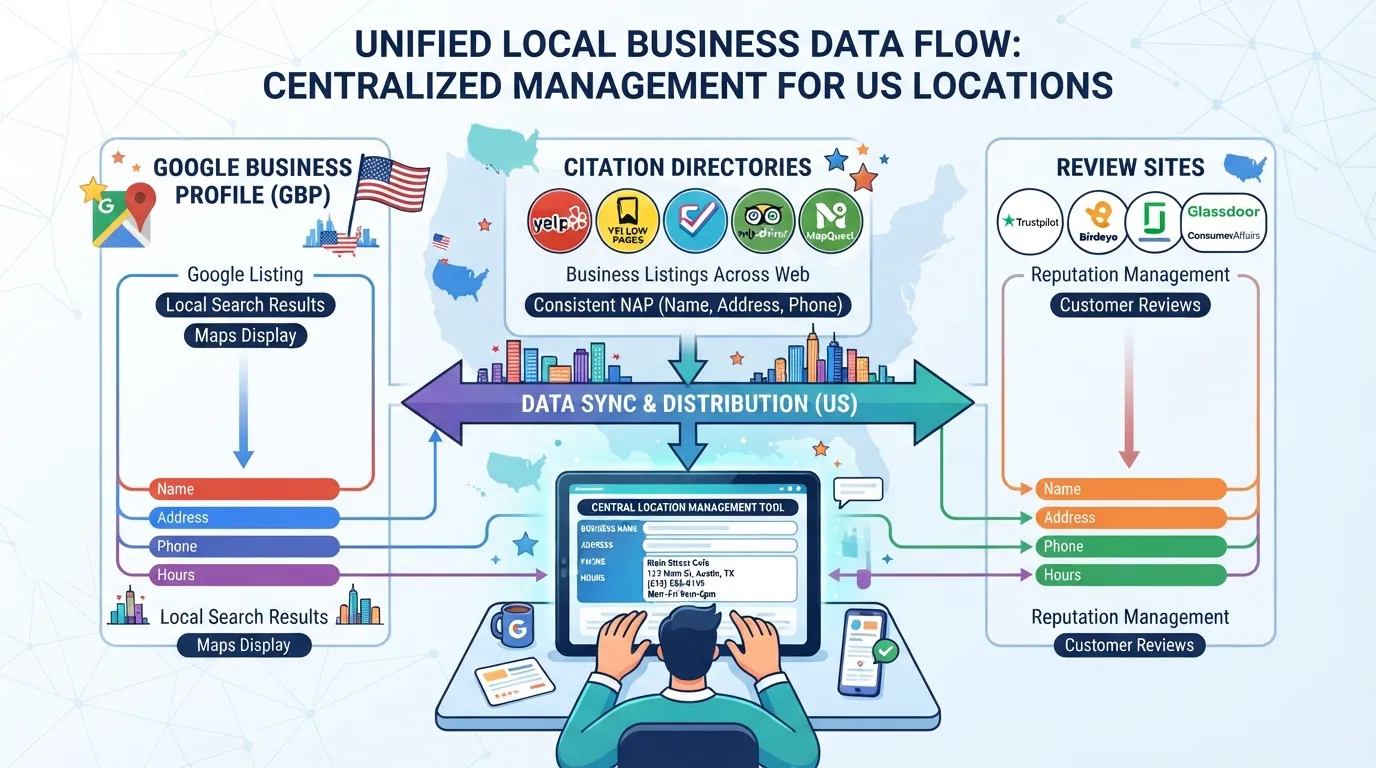
Paid tools earn their cost mainly through automation. Manual checks can cover a handful of profiles well, but beyond that, errors slip through.
Why Google Business Profile changes the stakes
Google’s own research reports that 71.3% of respondents always prefer companies with a complete Google profile. Wrong hours or an outdated phone number send the customer elsewhere, and across many locations one copied error can cost far more than the tool that would have caught it.
Why local search still rewards the businesses that invest
Many businesses have not yet invested in local search. Competitors who keep profiles accurate, respond to reviews and track local rankings tend to win the nearby searches the rest of the market leaves unclaimed.
Table of Contents
- Single-Location vs Multi-Location: The Real Differences
- Multi-Location Local SEO Management at Enterprise Scale
- Citations, Reviews and Rankings Across Many Locations
- Local SEO Tool Comparison and Pricing
- Conclusion
- Frequently Asked Questions
Single-Location vs Multi-Location: The Real Differences
At one location, local SEO is mostly checking. At fifty, it becomes a governance problem. Ask who can change what, how fast a wrong phone number gets corrected everywhere, and how you spot the branch that is slipping. Multi-location businesses need consistent brand presence and a clear view of each listing’s search results and reputation. This is where local SEO tools for multiple locations, and rank tracking like Local Falcon’s, become useful. Teams managing many branches also benefit from seo for multiple strategies that keep every page on message.
What changes when you go from one listing to fifty
At one storefront, you check the hours and fix a typo in minutes. Across fifty locations, the same check takes a team days, and errors multiply quietly. A holiday schedule updated in one place but not the others can send customers to a closed door.
Four things change at scale:
- Listing volume: you need one view of every profile.
- Data consistency: name, address and phone (NAP) must match across every directory, a task tools such as Moz Local support.
- Approval workflows: head office should review changes before they go live.
- Shared access: managers need edit rights for their own location only.
Where single-location tools break down
Single-location tools assume one profile and one owner. Add locations and the gaps appear fast:
- No bulk actions: you cannot push new opening hours to 40 profiles at once.
- No role-based access: a franchisee can edit another branch’s details.
- Thin location-level reporting: you see one set of numbers, not a ranking of which branch needs attention.
Without location-level alerts, a branch collecting one-star reviews can go unnoticed for weeks, which is why review management belongs in the evaluation from the start.
Where multi-location tools are overkill
A dental practice with two offices or a café with three outlets does not need an enterprise platform. Enterprise solutions such as Yext use a per-location annual subscription model, and rollouts take time. For two storefronts, a single-location tool plus a shared spreadsheet covers the work.
A decision matrix by location count and team structure
Score your operation on four axes: location count, how often listing data changes, how many people edit listings and review volume per location. Scoring high on two or more axes points to the higher tier. Location count alone misleads: a 12-location group with frequent changes faces more risk than a 30-location group that updates twice a year.
| Location count | Team editing listings | Governance needs | Recommended tool category |
|---|---|---|---|
| 1 to 2 | 1 owner | Low: manual checks suffice | Single-location tool or spreadsheet |
| 3 to 10 | 2 to 5 people | Moderate: shared access, bulk edits | Mid-tier multi-location tool |
| 10 to 50 | 5 to 20 people | High: role-based permissions | Mid-tier or entry enterprise platform |
| 50+ | Dozens across regions | Very high: approval chains, audit trails | Enterprise platform with approval workflows |
Worked example: a 12-location dental group changes hours weekly, has ten editors and scores high on three of the four axes. It belongs in the enterprise tier even though its location count sits mid-range. Treat the matrix as a starting point, not a verdict. Review-monitoring features such as Semrush Local’s should be part of that choice from the start. Track competitors in each market so you can see where a branch is losing visibility.
Multi-Location Local SEO Management at Enterprise Scale
Managing local SEO for ten storefronts is manageable in a spreadsheet. For two hundred, the enterprise category earns its cost. The job shifts from fixing listings to governing them: knowing which profile is wrong, who changed it and whether the fix reached every location sharing the error. Enterprise platforms that handle local seo tools for multiple locations make that governance practical. A tool such as Local Falcon can show how each location’s visibility compares in local results, and reviewing that data helps protect your brand’s reputation across every market. Strong review management keeps feedback from each site visible and answered.
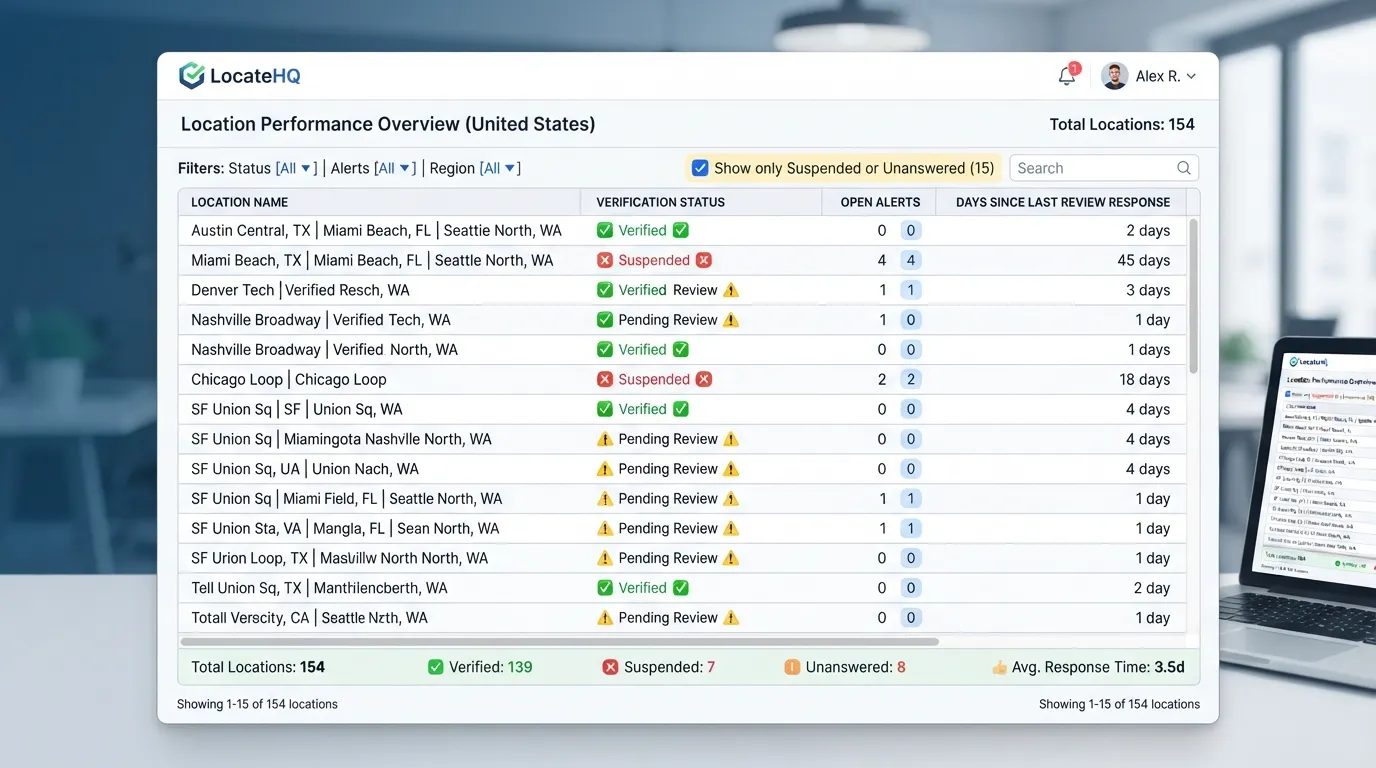
Centralized multi-location dashboard management
A multi-location dashboard shows every listing, its verification status and open alerts in one view. The test: can you tell how many of your 150 profiles are suspended, or have reviews unanswered for over seven days, in under a minute?
Bulk updates across hundreds of business locations
Bulk editing matters most for portfolio-wide changes, such as new holiday hours. One approved value is applied to every target and logged, so a mistyped phone number is caught once rather than copied 200 times.
Google Business Profile management for multiple locations
Customers mostly find locations through Google Maps, and at scale this creates ownership problems: former employees or franchisees may claim profiles, and duplicates appear when locations open, move or rename. Good management maps ownership, verifies every location and finds duplicates. Google’s own guidance requires owner-level access for many changes, so a central owner account with delegated managers is the safer structure. Moz Local can help audit how these local listings appear across directories, keeping the business information consistent everywhere customers search.
Multi-location listing management for enterprises
Three controls protect brand accuracy: role-based permissions so regional managers edit only their own sites, approval chains for changes to name, address or phone, and audit trails showing who changed what and when.
| Control | What it prevents | Practical threshold |
|---|---|---|
| Role-based permissions | Edits outside a manager’s own sites | One admin, regional editors, location viewers |
| Approval chain | Unreviewed changes to core fields | Required for any core NAP field |
| Audit trail | Unclear ownership of an error | Retain logs for every edit |
Reserve approvals for core fields and let location staff manage hours and photos directly.
Citations, Reviews and Rankings Across Many Locations
Citation management and NAP consistency
Name, address and phone (NAP) data is the backbone of every local listing. When one branch lists “Suite 4” and a directory lists “Unit 4”, search engines may treat them as separate businesses, and local search rankings suffer. Consistent NAP data across all sources is the foundation of local SEO for multiple locations. Citation audit tools such as Moz Local compare each listing against the master record and flag every mismatch.
Citation tools compare each listing against a master record for that location and flag every differing field. Fix the output in this order:
- Confirm the master record for each location (legal name, street format, local phone number).
- Group mismatches by type: name variants, address abbreviations, old phone numbers, duplicates.
- Fix high-visibility sources first, such as Google Business Profile, Apple Maps and Bing Places.
- Suppress duplicates and track closures so a shuttered branch does not keep ranking on stale data.
Any field that differs across more than two sources is a priority fix.
Managing online reviews and customer feedback
According to BrightLocal’s consumer research, 97% of consumers read reviews for local businesses, and 76% check them before visiting. At enterprise scale, the problem is routing: who answers, how fast, and whether a policy-breaking review is flagged before it sits for weeks. Responses shape how prospective customers judge the business and protect its reputation.
- Route by location. Each review goes to the branch manager, with a copy to regional oversight.
- Set response windows. Aim to reply within two days.
- Flag policy violations. Reviews with personal data, profanity or competitor abuse go to a moderation queue.
- Spot sentiment trends. A cluster of wait-time complaints at one branch is a staffing problem, not a review problem.
Review monitoring, management and intelligence
Compare each location’s average rating, response rate and review velocity against the portfolio median. A branch well below the median on rating and response rate is the first place to look. Platforms such as Semrush Local can surface these gaps across the full portfolio.
Tag recurring themes such as pricing, staff, cleanliness and wait times, and track how often each appears per location per quarter. Themes repeating across branches point to a brand-level process gap. A theme confined to one branch points to local management.
Local rank tracking and grid-based visibility
According to Google’s local search guidance, businesses in the top three local results attract far more attention than those lower down. Single-point tracking checks one search from one address, which hides the real picture for any business with a service area. Multi-location businesses need coverage that reflects how their customers actually search.
Grid-based tracking solves this. Local Falcon uses geo-grid technology to scan rankings from dozens or hundreds of points around a service area. A plumber may rank first from the office and fall to twelfth three miles away. Only a grid shows that.
Google Maps rank tracking and competitor benchmarking
Benchmark each location against its nearest rivals, not the national average. A dense urban branch competes with different businesses than a suburban one.
For each location, compare the top five competitors in the local grid on review count, rating and category choices. If a branch trails rivals on review volume but matches them on rating, the fix is a review-request process, not a listing overhaul. Consistent, well-managed local listings help the content customers see match the business they actually visit.
Local SEO Tool Comparison and Pricing
How to read pricing for single-location and multi-location tools
Enterprise platforms such as Yext are often quoted at $500 to $2,000+ per month, depending on locations and modules. Yext does not publish pricing, so treat any figure as indicative and request a quotation. Vendor pricing for SEO for multiple locations varies widely, so compare quotes on the same basis.
Check three things on every quote:
- Per-location pricing. Some vendors charge per listing; others charge a platform fee plus a per-location add-on. Quotes for 40 and 400 locations can diverge sharply at scale.
- Minimum commitments. Annual contracts with a location floor can lock you into paying for unused capacity.
- What the base fee excludes. Review management, rank tracking, API access and extra seats are often add-ons. Ask for a fully loaded price.
Choosing the right local SEO tool
Score each candidate on five criteria, weighted by your number of locations. As a rough guide, one to two locations suit a single-location tool, three to ten suit a mid-tier platform with bulk editing, and above ten, governance needs such as permissions and approval workflows usually justify an enterprise platform. These thresholds are judgement-based.
- Integration depth: Does it connect directly to Google Business Profile and major directories?
- Bulk tooling: Can you change hours, categories or attributes across many locations at once?
- Reporting: Can you see performance by location, not only as a portfolio average?
- Support: Is there a named contact, and what is the response window during peak periods?
- Data ownership: Can you export every listing, review and citation record if you leave?
| Tool category | Typical use case | Cost band | Fit for single-location | Fit for multi-location |
|---|---|---|---|---|
| Single-location listing tools | One profile, manual checks, basic reviews | Low monthly fee | Strong | Weak: no bulk editing |
| Mid-tier multi-location platforms | Bulk edits, shared dashboards, rank tracking | Mid monthly fee, per-location add-ons | Overkill | Strong for 10 to 100+ locations |
| Enterprise platforms (e.g. Yext) | API syndication, approval workflows, role-based permissions | Quoted per vendor; estimates from about $500 to $2,000+ per month | Overkill | Strong for large portfolios with governance needs |
| Grid-based rank trackers (e.g. Local Falcon) | Scanning visibility across a service area | Varies by scan volume | Useful for service-area businesses | Useful when paired with a governance tool |
Rank trackers and governance platforms solve different problems. A grid tracker shows where you appear in the local pack; a governance platform shows whether the information behind that appearance is correct. Monitoring competitors in the same grid helps you judge that visibility. To shortlist, start with the best local SEO tools.
Questions to ask vendors before signing
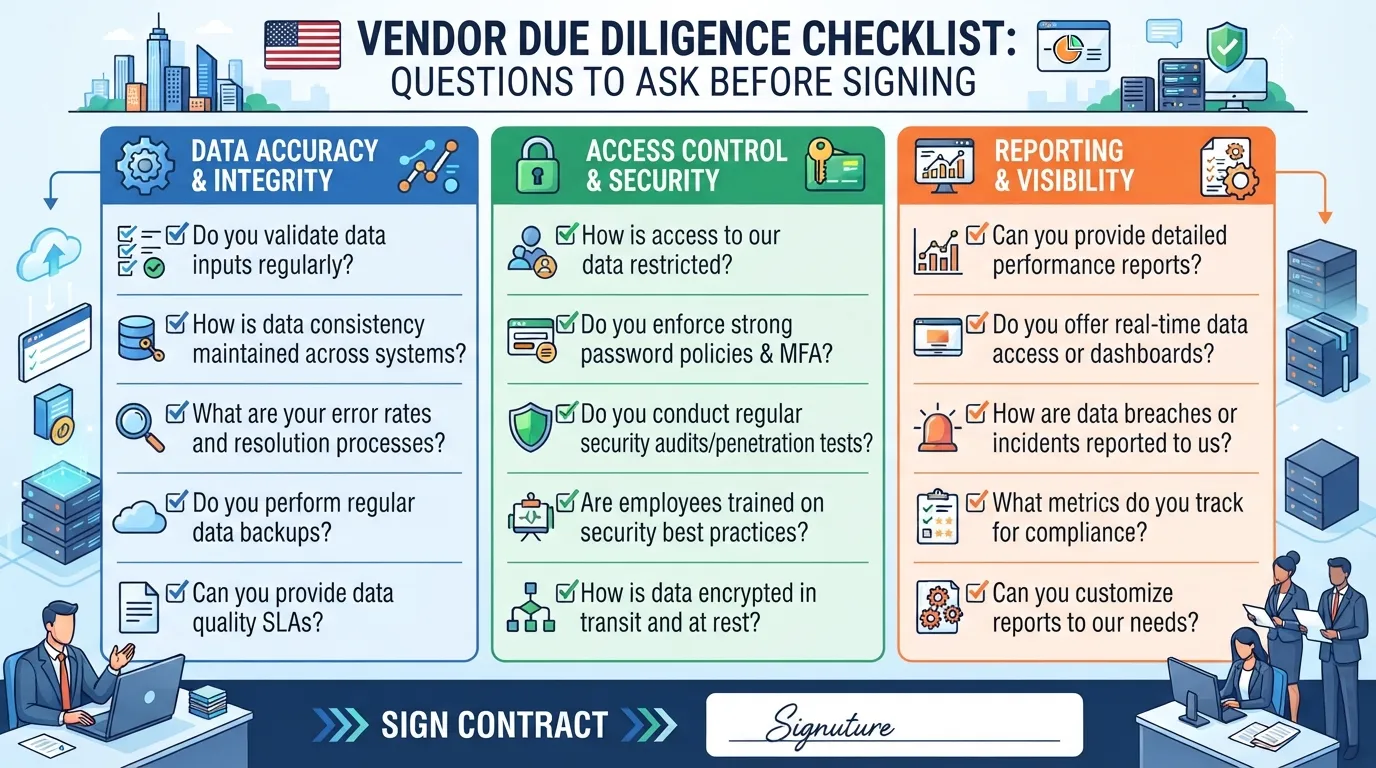
- Location limits: What is the maximum number of locations per plan, and what happens when you exceed it?
- API access: Is it included, and does it cover the endpoints you need for syndication and reporting?
- Sub-account structures: Can you create regional or brand-level sub-accounts with separate permissions?
- Exit terms: How much notice is required, and can you export listings, reviews and history in a usable format?
Exit terms matter most. A vendor that makes review history hard to extract has raised your switching cost, so treat portable data as a condition of purchase. Review history also feeds your reputation with customers, so losing it has a real cost.
Creating Optimized Location Pages That Support Your Listings
A Google Business Profile shows where a location is and when it is open. A location page on your own domain shows why that branch deserves to rank for a specific neighbourhood, service or intent. Brands that rely on listings alone often find the profile outranking a thin page that never earns its place in search results. Strong local SEO depends on both.
What a location page must contain
Each location page needs six branch-specific elements:
- Unique copy about the branch, its team, service mix and the areas it serves. Two sentences of real local detail beat four paragraphs of boilerplate.
- NAP (name, address and phone), formatted exactly as on the Google Business Profile and key citations.
- Hours, including holiday exceptions, marked up with structured data.
- Service details for what this location actually offers, not the franchise-wide catalogue.
- Local proof points such as named staff, local project photos or reviews from that branch.
- An embedded map pointing at the same coordinates as the listing.
A phone number that differs by one digit between the page and the profile weakens both.
Scaling location page creation without duplicate content
Templates make a portfolio of 50 or 200 pages manageable, but a template with only the city name swapped is a duplicate-content risk and a poor experience for readers. Layout and navigation can be shared; local staff, photos, reviews and service emphasis should not be.
Automation helps with structural parts, such as pulling NAP and hours from a single source of truth. It harms when it writes the prose without local inputs. A practical test: read two location pages side by side. If you cannot tell which city each serves without checking the header, the pages need more local substance.
Connecting location pages to Google Business Profile and citations
Point the profile’s website field at that location page rather than the homepage, so Google can see which page represents the branch. Directory citations should carry the same NAP as the page and profile. Moz Local and similar tools can help with that consistency across directories.
A simple audit sequence works well:
- Export the NAP from each location page.
- Compare it against the Google Business Profile for that branch.
- Check the main citation sources for mismatches in suite numbers, abbreviations or old phone numbers.
- Correct the page first, then the profile, then the citations, so the owned site stays the reference point.
When a branch moves or changes its number, update all three in the same session. Partial updates are the most common cause of conflicting data across a portfolio. Managing these updates centrally is what keeps the portfolio consistent, and search engines reward that consistency with clearer signals about each branch.
Conclusion
Single-location tools stop scaling when governance becomes the bottleneck. At twenty or two hundred locations, the questions are who changed a listing, when, and whether it was approved.
Three factors settle the decision: location count, team structure and data control. When several rise together, you need bulk editing, shared dashboards and permissions. Score your operation against the Location Governance Matrix first.
Start with an audit. Pull every listing, compare it against your source of truth, and log each mismatch to show which gaps your local SEO tools for multiple locations must close.
Frequently Asked Questions
Can a single-location tool manage several locations?
Sometimes, but only for a few listings with stable data. Single-location tools usually lack bulk editing, shared dashboards and role-based access. Beyond two or three locations, manual work becomes the bottleneck and inconsistent data becomes likely. Check whether a tool supports multiple locations in one account before committing.
What is the main advantage of a multi-location local SEO platform?
Central control. A multi-location platform gives you one view of every listing and its alerts, and lets you push a change to many profiles at once. Permissions let a branch manager update opening hours without changing the brand name or category. For teams running local SEO for multiple locations, this shared view keeps data accurate.
How much should a multi-location local SEO tool cost?
Pricing depends on scale and features. Yext does not publish its prices; it uses a per-location annual subscription that requires a direct consultation. Compare cost per location, check for minimum commitments, and confirm whether listing syndication or API access is included.
How often should multi-location listings be audited?
Run a full audit at least quarterly, and check any location whose hours, phone number or services changed. Check holiday schedules before each peak period. Because 54% of consumers would avoid purchasing a product if they suspected fake reviews, unchecked errors can cost trust as well as rankings.
Do location pages still matter if the business has a Google Business Profile?
Yes. The profile is the discovery surface, but the location page confirms your details, carries unique local content and links back to the profile. Both should show identical name, address and phone data.
How do I tell whether my business is ready for an enterprise tool?
Score your operation on four points: location count, how often listing data changes, how many people edit listings, and review volume per location. If you score high on two or more, evaluate an enterprise platform. If you score low on all four, a single-location tool or a disciplined spreadsheet process is usually enough.
Disclosure: digitalmarketingtools.ai is sponsored by Digimetrics.ai. Sponsored Highlights are clearly labelled advertising. Our reviews, comparisons and guides are written to be useful and fair regardless of who sponsors the site. Read the full disclosure.


