
Common Local SEO Tool Mistakes to Avoid
Local SEO tools only help when read correctly. Misreading an average ranking or a profile checklist can hide the neighbourhoods where customers search. This guide, building on our review of the best local seo tools, offers a three-step audit: Measure, Map, Match.
Key Takeaways
- Tools report data but don’t decide what to fix. Read each metric for what it measures.
- A 34% overall Share of Local Voice can hide a core above 70% and a northern gap below 10%. Map visibility by location.
- An organic #4 can mask a Maps slide outside the top 20.
- Keep your Name, Address and Phone Number identical across listings. Complete your Google Business Profile first.
- No one can guarantee a #1 ranking. Changes can take hours to months.
Table of Contents
- Why Local SEO Tools Fail Small Businesses That Use Them Wrongly
- The Measure, Map, Match Audit
- Conclusion: Use Tools to Test Decisions, Not Replace Them
- Frequently Asked Questions
The Five Most Common Local SEO Tool Mistakes
- Reading one headline score as the verdict. A single figure hides local spread across neighbourhoods. Cost: wrong neighbourhoods get investment.
- Tracking from one point, not a grid. One address misses traffic elsewhere, especially for businesses with multiple locations. Cost: weak cells go unnoticed.
- Trusting Maps position alone. A strong Maps slot can sit beside a weak organic result. Cost: page gaps go unseen, and content and site fixes are missed.
- Testing with an incomplete profile. Missing fields distort every report. Cost: the tool measures the wrong thing.
- Letting NAP data drift. Small variations split citations. Cost: local rank and reviews go to the wrong business.
Why Local SEO Tools Fail Small Businesses That Use Them Wrongly
Tools Report Data; They Don’t Make Decisions
A local SEO tool produces numbers, not decisions. The most common mistake small business owners make is buying a subscription, reading one headline score, and assuming the work is done. Each score needs interpretation before it becomes a plan. Compare it with your content and rank tracking data to see what it means for your business, and avoid treating a single figure as the full picture.
An average rank of 4.2 does not show which areas produce that average or whether it hides customers who never see you. Treat every tool output as a question to answer, not a verdict to accept. Instead of acting on the number alone, check which local search results customers actually see.
The Gap Between a Dashboard Score and a Customer’s Search
A dashboard summarises searches from points you chose, often one address. Customers search from wherever they stand, so visibility can look healthy in one area while potential customers elsewhere in your service area see little of your business. Businesses with multiple locations face this gap most sharply.
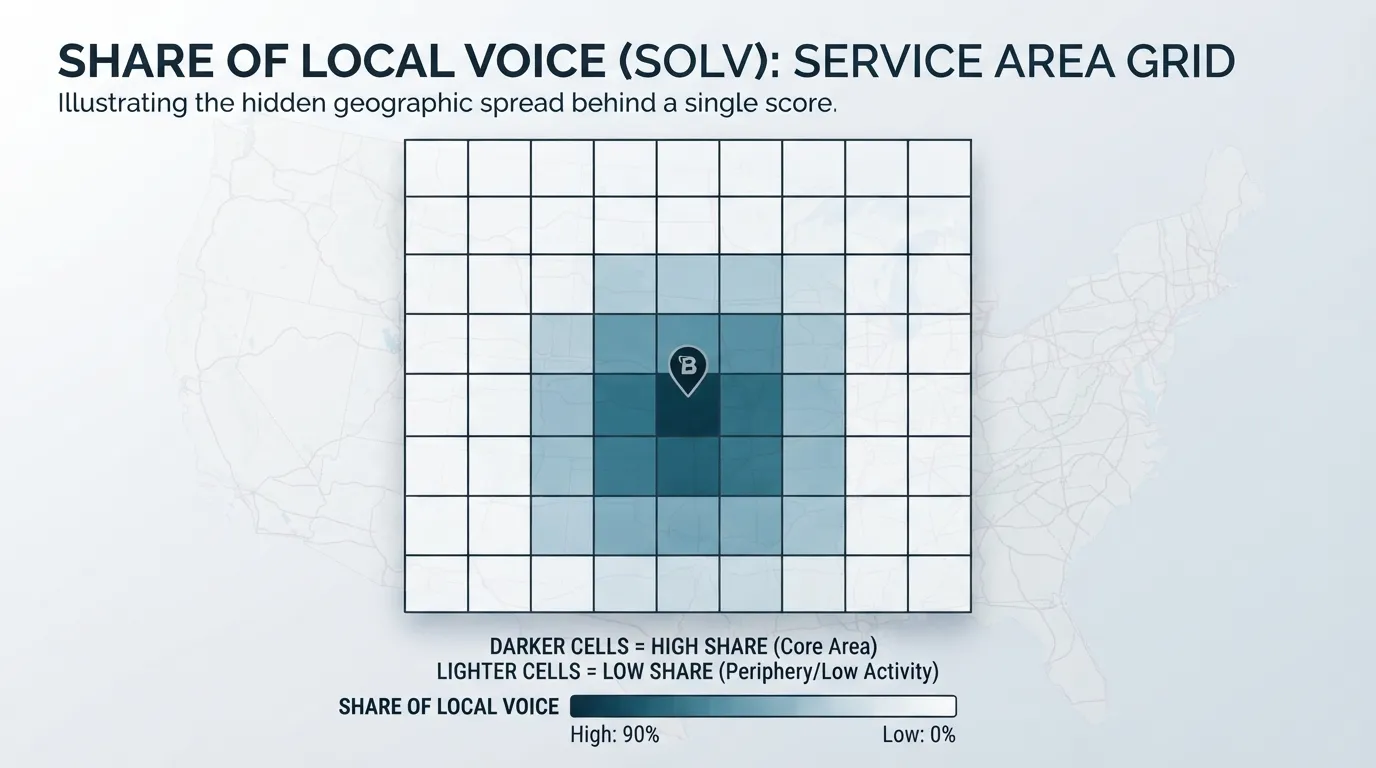
In one clinic example, the overall Share of Local Voice was 34%, which reads as middling. An exact-GPS grid showed above 70% within two kilometres and below 10% across parts of the northern service area. To check it yourself, compare cell scores on the same grid for the same keyword, and reproduce the grid on the next check.
Most setup failures trace back to the Google Business Profile. Every missing field weakens whatever a tool reports afterwards. A 2025 BrightLocal survey of 778 US small business owners found only 35% had a profile set up at all.
Inconsistent NAP Information Across Listings
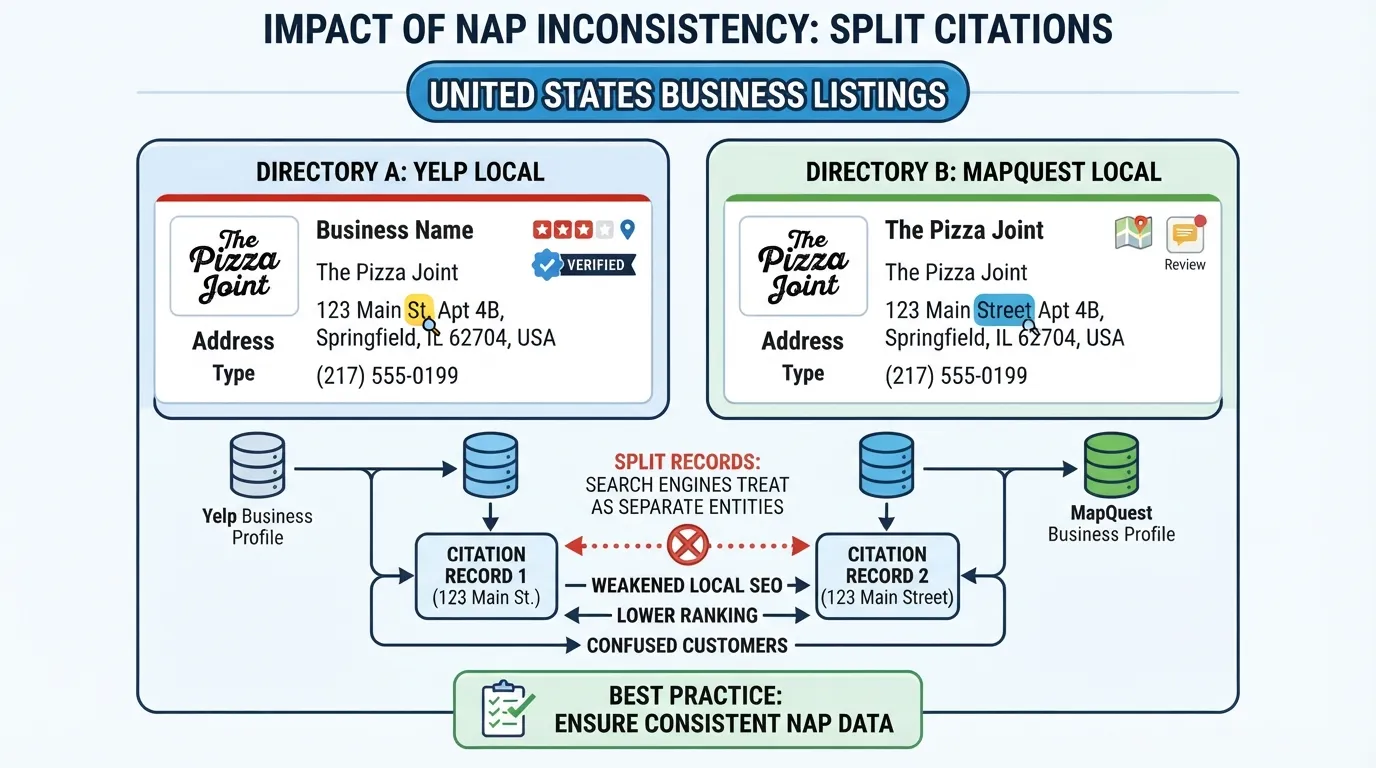
Your name, address and phone number must match exactly across every directory, website and map listing. Local Ranking’s guide to local SEO mistakes treats 100% consistency as the baseline, and it is one of the most common mistakes small businesses make. Variants such as “St.” versus “Street” can split your citation record and make a tool report conflicting data for the same business.
Skipping Local Citations and Directory Listings
Citations are mentions of your business on other sites. Whitespark’s Local Citation Finder surfaces opportunities, but only if you act on the list. Start with the major platforms your customers use, and check the review sites and industry directories that service providers in your area rely on.
Ignoring Local Structured Data Markup
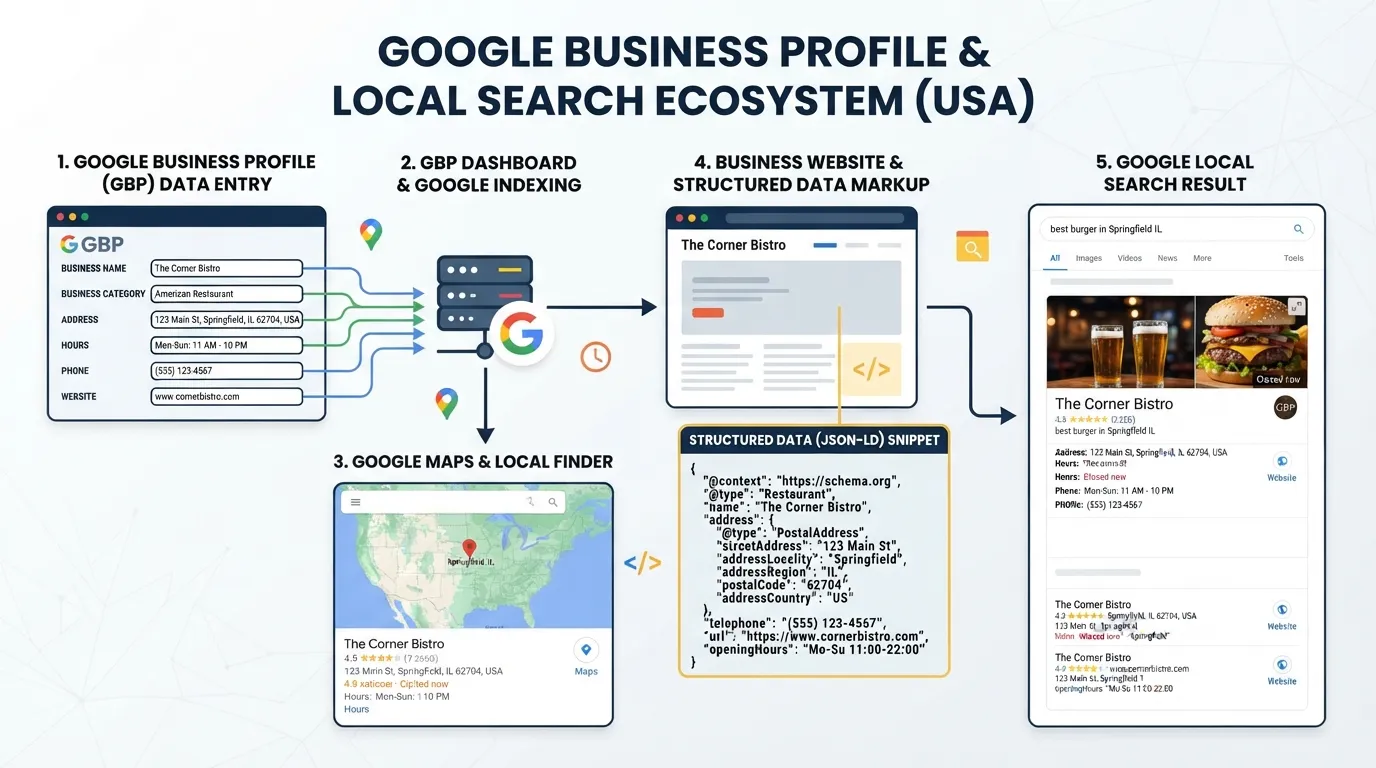
Structured data tells search engines your business type, hours and location in a machine-readable format. It supports eligibility for rich results but does not guarantee ranking. Add it to your location pages as a first step, and keep it consistent with your optimizing for local efforts elsewhere.
The Measure, Map, Match Audit
Most businesses read a single figure from their tool and treat it as the verdict on local visibility. The fix is an audit in three steps: measure what the tool reports, map where customers search, and match each gap to one fix. Business owners who run this audit against their local rankings get a clearer picture than any single score provides, and they avoid the common local SEO mistakes that small business teams make when they rely on one number.
Measure: Read the Metric, Not the Headline
Reading average rankings as local visibility. Misuse: treating an average position as your standing across the whole area. Correct setup: report Share of Local Voice, the share of grid points where your business appears in local search results. A score of 34% means you appear at about one of every three points.
Tracking from one point instead of a grid. Misuse: checking from a single search location, which measures one neighbourhood. Correct setup: use a grid of coordinates or ZIP codes and keep spacing consistent, especially for small business teams serving multiple locations. A 9×9 grid over a 10-kilometre span places points about 1.25 kilometres apart.
Trusting Maps position without the organic view. Misuse: reading a strong Maps position as proof of visibility everywhere. Correct setup: check Maps and organic search results separately on the same grid, since an organic #4 can mask a Maps slide to outside the top 20. Search engines rank these two surfaces differently, so each needs its own check.
Map: Plot Where Customers Search
Overlooking Share of Local Voice by area. Misuse: stopping at the overall score. Correct setup: map each grid point’s score. Act on a gap once adjacent cells sit well below your overall score for two consecutive checks.
Reviewing profile completeness after the tool. Misuse: buying a tool before the profile is finished. Correct setup: complete every Google Business Profile field first, starting with business name, primary category, address, hours and phone number, since each one changes what the tool reports.
Working out which tool tier you need. Misuse: buying the top plan by default. Correct setup: a single location with stable demand usually needs visibility and auditing only. BrightLocal’s one-location Grow plan is $65 monthly, with annual billing reducing the effective cost. Add a grid tool once you serve more than one area.
Match: Assign One Fix Per Gap
Inconsistent NAP data. Misuse: letting “St.” and “Street” coexist across listings. Correct setup: use one exact Name, Address and Phone Number everywhere.
Ignoring review responses. Misuse: leaving reviews unanswered or replying with a template. Correct setup: reply to every new review within a few days, and answer negative ones with a specific, calm response.
Using broad keywords. Misuse: chasing terms like “plumber”. Correct setup: target local keywords that name the service and place, such as “emergency plumber in Austin”, and confirm which phrases produce map impressions. Avoid vague phrasing that draws traffic from service providers outside your area.
Ignoring mobile experience. Misuse: trusting desktop reports alone. Correct setup: over 64% of Google searches happen on mobile devices, so test location pages on a phone for a tap-to-call button, a readable address and a fast load. Your site content should load quickly for potential customers on mobile.
Writing thin location pages. Misuse: near-duplicate pages with only the town name swapped. Correct setup: give each location its own address, opening hours, staff and a paragraph of genuinely local context.
Neglecting Google Posts. Misuse: a static profile. Correct setup: publish a short offer or update each week, and treat it like one of your blog posts that keeps the profile current.
Conclusion: Use Tools to Test Decisions, Not Replace Them
Local SEO tools show numbers, but treating them as the answer causes harm. Test each decision on the same grid.
No one can guarantee a #1 ranking, and changes can take months.
Run the Measure, Map, Match audit monthly, with one fix and one owner per gap.
Frequently Asked Questions
Which local SEO tool mistake costs businesses the most?
Reading a single average ranking as proof of local visibility is the costliest of the local SEO tool mistakes. In the Local Falcon 9×9 exact-GPS grid test, a clinic’s overall Share of Local Voice was 34%, hiding a core above 70% and a northern service area below 10%. Map the grid before deciding where to spend.
How often should I check my local rankings?
Check monthly for trends, and after any listing, review or content change. Google says changes can take hours to several months to appear. Use the same geographic grid each time.
Do I need a paid local SEO tool, or is free enough?
Free tools cover basic profile checks for one location. Paid tiers suit grid tracking, citation monitoring or multi-location reporting. Pricing changes often, so confirm current plans before buying.
Why does my Google Business Profile not show up in my area?
Usually the profile is incomplete, the categories do not match your target searches, or the searcher sits outside your signalled area. Check verification, the primary category, and that your name, address and phone number match your other listings exactly.
How long do local SEO changes take to appear in Search?
Google states that no one can guarantee a #1 ranking. Judge each fix against the same grid over at least one full month.
Disclosure: digitalmarketingtools.ai is sponsored by Digimetrics.ai. Sponsored Highlights are clearly labelled advertising. Our reviews, comparisons and guides are written to be useful and fair regardless of who sponsors the site. Read the full disclosure.


