
7 Best GEO Tools for Freelancers in 2026: Pricing, Clients & Value
You’re a freelance SEO specialist managing three client websites. One client wants to know why ChatGPT recommends a competitor, another wants to appear in Google AI Overviews, and the third is asking whether generative engine optimization (GEO) is worth including in their monthly marketing package.
You could purchase another SEO platform, sign up for a dedicated AI visibility tracker, or manually check a few AI-generated answers. The problem is that each approach comes with different costs, capabilities, and reporting limitations.
For freelancers, those differences matter more than they might for larger marketing teams. A $99 monthly subscription can consume a meaningful portion of a small client’s retainer, while a cheaper tool may lack the projects, prompt capacity, or exports needed to manage several accounts.
The best GEO tools for freelancers in 2026 is the one that supports the work you actually sell without adding unnecessary subscription costs or reporting complexity.
Some tools focus on monitoring brand mentions and citations across ChatGPT, Perplexity, and other AI experiences. Others combine GEO with keyword research, technical SEO, content optimisation, or reporting. Free tools provide useful first-party data, although they don’t replace cross-platform monitoring.
This guide compares seven GEO tools for freelancers, including free options, affordable subscriptions, and platforms suitable for managing multiple clients. We’ll examine their documented capabilities, pricing, limitations, and how to choose a setup that makes financial sense.
Editorial disclosure: DigitalMarketingTools.ai is sponsored by Digimetrics.ai, which is developed by MediaOne. Digimetrics is included alongside competing products based on publicly documented features and pricing. This article provides a research-based comparison rather than claiming that DMT conducted an independent head-to-head accuracy benchmark.
Key Takeaways
- Google Search Console is a free starting point for freelancers who need first-party visibility data for supported Google AI search experiences.
- Bing Webmaster Tools provides free AI citation reporting, making it useful for identifying client pages referenced within supported Microsoft AI answers.
- Otterly.AI starts at $29 per month and suits freelancers monitoring a focused set of customer questions, although its Lite plan includes only 15 tracked prompts.
- Digimetrics starts at $39 per month, combining GEO with keyword research, technical SEO, and content analysis using a shared credit allowance.
- Ahrefs Brand Radar offers custom-prompt tracking from $50 per month, making it worth examining for freelancers who already use Ahrefs or need configurable monitoring.
- Rankscale Pro starts at $99 per month and offers flexible, credit-based monitoring, although actual capacity depends on the AI engines selected.
- SE Visible starts at $99 per month, with 200 prompts and three projects, but freelancers must verify its supported countries and languages.
- Client capacity, report quality, and monitoring costs matter more than headline pricing. A freelancer should be able to explain the findings and justify the cost before adding GEO software to a recurring service.
What Should Freelancers Look for in a GEO Tool?
Generative Engine Optimization tools help marketers understand how brands, websites, and content appear within AI-generated answers.
They can monitor brand mentions, source citations, competing businesses, and questions that produce relevant responses. Some also help investigate content and technical issues that may influence how a website is discovered.
However, a freelancer’s requirements depend heavily on the services being delivered.
A freelance content writer may mainly need source research and page-level analysis. An SEO consultant might want first-party citation evidence, while someone selling recurring GEO services may need several client projects, daily monitoring, and exportable reports.
For a broader explanation of the technology, see our complete guide to GEO tools.
Freelancers Have Different GEO Workflows
| Freelancer Type | Main GEO Requirement | Useful Capabilities |
|---|---|---|
| SEO content writer | Investigate content gaps and citation opportunities | Source research, content analysis, technical checks |
| Freelance SEO consultant | Identify problems and opportunities across client websites | First-party reporting, audits, competitor research |
| GEO specialist | Monitor brands and questions across AI platforms | Prompt tracking, citations, response history |
| Local SEO freelancer | Investigate location-specific visibility | Country and language support, local information accuracy |
| Freelancer managing several clients | Deliver recurring GEO reports | Multiple projects, exports, client segmentation |
| Solo business owner | Improve visibility for their own services | Affordable monitoring and basic analytics |
One tool may support several of these workflows, but that doesn’t mean every freelancer needs a full-featured subscription.
Features That Matter Most
When comparing platforms, prioritise the features that affect client delivery.
Project capacity determines how many businesses can be organised separately. Prompt allowances influence how many questions can be monitored, while AI platform coverage determines which systems are actually included.
Citation and brand mention evidence matters because clients need more than an unexplained visibility score. Finally, reporting and exports determine whether the information can be presented clearly without extensive manual work.
A platform with more tools isn’t necessarily better if most remain unused.
7 Best GEO Tools for Freelancers in 2026: Quick Comparison
The following options cover free first-party reporting, affordable monitoring, integrated marketing tools, and more advanced multi-client workflows.
Prices and plan details reflect publicly available vendor documentation reviewed in October 2026.
| GEO Tool | Starting Price | Best Freelancer Use | Main Limitation |
|---|---|---|---|
| 1. Google Search Console | Free | Google AI search performance reporting | Only verified properties and Google data |
| 2. Bing Webmaster Tools | Free | AI citation and topic research | Microsoft-supported AI experiences |
| 3. Otterly.AI | $29/month | Affordable prompt-based monitoring | 15 prompts on Lite |
| 4. Digimetrics | $39/month | Integrated SEO, GEO, and content work | Credits shared across tools |
| 5. Ahrefs Brand Radar | $50/month for Custom Prompts | Configurable AI visibility research | Check-based billing and add-ons |
| 6. Rankscale | $99/month for Pro monitoring | Flexible monitoring schedules | Engine-dependent credit consumption |
| 7. SE Visible | $99/month | Multi-client brand and competitor reporting | Three projects on Basic; limited markets |
All paid prices are in USD. Plan allowances are not directly comparable: a project, a tracked prompt, a credit, and an AI response are different billing units. The numbered list groups tools by freelancer use case, not an experimentally verified accuracy ranking.
1. Google Search Console: Best Free GEO Tool for Freelance SEO Consultants
Price: Free
Best for: Freelancers managing client websites and reporting on Google AI search performance.
Google Search Console is an important starting point because its data comes directly from Google.
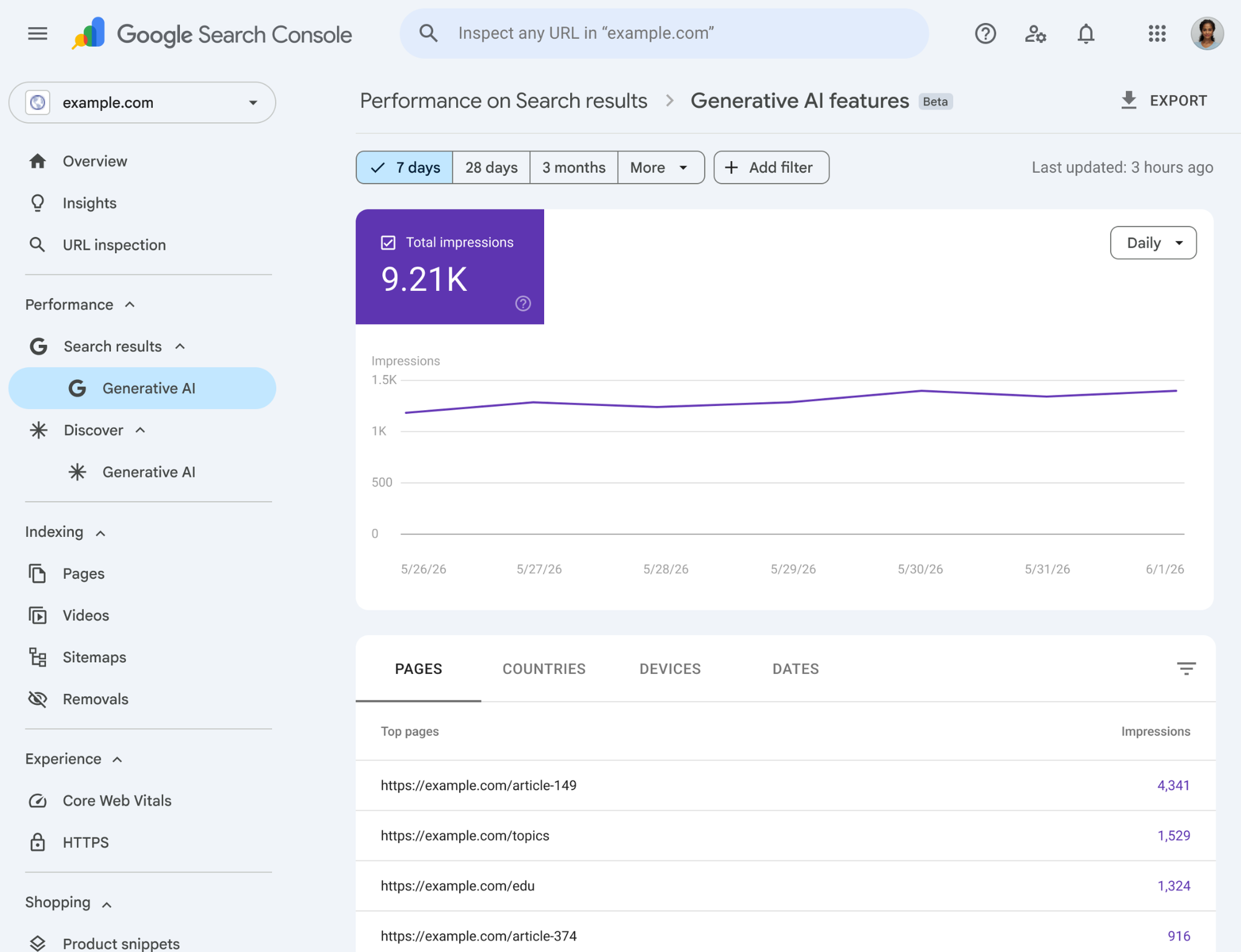
In June 2026, Google introduced a dedicated generative-AI performance report. The rollout expanded worldwide by August 31, giving eligible verified website owners access to impression reporting for Google AI Overviews and AI Mode.
This means freelancers can investigate part of a client’s generative-AI search visibility without immediately paying for a specialised GEO platform.
What Can Freelancers Do With It?
The Generative AI performance report shows impressions associated with website links appearing in supported generative-AI Search experiences.
You can examine which pages receive impressions, how visibility changes over time, and the countries or devices associated with the reported activity.
For example, a freelance SEO specialist could identify that a client’s comparison article receives generative-AI impressions while its main product page receives relatively few.
That observation might justify examining whether the product page addresses the relevant customer questions clearly.
However, the data doesn’t prove that changing the page will increase future AI visibility.
Why It’s Useful for Freelancers
Search Console provides first-party evidence that can strengthen an existing SEO reporting service.
Instead of presenting isolated screenshots from ChatGPT, freelancers can combine established search performance reporting with Google’s dedicated generative-AI impressions.
This can be particularly useful when clients want to understand how their existing SEO investment relates to newer AI search experiences.
Limitations
Search Console doesn’t provide a complete inventory of every brand mention appearing in ChatGPT, Gemini, Perplexity, or other AI assistants.
It also doesn’t expose every AI-generated answer or all competing brands referenced within them.
The generative-AI report may not appear for websites with insufficient eligible impressions.
Verdict: Start here if you already manage client SEO. It provides useful first-party evidence without adding another subscription.
2. Bing Webmaster Tools: Best Free GEO Tool for AI Citation Research
Price: Free
Best for: Freelance SEO consultants, content writers, and publishers investigating cited webpages.
Bing Webmaster Tools provides another useful source of first-party GEO-related data.
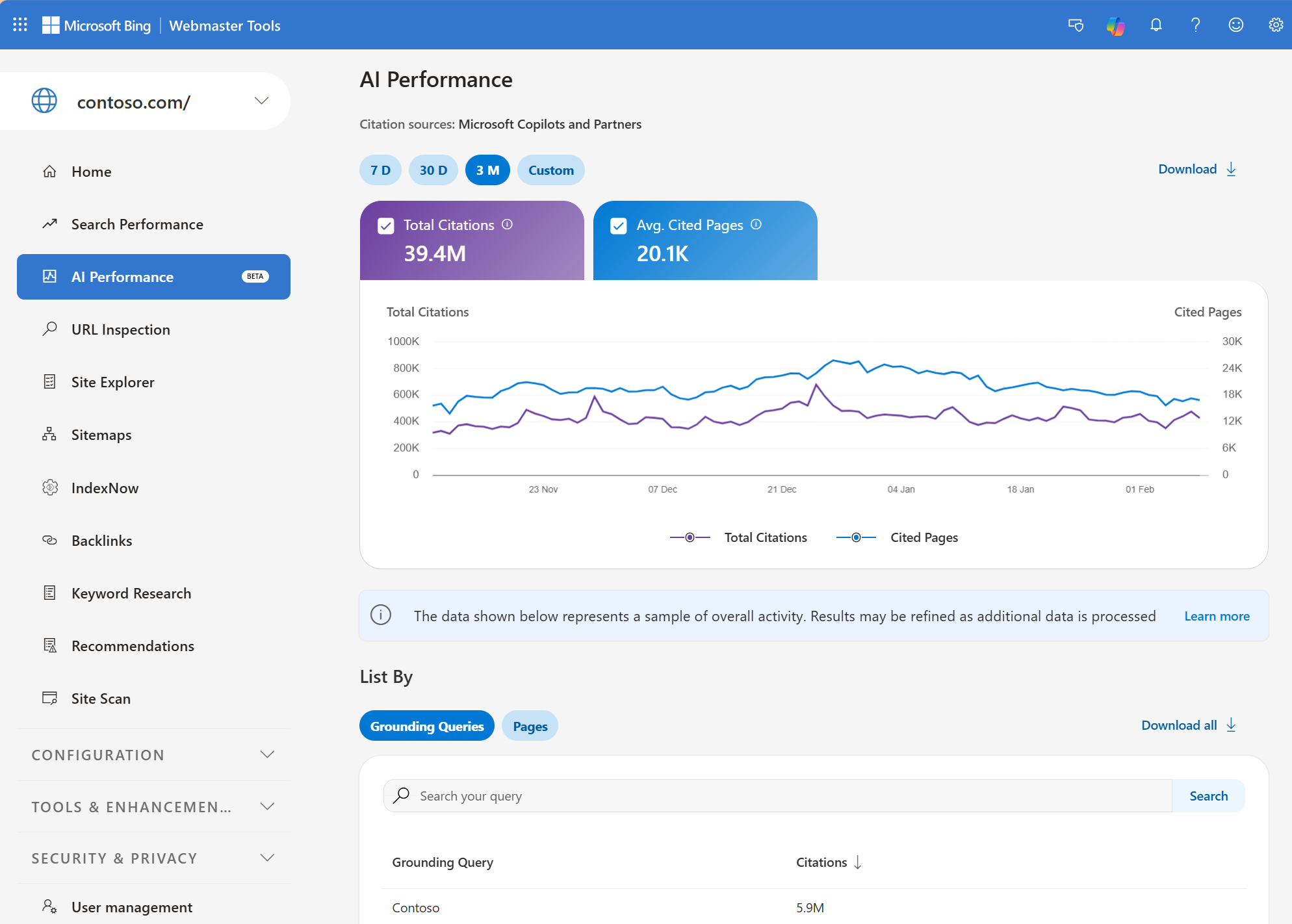
Microsoft introduced AI Performance reporting in February 2026 to show how verified websites appear as sources within supported AI experiences.
The reporting covers Microsoft Copilot, AI-generated summaries in Bing, and selected partner integrations.
Unlike Google’s impression-focused report, Bing AI Performance concentrates on citation activity.
What Can Freelancers Measure?
The report includes total citations, average cited pages, page-level citation activity, grounding queries, and historical trends.
For example, a freelance content strategist could investigate whether a client’s technical tutorials or detailed comparison pages appear as cited sources.
Grounding queries may reveal topics associated with those citations, although they aren’t necessarily the exact questions entered by users.
Microsoft also introduced Topics Portfolio beta in October 2026, grouping related grounding queries and identifying potential opportunities within broader subject areas.
That can support editorial planning when a client wants to invest in content relevant to AI-assisted discovery.
Why It’s Useful for Freelancers
Bing’s reporting gives freelancers a way to discuss citations using actual platform data rather than relying entirely on a third-party visibility estimate.
A freelancer could combine cited-page information with a content audit to identify areas worth reviewing.
For example, a page receiving citations for a specific technical topic may reveal an opportunity to update related content or improve an existing resource.
However, citation counts don’t directly measure visitor traffic, revenue, or the quality of a webpage.
Limitations
The data is aggregated and includes sampling limitations.
Grounding queries describe retrieval-related phrases rather than a complete log of real user prompts.
Bing’s reporting also doesn’t replace monitoring ChatGPT, Gemini, or other independently operated AI experiences.
Verdict: A useful free companion to Search Console, especially for freelancers offering content audits and citation research.
3. Otterly.AI: Best Affordable GEO Monitoring Tool for Solo Freelancers
Starting price: $29/month
Free trial: Seven days, no credit card required
Otterly.AI is a dedicated AI search monitoring platform focused on brand mentions, citations, competitors, and recurring prompt tracking.
Its Lite plan is designed for solo marketers and small teams.
This makes Otterly a relevant option for freelancers who want to introduce GEO reporting without purchasing a comprehensive SEO platform.
What Do You Get for $29?
The Lite plan includes:
- 15 tracked search prompts.
- Daily monitoring.
- ChatGPT, Google AI Overviews, Perplexity, and Microsoft Copilot.
- Brand visibility and sentiment analysis.
- Citation tracking and source analysis.
- One workspace with unlimited team members.
Additional engines such as Google AI Mode, Gemini, and Claude are paid add-ons.
Otterly’s Standard plan costs $189 per month and increases the prompt allowance to 100, along with additional workspace and reporting capabilities.
Example Freelancer Workflow
Imagine a freelance SEO consultant working with a single SaaS client.
The consultant identifies fifteen commercial questions related to the client’s main product category, such as alternatives, pricing comparisons, and integration requirements.
Otterly can monitor those questions and record which brands appear in the generated answers.
The freelancer can then investigate why competitors are mentioned, which webpages are cited, and whether the client’s product information accurately addresses those questions.
This provides material for a recurring GEO report without requiring an extensive enterprise setup.
What Are the Limitations?
Fifteen prompts can become restrictive once a freelancer needs to monitor multiple clients.
The Lite plan’s single-workspace limit also deserves attention. Unlimited brands and team members don’t automatically mean it provides the same client separation and workflow capacity as higher plans.
Freelancers should verify how individual client data can be organised and shared before using one workspace for unrelated clients.
Additional AI engines can also increase the monthly subscription cost.
Verdict: A practical starting point for freelancers offering GEO monitoring to one client or maintaining a small collection of important prompts.
4. Digimetrics: Best for Freelancers Who Need SEO and GEO in One Workspace
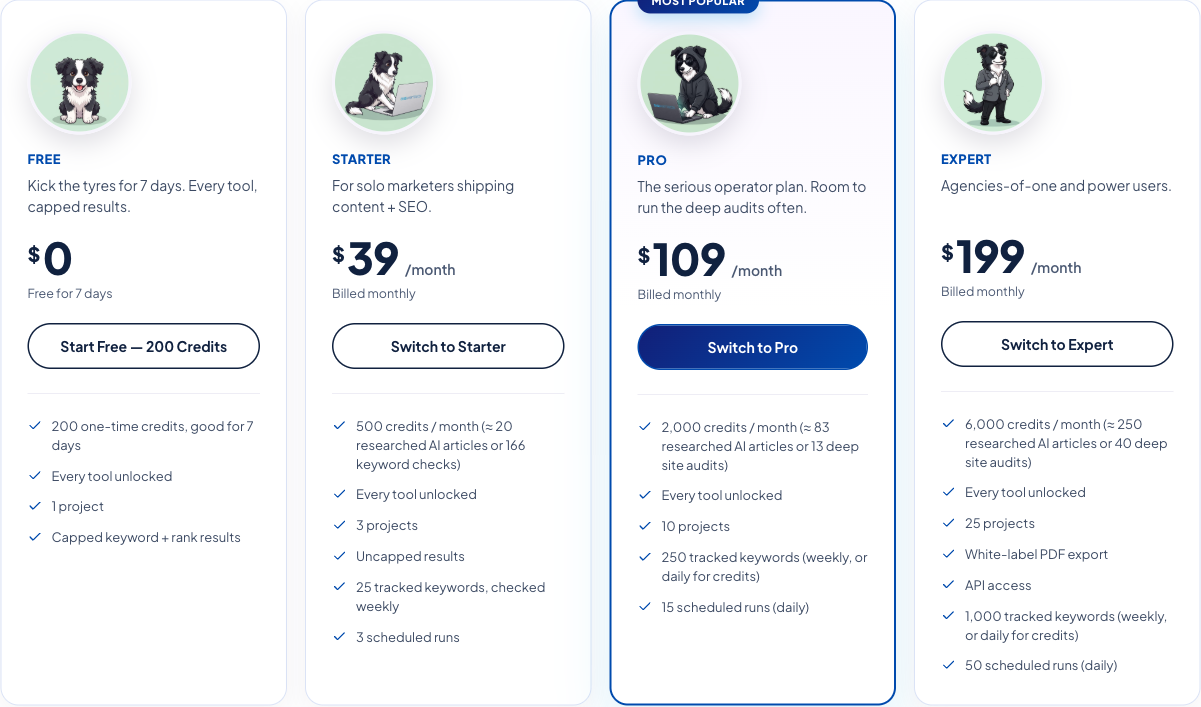
Starting price: $39/month
Free trial: Seven days with 200 credits; no credit card required
Digimetrics combines SEO analysis, AI visibility monitoring, technical auditing, content optimisation, and other digital marketing functions.
Instead of focusing exclusively on GEO reporting, the platform provides a wider toolkit for freelancers managing several parts of a client’s digital marketing strategy.
Its publicly documented GEO functions include AI Mentions Tracker, AI Discovery Audit, GEO On-Page Optimisation, and GEO+SEO Forensic Audit.
Related capabilities include keyword research, site health checks, content analysis, and marketing reporting.
What Do You Get for the Price?
| Plan | Monthly Price | Credits | Projects |
|---|---|---|---|
| Starter | $39 | 500 | 3 |
| Pro | $109 | 2,000 | 10 |
| Expert | $199 | 6,000 | 25 |
The platform advertises access to its tool collection across the plans, with different allowances for credits, projects, scheduled runs, exports, and monitoring.
Starter includes 25 tracked keywords and three scheduled runs. Pro expands those limits, while Expert adds white-label PDF exports and API access.
The seven-day trial provides 200 introductory credits and access to the available tools, subject to result restrictions.
Example Freelancer Workflow
Consider a freelance SEO content writer who also provides website optimisation services.
A client wants to improve visibility around a group of industry topics.
The freelancer could investigate brand mentions through Digimetrics’ GEO-related tools, evaluate relevant pages using content analysis, and review technical or on-page issues within the same workspace.
This could reduce the need to move between separate SEO, content, and GEO applications.
However, the usefulness of the recommendations depends on the evidence behind them. A content suggestion should be checked against the page, user intent, and actual search results before implementation.
What Makes It Relevant to Freelancers?
Digimetrics’ Starter plan includes three projects, which may be attractive to freelancers managing a small client portfolio.
Its combined functionality may also make more sense for someone selling SEO audits, content improvements, and GEO research together.
For example, a freelancer might use the same platform to prepare an initial website audit and identify opportunities for a larger content engagement.
Limitations
Digimetrics uses a shared credit system across its tools.
Five hundred credits don’t mean five hundred AI responses, five hundred tracked prompts, or five hundred completed audits. Different actions consume different credit amounts.
Before selecting a plan, freelancers should calculate the expected cost of the actual tools they intend to run.
The advertised keyword tracking allowance should also not be confused with an equivalent allowance for monitoring AI-generated prompts.
Freelancers requiring extensive response histories, large prompt datasets, or highly customised GEO reports should verify that Digimetrics supports those needs before committing.
Verdict: Worth evaluating for freelancers who want GEO alongside content research, technical SEO, and wider marketing services rather than buying a separate application for each task.
Sponsored product disclosure: DigitalMarketingTools.ai is sponsored by Digimetrics.ai, which is developed by MediaOne. This recommendation is based on documented features and pricing, not independent benchmark results.
5. Ahrefs Brand Radar: Best for Freelancers Already Using Ahrefs
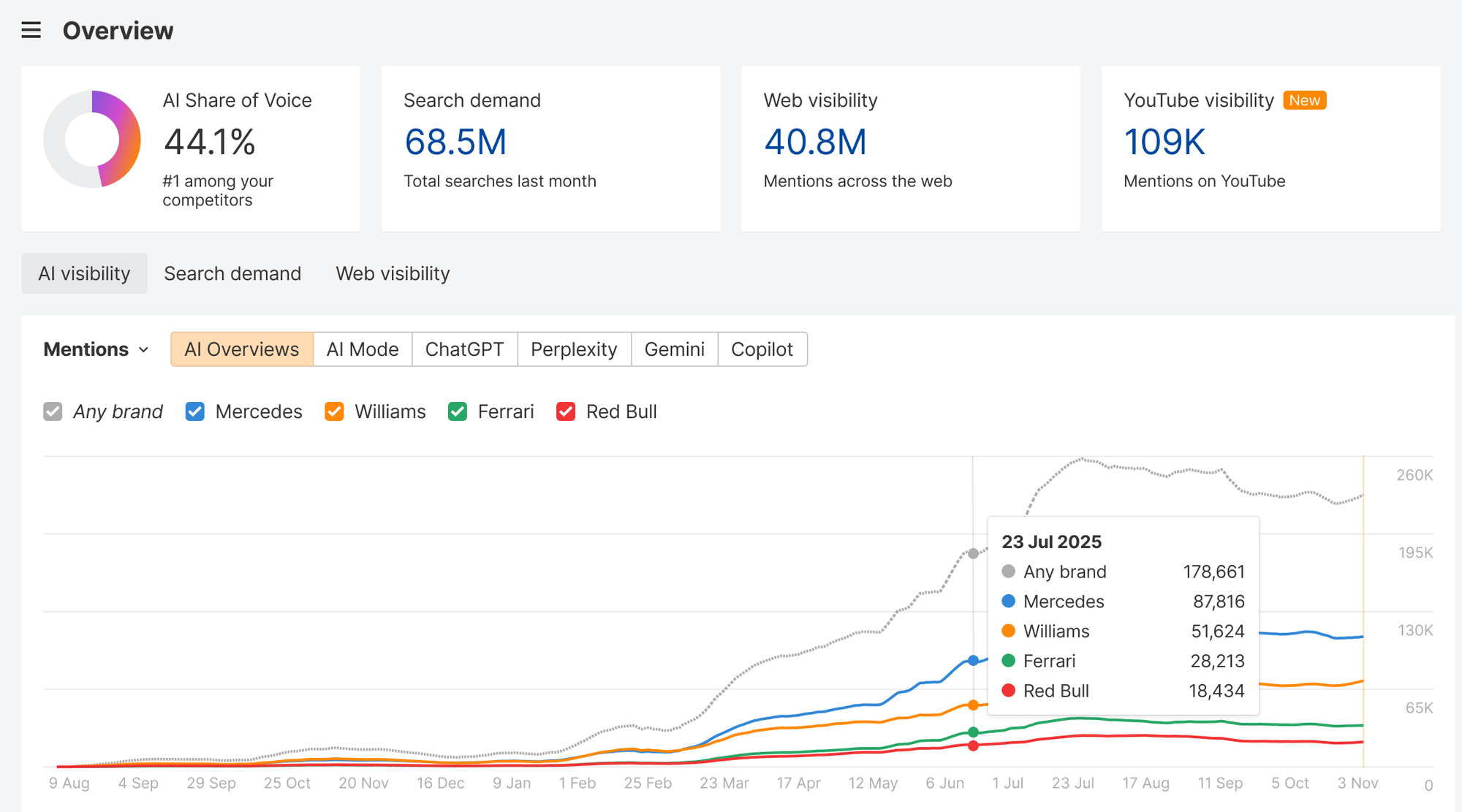
Starting price: Custom Prompts from $50/month
Ahrefs Brand Radar supports two different approaches to AI visibility research.
The first is Custom Prompts, which lets users monitor selected questions.
The second is its AI Visibility Index, which provides access to a much larger dataset of collected AI responses.
This distinction matters because freelancers often have narrowly defined client questions rather than the budget or need for broad market intelligence.
What Do You Get for the Price?
Ahrefs advertises Custom Prompts packages beginning at $50 per month.
Its Basic package includes 2,500 checks, while Growth and Scale provide higher allowances.
A check generally represents one prompt execution on one AI platform in one location, although certain engines have different credit requirements.
The wider AI Visibility Index starts at $199 per month for a single platform, with different packages for broader access.
Existing paid Ahrefs subscriptions also include limited Custom Prompts capacity.
For example, Lite includes five daily prompts, while Standard and Advanced provide larger allowances.
Example Freelancer Workflow
Suppose a freelance SEO consultant already uses Ahrefs for keyword research, backlink analysis, and competitor comparisons.
A client wants to understand why competitors are frequently mentioned in AI-generated answers about a particular software category.
The freelancer could monitor specific questions using Custom Prompts, investigate relevant citations, and then use existing SEO research to review competing content.
This may be more convenient than adopting a completely separate GEO reporting system.
When Is Ahrefs Worth Paying For?
Ahrefs makes the most sense when the freelancer already uses its SEO ecosystem or specifically needs configurable prompt monitoring and competitive source research.
Its Custom Prompts model can be cost-effective for carefully selected questions.
However, freelancers shouldn’t assume that the $50 package includes the broader AI Visibility Index.
Those products have different capabilities and commercial arrangements.
Limitations
Monitoring costs depend on the number of prompts, AI platforms, locations, and executions.
Freelancers handling several markets can consume checks faster than expected.
The AI Visibility Index also uses modelled visibility and estimated impressions. These aren’t direct records of how many real users encountered a brand in private AI interactions.
Verdict: A relevant option for freelancers already using Ahrefs or selling competitor research that combines conventional SEO with AI search visibility.
6. Rankscale: Best for Freelancers Who Want Flexible Monitoring
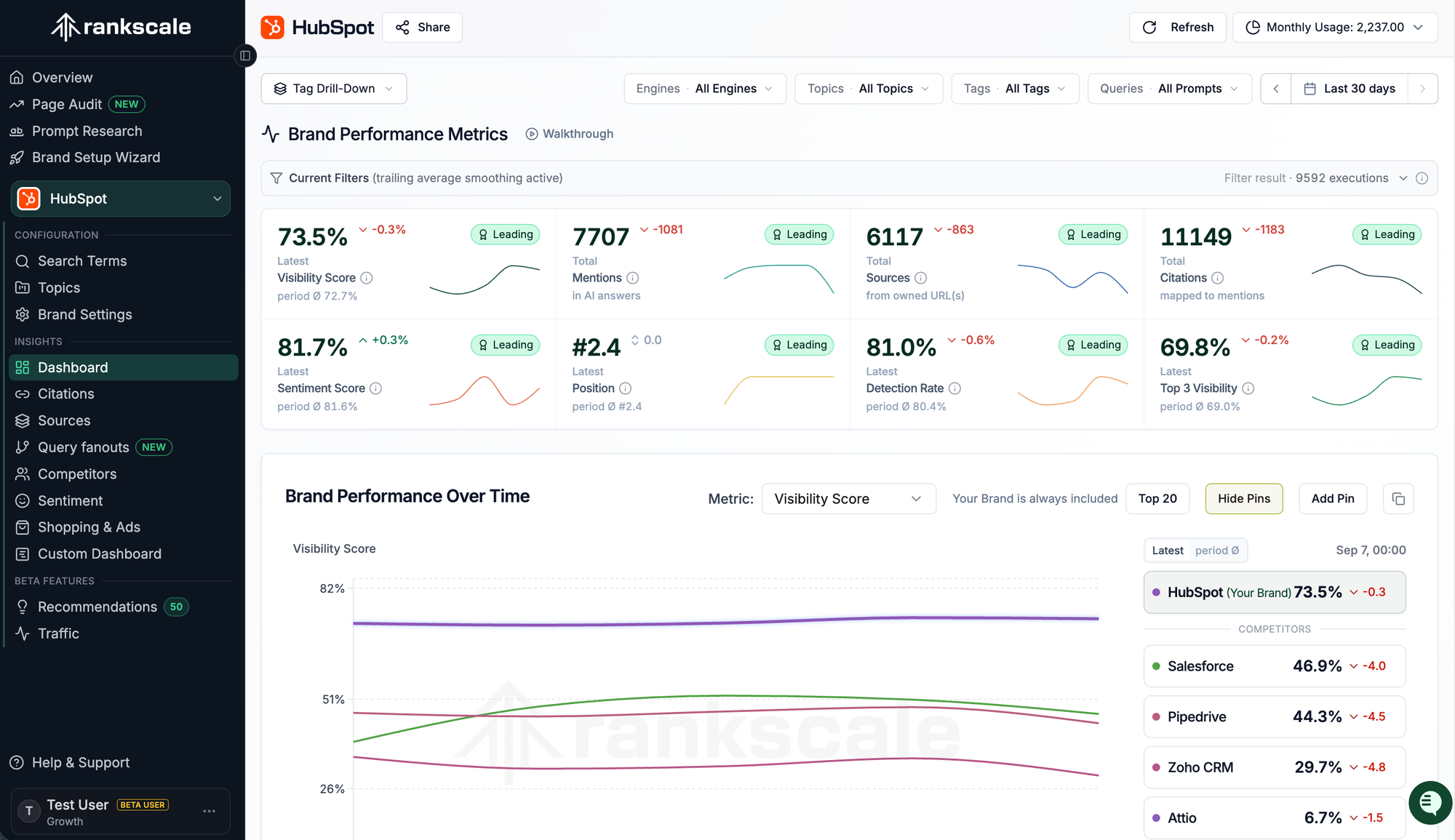
Starting point for recurring monitoring: Pro at $99/month
Free trial: Seven-day Pro trial
Rankscale provides credit-based monitoring across supported AI engines.
Its approach is more configurable than a simple subscription with a fixed number of tracked questions.
Freelancers can select relevant prompts, AI platforms, geographic regions, and monitoring frequency, then calculate the credits required.
This flexibility can help when different client questions need different levels of attention.
What Do You Get for $99?
Rankscale Pro includes 1,200 monthly monitoring credits.
The platform advertises capacity for up to approximately 4,800 collected answers under configurations where each response consumes a quarter of a credit.
The plan also includes ten brand dashboard slots, fifty page audits, flexible monitoring schedules, and reporting features.
Rankscale supports several AI engines, with different credit requirements depending on the selected platform.
Its scheduling options include hourly, daily, weekly, and monthly monitoring.
Example Freelancer Workflow
Imagine a freelancer managing AI visibility for two software clients.
Each client has a collection of commercial questions that deserve frequent tracking, along with broader informational questions that change less frequently.
Rankscale’s scheduling flexibility may allow the freelancer to monitor high-priority prompts daily and lower-priority topics weekly.
That can be more efficient than collecting every response at the same frequency.
However, the freelancer should calculate credit consumption before assuming a particular configuration is affordable.
What Are the Limitations?
Rankscale also advertises a lower-cost Essentials tier, but it is billed annually and doesn’t include monthly monitoring credits.
That means the advertised low starting price shouldn’t be compared directly with a product that includes an active recurring monitoring allowance.
The number of collected responses available under Pro also depends on the chosen AI engines and settings.
Freelancers should use Rankscale’s pricing calculator to estimate actual monthly usage.
Verdict: A useful option for freelancers comfortable managing credits and monitoring frequency, particularly when client requirements vary.
7. SE Visible: Best for Freelancers Managing Multiple GEO Clients
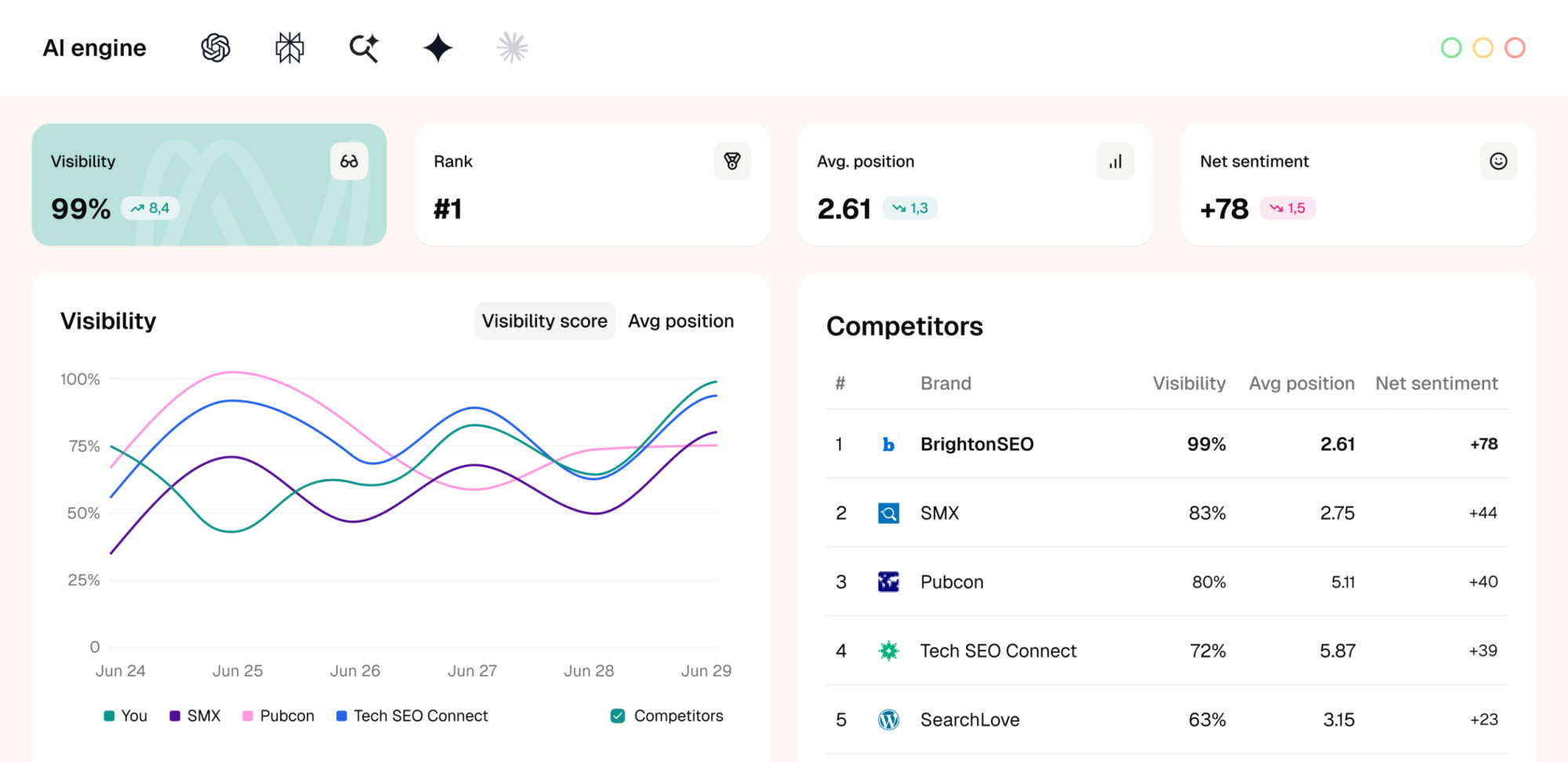
Starting price: $99/month
Free trial: Ten days
SE Visible is a dedicated AI visibility platform developed by the SE Ranking team.
It focuses on brand mentions, competitor comparisons, source analysis, sentiment, and historical monitoring across supported AI experiences.
Its project-based organisation makes it relevant to freelancers who manage multiple brands or sell recurring GEO reporting.
What Do You Get for $99?
SE Visible’s Basic plan includes:
- 200 monitored prompts.
- Three projects.
- Approximately 30,000 analysed AI answers per month under the advertised collection configuration.
- ChatGPT, Gemini, Google AI Mode, Google AI Overviews, and Perplexity.
- Competitor and source reporting.
- CSV exports and collaboration features.
Core costs $189 per month and expands capacity to 450 prompts and five projects.
Higher plans provide additional monitoring and project allowances.
Example Freelancer Workflow
A freelance GEO specialist could use separate projects to organise three client brands.
Within each project, the freelancer might group prompts by product category, location, or commercial intent.
The recurring reporting could identify where each client is mentioned, which competitors appear, and which sources are cited.
The freelancer could then prepare a short monthly analysis explaining important changes and recommended investigations.
This may be more manageable than manually collecting responses for every client.
What Are the Limitations?
SE Visible currently advertises monitoring coverage for seven countries: the United States, United Kingdom, Canada, France, Germany, the Netherlands, and Spain.
Its available language configurations include English, French, German, Dutch, and Spanish.
This matters for freelancers serving clients in markets outside the supported locations.
For example, someone working primarily with businesses in the Philippines or Singapore should confirm whether the required geographic targeting is available.
The Basic plan’s three-project limit also means freelancers managing additional clients may need a higher subscription.
Verdict: Worth considering when multiple-client reporting is the priority and the client’s countries and languages are supported.
Which GEO Tool Should Freelancers Choose?
A useful choice depends on whether GEO is an occasional research task or a recurring service.
The following recommendations focus on the most common freelancer situations rather than declaring a universal winner.
| Freelancer Situation | Suggested Starting Point | Why |
|---|---|---|
| No paying GEO clients yet | Google Search Console + Bing Webmaster Tools | Free first-party reporting |
| SEO writer adding GEO research | Digimetrics trial + first-party tools | Content, technical, and GEO analysis |
| One client needing ongoing AI monitoring | Otterly.AI Lite | Focused prompt monitoring |
| Existing Ahrefs user | Ahrefs Custom Prompts | Works alongside established SEO research |
| Several clients needing flexible schedules | Rankscale | Credit-based monitoring |
| Up to three clients needing dedicated GEO reports | SE Visible Basic | Separate projects and broader prompt capacity |
| Small portfolio needing SEO and GEO together | Digimetrics Starter | Three projects and multiple marketing functions |
There are additional products worth considering if these seven don’t meet your requirements.
For example, Semrush’s AI Visibility Toolkit offers brand performance research and 25 custom prompts starting at $99 per month per domain when billed annually. Peec AI also provides brand-focused monitoring and separate agency pricing.
However, freelancers should be particularly careful with per-domain charges, additional client projects, and subscription commitments.
Our comparison of paid GEO tools covers broader commercial options and their limits.
How Much Should a Freelancer Spend on GEO Tools?
Freelancers don’t need to buy software simply because it has become popular.
The important question is whether the subscription supports a paid deliverable, improves an existing workflow, or reduces enough manual work to justify its cost.
A freelancer who occasionally writes SEO articles may only need free first-party reporting and selected manual checks.
A consultant offering recurring GEO visibility reports to multiple clients may have a stronger reason to invest in dedicated monitoring.
GEO Tool Budgets for Different Freelancer Stages
| Freelancer Stage | Illustrative Monthly Software Budget | Practical Approach |
|---|---|---|
| Exploring GEO | $0 | Use first-party reports and free checkers |
| First GEO client | $25–$50 | Start with a focused subscription |
| Two or three recurring clients | $50–$150 | Evaluate prompt, credit, and project limits |
| Established GEO specialist | $150–$300 | Prioritise reporting efficiency and sufficient capacity |
| Growing independent consultancy | $300+ | Evaluate larger client workloads and automation |
These are suggested budget ranges, not typical market spending figures.
The correct amount depends on the freelancer’s client fees, number of projects, and services.
Example: Comparing Software Cost Per Client
Suppose a freelancer manages three GEO clients and pays $99 per month for a monitoring platform.
If the subscription is used equally across those clients:
$99 ÷ 3 clients = $33 in software cost per client per month
This doesn’t include research time, report preparation, client communication, taxes, or other operating expenses.
Now suppose the freelancer charges each client $250 monthly for a recurring GEO monitoring and reporting service.
The hypothetical monthly figures would be:
| Item | Amount |
|---|---|
| Clients | 3 |
| Monthly fee per client | $250 |
| Total monthly revenue | $750 |
| GEO software subscription | $99 |
| Revenue remaining before labour and other costs | $651 |
This is an illustration of cost allocation, not an earnings claim.
The remaining amount isn’t profit. The freelancer still needs to account for the time spent reviewing AI responses, preparing reports, investigating sources, and delivering the service.
The Hidden Cost: Monitoring Volume
Suppose each client needs fifteen questions monitored across two AI experiences every day.
For three clients over a thirty-day month:
3 clients × 15 prompts × 2 platforms × 30 days = 2,700 response checks
Under a system charging one check per prompt-platform-location execution, this would require 2,700 checks before any additional markets or special engine rates.
That is more than the 2,500 checks included in Ahrefs’ $50 Basic Custom Prompts package.
At its published $0.02 overage rate, an additional 200 standard checks would add $4, making the illustrative monitoring charge $54 before any other fees.
However, this calculation cannot be used directly for another provider that bills by tracked prompts, project capacity, or shared credits.
Freelancers should always calculate usage under the actual provider’s pricing rules.
How Freelancers Can Offer GEO as a Client Service
GEO reporting can complement SEO audits, content strategy, technical optimisation, and competitive research.
However, freelancers should avoid selling it as a service that guarantees placement in ChatGPT or other AI-generated answers.
A more defensible approach is to provide research, monitoring, and recommendations grounded in observable evidence.
Service 1: One-Time GEO Visibility Audit
A one-time audit can help establish what is currently known about a client’s AI search presence.
The freelancer might review first-party reports, inspect selected AI-generated responses, identify competitor appearances, and investigate relevant source citations.
The deliverable should include the monitoring method, selected questions, findings, limitations, and recommended next steps.
A useful audit might reveal that the client’s product documentation is outdated or that competing resources address important customer questions more clearly.
However, it shouldn’t promise that updating those pages will guarantee future AI recommendations.
Service 2: Monthly AI Visibility Monitoring
Recurring GEO monitoring focuses on changes across a consistent set of questions and AI experiences.
The freelancer can report observed brand appearances, cited sources, competitor mentions, and unusual changes in the response set.
Where possible, the report should preserve the original questions, generated answers, collection dates, and platform information.
This helps clients distinguish between evidence and interpretation.
For a more detailed explanation, see our AI brand mention tracking guide.
Service 3: GEO Content and Technical Review
Some freelancers may find GEO more useful as an extension of content and technical SEO services.
For example, a content audit can examine whether existing pages provide clear explanations, accurate product information, useful comparisons, and appropriate supporting evidence.
Technical review can investigate indexing, crawlability, structured data, and other relevant website conditions.
These are worthwhile activities for customers and search visibility generally, even though individual changes don’t guarantee AI citations.
Service 4: Competitor and Source Research
Clients may want to understand which businesses AI assistants mention in relevant product comparisons.
A freelancer can examine the monitored responses, identify recurring competitors, and investigate which sources appear.
However, a competitor appearing more frequently in a particular dataset doesn’t prove that it receives more overall AI traffic or revenue.
The findings should be used to explore relevant market positioning and information gaps rather than invent a universal brand ranking.
A Practical GEO Workflow for Freelancers
The most effective workflow begins with a small set of questions and expands only when the results justify more monitoring.
Step 1: Define the Client’s Objective
Ask what the client actually wants to understand.
For example, an ecommerce company might care about product comparisons, while a local service provider may want to investigate location-specific recommendations.
These needs require different prompts and potentially different AI platforms.
Don’t begin by tracking generic questions simply because a tool suggests them.
Step 2: Establish the Baseline
Start with Search Console and Bing Webmaster Tools when the client can provide authorised access.
Then select relevant questions for monitoring.
An initial set of ten to twenty prompts may be sufficient for an exploratory project, although it isn’t a statistically representative sample of all AI searches.
Record the data collection method and the date.
Step 3: Separate Brand Mentions From Citations
A brand mention occurs when an AI-generated answer names a business or product.
A citation occurs when the answer references a webpage or domain.
The client can receive a brand mention without its website being cited, while its website can be cited without the company being recommended.
Our AI citation tracking guide explains the differences.
Keeping these measurements separate prevents confusing or misleading reports.
Step 4: Investigate the Evidence
Review relevant AI responses and their cited sources.
Check whether brand names were recognised correctly and whether the responses contain outdated information.
If a competitor repeatedly appears for an important question, investigate the relevant information before recommending changes.
A missing mention doesn’t necessarily mean a client’s website is technically broken or poorly optimised.
Step 5: Prepare a Clear Client Report
Your report doesn’t need twenty pages of screenshots.
It should explain what was monitored, what changed, which findings matter, and which actions are worth considering.
Avoid presenting proprietary visibility scores as if they represent the percentage of all AI users encountering the client’s business.
A client should be able to understand the result without knowing the technical details of the monitoring software.
Step 6: Review the Results Over Time
If the freelancer recommends content or technical changes, record what was implemented and when.
Then continue reviewing comparable data.
AI-generated answers can vary even without a website change, so a single new citation isn’t sufficient evidence that the work caused an improvement.
The goal is to identify persistent, relevant patterns and connect the monitoring with measurable business outcomes where possible.
What Should a Freelance GEO Report Include?
A useful report should be simple enough for clients to understand while retaining the evidence necessary for verification.
| Report Section | Information to Include |
|---|---|
| Monitoring scope | Platforms, countries, dates, and prompts checked |
| Brand visibility | Responses containing the client’s brand |
| Source visibility | Cited domains and relevant client URLs |
| Competitive context | Other brands appearing in the same response set |
| Important findings | Outdated information, missing topics, or recurring patterns |
| Recommended actions | Content or technical changes worth investigating |
| Completed work | Updates made during the reporting period |
| Next review | Questions and outcomes to monitor |
| Limitations | Sampling, attribution, and measurement constraints |
Example: Reporting Brand Mention Coverage
Suppose a freelancer monitors ten non-branded questions across two AI experiences.
The client appears in six of the twenty collected responses.
Mention coverage = (6 ÷ 20) × 100 = 30%
That means the client was named in 30% of those twenty observed answers.
It doesn’t mean 30% of all people using ChatGPT or another AI platform encountered the client’s brand.
This distinction should be explained clearly in client reports.
The example is hypothetical and isn’t a result from testing any GEO platform.
How to Choose the Right GEO Tool Before Subscribing
A free trial can help freelancers determine whether the software is suitable for recurring client work.
However, the trial should be used to test a realistic workflow rather than simply exploring the dashboard.
Before committing, evaluate the following areas.
| Criterion | What to Test |
|---|---|
| Client management | Can separate clients be organised appropriately? |
| Prompt capacity | Can the plan cover the required questions? |
| AI engine coverage | Are the client’s relevant platforms supported? |
| Geographic coverage | Can the tool monitor the client’s target markets? |
| Evidence quality | Can you inspect original AI responses and citations? |
| Reporting | Can you create understandable client deliverables? |
| Export options | Can you retain or share useful records? |
| Billing | What costs increase as additional clients are added? |
| Efficiency | How long does it take to produce a useful finding? |
Test With a Realistic Client Scenario
Instead of checking only your own business name, create a trial project based on a real or approved client scenario.
Use a small group of commercially relevant prompts, review the generated answers, and prepare a sample client report.
The trial should reveal whether the software supports the intended work without excessive manual corrections.
Check whether it detects brand names accurately and preserves the evidence behind citations and recommendations.
Evaluate Reporting Time
A tool may be affordable but still require several hours to produce a client-ready report.
Measure the time required to configure the project, review results, identify meaningful findings, and prepare the deliverable.
A platform with more expensive software may still be more economical if it substantially reduces repetitive work, although this should be verified rather than assumed.
Protect Client Data
Freelancers often work across unrelated businesses, some of which compete in the same market.
Always obtain permission before connecting client accounts or uploading sensitive information.
Use appropriate account permissions and avoid sharing private client data through public links or shared workspaces.
Before purchasing, check how the provider manages account separation, user access, exports, and data retention.
For ongoing client work, these operational details can be as important as the visibility metrics.
Common Mistakes Freelancers Make With GEO Tools
Buying Expensive Software Before Having a GEO Service
A freelancer doesn’t need enterprise GEO monitoring software simply to understand the category.
Start with free first-party tools and validate whether clients actually require recurring GEO analysis.
Add subscriptions when they support a defined deliverable or save measurable working time.
Tracking Too Many Generic Questions
A large prompt allowance doesn’t automatically produce useful research.
If most questions are irrelevant to the client’s customers, the resulting visibility score may not support meaningful business decisions.
Choose questions based on actual products, customer needs, and commercial research intent.
Promising Guaranteed ChatGPT Recommendations
No third-party GEO monitoring platform controls every response generated by ChatGPT, Gemini, Perplexity, or Google AI Mode.
Freelancers should not guarantee recommendations, citations, rankings, or specific revenue outcomes.
Offer evidence-based research, optimisation, and monitoring instead.
Confusing Visibility With Traffic
A brand can be mentioned in an AI answer without receiving a click.
Likewise, a cited webpage may receive no measurable referral traffic.
Where attribution is possible, website analytics can help investigate visits and conversions, but those measurements should remain separate from brand mentions.
Ignoring Subscription Scaling
A $29 subscription may be affordable for one client but insufficient for five.
Project limits, additional AI engines, export restrictions, and credits can all affect the actual cost.
Calculate the expected monitoring workload before selecting the plan.
Final Verdict: What Is the Best GEO Tool for Freelancers in 2026?
For freelancers just beginning with GEO, Google Search Console and Bing Webmaster Tools are the strongest free starting combination. They provide first-party reporting that can support existing SEO and content services without adding another subscription.
Otterly.AI is worth considering for focused, recurring AI visibility monitoring, particularly when a small set of prompts covers the client’s important questions.
Digimetrics may fit freelancers handling both SEO and GEO tasks, since it combines AI visibility analysis with content research, technical auditing, and other marketing tools.
Ahrefs Brand Radar is relevant when GEO research needs to connect with an existing Ahrefs workflow or configurable custom prompts.
Rankscale offers greater flexibility around engine selection and monitoring frequency, while SE Visible is a candidate for freelancers managing multiple clients who require dedicated AI visibility reporting.
However, the final choice should account for each client’s market, the monitoring requirements, software cost, and time needed to prepare useful reports.
A freelancer with one small client doesn’t need the same GEO setup as an independent consultant managing several recurring accounts.
The best GEO tool for freelancers isn’t necessarily the cheapest or most feature-rich. It’s the one that makes client research more reliable, reporting more efficient, and the service financially sustainable.
Frequently Asked Questions
What Is the Best GEO Tool for Freelancers in 2026?
The best GEO tool depends on the freelancer’s services and budget. Google Search Console and Bing Webmaster Tools offer useful free reporting. Otterly.AI provides focused AI visibility monitoring, Digimetrics combines GEO with broader SEO tools, and Ahrefs, Rankscale, and SE Visible support different research and client reporting needs.
Are There Free GEO Tools for Freelancers?
Yes. Google Search Console provides first-party generative-AI impression reporting, while Bing Webmaster Tools provides AI citation information for verified websites. Other commercial vendors offer free checkers and limited trials, although they may not include ongoing monitoring.
How Much Should a Freelancer Spend on GEO Tools?
A freelancer exploring GEO can begin with free tools. Paid entry-level subscriptions commonly range from approximately $29 to $99 monthly among the platforms covered here, with higher tiers for additional prompts, projects, or capabilities. The appropriate spend depends on client revenue and actual usage.
Can Freelancers Offer GEO Services to Clients?
Yes. Freelancers can provide GEO visibility audits, competitor research, citation analysis, content recommendations, and recurring monitoring. The service should be based on verifiable observations rather than promises of guaranteed AI recommendations or rankings.
What Is the Cheapest Paid GEO Tool for Freelancers?
Otterly.AI currently advertises a $29 monthly Lite plan with fifteen monitored prompts, while Digimetrics offers a $39 Starter plan with shared credits across its marketing tools. The more affordable choice depends on whether the freelancer needs dedicated prompt monitoring or broader SEO functionality.
Which GEO Tool Is Best for Managing Multiple Clients?
SE Visible offers project-based AI visibility monitoring, with three projects on its $99 Basic plan. Digimetrics also includes three projects on Starter and ten on Pro. Rankscale and other tools offer different brand or workspace arrangements. Check reporting permissions and project limits before purchasing.
Can GEO Tools Track My Clients in ChatGPT?
Several GEO platforms can monitor selected ChatGPT-related questions and record whether client brands appear in generated responses. However, these tools don’t provide unrestricted access to private ChatGPT conversations or a complete record of every user interaction.
Is GEO Better Than SEO for Freelancers?
GEO and SEO address different aspects of search visibility. Traditional SEO remains relevant for crawlability, keyword research, content quality, and organic search performance, while GEO adds monitoring of brand mentions and citations in AI-generated answers. For many freelancers, GEO is most useful as an extension of established SEO work.
How Can Freelancers Measure GEO Results?
Freelancers can track observed brand mentions, source citations, prompt coverage, competitor appearances, and first-party AI search reporting. Website traffic and conversions may provide additional context where measurable. All reports should explain the underlying dataset and avoid treating sampled AI responses as total audience exposure.
Is Digimetrics Good for Freelancers?
Digimetrics may be relevant to freelancers who need AI visibility analysis alongside technical SEO, content optimisation, and other marketing functions. Its $39 Starter plan includes 500 monthly credits and three projects. However, its shared credit model should be evaluated against the freelancer’s actual workflow.
Do GEO Tools Guarantee More Clients or Revenue?
No. GEO tools provide research, monitoring, and analytical information, but they cannot guarantee search visibility, website traffic, leads, or sales. Freelancers should evaluate whether the information supports meaningful work and measurable business outcomes.
How We Review and Disclose
Our approach to product comparisons, source verification, and editorial disclosures is explained in the DigitalMarketingTools.ai Editorial Methodology.
This guide compares vendor-documented capabilities, pricing, and freelancer use cases. It does not claim that DMT performed a controlled, same-prompt accuracy benchmark across the seven tools.
Disclosure: DigitalMarketingTools.ai is sponsored by Digimetrics.ai, which is developed by MediaOne. Sponsorship does not establish that Digimetrics performs better than the competing products discussed.
Disclosure: digitalmarketingtools.ai is sponsored by Digimetrics.ai. Sponsored Highlights are clearly labelled advertising. Our reviews, comparisons and guides are written to be useful and fair regardless of who sponsors the site. Read the full disclosure.


