
How to Choose the Right GEO Tool for Your Business in 2026

Your website ranks for important Google keywords, attracts organic traffic, and publishes useful content. But when someone asks ChatGPT to recommend a product in your industry, your competitors appear and your business doesn’t.
You start researching Generative Engine Optimization (GEO) tools, expecting to find software that explains what’s happening. Instead, you encounter dozens of platforms promising AI visibility scores, citation tracking, competitor analysis, sentiment monitoring, and content recommendations.
Some advertise thousands of monitored prompts. Others offer access to several AI search platforms, extensive dashboards, or tools that supposedly improve how frequently AI assistants recommend your business.
The difficult part isn’t finding a GEO tool. It’s determining which features your business genuinely needs, whether the reported data is trustworthy, and whether the subscription will help you make better decisions.
A local service provider monitoring recommendations in one city doesn’t need the same software as an ecommerce brand tracking hundreds of products. Similarly, a publisher interested in source citations has different requirements from a B2B company trying to understand why competitors appear in AI-generated software comparisons.
Choosing the wrong platform can leave you paying for attractive reports that provide little information beyond what you already know.
This guide explains how to choose the right GEO tool for your business in 2026, including the metrics worth tracking, features to prioritise, pricing models to understand, and questions to ask before purchasing.
We’ll also introduce a practical evaluation scorecard and a repeatable 14-day test that you can use to compare shortlisted platforms against your own marketing requirements.
Editorial disclosure: DigitalMarketingTools.ai is sponsored by Digimetrics.ai, developed by MediaOne. Digimetrics is mentioned alongside independent competitors where relevant. This article provides a tool-selection framework based on documented capabilities and official guidance, not a controlled benchmark claiming that one platform is universally more accurate than another.
Key Takeaways
- Choose your GEO tool based on the decision you need to make, not the number of features advertised.Brand monitoring, citation research, competitor analysis, and content optimisation are different requirements.
- Start with free first-party information. Google Search Console reports impressions from supported generative AI search features, while Bing Webmaster Tools provides citation reporting for supported Microsoft AI experiences.
- Prioritise relevant prompts over large monitoring allowances. Twenty customer questions closely connected to your business may provide more useful information than hundreds of generic prompts.
- A useful GEO tool should let you inspect the underlying evidence. Look for collected AI answers, timestamps, cited URLs, brand mentions, and clear definitions of its metrics.
- Don’t confuse brand mentions, citations, impressions, and conversions. These measure different events and shouldn’t be combined into one unexplained visibility score.
- Compare monitoring costs using the same workload. Prompt allowances, AI engine checks, credits, refresh frequency, and country coverage can make subscriptions difficult to compare directly.
- A specialist GEO platform isn’t always the best investment. If your existing SEO software includes sufficient AI monitoring, another subscription may be unnecessary.
- Test the software before making a long-term commitment. A controlled pilot can reveal missing features, unreliable classifications, restrictive allowances, and unnecessary reporting work.
The right GEO tool should make it easier to answer three questions: Where does our business appear in AI search, what evidence supports the finding, and what should we investigate next?
What Is a GEO Tool, and What Should It Actually Do?
A Generative Engine Optimization tool is software that helps businesses monitor and analyse how brands, websites, products, and content appear in AI-generated search experiences.
Depending on the platform, this may include ChatGPT, Google AI Overviews, Google AI Mode, Gemini, Perplexity, Microsoft Copilot, Claude, and other supported systems.
Traditional SEO software focuses on information such as keyword rankings, backlinks, technical health, search traffic, and competing webpages.
GEO software adds another layer by examining AI-generated responses.
For example, a GEO tool may help you identify whether an AI assistant mentions your business when answering a relevant question, which competing companies appear in the same response, and which websites are cited as sources.
Some platforms also provide historical comparisons, sentiment analysis, prompt discovery, reporting integrations, and content recommendations.
Our complete guide to GEO tools explains these capabilities in more detail.
GEO Monitoring and GEO Optimisation Are Different
This distinction is important when choosing a product.
GEO monitoring collects and organises information about AI-generated answers. It helps businesses observe mentions, citations, competitor visibility, and historical changes.
GEO optimisation refers to the work performed after identifying an opportunity. That could involve improving content, correcting inaccurate business information, strengthening technical SEO, updating product documentation, or investigating the sources influencing a particular answer.
A tool may be good at monitoring without providing a sophisticated content workflow.
Another may offer AI content recommendations but have limited visibility into the original generated answers.
Neither approach is inherently better. The correct choice depends on where your business needs assistance.
Also, no GEO platform can guarantee that an AI assistant will recommend your brand after an optimisation.
Step 1: Identify Why Your Business Needs a GEO Tool
Before comparing vendors, define the marketing problem you’re trying to solve.
This prevents you from purchasing a broad platform when a smaller monitoring tool would be sufficient.
Most businesses fall into one or more of the following categories.
You Want to Track AI Brand Mentions
Your main concern is whether AI assistants include your business in relevant answers.
For example, a project management software company might want to monitor:
- What are the best project management tools for construction companies?
- Which project management platforms are suitable for small businesses?
- What alternatives should companies consider to a particular competitor?
The business wants to understand how often its products appear, which competitors are mentioned, and whether the responses change over time.
Prioritise: Relevant prompt monitoring, competitor comparisons, historical responses, and accurate brand identification.
A product offering thousands of citation records may be less important if it cannot reliably distinguish your brand from another company with a similar name.
You Want to Understand AI Citations
Your concern is whether AI-generated answers reference your website or individual pages.
This is particularly relevant to publishers, educational websites, technical documentation providers, and content-led businesses.
For example, a software company might discover that its tutorial is cited as a source even though its product isn’t recommended by name.
That distinction matters because a citation isn’t the same as a brand endorsement.
Prioritise: URL-level citation reporting, original response access, cited domains, historical source comparisons, and exportable evidence.
For a deeper explanation, see our guide to AI citation tracking tools.
You Want to Investigate Competitors
Your business may already know that competitors appear in AI-generated recommendations.
The next question is why.
A competitor research workflow might examine which topics trigger competing brands, which publishers receive citations, and whether your business has useful content addressing the same questions.
Prioritise: Competitor discovery, comparable prompt sets, cited-source analysis, topic clustering, and evidence that supports further investigation.
Avoid treating every business appearing in an AI answer as a direct commercial competitor. Publishers, directories, retailers, and individual experts can all appear in responses without selling competing products.
You Want to Improve Existing Content
Your team may already use GEO data but struggle to turn it into actionable work.
For example, a tool might identify that competitors appear frequently for a particular comparison topic. Your content team then needs to examine its existing pages, investigate gaps, and determine whether updates are justified.
Prioritise: SEO integrations, content analysis, source research, technical diagnostics, and clear recommendations with supporting evidence.
The key question is whether the platform helps your team move from identifying a gap to understanding a reasonable next action.
You Need Reports for Clients or Management
Agencies and larger organisations may care as much about reporting workflows as the monitoring itself.
A technically capable tool can still be inconvenient if every monthly report requires exporting files, combining spreadsheets, and manually explaining unclear metrics.
Prioritise: Separate projects, access permissions, recurring reports, exports, API support, and consistent definitions.
For businesses with several brands or markets, project separation and geographical coverage also become important.
Step 2: Decide Which AI Platforms Matter to Your Audience
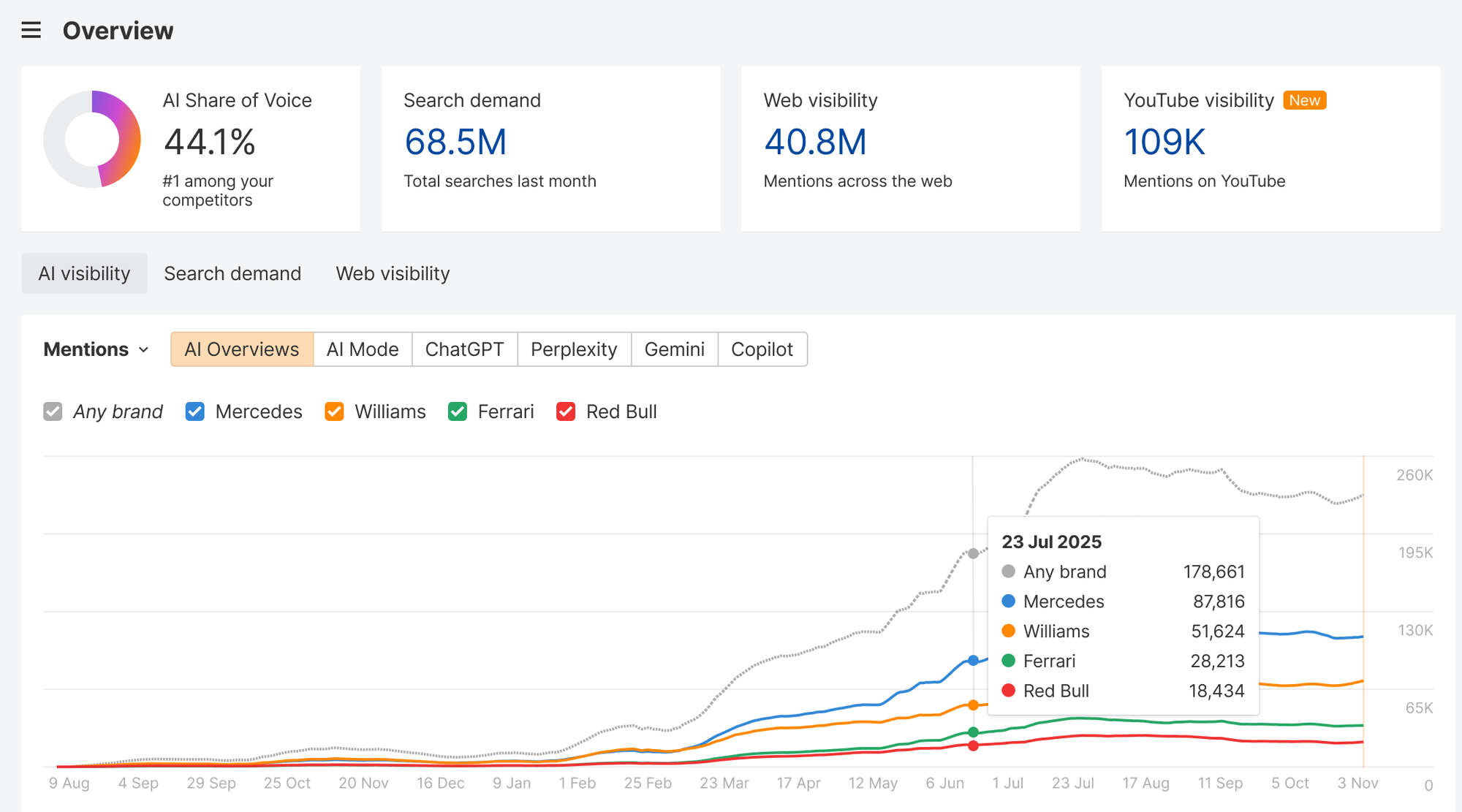
One of the most common mistakes is choosing a GEO tool because it supports the largest number of AI models.
More platforms don’t automatically produce better information.
A business serving customers through Google Search may prioritise Google AI Overviews and AI Mode. A B2B software company might also monitor ChatGPT and Perplexity when its buyers use those systems for product comparisons.
The appropriate combination depends on the customers, geography, industry, and questions being researched.
Compare Coverage Against Your Actual Requirements
| AI Platform | Useful Questions to Ask Before Monitoring |
|---|---|
| ChatGPT | Does the vendor monitor relevant search-enabled responses and preserve cited sources? |
| Google AI Overviews | Are results collected for relevant Google searches, countries, and devices? |
| Google AI Mode | Is this tracked separately from AI Overviews? |
| Gemini | Which experience, version, or response collection method is used? |
| Perplexity | Are visible citations and source URLs retained? |
| Microsoft Copilot | Which Copilot experiences are represented in the dataset? |
| Claude | Is the required model or search-enabled experience included, and does it cost extra? |
The exact product experience matters because similarly named models and interfaces can behave differently.
For example, monitoring Gemini through one interface doesn’t necessarily reproduce results from Google AI Mode.
Likewise, a tool may support ChatGPT without collecting the same search-enabled responses that customers encounter.
Geographic Coverage Matters
Imagine a local plumbing company operating in Singapore.
The business cares about recommendations relevant to Singapore customers. Monitoring generic US responses may not provide useful evidence about its target market.
The same problem affects ecommerce stores with international shipping limitations, professional services with regional licensing requirements, and software companies offering country-specific pricing.
Before purchasing, check whether the platform supports the relevant countries and languages and how location settings influence data collection.
If local coverage is essential, include location-specific questions during the trial.
Don’t Pay for Engines You Won’t Use
Some GEO vendors charge separately for additional AI platforms. Others include several engines within one prompt allowance.
Begin with the two or three environments most relevant to your buyers.
Expand coverage when the additional results reveal meaningful differences or support an actual business decision.
Step 3: Understand the GEO Metrics Before Comparing Dashboards
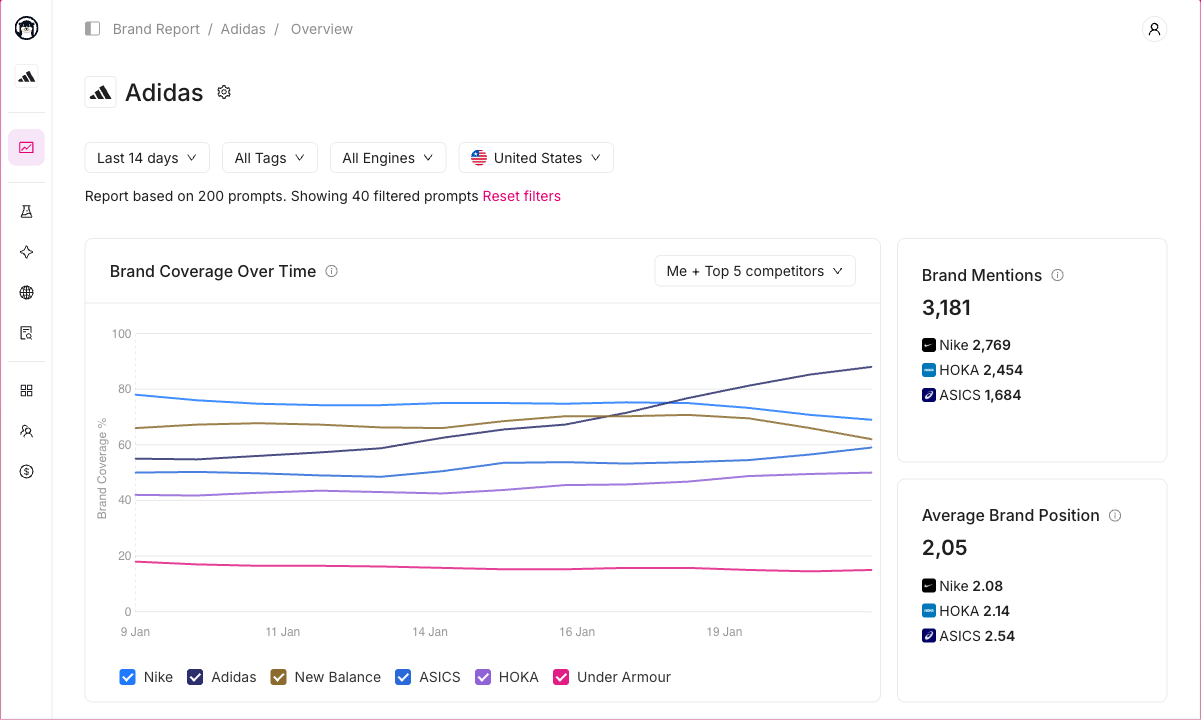
GEO platforms frequently use familiar terms while calculating them differently.
Two tools may report different visibility percentages for the same brand because they monitor different prompts, collect responses on different schedules, or use different definitions.
That doesn’t automatically mean one platform is inaccurate.
However, you need to understand what each measurement represents.
The Main GEO Metrics Explained
| Metric | What It Measures | What It Doesn’t Prove |
|---|---|---|
| Brand mention rate | How often your brand appears in collected AI responses | Total market reach or revenue |
| AI citation count | How often a URL or domain is visibly cited under the vendor’s counting rules | Product recommendation or endorsement |
| Sampled share of voice | Relative presence among monitored brands and responses | Universal AI search market share |
| Sentiment | Estimated tone of an AI-generated brand description | Whether every claim is factually correct |
| AI visibility trend | Changes within a defined monitoring dataset | That a particular content update caused the change |
| Google generative AI impressions | How often eligible website links were shown in supported Google AI search features | Total brand mentions across all AI assistants |
| AI referral sessions | Website sessions attributed to identifiable AI sources | Every user influenced by an AI-generated answer |
| Conversions | Business actions recorded through an attribution process | That GEO activity independently caused those actions |
These distinctions are essential when selecting software.
A dashboard reporting higher brand visibility may be useful, but it shouldn’t be interpreted as proof that more paying customers discovered your business.
Our GEO analytics guide explains how these metrics should be interpreted alongside traditional SEO and business performance data.
Example: What Does a 40% AI Visibility Score Mean?
Suppose you monitor twenty customer questions through a GEO platform.
Your brand appears in eight collected answers.
Under a simple response-presence calculation:
Brand mention rate = 8 ÷ 20 × 100 = 40%
That means your brand appeared in 40% of the twenty answers collected for this particular test.
It doesn’t mean your business has 40% of the entire AI search market, nor does it establish that 40% of potential customers encountered your brand.
The result depends on the questions you selected, the models used, and when the responses were collected.
If you replace ten generic questions with ten branded questions, the percentage could change substantially without any actual improvement in your business’s wider visibility.
A trustworthy GEO tool should explain the denominator behind its metrics.
If a vendor cannot explain where its visibility score comes from, how often the data is refreshed, or which responses were included, treat the score cautiously.
Step 4: Prioritise Evidence Over Attractive Dashboards
A good GEO tool should let you investigate the information behind its charts.
Suppose the platform reports that your brand’s visibility dropped by 20% during the past month.
That observation raises several questions.
Did your business disappear from answers where it previously appeared? Did the tool change its monitored questions? Were additional competitors introduced? Did an AI platform update its response behaviour?
Without access to the underlying evidence, the percentage may create concern without explaining what deserves investigation.
Five Evidence Features Worth Checking
1. Original AI responses
Can you inspect the actual text collected by the platform?
A useful tool should show enough of the original response to verify whether the brand was mentioned, recommended, criticised, or merely referenced.
2. Collection timestamps
Does each response include a date and, where appropriate, a collection time?
This helps distinguish older observations from recent changes.
3. Exact monitored questions
Can you see the question that produced each response?
Prompt wording matters. A product may appear when a question mentions a particular feature but disappear when the question is phrased more generally.
4. Source URLs
Can you inspect the websites and individual pages cited?
Domain-level citation totals are less useful when you need to identify which specific articles or resources deserve further analysis.
5. Historical comparisons
Can you compare the same prompt under equivalent settings over time?
A tool that changes its sample without making that change clear can produce misleading trend interpretations.
Test Whether Brand Matching Is Accurate
Brand matching is a frequently overlooked issue.
Consider a business whose name is also a common English word or shared by several unrelated companies.
A GEO tool may count references to the wrong entity, artificially inflating the brand’s reported visibility.
During your trial, inspect examples involving brand names, product abbreviations, subsidiaries, and competing companies.
Check whether the platform distinguishes your business from unrelated entities.
This is especially important for agencies and businesses with complex product portfolios.
Step 5: Compare Standalone GEO Tools With All-in-One SEO Platforms
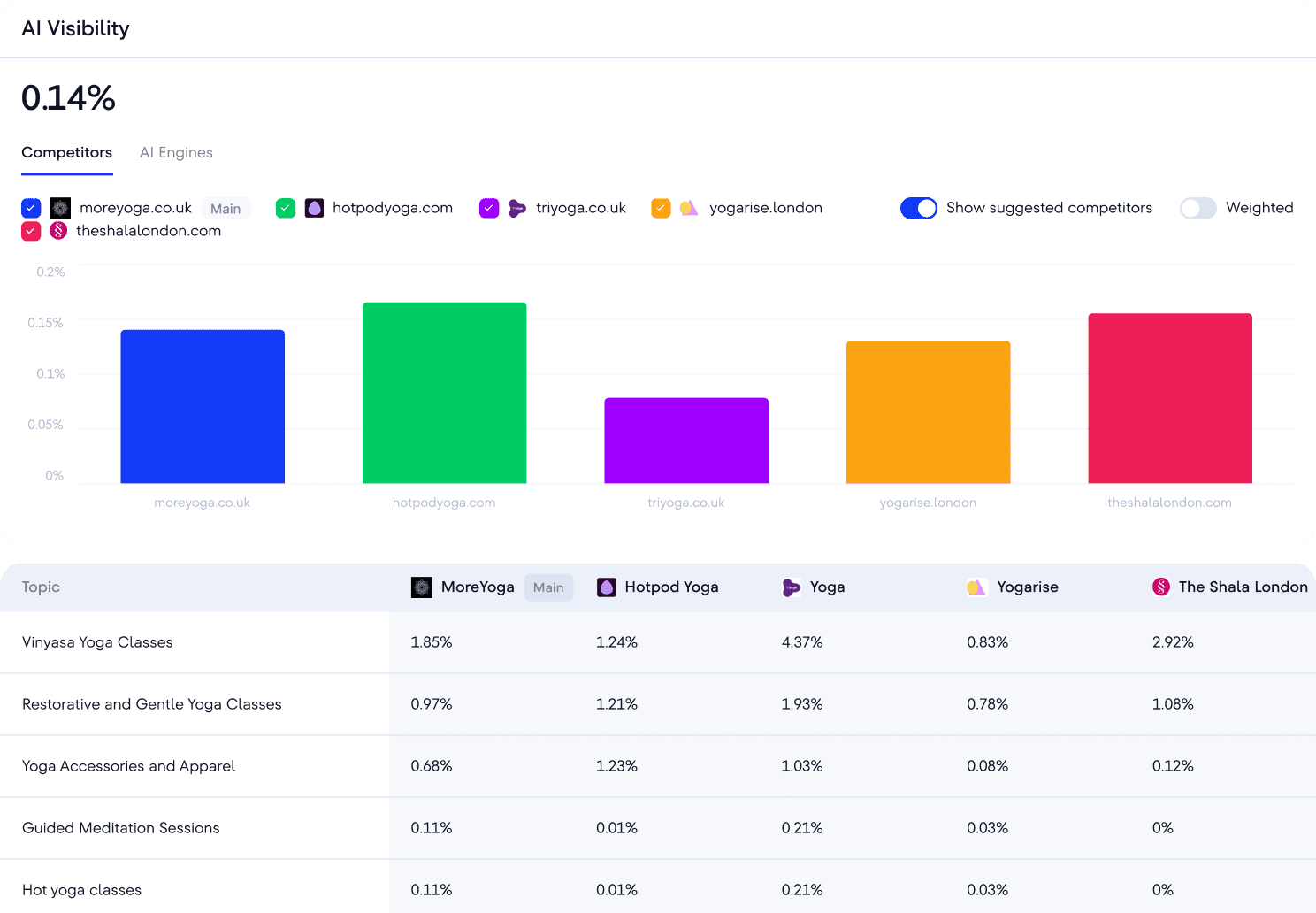
Not every business needs specialist GEO software.
If you already use a comprehensive SEO platform, check whether it provides sufficient AI visibility functionality before purchasing another subscription.
There are three main approaches.
Option A: Dedicated GEO Monitoring Software
Specialist GEO products concentrate on AI-generated answers, brand mentions, citations, and competitor visibility.
Examples include Otterly.AI, Peec AI, and Rankscale.
These tools can be attractive when your primary requirement is a repeatable AI search monitoring workflow.
For example, Otterly’s published Standard plan includes 100 tracked search prompts, daily monitoring, citation analysis, and reporting capabilities.
Peec’s Starter plan includes fifty prompts, three selected AI models, daily tracking, and one project.
Rankscale uses a credit-based approach to monitoring, with brand dashboards, citation analysis, and different refresh schedules.
Best fit: Businesses that already have suitable traditional SEO tools and mainly need dedicated AI visibility research.
Potential limitation: You may still need separate software for technical audits, keyword research, backlinks, and conventional rank tracking.
Option B: Integrated SEO and GEO Platforms
These products combine some form of AI visibility monitoring with traditional SEO research.
Examples include SE Ranking, Semrush, Ahrefs Brand Radar alongside the wider Ahrefs platform, and Digimetrics.
For businesses already performing SEO work, the integration can reduce the need to switch repeatedly between platforms.
For example, SE Ranking combines conventional rank tracking and SEO research with AI prompt monitoring and GEO competitive research.
Ahrefs provides Custom Prompts for selected questions and an AI Visibility Index for broader brand research.
Digimetrics combines GEO tools with keyword research, SEO diagnostics, technical checks, and content workflows.
Best fit: Teams whose GEO findings regularly lead into SEO, content, and technical optimisation.
Potential limitation: Integrated tools may provide less specialist detail in particular research areas, or charge separately for expanded AI monitoring.
Option C: Free First-Party Reporting Plus Targeted Tools
For smaller businesses, the most economical approach may be to begin with free tools.
Google Search Console and Bing Webmaster Tools already provide useful information about how verified websites appear in supported AI search experiences.
You can then add limited prompt monitoring when you identify a specific gap that those reports cannot answer.
Best fit: Businesses beginning GEO measurement, small websites, and teams with limited budgets.
Potential limitation: Free first-party reports do not provide a complete view of competitors’ appearances across every AI platform.
Which Approach Is Right for You?
| Business Requirement | Recommended Starting Approach |
|---|---|
| Monitor a few important AI questions | Free reporting plus limited specialist monitoring |
| Track brand mentions and citations across AI platforms | Dedicated GEO tool |
| Combine GEO with rankings and technical SEO | Integrated SEO/GEO platform |
| Research a large number of competitors and sources | Advanced AI visibility research platform |
| Manage multiple clients or brands | Multi-project tool with reporting and permissions |
| Meet formal security and governance requirements | Enterprise platform with verified controls |
For specific product comparisons, see our best GEO tools in 2026 guide.
Step 6: Calculate the Real Cost of GEO Monitoring
A low monthly subscription isn’t automatically good value.
Different products charge for different units, making it difficult to compare plans directly.
One tool might include fifty configured prompts across selected AI platforms. Another might provide thousands of individual response checks, while a third uses shared credits.
Those allowances may support very different workloads.
Understand the Main Pricing Models
| Pricing Model | How It Works | What to Verify |
|---|---|---|
| Configured prompts | Pay for a fixed number of questions being tracked | Included engines and refresh schedules |
| AI response checks | Each prompt execution consumes usage | Cost per engine, location, and execution |
| Credits | Activities consume different credit amounts | Credit cost per monitoring task |
| Brand or project | Allowance depends on tracked brands or workspaces | Prompts and reports permitted per project |
| Domain-based | Price increases with monitored websites | Treatment of subdomains, markets, and brands |
| Enterprise contract | Custom monitoring and governance package | Overage policy, integrations, support, and security |
Worked Example: One Business Monitoring 20 Questions
Suppose your business wants to track twenty important customer questions across three AI platforms, in two countries, every day.
For a platform that charges for individual prompt executions:
20 prompts × 3 AI platforms × 2 countries × 30 days = 3,600 monthly response checks
This is the monitoring workload under that billing model.
It isn’t necessarily what every GEO vendor would charge.
A product with an allowance of twenty configured prompts might include several monitored platforms. Another may deduct credits differently depending on the selected AI engine.
The important step is translating your requirements into the vendor’s actual billing unit.
Compare Price Against Useful Output
Imagine that your GEO software costs $150 per month.
During the month, your team identifies three genuinely useful opportunities: a missing commercial comparison topic, an outdated product description influencing AI responses, and a relevant publisher citation worth investigating.
Under a simple cost-per-finding calculation:
$150 ÷ 3 useful findings = $50 per useful finding
That figure is illustrative. It doesn’t establish that the software generated $50 of business value per finding or that the recommended actions will create revenue.
However, it encourages a more meaningful question than whether the subscription is cheap.
Did the tool reveal something worth investigating, or did it mainly produce information you already knew?
Also account for the analyst time required to verify the results, prepare reports, and maintain the monitoring configuration.
For a broader look at subscription limits, see our best paid GEO tools comparison.
Step 7: Check Reporting, Integrations, and Team Requirements
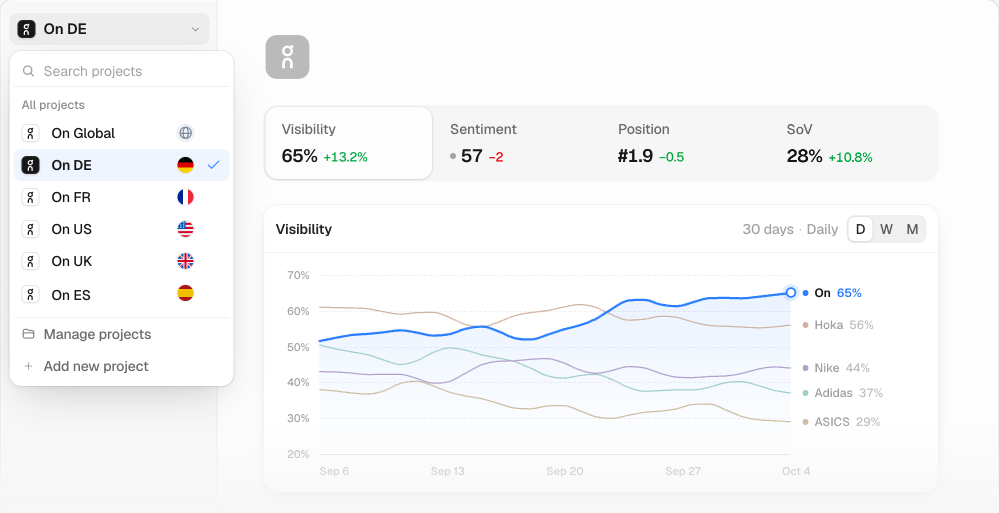
GEO data becomes more valuable when the people responsible for marketing decisions can understand and use it.
For a solo marketer, a simple dashboard and CSV export may be enough.
For an agency, reporting and project separation may be essential. For an enterprise, security controls and integration requirements can determine whether the software is suitable at all.
Reporting Features Worth Prioritising
Look for reports that clearly explain what is being monitored, how metrics are defined, which changes occurred, and what evidence supports those changes.
The report should make it possible to distinguish meaningful developments from ordinary fluctuations in AI-generated answers.
For example, a brand appearing once in a different response is not necessarily evidence that a content campaign succeeded.
Historical trends should preserve a consistent measurement basis whenever possible.
Integrations With Existing SEO and Analytics
Useful integrations may include Google Search Console, website analytics, Looker Studio, data exports, and APIs.
However, integrations should serve a clear workflow.
A platform advertising many integrations isn’t necessarily more useful than one that reliably exports the small dataset your team actually needs.
Also check whether the integration is included with the advertised plan or requires a higher subscription.
Client and Team Access
Agencies should evaluate whether each client can have a separate workspace, with appropriate permissions and reporting settings.
A business with several brands may need a similar separation between divisions.
Enterprise buyers may also require SSO, role-based access, data retention policies, security documentation, and contractual protections.
If those features are mandatory, treat them as purchasing requirements rather than optional scoring points.
Step 8: Use a Weighted Scorecard to Shortlist GEO Tools
Once you’ve defined the intended workload, you can compare shortlisted platforms against a consistent framework.
A weighted scorecard helps prevent sales demonstrations from distracting you with features that have little relevance to your business.
The following weights are a suggested starting point for a typical business buying GEO software.
GEO Tool Evaluation Scorecard
| Evaluation Criterion | Weight | What to Look For |
|---|---|---|
| AI platform and geographical coverage | 15% | Relevant engines, countries, and languages |
| Data transparency and verification | 25% | Original answers, timestamps, source URLs, clear methodology |
| Brand and competitor monitoring | 15% | Relevant prompts, accurate entity matching, comparable histories |
| Actionability | 15% | Findings that support identifiable next steps |
| Pricing and monitoring capacity | 15% | Sustainable cost at the required monitoring volume |
| Reporting and integrations | 10% | Export quality, reporting time, connections |
| Ease of use and onboarding | 5% | Setup complexity and time to first useful finding |
| Total | 100% |
Rate each shortlisted product from 0 to 5 for each criterion.
Then calculate:
Weighted score = Σ (criterion rating ÷ 5 × criterion weight)
For example, if a product receives 4 out of 5 for data transparency, it earns:
4 ÷ 5 × 25 = 20 points out of the available 25
Repeat the calculation for every criterion.
The resulting score is useful only when the ratings come from the same evaluation tasks.
Don’t award a perfect transparency rating because a vendor claims its data is accurate. Inspect the underlying responses and scoring definitions first.
Add Mandatory Pass/Fail Requirements
Some features should be mandatory rather than weighted.
For example, an international business might require support for Japanese-language monitoring, while an enterprise may need SSO and specific data-processing terms.
If a product cannot meet a mandatory requirement, a high score elsewhere shouldn’t automatically make it the best choice.
A useful shortlist process has two stages:
Stage 1: Eliminate products that fail essential requirements.
Stage 2: Compare the remaining products using the weighted scorecard.
This is more defensible than assigning one universal ranking to software intended for different customers.
Step 9: Run a 14-Day GEO Tool Test Before Purchasing
A free trial is most useful when you know what you’re testing.
Opening a dashboard, checking a brand visibility score, and browsing a few example reports doesn’t tell you whether the software will support ongoing marketing decisions.
Instead, give every shortlisted vendor the same assignment.
Days 1–2: Establish a Baseline
Choose one business and two or three relevant competitors.
Create a set of twenty-four questions covering four categories.
| Prompt Category | Number | Example |
|---|---|---|
| Product or service discovery | 6 | What are the best accounting tools for small businesses? |
| Competitor comparisons | 6 | Which alternatives are worth considering to Product X? |
| Problem-solving questions | 6 | How can a business reduce manual invoice processing? |
| Purchase considerations | 6 | Which accounting platforms integrate with Shopify? |
| Total | 24 |
Replace these examples with questions relevant to your own business.
Include both branded and unbranded questions, but don’t allow branded prompts to dominate the sample.
Record your chosen engines, countries, and monitoring frequency.
Days 3–5: Configure the Same Monitoring Tasks
Set up the identical prompt set across the shortlisted platforms wherever possible.
If one vendor doesn’t support a required engine or region, record the difference.
Also note how long each platform takes to connect, configure, and produce an initial usable report.
The goal isn’t simply to reward the fastest setup.
It’s to determine whether the software can support the intended workflow without unnecessary manual work.
Days 6–9: Verify a Sample of Responses
Inspect collected answers and confirm whether reported mentions and citations are correctly classified.
For example, choose ten responses from each tool and check whether the claimed brand appearances genuinely refer to the intended business.
Review cited URLs, collection dates, competitor classifications, and any sentiment labels.
If the tool doesn’t expose original evidence, document that limitation in the evaluation.
Keep the verification sample consistent across products.
Days 10–12: Turn Findings Into Decisions
Ask the same analyst to produce a short research briefing from each tool.
The briefing should identify three meaningful findings and explain what the business could investigate next.
Examples might include an inaccurate product statement, a recurring competitor recommendation, or a relevant topic where third-party sources dominate citations.
Record the time needed to verify the findings and prepare the briefing.
A product that generates a larger number of suggestions isn’t automatically better if most are irrelevant or cannot be substantiated.
Days 13–14: Evaluate Reporting and Cost
Create a management-ready summary.
Confirm whether the tool can export evidence, compare the same prompts over time, and explain its calculations.
Then calculate the subscription required to maintain the intended workload for the next three months.
Use the weighted scorecard to compare the products.
What Counts as a Successful Trial?
A successful trial should establish that the product can:
- Monitor the questions and AI experiences your business cares about.
- Correctly identify relevant brand mentions and citations.
- Preserve sufficient evidence for verification.
- Provide understandable historical comparisons.
- Support at least a few defensible marketing investigations.
- Produce usable reporting without excessive manual work.
- Remain affordable at the required scale.
Fourteen days may be enough to evaluate usability, data access, reporting, and monitoring configuration.
It isn’t necessarily enough to prove long-term data reliability or establish that GEO changes produce measurable business growth.
For trial options, see our comparison of GEO tools with free trials.
Step 10: Choose a GEO Tool Based on Your Business Type
Different organisations should prioritise different features.
The following recommendations are based on the type of work involved rather than an unsupported universal product ranking.
Local Businesses
A local restaurant, dental clinic, or service provider may care primarily about whether AI-generated answers correctly describe its services, location, and availability.
Begin with Google Search Console, Bing Webmaster Tools, Google Business Profile, and a small set of relevant local prompts.
If recurring monitoring reveals useful gaps, consider a low-cost GEO subscription.
Prioritise location relevance and accurate business information over large prompt databases.
Ecommerce Businesses
An ecommerce brand may need to investigate product comparisons, category recommendations, competing retailers, and citations to product guides.
It may also benefit from connecting GEO research with product data, Merchant Center, technical SEO, and conventional search performance.
Choose a platform that supports the relevant AI engines and allows the team to inspect source evidence.
For more advanced ecommerce operations, SEO and GEO integration may be more valuable than a standalone visibility score.
B2B and SaaS Businesses
B2B companies often compete through product comparisons, feature explanations, integrations, and purchasing considerations.
A suitable GEO tool should support competitor monitoring, commercial prompt groups, cited-source research, and historical changes.
A product with good citation evidence may help the team understand why third-party review websites appear in AI-generated recommendations.
This can support content research and digital PR planning, although it doesn’t guarantee future citations.
Content Publishers
Publishers may care less about direct product recommendations and more about whether their articles, tutorials, and research are cited.
Start with first-party citation and impression data.
Then evaluate whether a paid tool adds meaningful cross-platform source analysis or competitor research.
Prioritise URL-level evidence, historical reporting, and the ability to investigate relevant cited topics.
Agencies
Agencies need repeatable workflows across clients.
Look for separate brand workspaces, shared reporting permissions, monitored prompt allowances, exports, and sustainable per-client costs.
For larger portfolios, project management and reporting efficiency may matter as much as the underlying monitoring features.
Enterprises
Enterprises need to evaluate security, international coverage, integrations, governance, and commercial arrangements.
A product offering extensive AI visibility monitoring may still be unsuitable if it cannot meet mandatory access controls or data-processing requirements.
Enterprise buyers should make these requirements explicit during procurement and request documentation rather than relying on promotional claims.
Do You Actually Need a Paid GEO Tool?
Not every business does.
In 2026, free first-party reporting offers more useful AI search information than it did when GEO software first emerged.
Google Search Console
Google introduced dedicated Generative AI performance reports in 2026, with worldwide rollout completed by August 31.
The Search report covers impressions from AI Overviews and AI Mode, including breakdowns by page, country, device, and date.
For verified websites, this provides a useful baseline for understanding where their links are appearing within Google’s generative AI search features.
However, it doesn’t reproduce every generated answer or provide comprehensive competitor mention tracking across third-party assistants.
See Google’s official Generative AI performance report documentation.
Bing Webmaster Tools
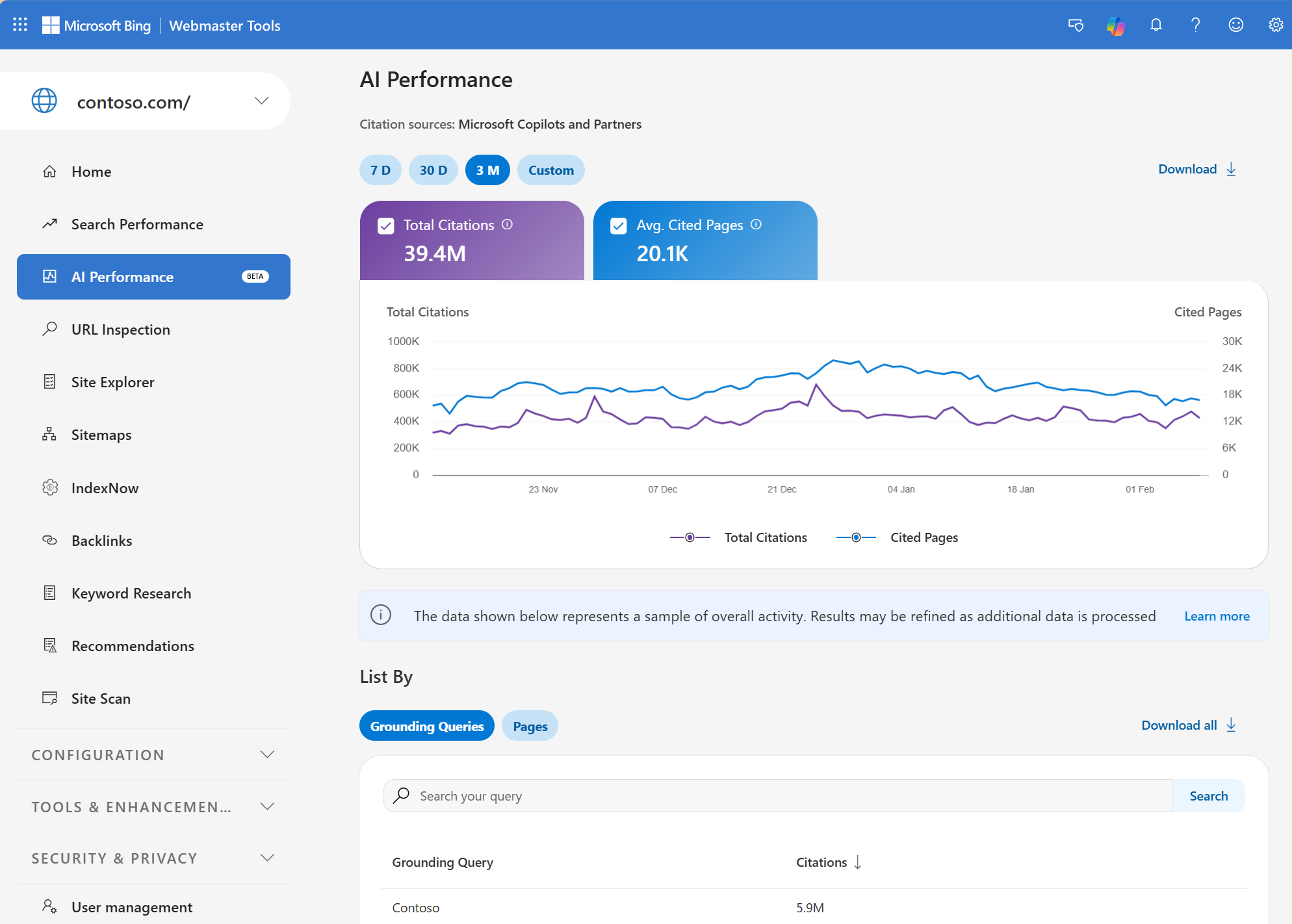
Bing Webmaster Tools includes an AI Performance report covering citation activity in supported Microsoft AI experiences.
It reports cited pages, citation trends, grounding queries, and related information.
These are aggregated first-party observations for your verified website.
They aren’t a complete log of every AI-generated answer, and citation counts don’t represent clicks or conversions.
See Microsoft’s AI Performance documentation.
When Paid GEO Software Becomes Worth Considering
A paid product becomes more useful when your business needs something the free reports cannot provide.
That might include monitoring specific commercial questions across several AI platforms, comparing competing brands, inspecting original answers, or automating recurring reports.
The subscription should address a defined information gap.
If the only result is another visibility percentage without a clear explanation or next step, the expense may be difficult to justify.
Red Flags to Watch for When Choosing a GEO Tool
GEO is still an evolving software category, and product marketing can make capabilities sound more definitive than they are.
Be cautious when a vendor makes claims that aren’t supported by accessible evidence.
A Visibility Score With No Clear Methodology
A percentage is difficult to interpret without knowing which prompts and responses were included.
Ask for the monitored sample, calculation method, and reporting period.
If the vendor cannot explain them, don’t use the number as an important business KPI.
Guaranteed AI Rankings or Citations
AI-generated responses can change between runs, platforms, locations, and model versions.
No third-party tool can reliably guarantee that your website will appear in a particular answer.
Treat promises of guaranteed placements or recommendations with considerable scepticism.
Recommendations Without Supporting Evidence
A tool might suggest adding certain headings, restructuring content, or increasing brand mentions.
Ask which evidence supports the recommendation and how the business should measure the result.
Google’s official guidance emphasises foundational SEO, useful original content, crawlability, and accurate information.
It also explicitly warns against unnecessary GEO-specific tactics, such as creating special AI files or restructuring content purely around supposed AI ranking tricks.
See Google Search Central’s guide to generative AI optimisation.
No Access to Original AI Responses
Without original responses, it’s difficult to verify whether a brand was genuinely recommended or simply appeared in unrelated text.
This is a significant weakness for businesses using GEO data to support client reporting or important strategy decisions.
Unclear Usage Limits
A subscription advertising hundreds of prompts may still have restrictions on AI platforms, countries, refresh frequency, workspaces, or total response checks.
Request a workload-specific quotation.
Too Many Features That Duplicate Existing Tools
A GEO platform offering keyword research, audits, content generation, rank tracking, and competitor analysis may sound attractive.
However, if you already pay for strong SEO tools, the extra features may not justify replacing them.
Prioritise what the new software adds rather than the total number of modules.
A Simple GEO Tool Buying Checklist
Before subscribing, confirm that you can answer these questions.
| Question | Pass Condition |
|---|---|
| What business problem will the tool solve? | A specific research or reporting requirement is defined |
| Does it cover the right AI platforms? | Required engines and experiences are supported |
| Can it monitor the right markets? | Relevant countries and languages are available |
| Can I inspect the original responses? | Evidence and timestamps are accessible |
| Are mentions and citations distinguished? | Metric definitions are clear |
| Can I monitor competitors? | Relevant competitor comparisons are supported |
| Can I track changes consistently? | Historical comparisons preserve context |
| Are exports and reports useful? | Required information can be shared |
| Can I afford the intended workload? | All prompts, checks, credits, and add-ons are accounted for |
| Did the trial produce useful findings? | At least some findings support defensible next steps |
If a shortlisted platform fails several essential conditions, don’t compensate for those shortcomings merely because it offers an impressive dashboard.
Final Verdict: Choose the GEO Tool That Helps You Make Better Decisions
The best GEO tool for your business in 2026 isn’t necessarily the one with the most AI models, biggest prompt database, or highest advertised visibility score.
It’s the platform that provides relevant, trustworthy information about how your brand and content appear in AI-generated answers.
For smaller businesses, begin with Google Search Console, Bing Webmaster Tools, and a focused set of relevant customer questions.
If you need recurring cross-platform monitoring, evaluate specialist products such as Otterly.AI, Peec AI, or Rankscale.
If GEO findings need to connect with keyword research, technical SEO, content, and conventional search performance, an integrated platform such as SE Ranking, Semrush, Ahrefs, or Digimetrics may make more sense.
Agencies and enterprises should place additional emphasis on project separation, reporting, governance, integrations, and monitoring costs.
Whatever platform you choose, apply the same evaluation principle:
Define the decision → Choose relevant prompts → Collect evidence → Verify the results → Investigate opportunities → Measure what changes.
A tool that supports that process is more valuable than one that simply produces another chart showing your brand is becoming more or less visible.
Before making a long-term commitment, run a controlled trial, inspect the underlying answers, and calculate the full cost of your intended monitoring programme.
The goal isn’t to collect the most GEO data.
It’s to make better marketing decisions with the information you can actually trust.
Frequently Asked Questions
How Do I Choose the Right GEO Tool for My Business?
Start by identifying whether you need brand mention monitoring, citation research, competitor analysis, or integrated SEO and GEO workflows.
Then compare relevant AI platform coverage, original response evidence, geographical support, reporting, monitoring limits, and total cost.
Use a consistent prompt set during a trial before purchasing.
What Is the Best GEO Tool for Small Businesses?
The best option depends on the business’s monitoring needs and existing SEO software.
Small businesses may begin with free first-party tools, then evaluate affordable dedicated monitoring or integrated SEO/GEO software.
Our best GEO tools for small businesses guide compares the practical options.
How Many AI Prompts Should I Track?
There is no universal requirement.
A small business can start with approximately 15–30 relevant customer questions covering product discovery, comparisons, problem-solving, and purchase decisions.
Expand the sample only when additional prompts support meaningful research or reporting requirements.
What Is the Difference Between a GEO Tool and an AI SEO Tool?
A GEO tool generally focuses on monitoring and analysing appearances in AI-generated answers, including brand mentions and citations.
An AI SEO tool is a broader term that may describe software using artificial intelligence for keyword research, content creation, technical audits, or conventional SEO automation.
Some products provide both.
Can a GEO Tool Improve My ChatGPT Rankings?
A GEO tool may help you identify missing brand appearances, inaccurate descriptions, and content opportunities.
However, AI-generated answers don’t necessarily operate as stable numbered rankings, and no tool can guarantee that ChatGPT will recommend a specific website.
Use monitoring as evidence for investigation, not as a promise of placement.
Which GEO Metrics Matter Most?
The most useful metrics depend on your business objective.
Brand mention rate is relevant to recommendation visibility. Citation tracking helps publishers and content teams understand source references. Historical comparisons reveal observed changes within a consistent monitoring sample.
Where possible, connect these findings with first-party analytics and business outcomes.
Are GEO Visibility Scores Accurate?
They can be useful representations of a defined dataset, but they aren’t universal measurements of AI search market share.
Results depend on monitored prompts, AI systems, data collection frequency, brand matching, and vendor methodology.
Evaluate whether you can inspect the evidence and understand how each score is calculated.
Do I Need Both SEO and GEO Software?
Not necessarily.
Some SEO platforms already include AI search monitoring, while specialist GEO products focus on deeper response analysis.
Check whether your existing tools cover your requirements before purchasing another subscription.
How Much Should I Spend on a GEO Tool?
There is no universally appropriate budget.
Entry-level tools may cost a few dozen dollars per month, while higher monitoring capacity, multiple brands, integrations, and enterprise features can increase costs substantially.
Calculate the subscription required for your actual prompts, AI engines, locations, and refresh schedules before comparing vendors.
Is There a Free GEO Tool?
Yes.
Google Search Console provides generative AI impression reporting for supported Google Search experiences, while Bing Webmaster Tools reports citation activity across supported Microsoft AI experiences.
Some third-party platforms also offer free checks, limited monitoring, or trials.
Free tools are useful starting points but may not provide comprehensive competitor monitoring.
How Long Should I Test a GEO Tool Before Buying?
A 14-day pilot can help evaluate onboarding, data transparency, reporting, monitoring limits, and workflow suitability.
Longer observation may be required to assess historical reliability and whether the information supports sustained marketing improvements.
Don’t treat a short trial as proof that the software will increase AI visibility or revenue.
What Are the Biggest Red Flags in GEO Software?
Be cautious of unexplained visibility scores, guaranteed AI recommendations, missing original response data, unclear monitoring limits, and optimisation advice unsupported by evidence.
Also confirm whether the product provides unique capabilities or mainly duplicates information already available in your current SEO stack.
Editorial Methodology and Disclosure
This guide draws on publicly documented product capabilities, official search engine guidance, and a practical GEO software evaluation framework reviewed on October 21, 2026.
The scorecard, monitoring examples, and pilot plan are recommended methods, not results from a completed head-to-head vendor benchmark.
Tool pricing, AI platform support, monitoring limits, and features may change. Verify current conditions before subscribing.
DigitalMarketingTools.ai is sponsored by Digimetrics.ai, developed by MediaOne. Digimetrics is referenced as one option within the broader GEO software market and does not receive an automatic recommendation because of that relationship.
Our editorial standards and sponsorship principles are explained in the Editorial Methodology.
Disclosure: digitalmarketingtools.ai is sponsored by Digimetrics.ai. Sponsored Highlights are clearly labelled advertising. Our reviews, comparisons and guides are written to be useful and fair regardless of who sponsors the site. Read the full disclosure.


