
All-in-One SEO Platforms vs Specialized SEO Tools: Which Should You Choose?
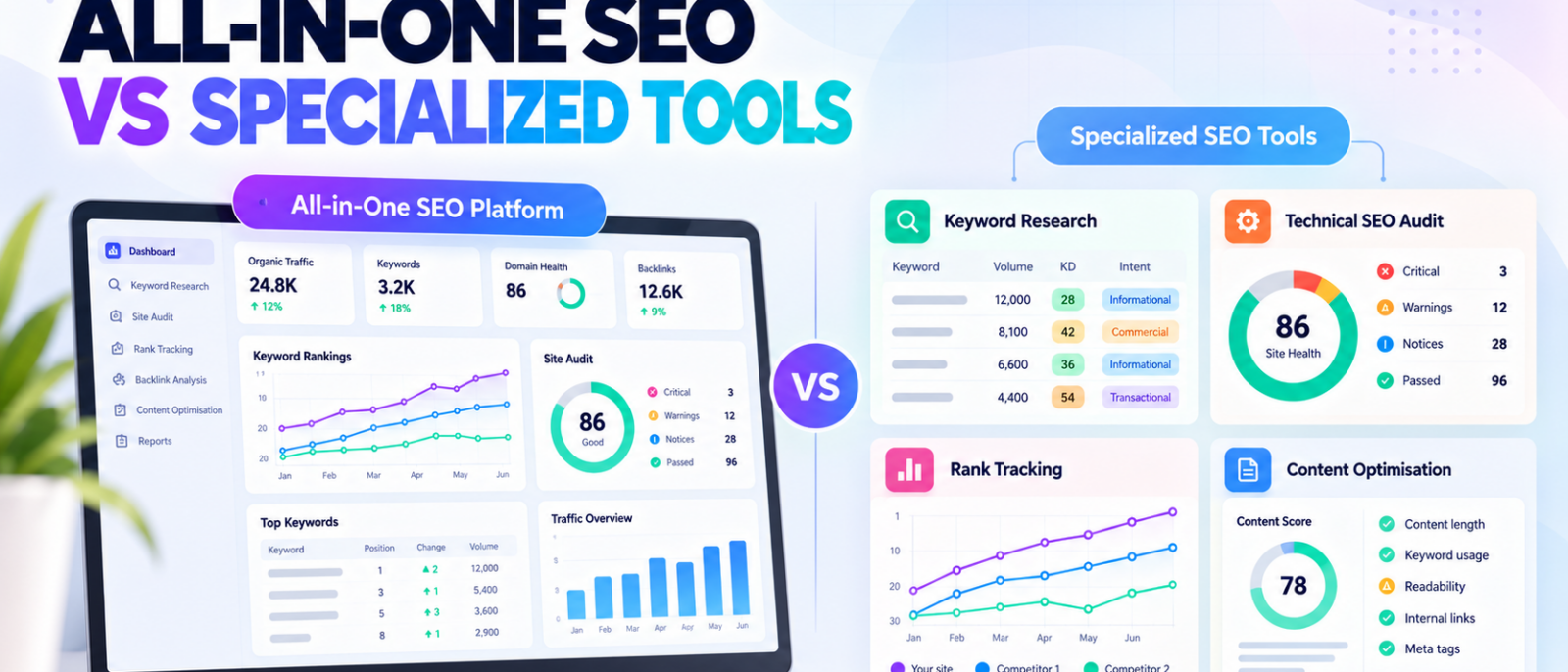
An all-in-one SEO platform can help you research keywords, audit a website, analyse competitors, and track rankings without switching between several products.
A specialized SEO tool takes a different approach. Instead of covering the entire workflow, it concentrates on a particular task, such as technical crawling, rank tracking, backlink research, or content optimization.
Both approaches have advantages, but the more comprehensive platform isn’t necessarily the better investment.
Consider a marketing team that already uses Semrush for keyword research and reporting. Its built-in Site Audit may be enough for routine website checks. However, the same team might still need Screaming Frog to investigate JavaScript rendering, redirect chains, or complex crawl configurations.
In that situation, replacing every specialist with one platform could create more problems than it solves.
The best approach depends on where your team needs breadth, where it needs deeper functionality, and how much work is involved in moving between different systems.
At MediaOne, our SEO workflows cover keyword research, competitor analysis, technical auditing, content optimization, and performance reporting. These activities often overlap, but they don’t always require the same software.
This article compares all-in-one SEO platforms with specialized tools, explains their practical trade-offs, and shows when a hybrid setup makes more sense than choosing either approach exclusively.
Key Takeaways
- All-in-one SEO platforms offer broader coverage. They can combine keyword research, audits, backlink analysis, rank tracking, and reporting within one product.
- Specialized SEO tools focus on particular tasks. Their value comes from capabilities or workflows that a broader platform may not provide at the required depth.
- Neither approach is automatically cheaper. Subscription limits, integrations, additional users, and staff time affect the actual cost.
- A hybrid setup can offer a practical balance. One primary SEO platform plus selected specialist software may cover both everyday work and advanced requirements.
- First-party data remains important. Google Search Console and Google Analytics complement both approaches rather than becoming unnecessary when you buy an SEO suite.
- Choose based on real tasks. Testing the same workflow reveals more than comparing feature counts alone.
All-in-One SEO Platform vs Specialized SEO Tools: What’s the Difference?
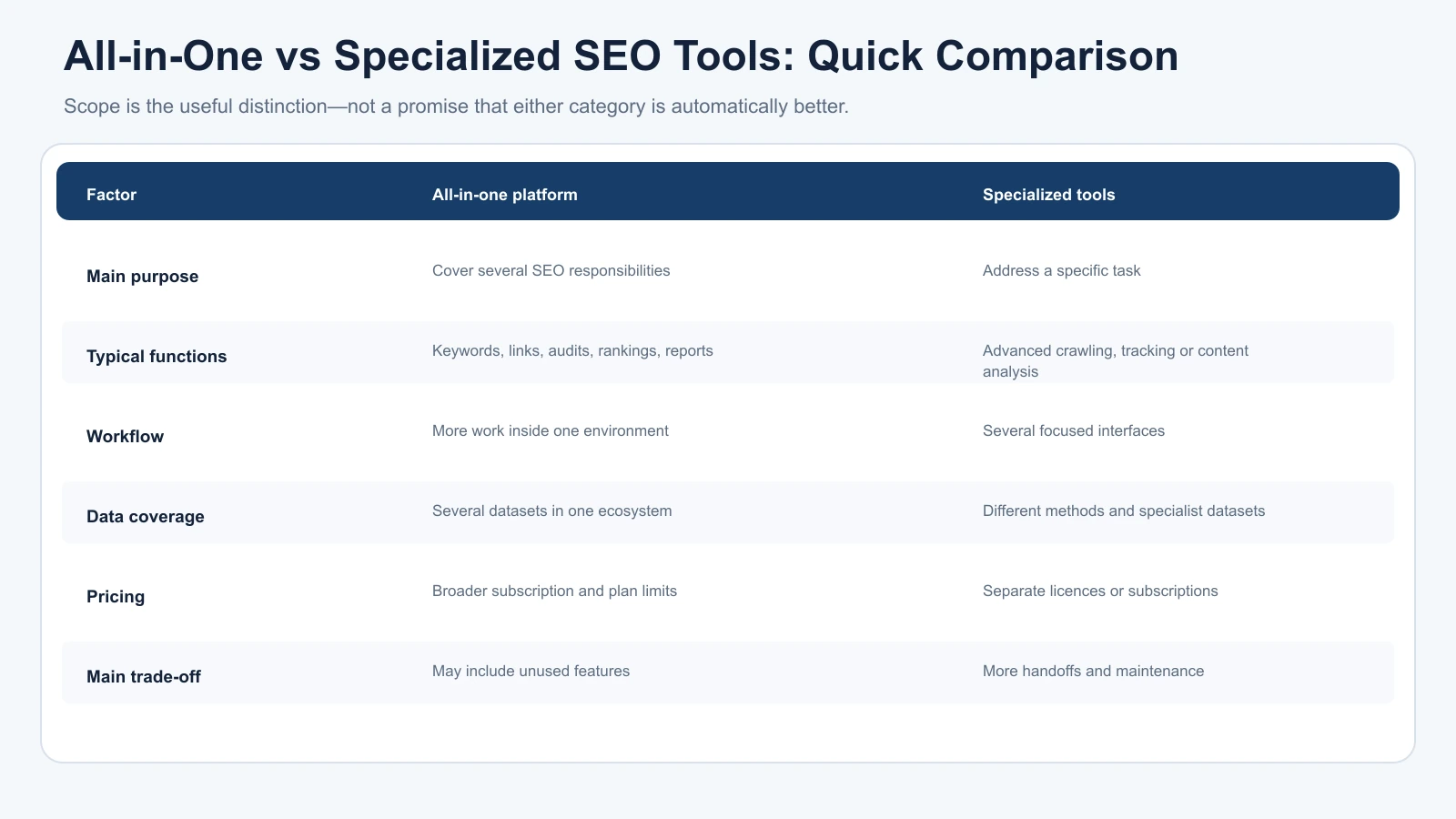
The main difference is the scope of work each product is designed to support.
An all-in-one SEO platform combines several related functions. A specialized tool concentrates on a narrower set of capabilities.
For example, Semrush and Ahrefs offer keyword research, competitor analysis, rank tracking, backlink research, and technical auditing within their broader platforms.
Screaming Frog, meanwhile, is primarily a technical website crawler. AccuRanker concentrates on rank tracking, while Surfer focuses heavily on content optimization.
These categories aren’t absolute. A specialist may offer several complementary features, and an all-in-one platform may perform certain tasks particularly well.
The useful distinction is whether the software serves as your main SEO workspace or fills a specific requirement within that workspace.
Quick Comparison
| Factor | All-in-One SEO Platform | Specialized SEO Tools |
|---|---|---|
| Main purpose | Cover multiple SEO responsibilities | Address specific SEO tasks |
| Typical functions | Keywords, backlinks, audits, rankings, reporting | Advanced crawling, dedicated tracking, content analysis |
| Workflow | More tasks within one environment | Several products and interfaces |
| Learning curve | One broader platform to learn | Separate workflows for individual tools |
| Data coverage | Multiple datasets within one ecosystem | Different datasets and measurement methods |
| Pricing | Usually a broader subscription with plan limits | Individual subscriptions or licences |
| Flexibility | Depends on available modules and tiers | Choose tools for individual requirements |
| Main trade-off | Potentially paying for unused features | More handoffs, subscriptions, and maintenance |
Neither approach guarantees better results.
A specialist product isn’t automatically more accurate, just as an all-in-one platform isn’t necessarily less capable.
The right choice depends on what the tools need to accomplish and whether their outputs support useful decisions.
For an explanation of the different categories, our complete guide to SEO tools covers how keyword research, technical SEO, competitor intelligence, and performance monitoring fit together.
What Do All-in-One SEO Platforms Actually Offer?
An all-in-one SEO tool brings several commonly used SEO functions into one interface.
For a small marketing team, this can simplify everyday work.
Instead of exporting keyword ideas from one platform, checking competitors in another, and preparing reports elsewhere, the team may be able to complete most of that work within a single product.
However, the capabilities available depend on the platform and subscription.
Semrush: Integrated Research, Tracking, and Auditing
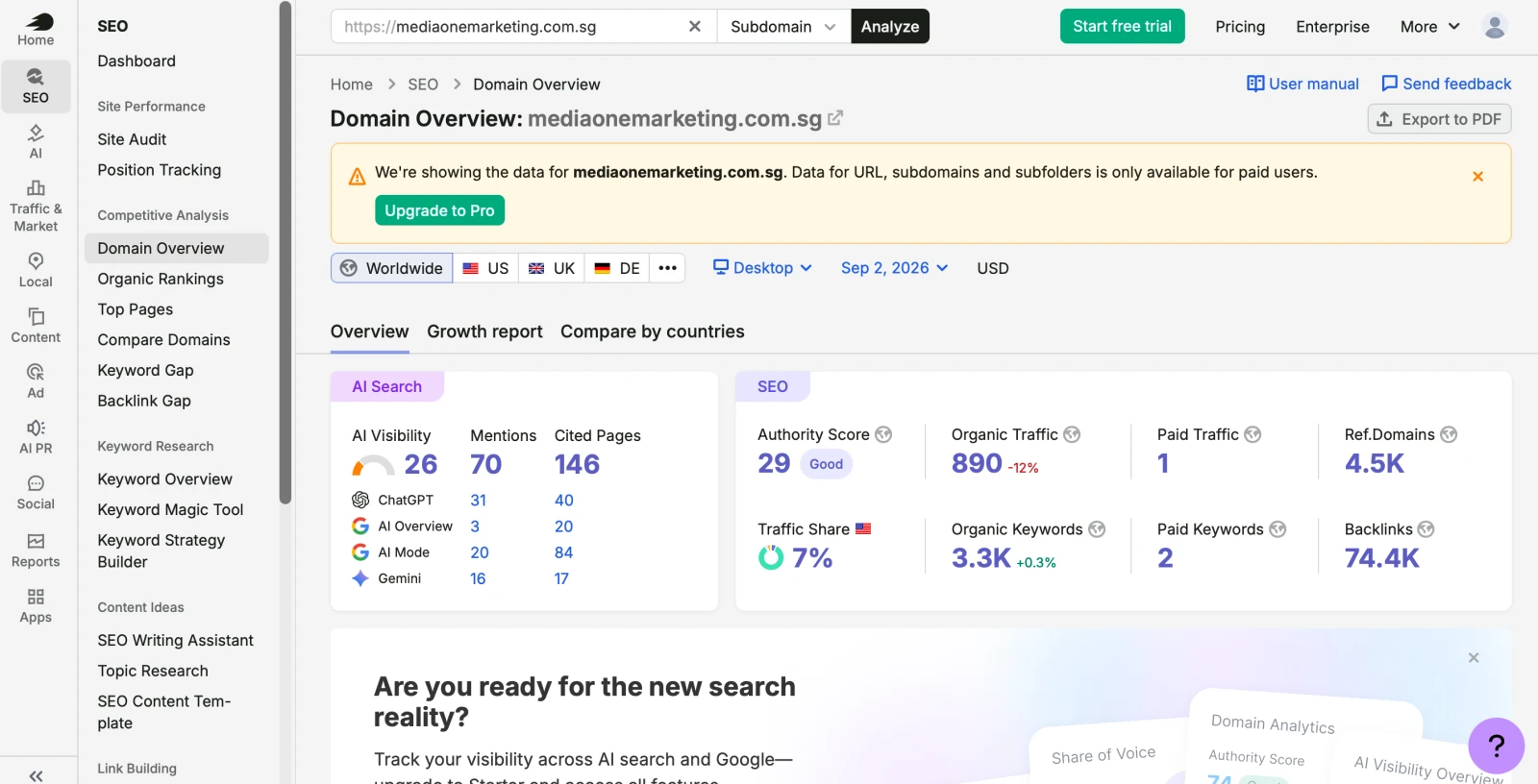
Semrush combines keyword and competitor research with Site Audit, Position Tracking, and other SEO functions.
Its current SEO subscription starts at $139 per month when billed monthly.
The entry plan includes monitoring for five websites and daily tracking for 500 keywords.
Higher tiers expand allowances and provide additional functionality, including more advanced content, tracking, and integration features.
That structure can work well for teams regularly moving between research, auditing, and reporting.
However, the monthly subscription becomes harder to justify if the business only needs occasional keyword checks.
A broader toolkit creates value when its functions are actually used.
Ahrefs: Competitive Research Within a Broader SEO Suite
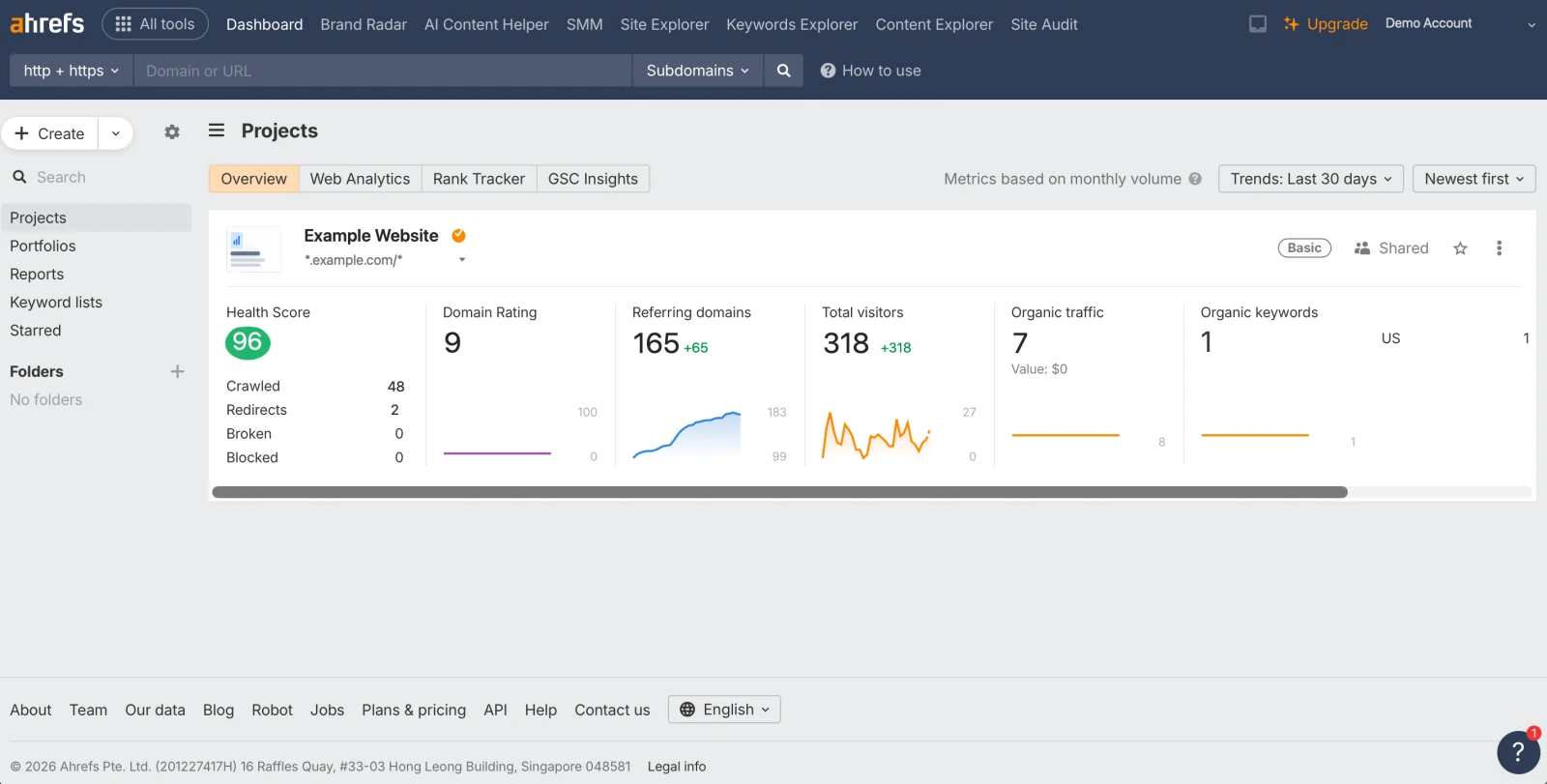
Ahrefs provides keyword research, backlink analysis, Site Audit, Rank Tracker, and competitive intelligence within one platform.
Its Lite plan is advertised at $129 monthly, with higher subscriptions available for teams requiring additional data and functionality.
Lite includes 750 tracked keywords, 100,000 monthly crawl credits, and six months of historical data.
Ahrefs also offers additional products and add-ons, including content-related and reporting functionality.
This is an important distinction: having an all-in-one platform doesn’t necessarily mean every advanced capability is included in the base subscription.
A research-heavy team may find the platform useful because keyword, backlink, and competitor data sit within the same ecosystem.
However, that doesn’t automatically eliminate the need for specialist software.
SE Ranking: Multi-Project SEO Management

SE Ranking combines keyword research, rank tracking, website auditing, backlink analysis, and other SEO functions.
Its current Core subscription is listed at $129 monthly, supporting ten projects, one manager seat, and 2,000 tracked keywords.
Growth expands those allowances to thirty projects, three manager seats, and 5,000 tracked keywords at $279 monthly.
The platform also includes GEO-related functionality, with limits depending on the plan.
For agencies managing several websites, these allowances can be particularly relevant.
Still, the number of supported projects isn’t the only factor. Teams need to consider tracked keywords, user access, audit capacity, reporting, and integrations.
The Main Advantage: Less Workflow Fragmentation
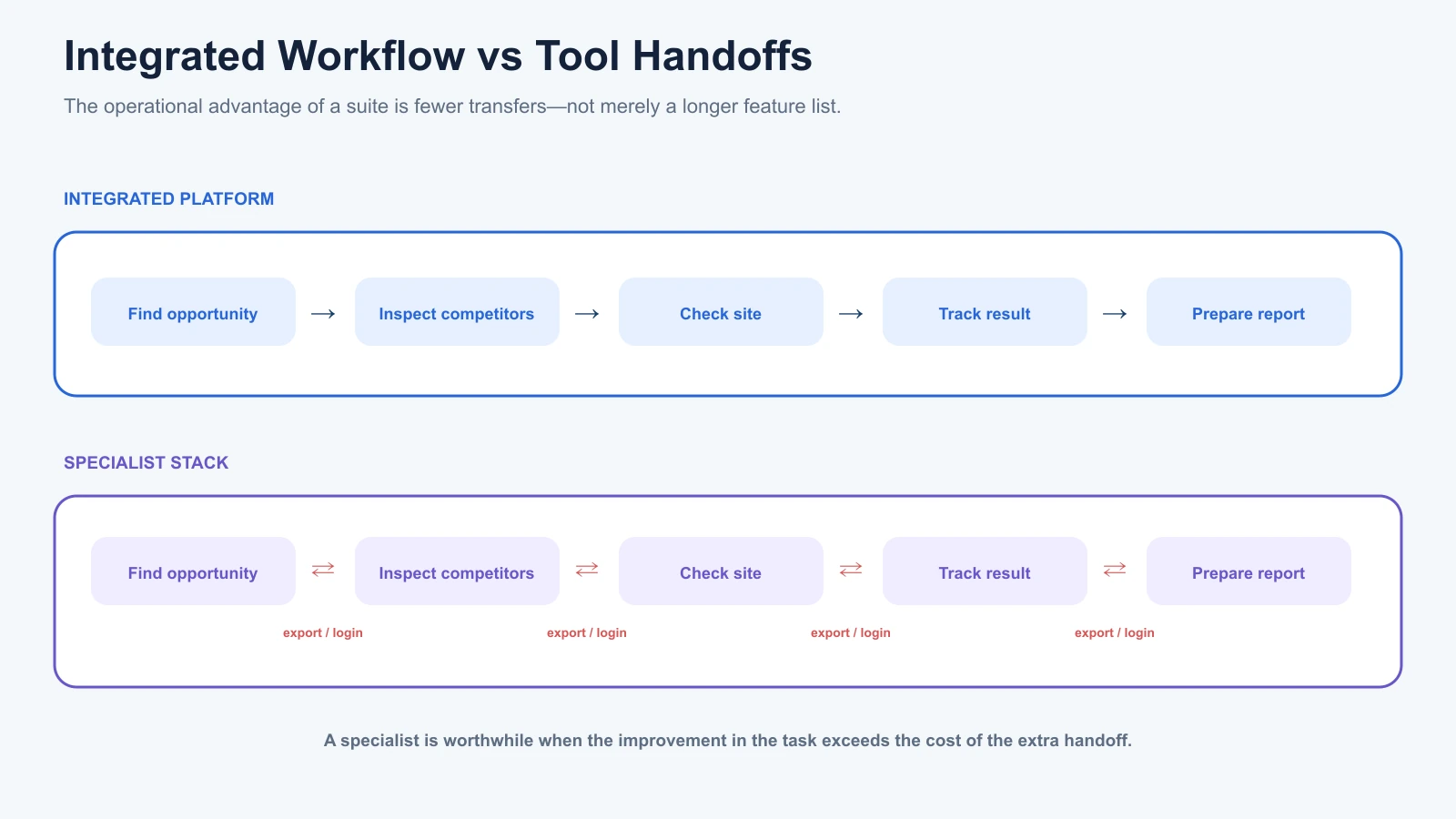
The strongest argument for an all-in-one platform is often operational rather than technical.
Consider a typical SEO task:
A content strategist identifies a keyword opportunity, researches competing pages, examines the existing website, and checks whether the relevant page is already ranking.
If those functions are connected within one platform, the strategist may be able to complete the research without repeatedly exporting and importing information.
That reduces unnecessary handoffs.
However, a shared interface doesn’t guarantee that every module uses identical data or that every integration is automatic.
Before choosing an all-in-one product, test whether the specific workflows you need are genuinely connected.
Where Specialized SEO Tools Have the Advantage
Specialized tools become valuable when one SEO task requires capabilities beyond what your primary platform provides.
The advantage is not specialization for its own sake.
It’s the ability to complete a particular task more effectively.
Technical SEO: Screaming Frog
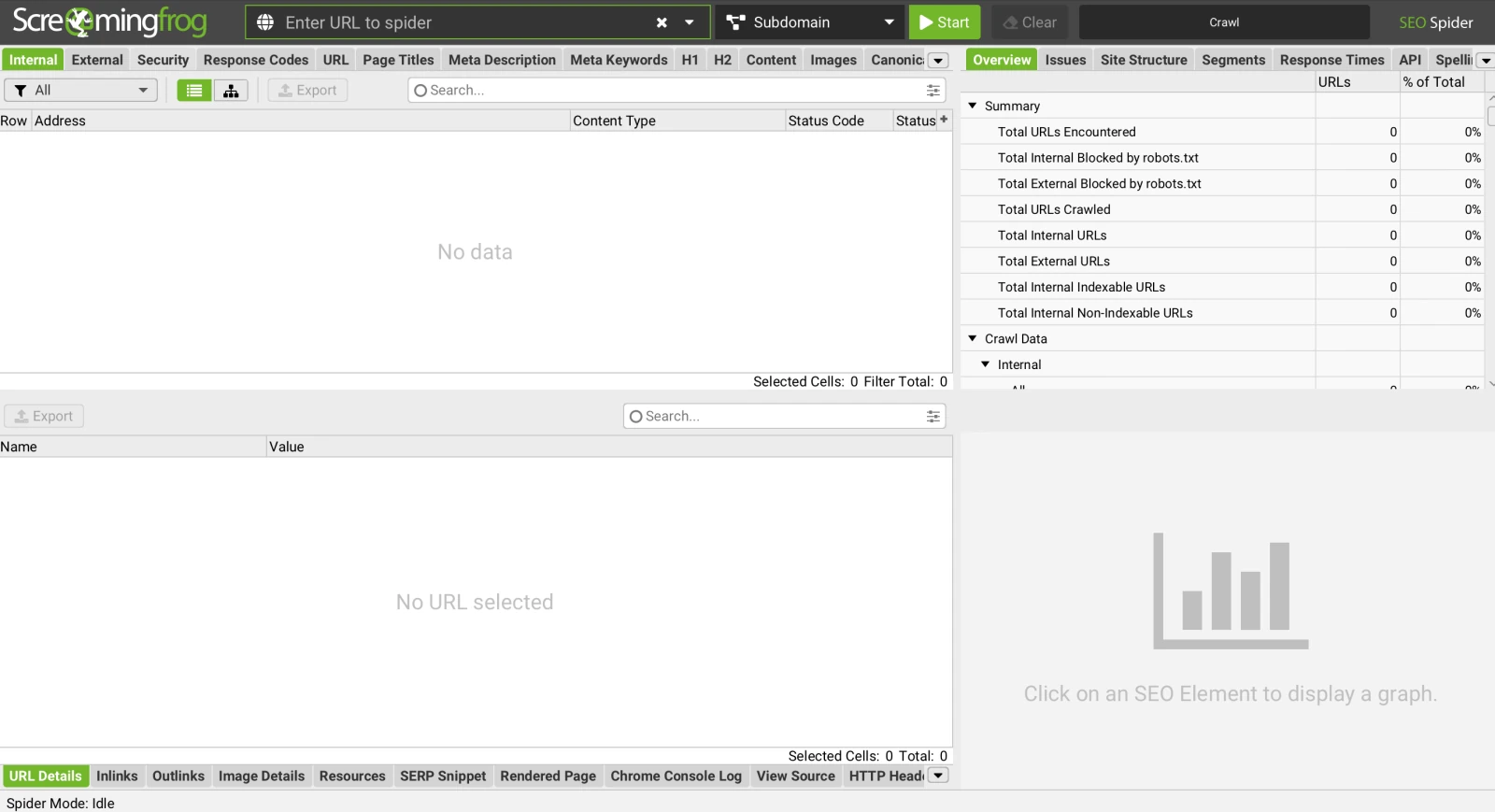
Screaming Frog SEO Spider concentrates on crawling and technical website analysis.
Its free edition can crawl up to 500 URLs, while the paid licence costs £199 per user annually.
The licensed version offers advanced functionality such as JavaScript rendering, crawl configuration, custom extraction, scheduled crawling, and crawl comparisons.
These capabilities can be important for complex websites.
For example, an ecommerce site might have thousands of filtered URLs, several redirect patterns, and JavaScript-generated internal links.
An integrated cloud audit may identify many relevant issues.
However, a dedicated crawler can provide additional control over how the website is inspected.
That doesn’t mean every business needs Screaming Frog.
A smaller website with straightforward technical requirements may be adequately served by the auditing functionality already included in its SEO platform.
Our technical SEO crawlers comparison explores how different auditing approaches affect the issues each tool identifies.
Rank Tracking: AccuRanker
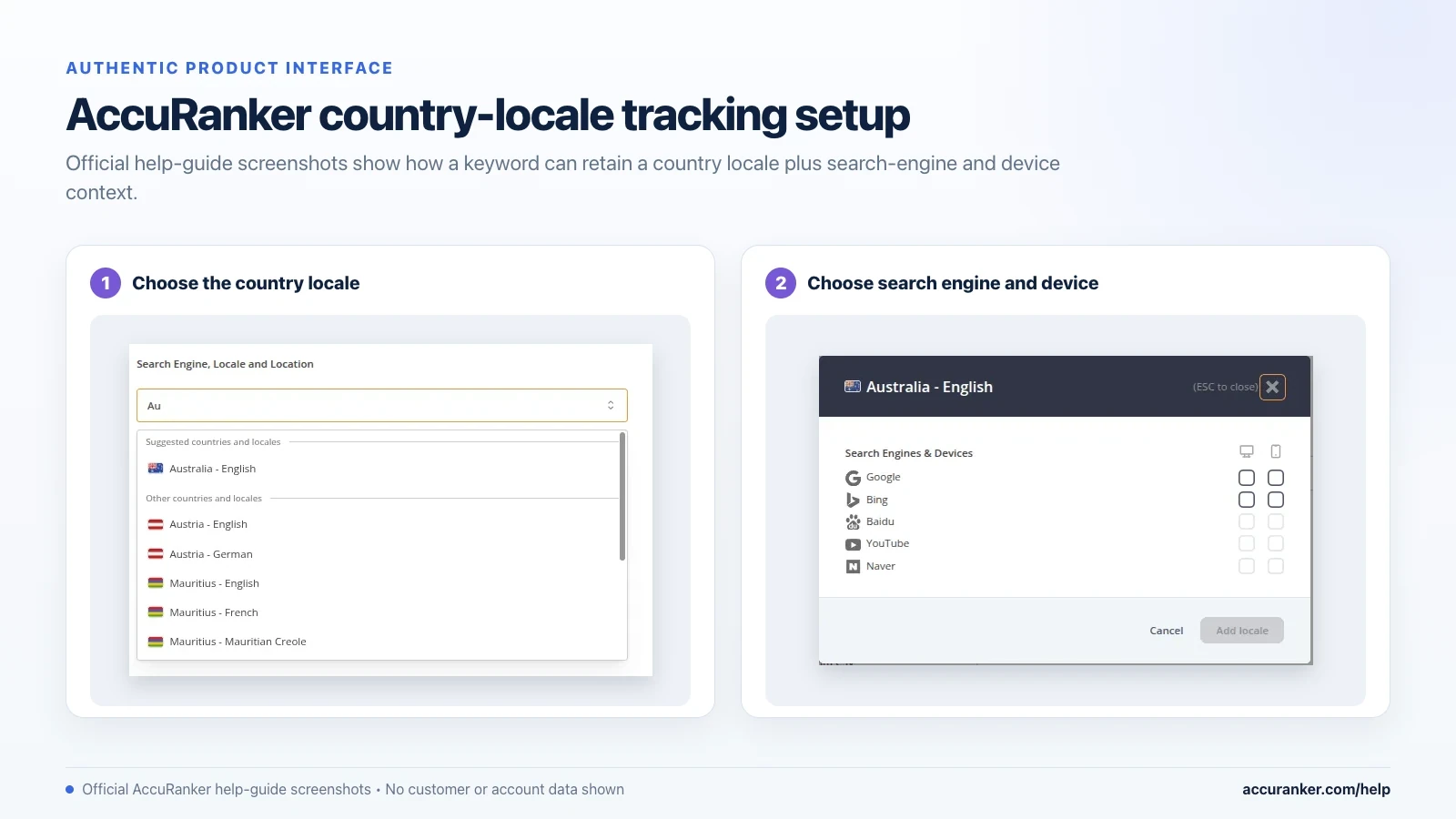
AccuRanker focuses on keyword rank monitoring, reporting, and detailed search visibility analysis.
Its documented capabilities include daily tracking, on-demand updates, and pixel-position information.
These can be valuable for agencies managing substantial keyword portfolios or businesses requiring detailed location-specific monitoring.
However, faster tracking isn’t automatically more useful.
A company reviewing rankings once a month may not need the additional monitoring options available in a specialist product.
A dedicated tracker becomes more attractive when the frequency, precision, reporting, or scale of monitoring is central to the workflow.
Content Optimization: Surfer
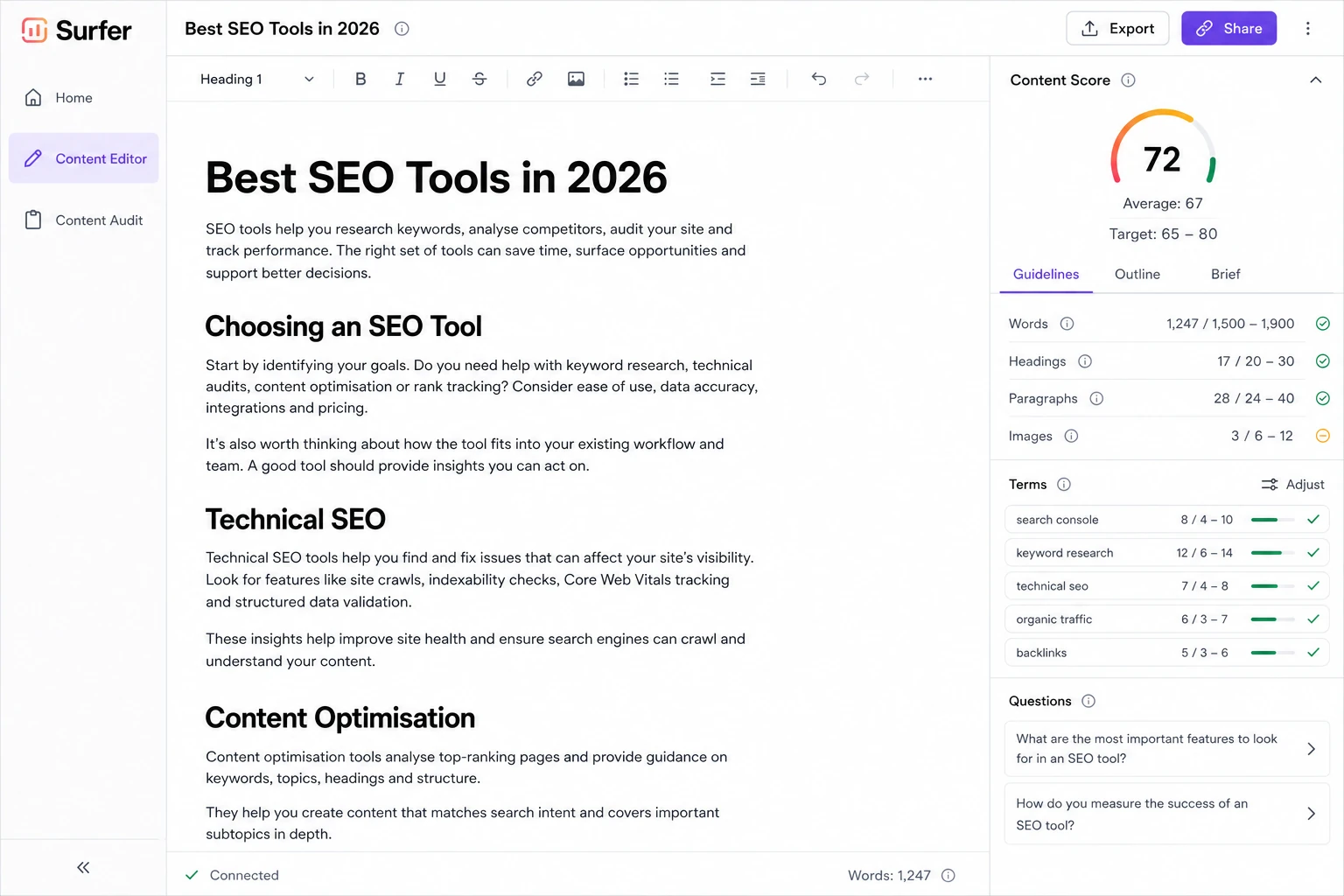
Surfer’s Content Editor provides recommendations based on analyses of ranking content.
Its features include content guidelines, relevant terms, competitor information, and editorial optimization scores.
For teams producing articles regularly, this can help structure research and editing.
However, a high Content Score shouldn’t be interpreted as a Google ranking score.
The recommendations remain tool-generated guidance that needs editorial judgement.
A specialized content platform is worth considering when its analysis meaningfully improves the team’s output or reduces repeated research work.
It isn’t necessary simply because the business publishes content.
Content Research and Planning: Frase and MarketMuse
Frase supports research into competing search results, content gaps, questions, and article briefs.
Its workflow is especially relevant to teams preparing content briefs and moving from research to writing.
MarketMuse focuses on content strategy, topical coverage, content planning, and research briefs.
These products illustrate why content specialists can’t always be compared directly.
A team struggling to create useful article briefs has different needs from one trying to identify gaps across an established content library.
The better product depends on which task requires improvement.
The Main Disadvantage: More Systems to Maintain
A specialized SEO stack may offer excellent capabilities, but it also requires coordination.
Every product can introduce another subscription, login, reporting format, interface, and data source.
These differences become more significant as the team grows.
For example, a content team may conduct keyword research in Ahrefs, prepare briefs using Frase, optimize articles with Surfer, and monitor results through another reporting platform.
That workflow can be effective.
However, it may require manual transfers or additional integrations to keep information consistent.
The relevant question is whether the improvement in each specialist task justifies those operational costs.
When Is an All-in-One Platform the Better Choice?
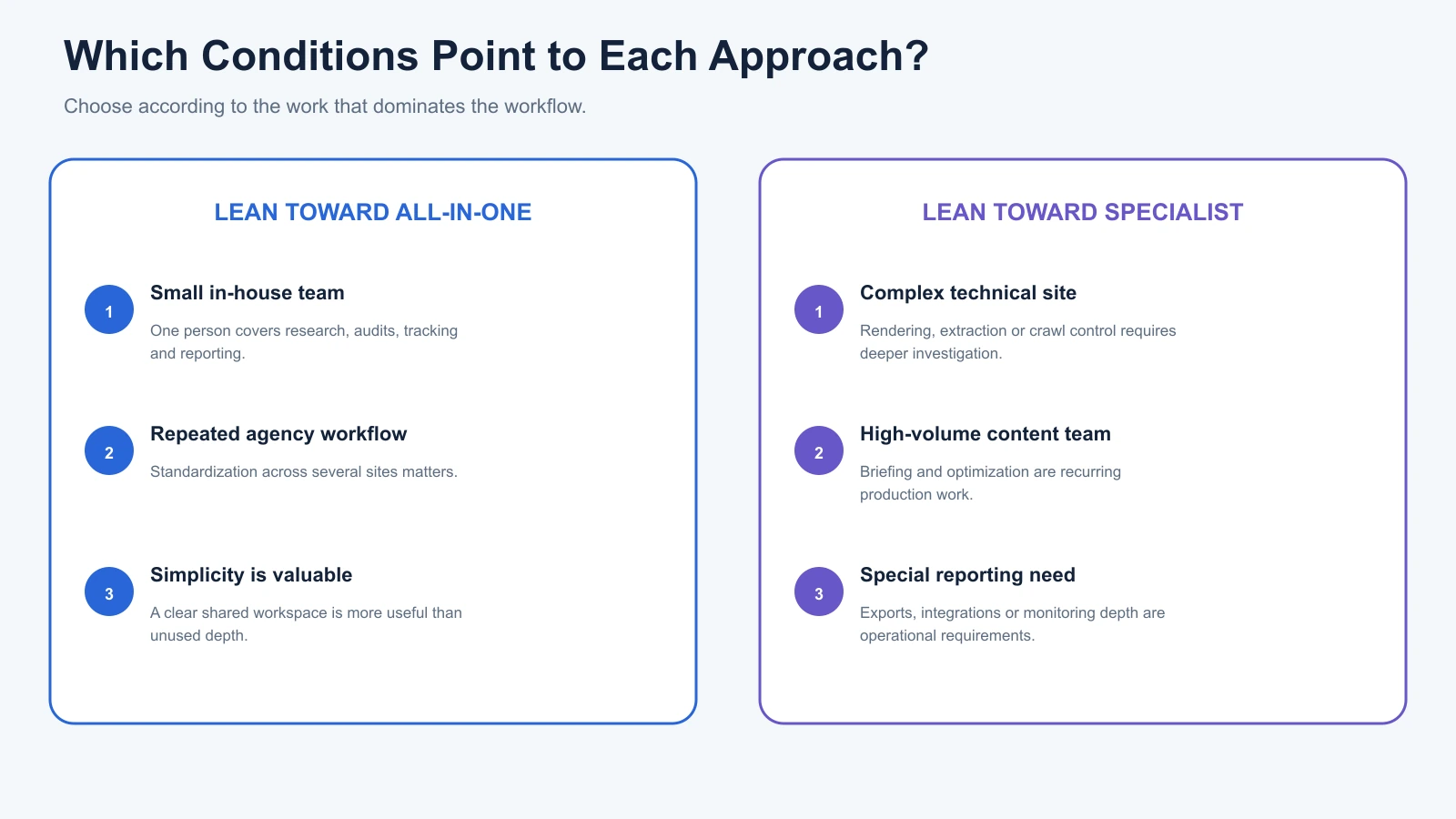
An all-in-one platform generally makes more sense when a business performs several SEO activities regularly and benefits from managing them together.
Small In-House Marketing Teams
A small marketing team often handles multiple responsibilities.
The same person may research keywords, review technical issues, monitor rankings, and prepare monthly reports.
Maintaining separate specialist platforms for every activity could create unnecessary work.
An integrated product may provide enough depth for those tasks while simplifying project management.
This is particularly useful when team members are not dedicated technical SEO specialists.
However, the subscription should still be compared with a lean free-tool setup.
A website using Google Search Console, GA4, and occasional technical audits may not need a comprehensive paid platform immediately.
Agencies Managing Repeated Client Workflows
Agencies often repeat similar processes across several websites.
They research markets, analyse competitors, monitor rankings, conduct audits, and prepare reports.
An all-in-one platform can make these activities easier to standardize.
However, agencies should check whether the plan provides enough projects, tracked keywords, seats, and report capacity.
A product may include every required feature but still lack sufficient allowances for the agency’s client roster.
Teams That Prioritize Simplicity
A broader platform can also be useful when reducing workflow complexity is more important than obtaining advanced functionality in every category.
For example, a business owner may prefer one understandable dashboard for tracking visibility and identifying website issues.
That can be more useful than several detailed specialist reports nobody has time to interpret.
In this situation, ease of use is part of the value.
When Are Specialized SEO Tools the Better Choice?
Specialized tools are more appropriate when a particular SEO discipline represents a large or technically demanding part of the work.
Complex Technical Websites
Large ecommerce websites, JavaScript-heavy applications, and international sites may require advanced technical investigation.
A dedicated crawler can be valuable when the team needs detailed control over rendering, parameters, authentication, or extraction.
A broader SEO suite may remain useful for research and reporting, but specialist crawling addresses the technical requirement.
Content Teams Producing at Scale
An editorial operation publishing frequently may need more detailed content research, brief creation, or optimization functionality.
Specialist products may help standardize those workflows.
However, software recommendations should remain secondary to content accuracy, originality, and usefulness.
Adding a content platform makes sense when it reduces actual editorial work, not simply because it produces another optimization score.
Businesses With Specialist Reporting Requirements
Some agencies need advanced rank tracking, custom data exports, or integrations with internal reporting systems.
A dedicated rank tracker can be appropriate when the primary SEO suite doesn’t provide the necessary depth or flexibility.
In that case, the additional subscription serves a specific operational requirement rather than duplicating an existing feature.
The Hybrid Approach: One Primary Platform Plus Selected Specialists
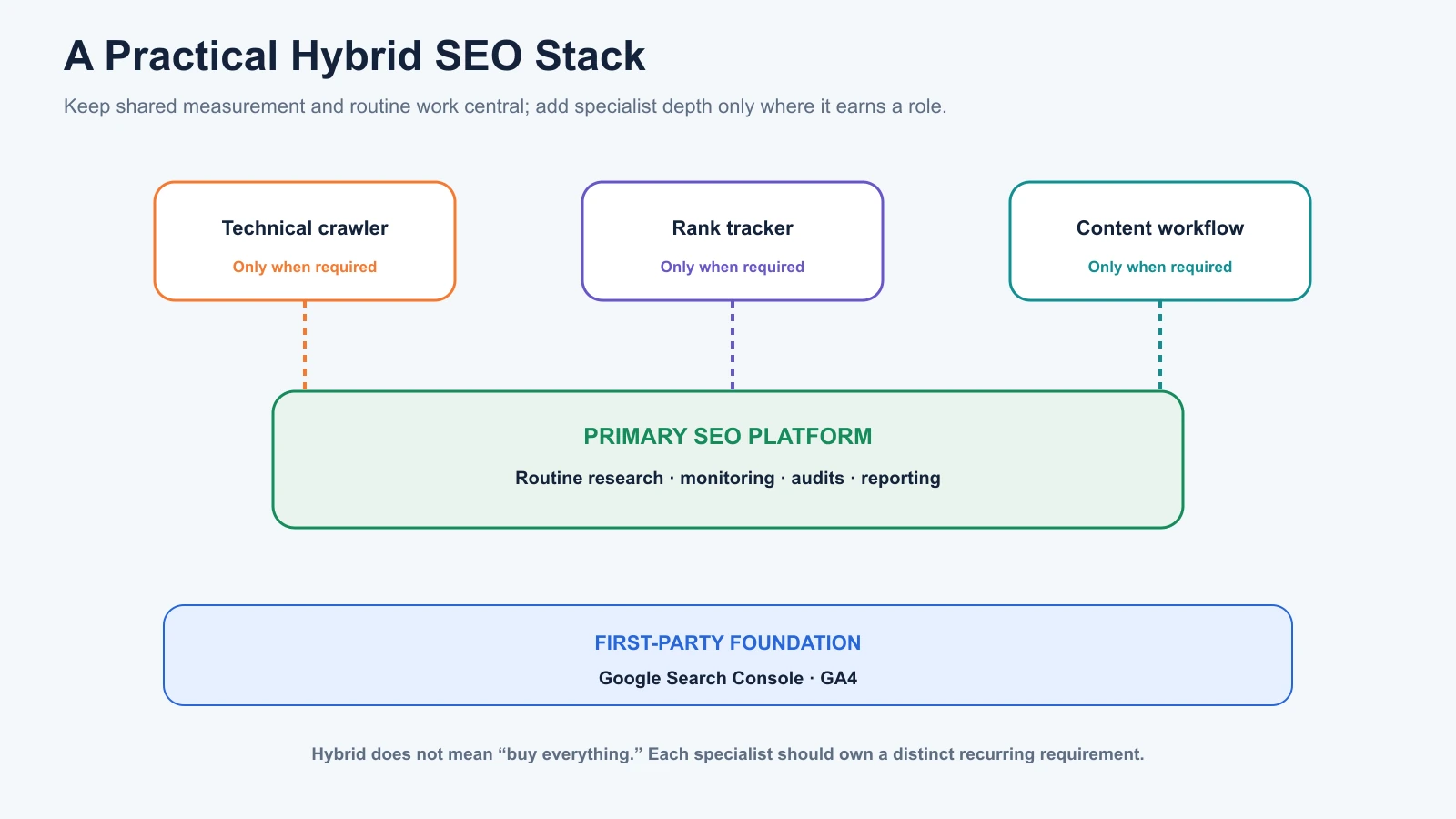
For many SEO teams, choosing between all-in-one and specialist software isn’t an either-or decision.
A hybrid approach combines broader workflow coverage with specialist functionality where necessary.
For example, a team might use Semrush or Ahrefs as its primary SEO research platform while keeping Screaming Frog for advanced technical crawling.
Another may use SE Ranking for regular monitoring alongside Surfer for content optimization.
The advantage is flexibility.
You don’t need to replace the entire stack when one workflow requires more advanced functionality.
Practical SEO Stack Examples
| Business Situation | Possible Setup | Why It May Work |
|---|---|---|
| Small local website | Search Console, GA4, free crawling tools | Covers important measurement and basic technical checks |
| Small in-house SEO team | One integrated SEO platform + Google tools | Simplifies routine research, tracking, and reporting |
| Technical SEO consultancy | Primary research platform + Screaming Frog | Combines competitive research with detailed technical crawling |
| Content-focused agency | Integrated SEO suite + content specialist | Supports keyword strategy and repeatable editorial workflows |
| Larger multi-client agency | Integrated platform + selected tracking, crawling, or reporting tools | Adds specialist capacity where standard features are insufficient |
These are illustrative workflows rather than fixed recommendations.
A technical consultancy may use several specialist tools because the work requires them.
A growing agency may prefer one integrated platform because it covers most of its existing services.
The number of tools isn’t the deciding factor.
It’s whether the combination covers the required work without unnecessary duplication.
All-in-One vs Specialized SEO Tools: Which Costs Less?
Neither approach is consistently cheaper.
The total cost depends on the actual subscriptions required and the work needed to operate them.
An all-in-one platform may reduce spending by replacing several products.
However, specialized tools can be more cost-effective when the business only needs one or two advanced capabilities.
Comparing Real Subscription Costs
The table below uses selected official prices reviewed in October 2026.
| Product | Published Price | Main Role |
|---|---|---|
| Semrush SEO | $139/month | Broad SEO research, tracking, and auditing |
| Ahrefs Lite | $129/month | Keyword, backlink, competitor research, and auditing |
| SE Ranking Core | $129/month | Multi-project research, tracking, and auditing |
| Screaming Frog SEO Spider | £199/user/year | Specialist technical crawling |
| Google Search Console | Free | First-party Google Search performance |
| Google Analytics 4 | Free standard service | Website activity and conversion analysis |
Prices represent specific published plans, not equivalent feature packages. Currency, billing terms, user allowances, and additional costs vary. Check the official pricing pages before purchasing.
Example: An Integrated SEO Stack
Suppose a small marketing team uses Semrush SEO as its main platform.
At the published monthly rate of $139, the annual subscription cost would be $1,668 before taxes or add-ons.
The team also uses free Search Console and GA4 accounts.
If those tools meet its research, auditing, and reporting requirements, additional specialist software may not be necessary.
However, the team should verify the subscription’s project and keyword allowances.
Example: A Hybrid SEO Stack
Another team uses Ahrefs Lite for research and adds one Screaming Frog licence for technical crawling.
Its published software commitments are:
- Ahrefs Lite: $129 per month.
- Screaming Frog: £199 per year.
These are separate currencies and billing arrangements, so they shouldn’t be combined into a single USD figure without selecting an exchange rate.
The setup may be suitable for a research-led team that also performs technical crawling.
However, Ahrefs already includes Site Audit. The additional crawler needs to justify its cost through capabilities or workflows the team actually uses.
Account for More Than Subscription Fees
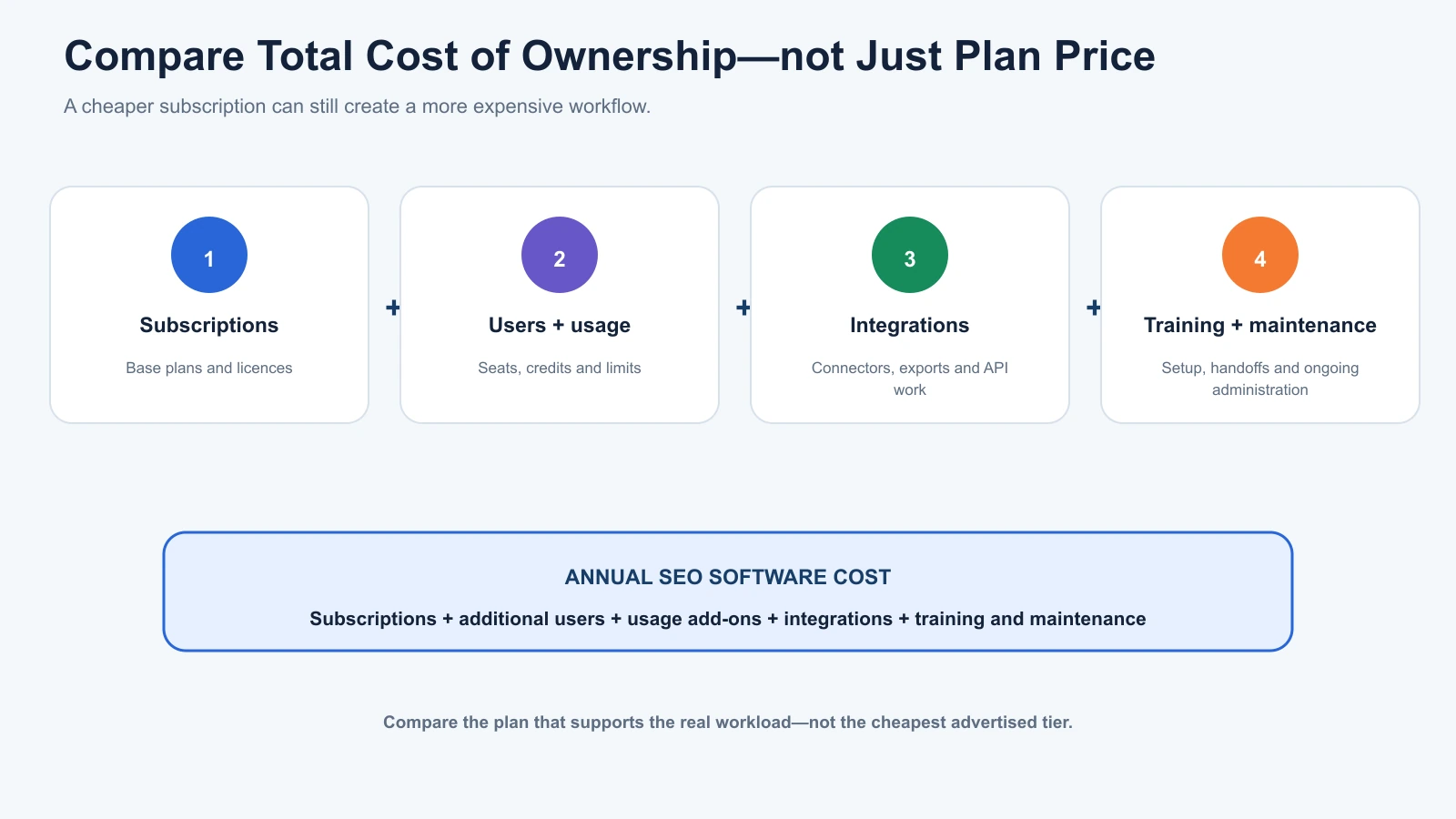
A useful total cost of ownership model is:
Annual SEO Software Cost = Subscriptions + Additional Users + Usage Add-ons + Integrations + Training and Maintenance
The last two components are often overlooked.
Specialized stacks may involve manual exports, custom integrations, or additional report preparation.
An integrated suite can reduce some of that work, but it may also require paid modules, higher plans, or additional seats.
A cheaper subscription doesn’t always result in a cheaper workflow.
For a detailed breakdown of software budgeting, compare our guidance on choosing the right SEO tool for your business, including how subscription allowances influence the decision.
How to Determine Whether You Need a Specialist Tool
Before subscribing to another platform, test whether your existing software already performs the required task well enough.
The key is to compare the same workflow rather than unrelated product features.
Define the Problem First
Suppose your team is struggling with technical audits.
You might need better JavaScript rendering, more detailed redirect analysis, or additional crawl configuration.
Those are specific requirements.
Simply deciding that Screaming Frog is more advanced than a built-in audit module doesn’t tell you whether the additional software is necessary.
Test the Same Task in Both Products
Use the same website and equivalent settings wherever possible.
For a technical audit, compare the ability to identify important issues and investigate affected URLs.
For content optimization, compare how useful the recommendations are for the same article.
For rank tracking, compare location, device, update frequency, and reporting capabilities.
Document any settings that cannot be matched.
Evaluate the Results Against Your Workflow
A specialist becomes worth keeping when its additional capabilities support meaningful work.
That might mean identifying a problem your existing platform missed, reducing recurring manual effort, or providing reporting functionality needed by the team.
Avoid judging only by the number of warnings, keyword suggestions, or dashboard widgets.
Those totals don’t automatically establish usefulness.
Test the Entire Handoff
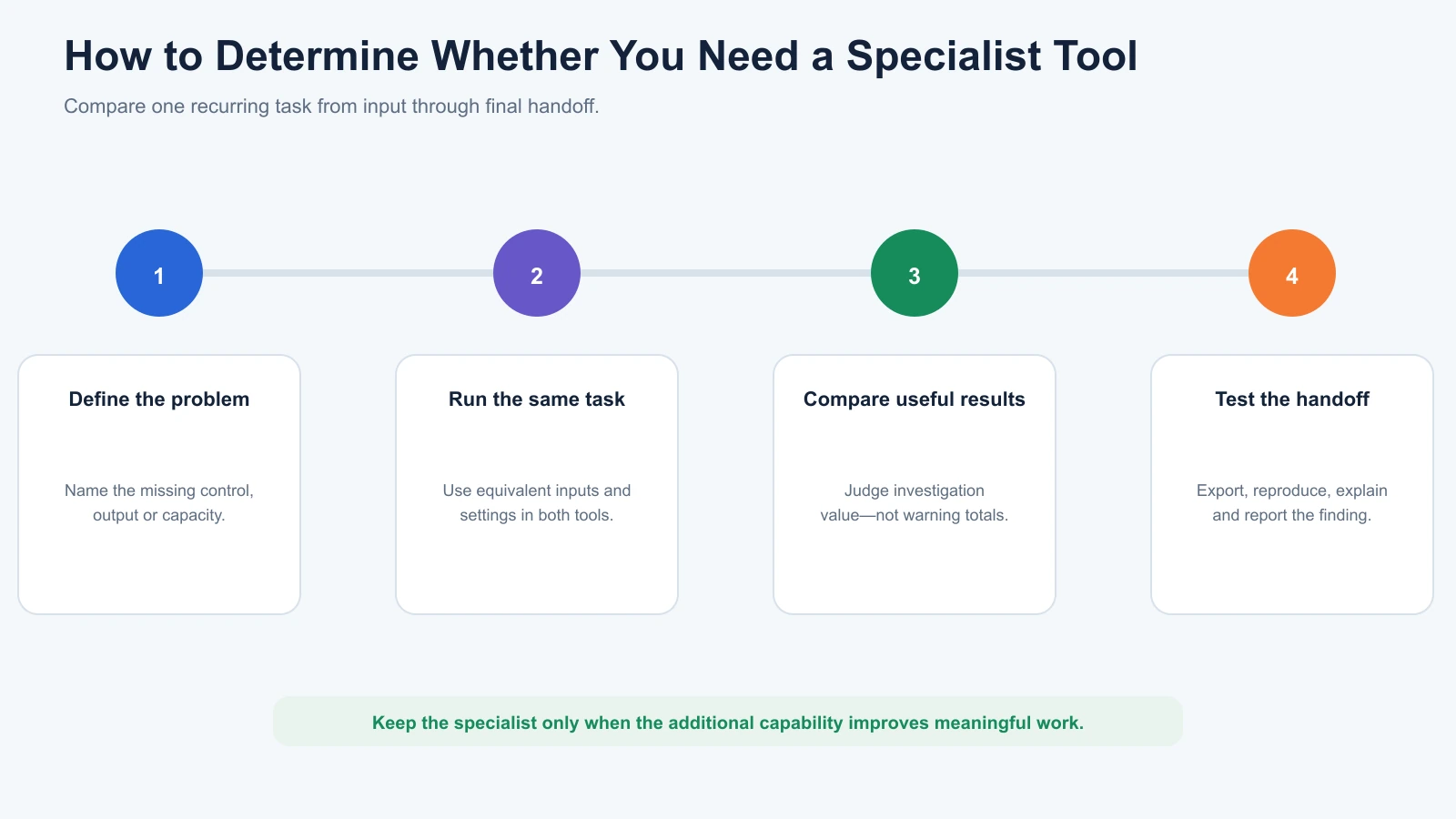
The evaluation shouldn’t stop when the individual task is complete.
Check how the finding moves into the next step.
Can the team export the data?
Can the content editor understand the recommendation?
Can the technical specialist reproduce the issue?
Can the result be included in a report?
A specialist tool may perform one task exceptionally well but introduce enough additional work that its overall value becomes less clear.
A Practical Decision Framework
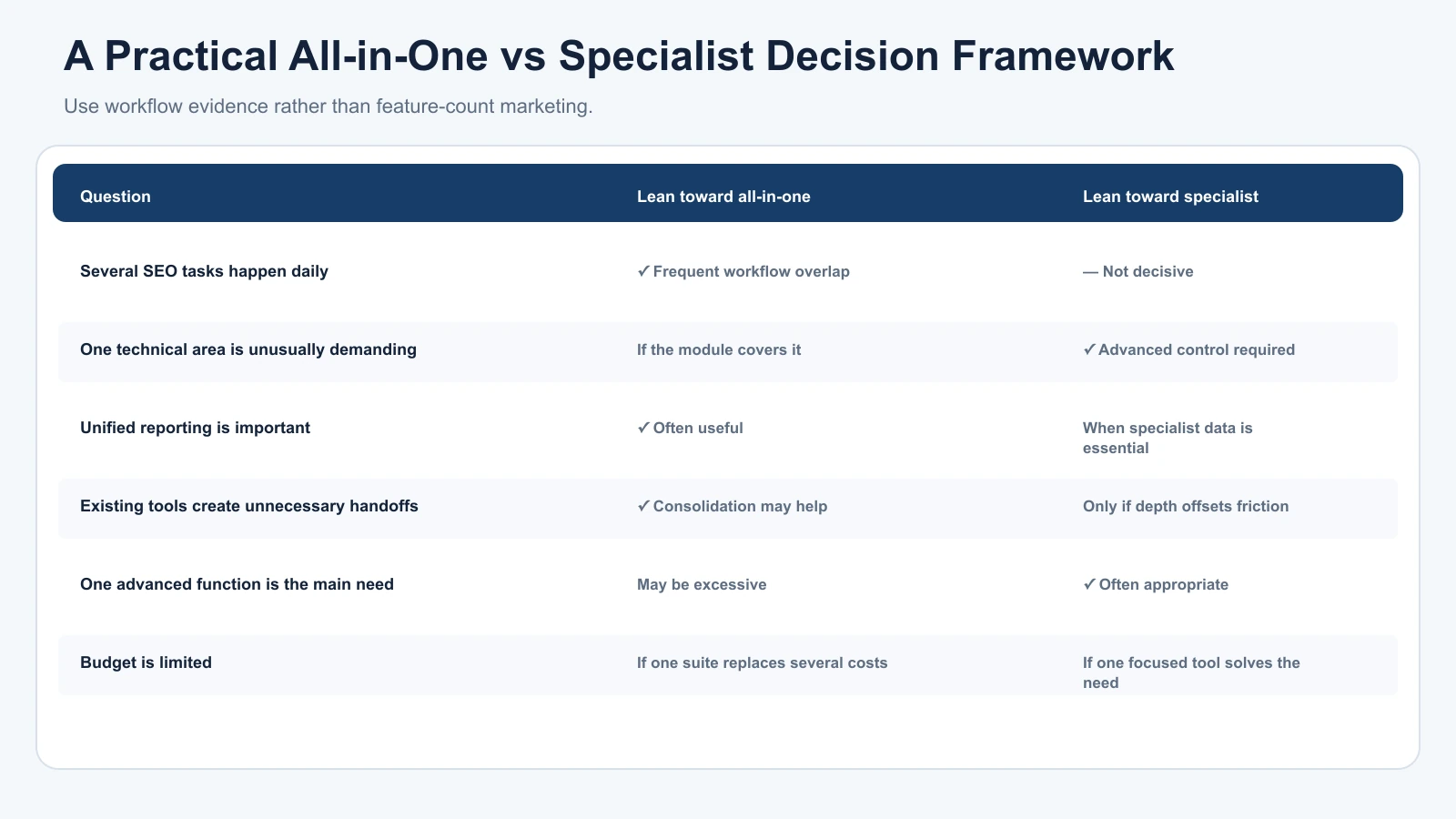
Use these questions when comparing an all-in-one platform with specialized software.
| Question | Lean Toward All-in-One | Lean Toward Specialist |
|---|---|---|
| Do you perform several SEO tasks daily? | Yes, with frequent workflow overlap | Not necessarily |
| Is one technical area unusually demanding? | If existing modules cover it | If advanced controls are required |
| Does your team need unified reporting? | Often useful | When specialist data is essential |
| Are existing tools creating unnecessary handoffs? | Consolidation may help | Only if specialist value offsets friction |
| Do you primarily need one advanced function? | May be excessive | Often more appropriate |
| Is your budget limited? | If one suite replaces several expenses | If one focused tool covers the actual need |
A useful purchasing process is to test one real task before and after introducing the new tool.
Record the time required, output quality, additional actions needed, and whether the findings support better decisions.
If the new product doesn’t meaningfully improve the work, another subscription may not be worthwhile.
How AI SEO and GEO Tools Affect the Decision
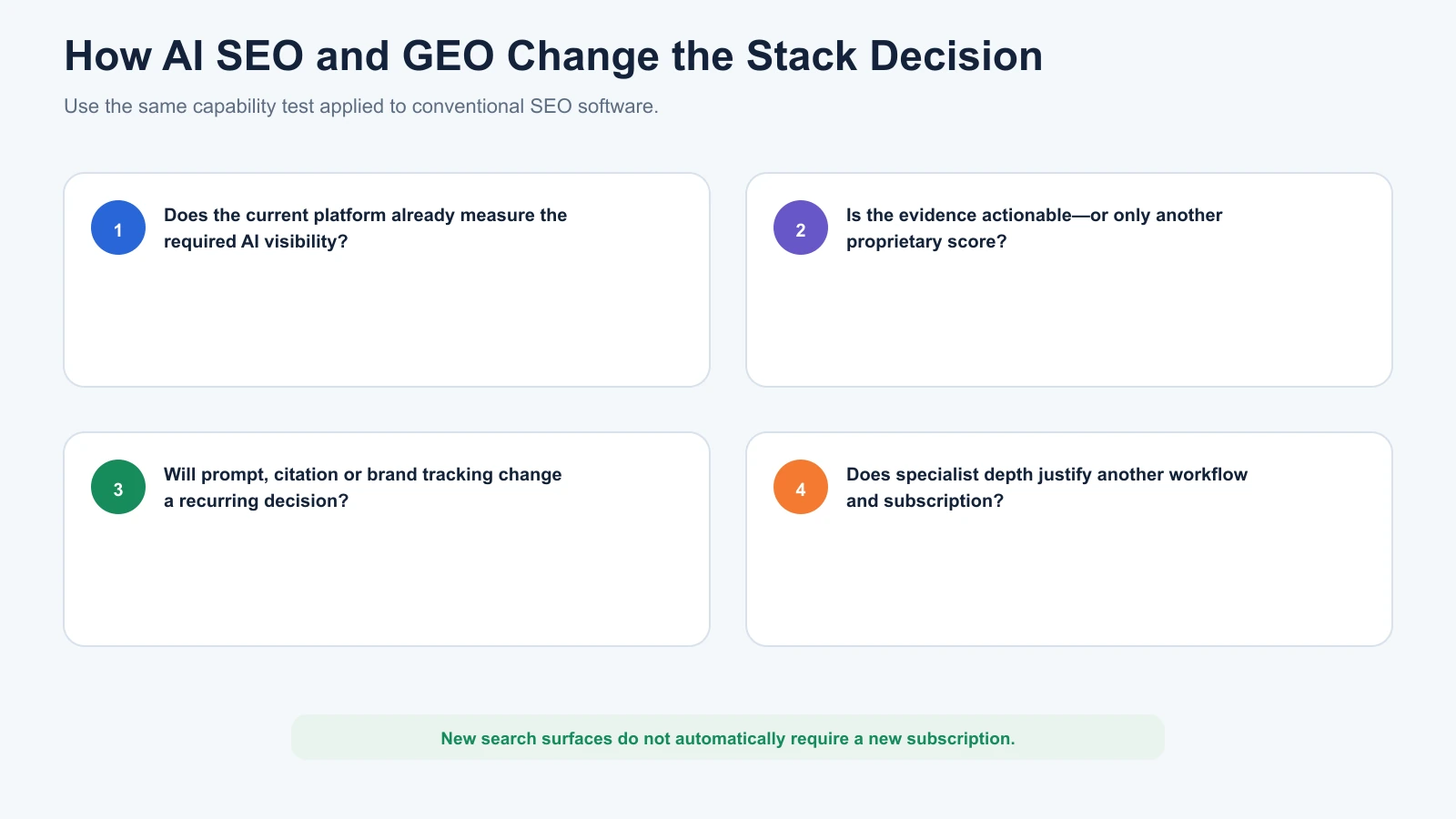
AI-assisted SEO features have introduced another layer to the all-in-one versus specialist comparison.
Traditional SEO platforms increasingly include AI-related research, content recommendations, and search visibility functions.
Specialized products may focus on narrower activities such as AI citation monitoring, brand mentions, prompt tracking, or content optimisation for generative search experiences.
The decision follows the same principle as conventional SEO.
A business doesn’t necessarily need another subscription simply because AI visibility has become part of its reporting.
Instead, determine whether the existing platform provides the required measurements and whether those measurements are useful.
Where Digimetrics Fits
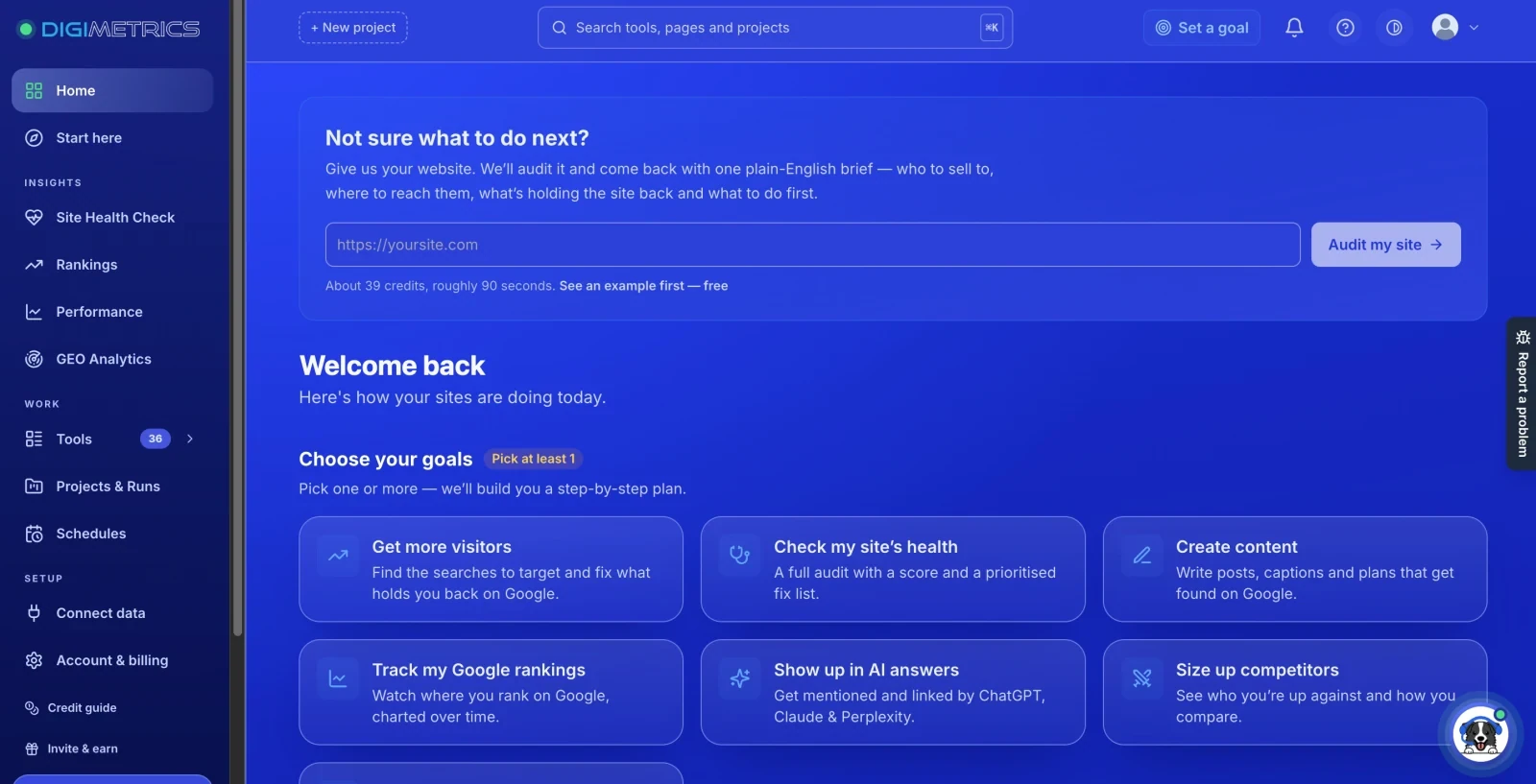
Disclosure: DigitalMarketingTools.ai is sponsored by Digimetrics.ai, which is developed by MediaOne.
Digimetrics follows an integrated-workspace approach, connecting SEO-related tools with content optimisation, technical diagnostics, AI visibility, and broader marketing workflows.
This may be useful when teams regularly move between keyword analysis, website diagnostics, content development, and GEO-related monitoring.
However, broader functionality doesn’t automatically make it a better replacement for specialist software.
A dedicated crawler may still provide more advanced technical controls. A mature backlink platform may provide research capabilities that a newer integrated product cannot match for a specific task.
The relevant question is whether Digimetrics can consolidate the particular workflows the business needs without removing important specialist capabilities.
As with any affiliated product, the evaluation should consider documented functionality, limitations, pricing, and actual workflow requirements.
Common Mistakes When Building an SEO Tool Stack
Assuming All-in-One Means Every Feature Is Included
A broad platform may advertise content optimization, APIs, historical research, and advanced reporting.
However, some of those features may be limited to higher subscriptions or sold separately.
Read the current plan details before assuming that the base subscription replaces every existing tool.
Assuming Specialists Are Always More Accurate
A tool focused on one task isn’t automatically more reliable.
Different vendors use different datasets, crawling methods, and proprietary calculations.
For example, keyword search volume and Keyword Difficulty are estimates that can vary between platforms.
A specialized product should be assessed using evidence relevant to the task, not its marketing category.
Google’s guidance on third-party SEO tools also makes clear that external platforms don’t have access to Google’s internal ranking systems.
Paying for Overlapping Reports
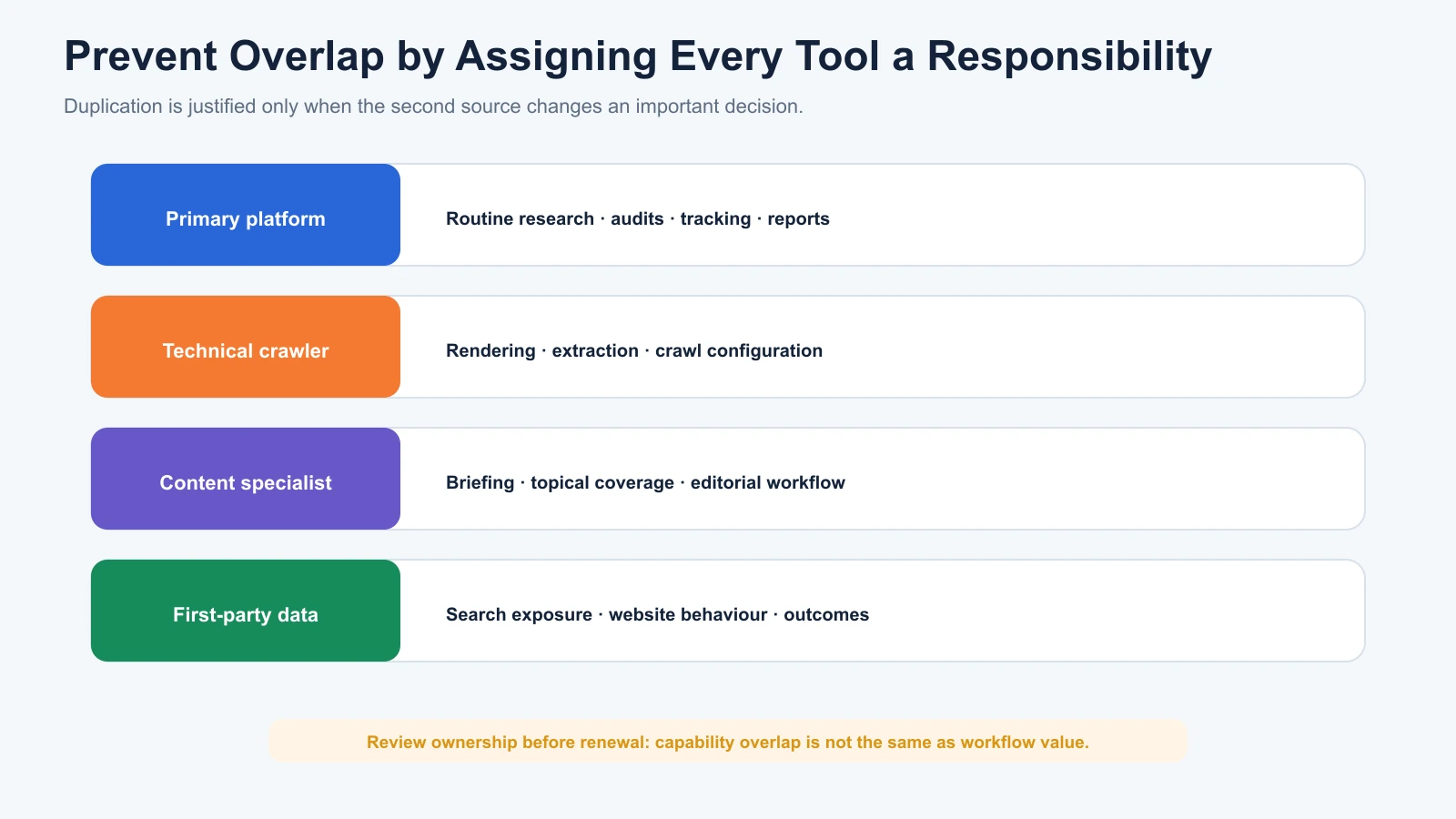
Using Semrush and Ahrefs together may be valuable when their respective datasets support different research needs.
However, it becomes less useful when both subscriptions repeatedly produce similar findings that don’t change any important decision.
Overlap isn’t automatically wasteful.
Unexplained overlap is where spending deserves review.
Ignoring Integration and Maintenance Costs
A specialist stack may look affordable when each subscription is considered independently.
However, the complete workflow might require manual transfers, repeated configuration, and additional report preparation.
Those costs should be considered alongside subscription fees.
Replacing Useful Specialists Just to Reduce Tool Count
Consolidation can make workflows simpler, but it shouldn’t eliminate capabilities a team genuinely needs.
A technical SEO team may reasonably maintain Screaming Frog alongside an integrated platform.
The specialist isn’t redundant if it supports work the primary platform cannot perform efficiently.
Final Verdict: Which Approach Should You Choose?
An all-in-one SEO platform is generally a better starting point when your team regularly handles several SEO responsibilities and benefits from keeping research, monitoring, auditing, and reporting in one environment.
Specialized tools become more valuable when a particular task requires deeper functionality, advanced configuration, or reporting that the existing platform cannot provide.
For many businesses, a hybrid approach offers a sensible balance.
One primary platform can handle recurring SEO work, while specialist software supports technical crawling, rank tracking, content research, or other areas that require additional depth.
However, the goal should never be to assemble a particular number of products.
The right SEO stack is the smallest combination that reliably supports your work without sacrificing capabilities your team actually needs.
At MediaOne, we approach SEO software as a collection of evidence and workflow tools, not a competition to own the most platforms.
A keyword database helps identify opportunities. A crawler helps investigate technical problems. A rank tracker monitors search visibility. First-party analytics helps connect those activities to measurable website outcomes.
When those responsibilities are clear, deciding between an all-in-one platform and specialized tools becomes much easier.
If you’re comparing specific products rather than software approaches, our best SEO tools comparison examines the strengths and limitations of the available options.
Frequently Asked Questions
Is an All-in-One SEO Tool Better Than Specialized Tools?
Not necessarily. An all-in-one platform may be better for teams managing several SEO functions, while specialist software can provide additional functionality for demanding tasks. The choice depends on your workflow, budget, team expertise, and whether the specialist offers meaningful advantages over your existing platform.
Can One SEO Tool Handle Everything?
An all-in-one platform can cover many common SEO tasks, including keyword research, rank tracking, backlink analysis, and technical auditing. However, it may not provide the same advanced controls or specialist workflows as dedicated software. Google Search Console and website analytics also remain useful first-party data sources.
Are Specialized SEO Tools More Accurate?
Not automatically. Accuracy depends on the data source, collection method, configuration, and metric being measured. Specialized software may offer greater control in its chosen field, but it shouldn’t be assumed to outperform a broader platform without relevant testing.
Is Semrush an All-in-One SEO Platform?
Yes. Semrush combines keyword research, competitor analysis, rank tracking, technical auditing, and other SEO functions. However, the capabilities and allowances available depend on the subscription, and some advanced features require higher plans or additional products.
Is Ahrefs an All-in-One SEO Tool?
Yes. Ahrefs combines keyword research, backlink analysis, rank tracking, competitive intelligence, and Site Audit. It is particularly relevant to research-driven SEO workflows. However, users should check the features included in their chosen subscription, since additional content and reporting functionality may be available separately.
Should Agencies Use an All-in-One SEO Platform?
Agencies may benefit from integrated software because they regularly repeat research, auditing, monitoring, and reporting tasks across clients. However, agencies handling advanced technical SEO or specialist content workflows may still need dedicated products. The right setup depends on client requirements and operational limits.
Can I Use All-in-One and Specialized SEO Tools Together?
Yes. A hybrid stack is often practical. For example, a team might use Ahrefs for competitor research and Screaming Frog for technical crawling. The additional software should provide capabilities that justify its cost rather than duplicate features without improving the workflow.
How Much Does an All-in-One SEO Tool Cost?
Pricing varies by vendor and plan. As of October 2026, Semrush’s SEO subscription starts at $139 monthly, Ahrefs Lite at $129 monthly, and SE Ranking Core at $129 monthly. Higher tiers and add-ons can increase the total cost, so compare the plan required for your actual workload.
Do Small Businesses Need Specialized SEO Tools?
Not always. Smaller websites can often begin with Google Search Console, GA4, limited free tools, or one integrated SEO platform. Specialist products become more useful when a recurring task requires greater technical depth, monitoring capacity, or functionality not available through the current setup.
Is a Hybrid SEO Stack More Expensive?
It can be, but not always. A hybrid setup introduces additional software costs, yet it may improve efficiency when specialist capabilities are required. Compare the entire workflow, including subscriptions, user seats, integrations, and staff time, rather than assuming either approach is always cheaper.
Disclosure: digitalmarketingtools.ai is sponsored by Digimetrics.ai. Sponsored Highlights are clearly labelled advertising. Our reviews, comparisons and guides are written to be useful and fair regardless of who sponsors the site. Read the full disclosure.


