
7 Best GEO Tools for Beginners in 2026: Easy, Affordable & Practical
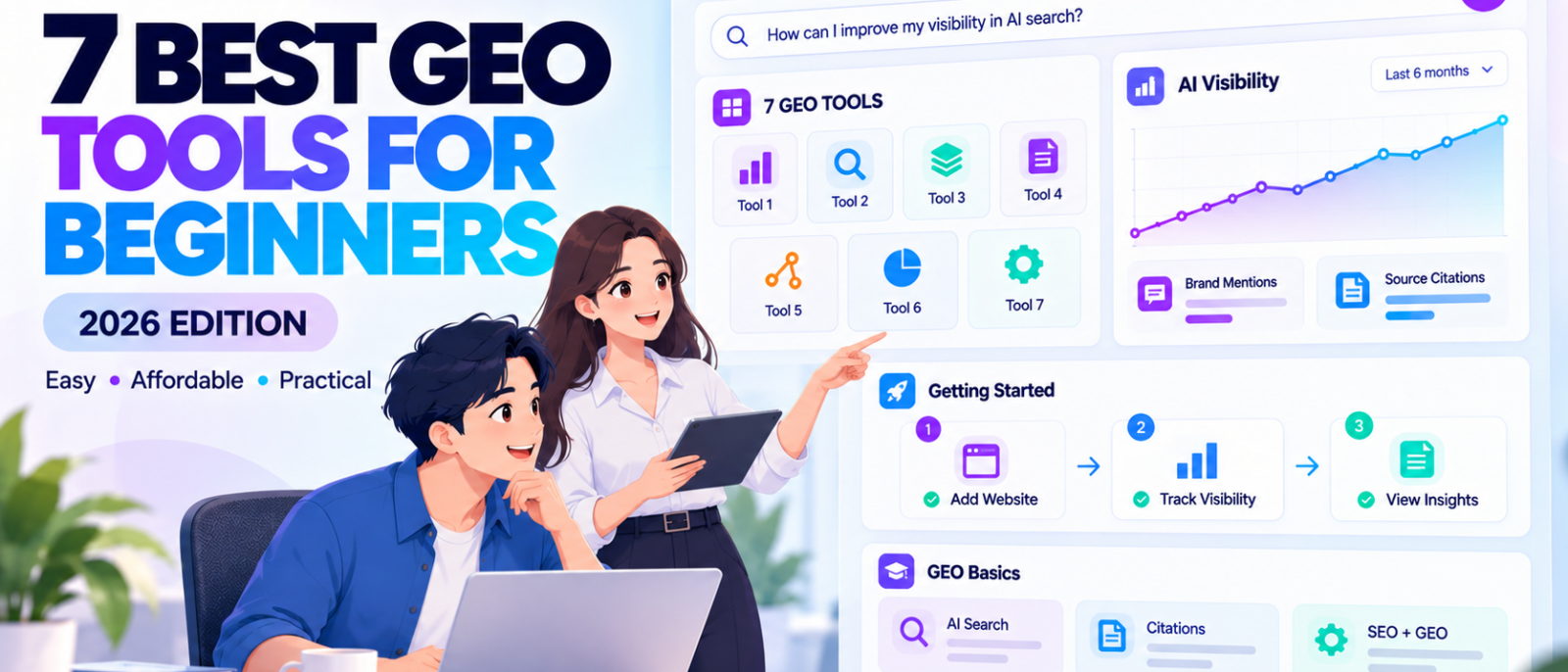
You ask ChatGPT to recommend a product in your industry, and it mentions three competitors but not your business. Then you check Google AI Overviews and notice that an independent article appears as a source while your website doesn’t.
Does that mean your SEO isn’t working? Should you optimise your content differently, or do you need another marketing tool to understand what’s happening?
These are common questions for marketers discovering Generative Engine Optimization (GEO). Traditional SEO tools help you understand keyword rankings, backlinks, website traffic, and technical problems, but they don’t always explain how AI-generated answers represent your brand or use your content.
GEO tools address that gap by monitoring brand mentions, source citations, competing businesses, and visibility across supported AI search experiences. Some also provide page audits, content suggestions, or integrations with existing SEO tools.
However, the best GEO tools for beginners in 2026 isn’t necessarily the platform with the most features. A new marketer may benefit more from free first-party reporting and an easy-to-understand visibility checker than a $300 subscription filled with unfamiliar metrics.
This guide compares seven beginner-friendly GEO tools, including Google Search Console, Bing Webmaster Tools, Ahrefs, Semrush, Frase, Otterly.AI, and Digimetrics. We’ll explain what each product measures, its documented access conditions, the limitations beginners should understand, and how to build a practical GEO workflow without wasting money.
Editorial disclosure: DigitalMarketingTools.ai is sponsored by Digimetrics.ai, which is developed by MediaOne. Digimetrics is included alongside competing products using the same product-selection considerations. This comparison is based on documented functionality and pricing, not an independent head-to-head benchmark of AI visibility accuracy.
Key Takeaways
- Start with free tools. Google Search Console and Bing Webmaster Tools offer first-party GEO-related reporting without another subscription, although they measure different activities.
- Ahrefs and Semrush offer beginner-friendly AI visibility checkers. They can provide quick brand visibility snapshots without requiring a paid plan.
- Frase is useful for investigating individual pages. Its free checkers cover AI citations, page-level GEO readiness, and AI-agent accessibility.
- Otterly.AI starts at $29 per month and is worth evaluating when you want recurring monitoring of a small set of questions.
- Digimetrics starts at $39 per month and combines GEO with keyword research, technical SEO, content optimisation, and broader marketing tools.
- Learn the difference between mentions, citations, and impressions. These measurements aren’t interchangeable, even when they appear in the same dashboard.
- Don’t buy software before identifying a useful task. Beginners should focus on understanding a few important customer questions and the evidence behind the resulting answers.
What Is a GEO Tool?
A Generative Engine Optimization tool helps marketers understand how their brands, websites, products, and content appear in AI-generated answers.
For example, imagine a small accounting software company wants to know whether ChatGPT mentions its product when someone asks about affordable invoicing tools.
A GEO monitoring tool could collect responses to relevant questions, identify the products mentioned, and show whether the company’s website appears as a cited source.
Other GEO tools serve different purposes. Some measure appearances directly within a search platform, while others audit webpages and suggest improvements to their structure, accessibility, or content.
These functions are related, but they shouldn’t be confused.
A webpage can be technically accessible without receiving AI citations. A business can also be mentioned in an AI answer without its website receiving a link or visitor.
For a more detailed introduction, read our complete guide to GEO tools, which explains how GEO works alongside traditional SEO.
GEO vs SEO: What Beginners Should Understand
SEO and GEO overlap because both involve helping users discover useful information.
Traditional SEO focuses on how content performs in search engines, including organic rankings, clicks, indexing, and technical accessibility.
GEO adds another measurement layer by examining what AI-generated answers say about websites and businesses.
| SEO Measurement | GEO Measurement |
|---|---|
| Organic search ranking | Brand appearance within an AI-generated response |
| Search impressions | AI search impressions or observed response coverage |
| Organic clicks | Identifiable AI referral visits |
| Backlinks | AI source citations |
| Keyword competitors | Brands and sources appearing in monitored AI answers |
| Technical SEO audit | AI accessibility and content-readiness assessment |
These are related concepts, not exact equivalents.
For example, an AI citation is not the same as a backlink, and an observed brand mention doesn’t prove that a real customer visited the website.
Beginners should learn these distinctions before relying on a platform’s visibility score.
7 Best GEO Tools for Beginners in 2026: Quick Comparison
The following tools represent different ways to begin GEO research, from free website reporting to recurring paid monitoring.
The recommendations are based on documented capabilities, access requirements, and practical beginner use cases. The numbered order is not a ranking established through controlled accuracy testing.
| GEO Tool | Free or Starting Price | Best Beginner Use |
|---|---|---|
| 1. Google Search Console | Free | Understanding Google AI search impressions |
| 2. Bing Webmaster Tools | Free | Finding AI citations and related topics |
| 3. Ahrefs AI Visibility Checker | Free limited checks | Checking brand visibility across AI platforms |
| 4. Semrush AI Visibility Checker | Free, 3 checks per day | Exploring brand mentions and AI visibility scores |
| 5. Frase Free GEO Tools | Free limited checks | Assessing citations and individual webpages |
| 6. Otterly.AI | From $29/month | Monitoring selected questions over time |
| 7. Digimetrics | From $39/month; 7-day trial | Learning GEO alongside SEO and content workflows |
Prices are in USD where applicable and reflect published terms reviewed in October 2026. Free checkers, first-party reporting, and paid monitoring platforms collect different data, so their results shouldn’t be compared as identical measurements.
1. Google Search Console: Best Free Starting Point for GEO Beginners
Price: Free
Best for: Website owners learning how their content appears in Google’s AI search experiences.
Google Search Console is a useful starting point for GEO because many marketers already rely on it for technical SEO, indexing, and search performance.
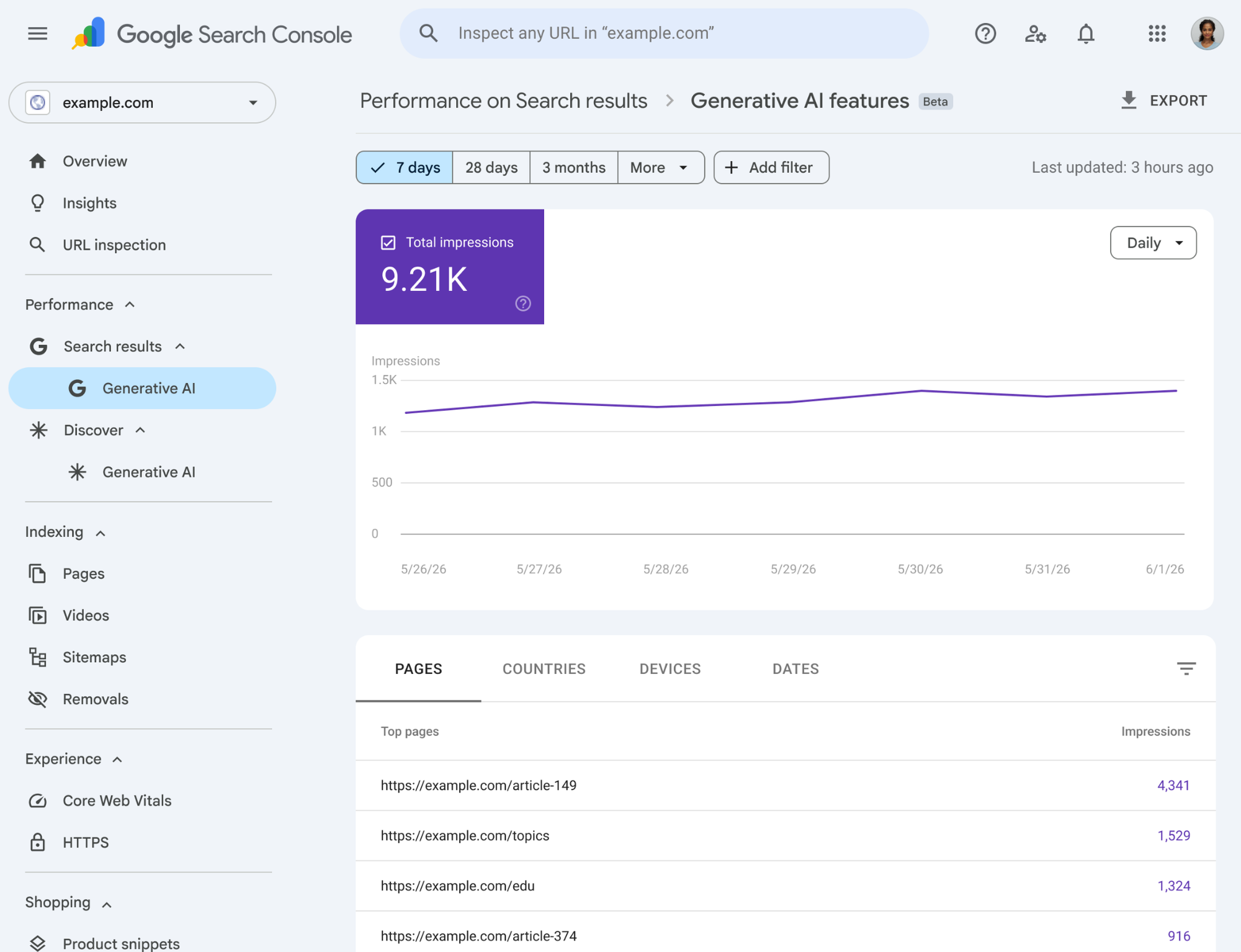
In June 2026, Google introduced dedicated generative-AI performance reporting, with worldwide rollout completed by August 31.
The report provides information about website links appearing within supported Google AI search experiences, including AI Overviews and AI Mode.
This makes Search Console particularly valuable for beginners because the measurements come directly from Google rather than a third-party estimate.
What Can You Do With Google Search Console?
The Generative AI performance report helps website owners investigate impressions associated with supported generative-AI features.
You can examine changes over time, identify pages receiving impressions, and review geographic or device-level differences.
For example, a small business might discover that its educational articles receive generative-AI impressions while important service pages receive relatively few.
That finding doesn’t automatically mean the service pages require rewriting. It provides a reason to investigate which questions the pages answer, whether their information is useful, and how they fit within the website’s broader SEO strategy.
Why It’s Beginner-Friendly
Search Console allows beginners to start with information from a platform they may already use.
Instead of learning a new proprietary scoring system, they can examine impressions and individual webpages within Google’s reporting environment.
It also supports traditional SEO work, making it easier to understand how established search performance and AI-related reporting fit together.
What Are the Limitations?
Search Console doesn’t provide a complete record of every time ChatGPT or Perplexity mentions a business.
It also doesn’t show every individual AI-generated response or the competing brands appearing in those answers.
Some properties may not display the dedicated generative-AI report when there hasn’t been enough eligible activity.
Beginner verdict: Start with Google Search Console if you own or manage a website. It provides a useful foundation before introducing specialist GEO software.
2. Bing Webmaster Tools: Best Free Tool for Understanding AI Citations
Price: Free
Best for: Beginners who want to see which webpages AI systems reference as sources.
Bing Webmaster Tools provides first-party reporting related to search performance, indexing, technical SEO, and AI citations.
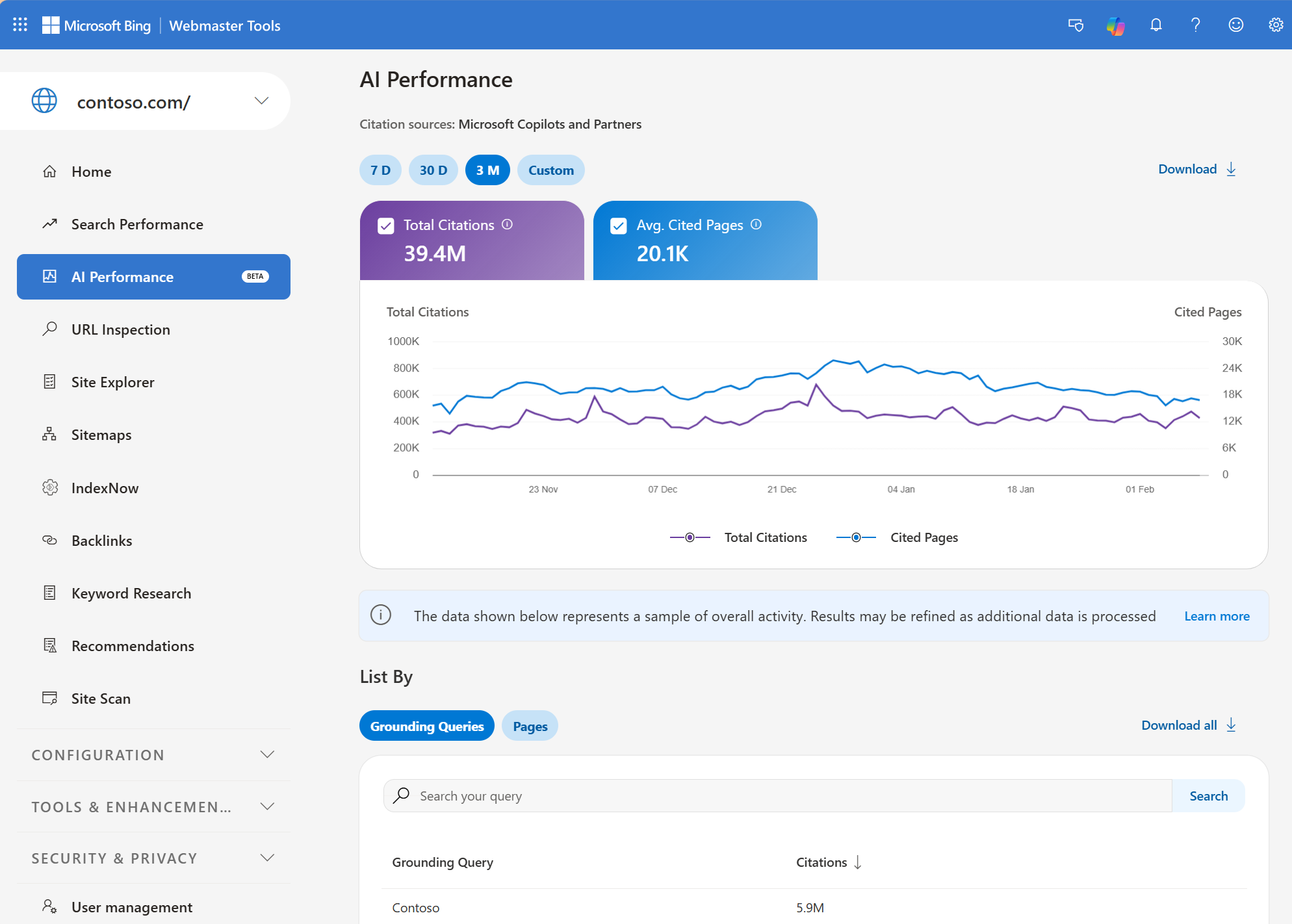
Microsoft introduced its AI Performance report in February 2026, allowing verified website owners to investigate how their content appears as a source within supported AI experiences.
These experiences include Microsoft Copilot, Bing AI-generated summaries, and selected partner integrations.
Unlike Search Console’s generative-AI impression reporting, Bing’s AI Performance focuses on citation activity.
What Can You Do With Bing Webmaster Tools?
The report includes total citations, cited pages, grounding queries, and historical trends.
For example, a beginner managing a gardening website could investigate whether its articles about soil preparation or plant care appear as sources within supported AI answers.
This information may help identify which topics are associated with existing citation activity.
Microsoft also introduced Topics Portfolio beta in October 2026. It groups related grounding queries into broader topics and highlights possible opportunities where competing sites appear.
These features can help beginners understand the topics associated with their website’s AI search presence without having to manually collect hundreds of responses.
What Are Grounding Queries?
A grounding query is a phrase associated with information retrieval during the creation of an AI-generated response.
For example, an AI system answering a broader question about gardening might retrieve information using a more specific phrase related to soil nutrients.
However, grounding queries aren’t necessarily the exact questions entered by real users.
This distinction is important because beginners may otherwise confuse a retrieval-related phrase with a complete record of customer searches.
What Are the Limitations?
Bing’s citation reporting is aggregated and includes sampling limitations.
A citation doesn’t necessarily mean someone clicked the source, read the article, or purchased a product.
The reporting also covers supported Microsoft AI experiences, not every assistant available online.
Beginner verdict: Use Bing Webmaster Tools alongside Search Console. Together, they provide free first-party information about AI search visibility and citations.
3. Ahrefs AI Visibility Checker: Best for a Quick Brand Visibility Snapshot
Price: Free limited preview
Best for: Beginners who want to understand whether their brand appears in AI-generated answers.
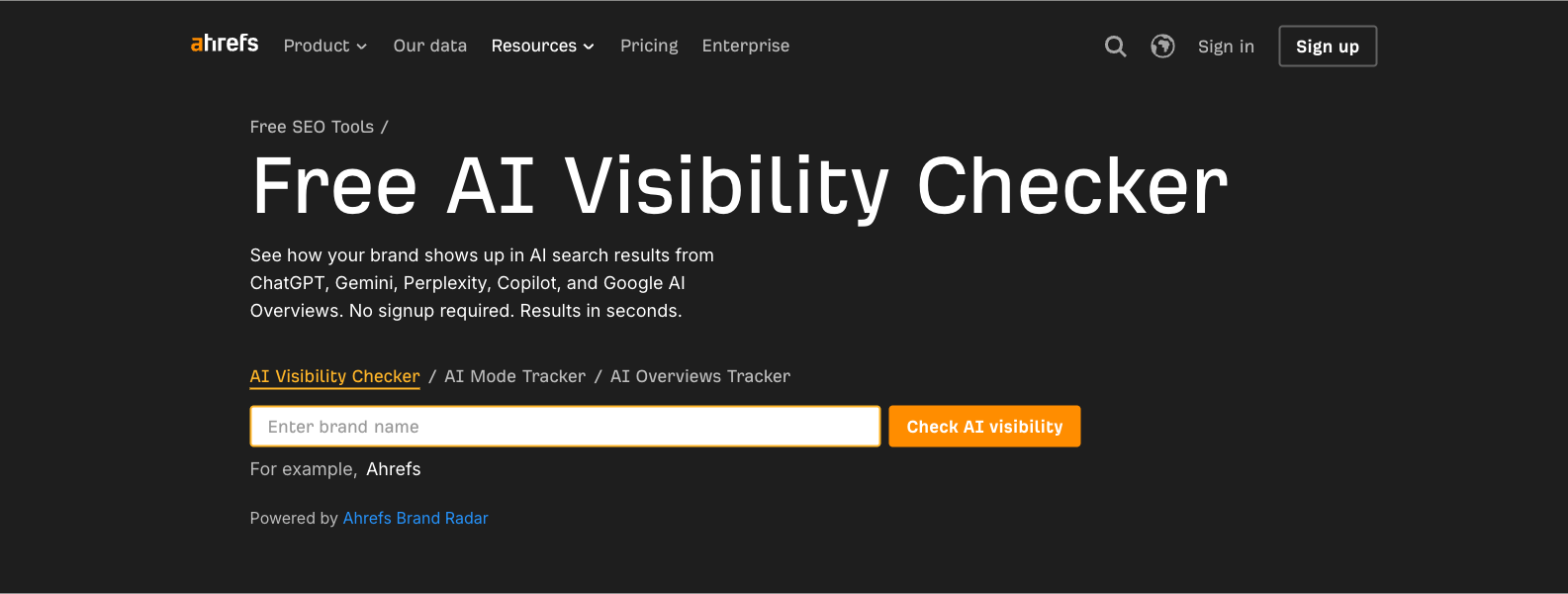
The Ahrefs AI Visibility Checker is a free tool powered by Ahrefs Brand Radar.
Unlike Search Console and Bing Webmaster Tools, it focuses on brand visibility across several supported AI platforms rather than requiring access to a verified website property.
The tool currently covers ChatGPT, Gemini, Perplexity, Microsoft Copilot, Google AI Overviews, and Google AI Mode.
You can enter a brand name and review the available results without creating an account.
What Can You Do With Ahrefs?
The free report provides brand mentions, platform-level visibility information, and a limited preview of associated topics and cited sources.
For example, a small ecommerce business could enter its brand name and investigate which AI platforms mention it within Ahrefs’ collected dataset.
The report may also show websites that appear as sources alongside relevant brand mentions.
This can help beginners become familiar with the relationship between brand visibility and source citations.
Why It’s Beginner-Friendly
Ahrefs doesn’t require users to configure a monitoring project before producing an initial report.
That makes it useful for someone who wants to understand what an AI visibility dashboard looks like without learning a comprehensive SEO platform.
The report also introduces several important GEO concepts, including mentions, topics, and cited domains.
What Are the Limitations?
The free checker provides only a limited preview, including top-five results for several reporting sections.
Historical monitoring, deeper competitor comparisons, and custom prompt tracking belong to the paid Brand Radar product.
The free results also come from Ahrefs’ collected AI search dataset. They shouldn’t be interpreted as a complete record of every AI conversation involving the brand.
Beginner verdict: A convenient first tool for exploring AI brand visibility without paying for specialist monitoring.
4. Semrush AI Visibility Checker: Best for Learning GEO Visibility Metrics
Price: Free, with three checks per day
Best for: Beginners interested in brand mentions, citations, and AI visibility scores.
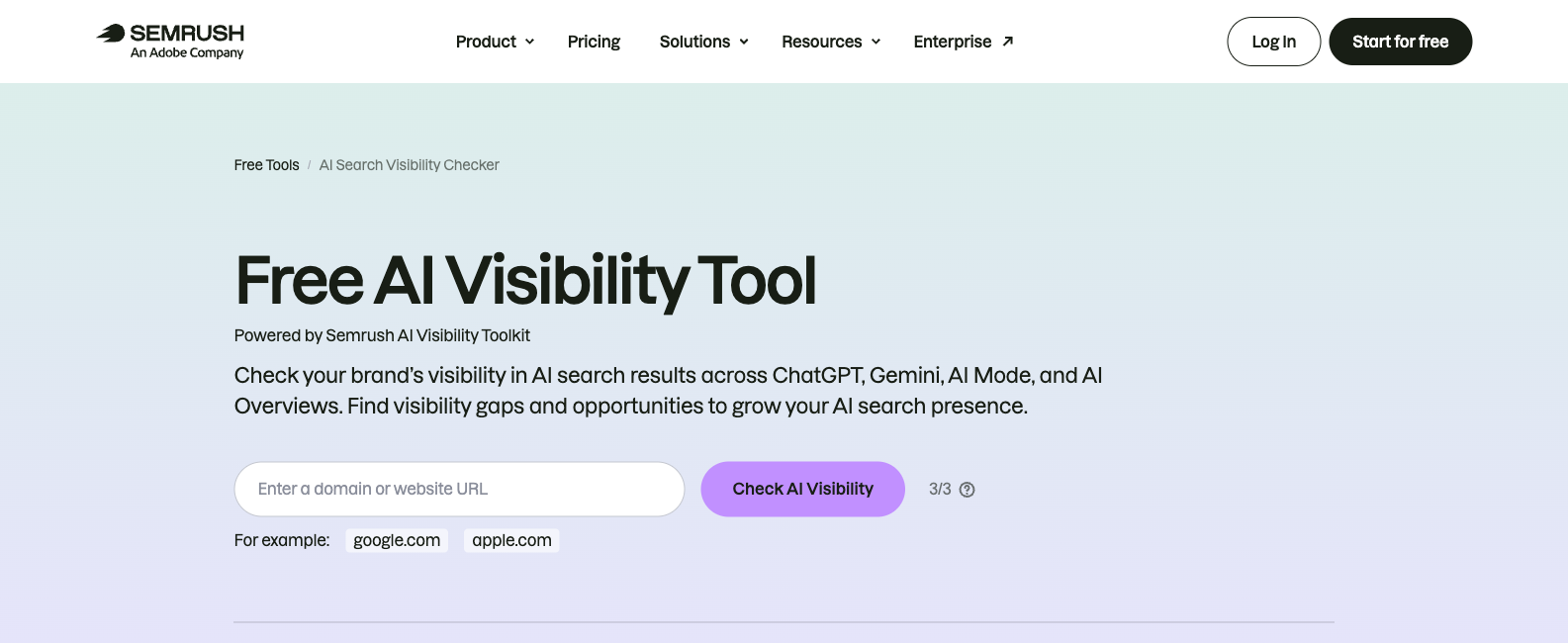
Semrush’s Free AI Visibility Checker provides a domain-level snapshot of how a business appears within its AI search dataset.
The tool covers supported experiences including ChatGPT, Gemini, Google AI Mode, and Google AI Overviews.
Users enter a website address and generate a report containing several AI visibility measurements.
Unlike a recurring monitoring platform, this free version is intended for limited checks rather than continuous tracking.
What Can You Do With Semrush?
The report includes an AI Visibility Score, brand mentions, platform breakdowns, cited webpages, and relevant topics.
For example, a beginner working on a software website could investigate whether Semrush’s dataset includes the brand in relevant AI-generated answers.
They might also identify pages appearing as sources and compare the subjects associated with those appearances.
The resulting report can provide useful context for deciding which topics deserve further investigation.
What Does the AI Visibility Score Mean?
Semrush provides a proprietary AI Visibility Score on a 0–100 scale.
The score summarises visibility within Semrush’s methodology, making it useful for understanding the provider’s reporting environment.
However, it isn’t a universal ranking assigned by ChatGPT, Google, or another AI platform.
A website scoring 65 in Semrush shouldn’t automatically be described as more visible than another website scoring 50 in an unrelated tool.
The products may use different datasets, calculations, and monitoring conditions.
What Are the Limitations?
The free checker currently permits three checks per day without registration.
Deeper competitor analysis, ongoing prompt tracking, and advanced reporting require paid functionality.
Beginners should also distinguish brand mentions from measurable visitor traffic. Being named in an AI response doesn’t guarantee that anyone clicked through to the website.
Beginner verdict: Useful for learning the basic metrics found in commercial GEO dashboards before deciding whether advanced monitoring is necessary.
5. Frase Free GEO Tools: Best for Understanding What to Improve on a Page
Price: Free limited checks
Best for: Beginners who want to investigate individual webpages and AI citations.
Frase provides several free tools related to AI search visibility and page-level GEO analysis.
Its main advantage for beginners is that it separates different questions into different checks.
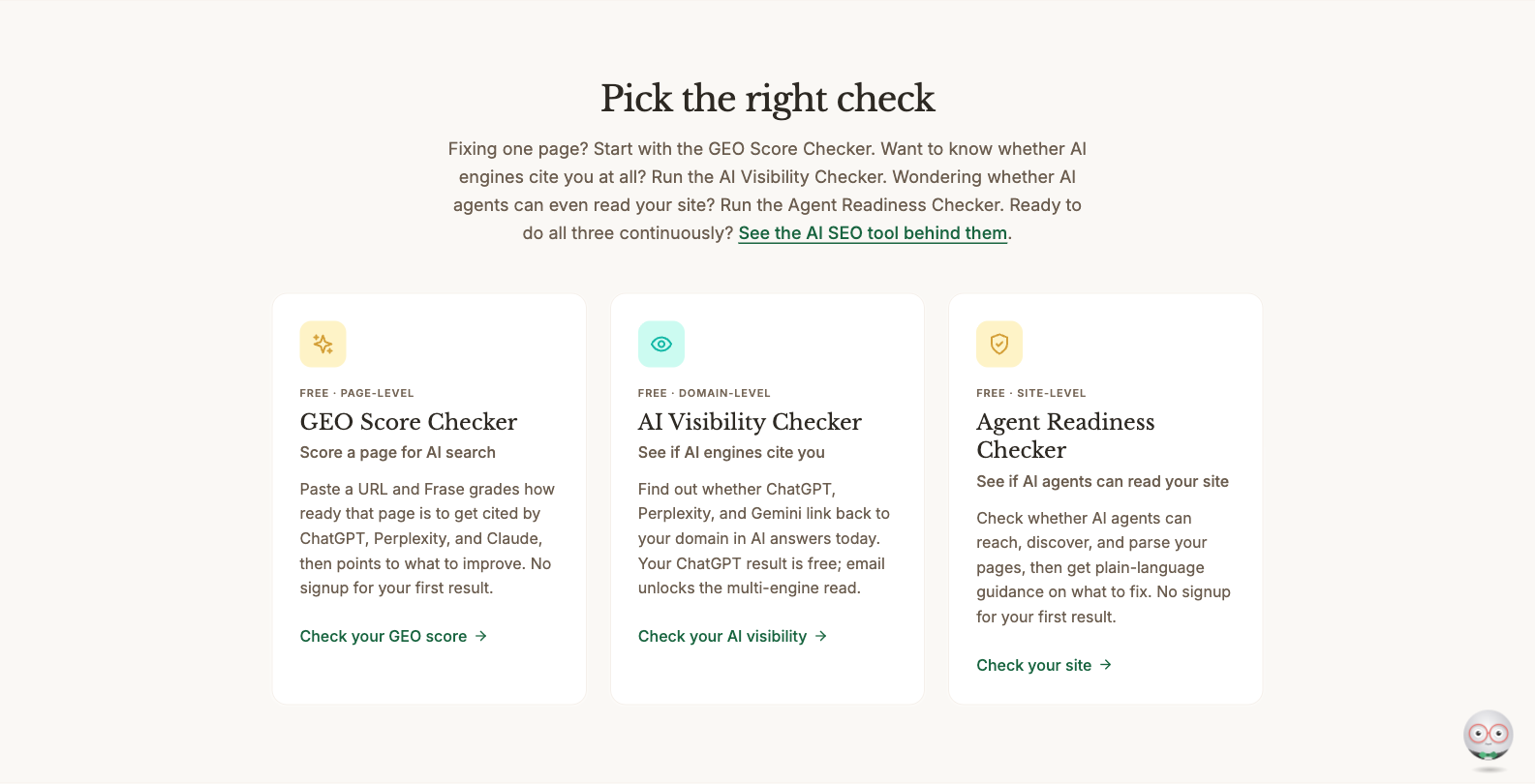
One tool investigates whether a domain appears as a cited source, another assesses the readiness of an individual webpage, and another examines technical accessibility for AI-related systems.
This can make the category easier to understand than a dashboard combining every signal into one proprietary score.
Three Free Frase Checks Worth Understanding
| Tool | What It Checks | What Beginners Can Learn |
|---|---|---|
| AI Visibility Checker | Whether selected AI answers cite a domain | The difference between observed citations and brand mentions |
| GEO Score Checker | A page’s readiness under Frase’s assessment criteria | Potential content and page-level improvements |
| Agent Readiness Checker | Whether AI-related agents can reach and interpret a website | Basic technical accessibility considerations |
The AI Visibility Checker provides an initial ChatGPT result without signup. An email address unlocks additional Perplexity and Gemini results without payment.
Frase explains that the free visibility check uses three AI-search-style questions, making it a limited snapshot rather than a broad monitoring system.
How Beginners Can Use Frase
Imagine you published an article explaining how to choose accounting software for small businesses.
You could use Frase’s page-level checker to review potential issues with the article’s structure and clarity.
You could then use the visibility checker to investigate whether the domain receives citations in the limited set of generated responses.
However, these results answer different questions.
A strong GEO readiness score doesn’t prove that ChatGPT cited the article, while the absence of a citation from three sampled questions doesn’t establish that the article never appears in AI search.
What Are the Limitations?
Frase’s free checkers don’t replace recurring historical monitoring.
Its page readiness scores also use vendor-defined criteria rather than an official ranking system published by an AI platform.
Beginners should use the suggestions to identify information worth reviewing, then verify whether the recommended changes improve the page for actual readers.
Beginner verdict: A useful starting point for content creators who want to connect GEO research with practical page improvements.
6. Otterly.AI: Best First Paid GEO Tool for Recurring Monitoring
Starting price: $29/month
Free trial: Available for new users; confirm current signup conditions
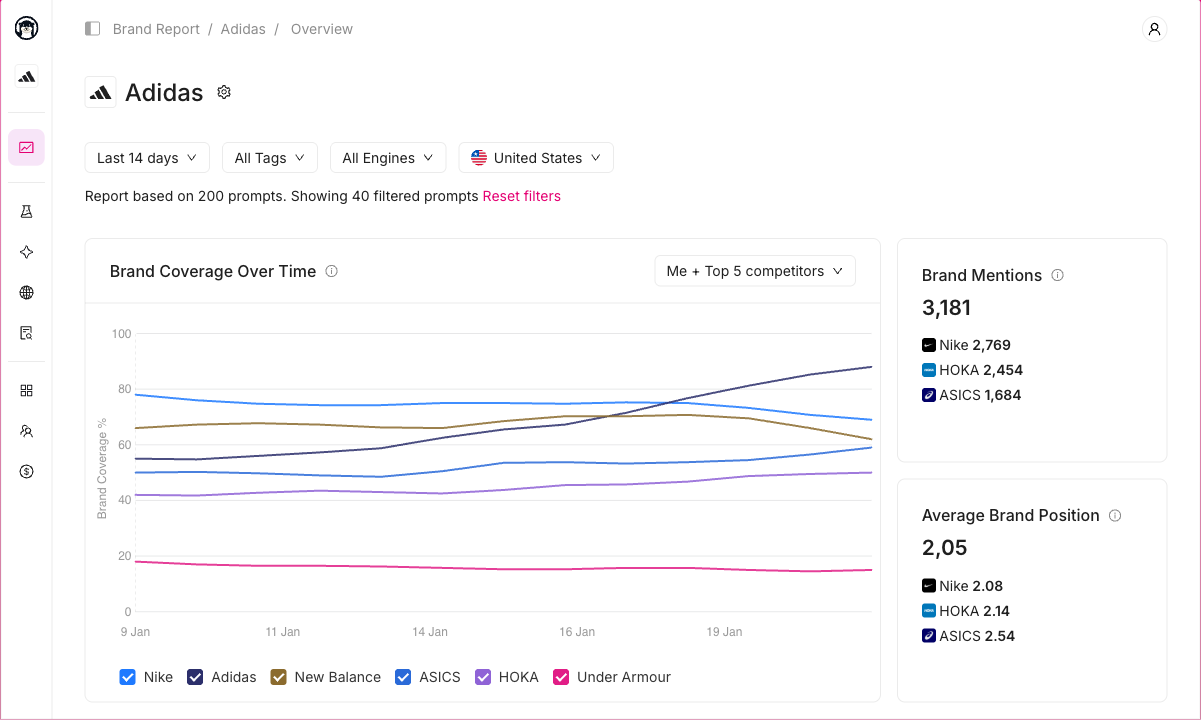
Otterly.AI is a dedicated AI search monitoring platform designed to track brand visibility across selected questions.
Unlike free checkers that produce a limited snapshot, Otterly can monitor the same prompts repeatedly and show how the collected answers change over time.
Its Lite plan is specifically positioned for solo marketers and small teams, making it a relevant option for beginners ready to move beyond occasional checks.
What Do You Get With Otterly Lite?
The Lite plan includes fifteen tracked prompts, daily monitoring, and coverage across four standard AI search experiences: ChatGPT, Google AI Overviews, Perplexity, and Microsoft Copilot.
It also provides brand visibility and sentiment analysis, citation source tracking, brand profiling, and optimisation recommendations.
Google AI Mode, Gemini, and Claude are available as optional paid add-ons.
Otterly’s Standard plan increases capacity to 100 prompts for $189 per month and includes additional reporting and integration functionality.
How Beginners Can Use Otterly
Suppose a small fitness business wants to know whether its brand appears when customers ask AI assistants about personal training options.
It could select a small group of relevant questions, organise them within Otterly, and monitor whether the business or its competitors appear over time.
The platform can help preserve observations that would otherwise require repeated manual checking.
This becomes useful when the business needs consistent reporting rather than a one-time snapshot.
What Are the Limitations?
Fifteen prompts may be sufficient for one product or a narrowly defined category, but restrictive for businesses covering several markets or services.
Additional AI engines also increase the cost.
Beginners should avoid treating every recorded mention as a positive recommendation. The original answer needs to be reviewed to understand whether the brand was recommended, mentioned neutrally, or described negatively.
Beginner verdict: Worth considering when you’ve already identified important customer questions and need to monitor them consistently.
7. Digimetrics: Best for Beginners Learning SEO and GEO Together
Starting price: $39/month
Free trial: Seven days, 200 credits, no credit card required
Digimetrics is a broader digital marketing platform combining SEO, GEO, content optimisation, technical auditing, and other marketing tools within one workspace.
Its approach differs from dedicated AI visibility trackers because it also focuses on identifying possible website and marketing improvements.
For beginners, this may be useful when GEO isn’t the only unfamiliar part of digital marketing.
Someone learning keyword research, website auditing, content optimisation, and AI search visibility may prefer a connected workflow rather than subscribing to several specialised applications.
What GEO Features Does Digimetrics Offer?
Digimetrics’ documented GEO functionality includes AI Discovery Audit, AI Mentions Tracker, GEO On-Page Optimisation, and GEO+SEO Forensic Audit.
These tools are intended to investigate how a business is represented in AI-related search experiences and identify relevant website or content considerations.
The platform also includes technical SEO crawling, keyword analysis, page optimisation, content analysis, and broader marketing functions.
Its AI assistant, Monty, is designed to explain findings in plain language and help users understand possible next actions.
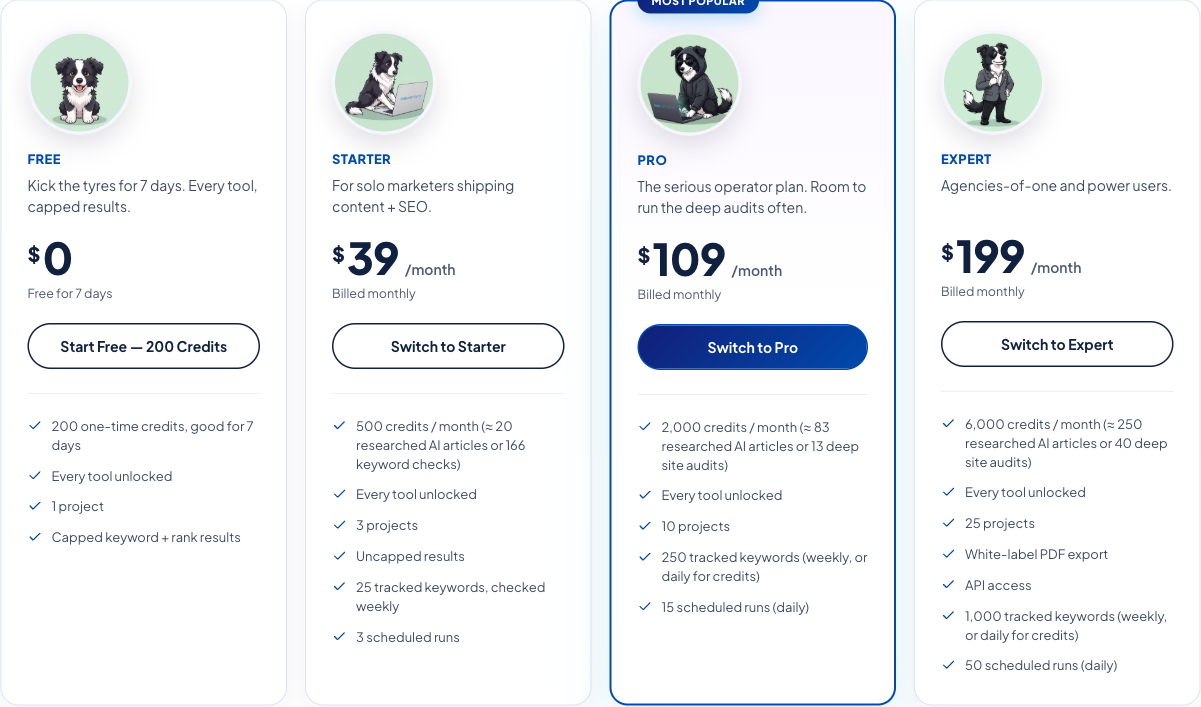
Digimetrics Pricing
| Plan | Monthly Price | Credits | Projects |
|---|---|---|---|
| Free Trial | $0 for 7 days | 200 one-time | 1 |
| Starter | $39 | 500/month | 3 |
| Pro | $109 | 2,000/month | 10 |
| Expert | $199 | 6,000/month | 25 |
Digimetrics advertises access to its full tool collection across these plans, although result caps, scheduling, exports, and project allowances differ.
The trial unlocks the tools for seven days with capped results, while the paid plans provide higher ongoing capacity.
How Beginners Can Use Digimetrics
Consider someone managing a small business website who wants to understand both its traditional SEO health and AI search visibility.
They could begin with a website audit to identify potential crawlability or content issues, then investigate relevant GEO findings using the platform’s AI visibility tools.
For example, an audit might identify a service page with incomplete information or technical accessibility concerns.
The marketer could then review the page, verify the issue, and decide whether improving it would make the information more useful for potential customers.
This workflow connects GEO research with established website improvement practices rather than focusing entirely on appearance counts.
What Are the Limitations?
Digimetrics uses a shared credit system.
Its 500 monthly Starter credits don’t correspond to 500 AI responses or 500 tracked questions. Different tools consume different amounts of credits.
Beginners should check the cost displayed before each analysis and plan their trial usage around a small number of useful tasks.
The platform also provides broader marketing functionality than someone seeking only AI mention tracking may need.
For dedicated high-volume prompt monitoring, users should compare its supported AI experiences, historical reporting, collection methods, and usage capacity against specialist tools.
Beginner verdict: Worth evaluating when you want to learn and practise SEO, GEO, content improvement, and website auditing within one connected workspace.
Sponsored product disclosure: DigitalMarketingTools.ai is sponsored by Digimetrics.ai, developed by MediaOne. This assessment reflects published capabilities and pricing, not an independent claim that Digimetrics outperforms the other products.
Which GEO Tool Should You Start With?
A beginner doesn’t need all seven tools.
The better approach is to start with the one that answers a question you actually have, then add another only when its information provides something different.
| Your Situation | Recommended Starting Point |
|---|---|
| You own a website and want free AI search data | Google Search Console |
| You want to see which pages AI systems cite | Bing Webmaster Tools |
| You want to check whether AI mentions your brand | Ahrefs AI Visibility Checker |
| You want to understand AI visibility scores | Semrush AI Visibility Checker |
| You want to improve individual webpages | Frase Free GEO Tools |
| You want ongoing monitoring of customer questions | Otterly.AI |
| You want to learn SEO and GEO in one workspace | Digimetrics |
For someone completely new to GEO, Google Search Console and Bing Webmaster Tools are the strongest free foundation.
After reviewing their reports, Ahrefs or Semrush can provide additional insight into how third-party platforms measure brand appearances.
Frase can help with page-level investigation, while Otterly and Digimetrics become more relevant when a recurring workflow justifies the subscription.
How to Start Using GEO Tools: A Beginner’s First-Week Workflow
One of the most common beginner mistakes is purchasing software before understanding what to monitor.
A simple first-week workflow can help you learn the essential measurements, identify useful questions, and establish a baseline without generating excessive reports.
Day 1: Identify the Questions Your Customers Ask
Start by listing five to ten questions that represent how potential customers research your products or services.
For example, a company selling invoicing software might consider questions about the best tools for freelancers, affordable invoicing platforms, software integrations, and alternatives to established products.
Include some non-branded questions. If every prompt contains your company name, you’re primarily testing whether an assistant responds to a direct mention of the brand rather than whether it appears during broader customer research.
Keep the questions realistic and commercially relevant rather than generating dozens of slightly different variations.
Day 2: Review Google Search Console
Open Search Console and examine the available performance reports for your website.
If the dedicated generative-AI report is available, investigate which pages are receiving impressions and whether meaningful patterns appear across the reporting period.
Compare those observations with the topics covered by the website’s content, but don’t assume that pages without recorded impressions have a confirmed GEO problem.
The goal is to understand what Google is reporting before deciding whether additional monitoring would be useful.
Day 3: Check Bing’s AI Citation Reporting
Open Bing Webmaster Tools and review the AI Performance report if your verified property has relevant data.
Look for cited pages, associated grounding queries, and broader topic patterns.
For example, an article repeatedly cited around a particular technical topic might reveal an area where the website already provides useful information.
Remember that citations don’t automatically equal website traffic or business conversions. Record them as source visibility measurements rather than assigning a financial value without supporting evidence.
Day 4: Run a Free Brand Visibility Check
Use Ahrefs or Semrush to explore the available brand visibility data.
Look at the supported AI experiences, topics, and sources rather than concentrating only on the headline visibility score.
If the two tools produce different results, investigate their methodologies. They may use different datasets, collection periods, and definitions.
The objective isn’t to choose the tool with the highest number, but to understand what each report actually demonstrates.
Day 5: Investigate One Important Page
Choose a page that addresses a relevant customer question and examine it using a free page-level checker such as Frase.
Review the content yourself as well. Check whether the article or landing page clearly explains the topic, includes current information, answers relevant questions, and uses appropriate supporting evidence.
If the tool identifies a possible technical or content problem, verify it before editing.
An automated recommendation is a starting point for investigation, not proof that the page will receive more AI citations after the suggested change.
Days 6–7: Document Findings and Decide What to Monitor
Organise your observations into a simple spreadsheet.
Record the monitored question, relevant platform, date, brand mentions, source citations, and any issue worth investigating.
Then identify which findings need follow-up.
For example, an outdated product description might deserve correction, while a single missing brand mention may not justify immediate action.
At the end of the week, decide whether you need ongoing prompt monitoring. If your research requires repeated observations across several AI experiences, a trial of Otterly or Digimetrics may be worthwhile.
Example: A Simple GEO Tracking Spreadsheet
A beginner can start with a straightforward reporting table before investing in a dedicated dashboard.
| Date | AI Experience | Question | Brand Mentioned? | Website Cited? | Observation |
|---|---|---|---|---|---|
| Oct 20 | ChatGPT Search | Best invoicing tools for freelancers | Yes | No | Brand appears in a comparison |
| Oct 20 | Perplexity | Affordable accounting software | No | No | Competing products appear |
| Oct 20 | Google AI Mode | How to automate invoices | No | Yes | Informational guide appears as a source |
| Oct 20 | ChatGPT Search | Alternatives to Brand A | Yes | Yes | Product and documentation referenced |
The entries are hypothetical examples, not actual observations or benchmark results.
This format helps distinguish brand appearances from citations and makes it easier to review what was actually observed.
As the number of questions grows, a dedicated monitoring tool may reduce the amount of manual work required to repeat the process.
The GEO Metrics Beginners Should Learn First
Many GEO tools include unfamiliar measurements, but beginners don’t need to understand every dashboard feature immediately.
Five concepts provide a useful foundation.
1. Brand Mentions
A brand mention occurs when an AI-generated answer names a company or product.
This can include positive recommendations, neutral comparisons, or critical descriptions.
A mention alone doesn’t establish that the assistant endorsed the brand.
For more detail, see our AI brand mention tracking guide.
2. AI Citations
A citation occurs when an AI-generated answer presents a webpage or domain as a source.
For example, an assistant might recommend a software product while citing an independent comparison article that discusses several competitors.
The software brand receives a mention, while the independent publisher receives a source citation.
These measurements should be reported separately.
Our AI citation tracking tools guide explains how different platforms count cited sources.
3. AI Search Impressions
An impression is an exposure event defined and reported within a supported platform.
For example, Google Search Console now measures impressions for website links appearing within supported generative-AI Search features.
This is different from a third-party GEO tool estimating visibility using selected prompts.
The two numbers shouldn’t be combined or described as though they represent identical events.
4. Prompt Coverage
Prompt coverage describes how often a brand appears within a defined collection of AI responses.
Suppose you monitor ten questions across two AI platforms, collecting twenty responses in total.
Your brand appears in five of those responses.
The calculation would be:
Prompt coverage = (5 ÷ 20) × 100 = 25%
This means the brand appeared in 25% of the twenty observed responses.
It doesn’t mean 25% of all ChatGPT or AI search users encountered the brand.
The calculation is illustrative, not a result from testing any particular company.
5. AI Referral Traffic
Referral traffic measures identifiable website visits arriving from another platform.
Some visits from AI search experiences may be visible within Google Analytics 4 or another analytics system.
However, not every AI-generated answer creates a website visit, and some visits may lack enough information for accurate attribution.
Beginners should keep visitor measurements separate from mentions, citations, and proprietary visibility scores.
For a fuller reporting explanation, see our guide to GEO analytics tools.
Do Beginners Need to Pay for GEO Tools?
Not immediately.
Free first-party reporting and limited visibility checkers can provide useful information while you learn the basics.
The decision to subscribe should depend on whether you need more frequent monitoring, better historical records, larger prompt allowances, or additional workflows.
When Free GEO Tools Are Enough
Free tools may be sufficient when you’re learning GEO, managing one small website, or conducting occasional research.
For example, a new blogger might only need to examine Google and Bing’s reporting and run a limited visibility check after publishing important content.
That doesn’t require an enterprise subscription or a large prompt database.
If you’re still exploring available options, our comparison of free GEO tools explains which products provide ongoing access and which rely on temporary allowances.
When a Paid GEO Tool Makes Sense
Paid monitoring becomes more useful when you need consistent observations across the same questions.
For example, a business may want to monitor product recommendations every day or compare brand appearances with several competitors across different AI experiences.
That workflow can become time-consuming when handled manually.
However, the subscription still needs to match the required platforms, questions, markets, and reporting capacity.
A $29 plan may be enough for a narrowly defined project, while a broader SEO and GEO workspace may offer better value when the business already needs several marketing functions.
For a more detailed comparison of trial conditions, see our GEO tools with free trials guide.
How to Choose a Beginner-Friendly GEO Tool
The easiest tool isn’t always the one with the fewest features.
A simple dashboard can still be confusing when it reports unexplained percentages, while a more comprehensive platform may be useful if it clearly explains what the findings mean.
Before subscribing, consider the following evaluation criteria.
| Criterion | What Beginners Should Check |
|---|---|
| Ease of setup | Can you begin without complicated integrations? |
| Metric clarity | Does the platform explain mentions, citations, and scores? |
| Source evidence | Can you inspect the relevant responses or URLs? |
| Free access | Is access ongoing, limited, or a temporary trial? |
| AI platform coverage | Does it monitor the systems important to you? |
| Monitoring capacity | How many questions or analyses can you run? |
| Cost | What happens when you exceed the entry allowance? |
| Practical guidance | Can you identify an understandable next action? |
Prioritise Evidence Over Scores
A tool displaying an AI Visibility Score of 80 may look impressive, but the number has limited value without context.
Ask which questions were monitored, which platforms contributed to the score, and whether the results can be checked.
A lower score from another tool doesn’t automatically mean worse performance.
The underlying evidence matters more than the apparent precision of the dashboard.
Avoid Unnecessary Features
Some GEO products include advanced market research, automated workflows, APIs, large competitor databases, and extensive reporting integrations.
Those capabilities may become useful later, but they aren’t essential for understanding the first few AI search observations.
Choose software that supports your current tasks and expand when additional functionality will save time or improve decisions.
Check Trial and Credit Limits
Free trials can be useful for exploring a platform, but they’re not equivalent to permanently free access.
Similarly, 200 software credits don’t necessarily provide 200 monitored prompts or 200 complete reports.
Confirm which activities consume credits and what happens when the trial ends.
This is particularly important when evaluating several GEO tools at once.
Common Mistakes Beginners Make With GEO Tools
Treating AI Visibility as a Traditional Ranking
AI-generated answers don’t operate like one universal organic search results page.
An assistant might recommend a business in one response and omit it in another, depending on the question, platform, context, and collection conditions.
A proprietary GEO score should therefore not be presented as a universal AI ranking position.
Assuming Every Citation Is a Recommendation
An AI answer may cite an independent comparison article while recommending products from several other companies.
The cited publisher and the recommended brands receive different forms of visibility.
Confusing them can lead to misleading performance reports.
Trying to Optimise for Every AI Platform Immediately
Beginners often assume they need separate workflows for ChatGPT, Gemini, Perplexity, Google AI Mode, and every other experience.
However, that can create unnecessary work before the business knows which questions matter.
Start with a small set of relevant platforms and expand only when monitoring additional systems would provide useful information.
Following Every Automated Content Recommendation
A GEO audit may recommend adding definitions, improving headings, updating information, or restructuring a page.
Some suggestions may be useful, but others may be generic or poorly matched to the audience.
Review the page and verify the recommendation before implementing it.
The goal should be clearer, more accurate, more useful information, not simply increasing an arbitrary GEO readiness score.
Expecting Immediate Results
AI responses can change between collection periods even when the website hasn’t been updated.
A new citation after publishing an article doesn’t automatically prove that the article caused the change.
Use consistent monitoring, investigate the evidence, and avoid drawing conclusions from a single response.
Final Verdict: What Is the Best GEO Tool for Beginners in 2026?
Google Search Console and Bing Webmaster Tools are the best free starting combination for beginners who already own or manage a website. They provide first-party information about supported AI search impressions and citations without requiring another subscription.
For quick brand research, Ahrefs and Semrush offer accessible AI visibility checkers that can introduce beginners to mentions, cited sources, and other GEO measurements.
Frase is particularly relevant for content creators who want to investigate individual pages and understand the difference between GEO readiness and observed citations.
When recurring monitoring becomes necessary, Otterly.AI offers a focused entry-level subscription, while Digimetrics provides broader SEO and GEO functionality within a connected marketing workspace.
The appropriate choice depends on what you need to learn and how often you intend to use the information.
A beginner doesn’t need to master every GEO platform to improve their research. Start with the questions customers ask, review the evidence behind AI-generated answers, and make changes that genuinely improve your website’s information.
The best GEO tool for beginners is the one that helps you understand what you’re measuring and what to investigate next—without making the process more complicated than it needs to be.
Frequently Asked Questions
What Is the Best GEO Tool for Beginners in 2026?
Google Search Console and Bing Webmaster Tools are useful free starting points for website owners. Ahrefs and Semrush provide introductory AI visibility checkers, while Frase offers page-level checks. Otterly.AI and Digimetrics are worth evaluating when beginners need recurring monitoring or broader marketing functionality.
What Is GEO in Simple Terms?
Generative Engine Optimization is the practice of improving how information about a website, business, or product can be discovered and represented within AI-generated answers. GEO combines useful content, technical accessibility, and monitoring of brand mentions or source citations. It complements traditional SEO rather than replacing it.
Are There Free GEO Tools for Beginners?
Yes. Google Search Console and Bing Webmaster Tools provide free first-party reporting for eligible verified websites. Ahrefs, Semrush, and Frase also offer limited free checks. However, free checkers don’t necessarily include ongoing monitoring or historical reporting.
Can Beginners Learn GEO Without SEO Experience?
Yes, although basic SEO knowledge is helpful. Understanding website indexing, content quality, search intent, and technical accessibility provides a useful foundation for GEO. Beginners can start with simple visibility checks and gradually learn more advanced reporting concepts.
Does GEO Require Coding?
Most GEO tools don’t require coding for basic reporting or monitoring. Website verification and technical integrations may involve configuration steps, but dedicated GEO platforms generally provide dashboards and guided workflows. More advanced automation or data integration can require technical knowledge.
What Is the Cheapest Paid GEO Tool for Beginners?
Among the dedicated paid monitoring products covered here, Otterly.AI starts at $29 per month with fifteen tracked prompts. Digimetrics starts at $39 per month and provides access to broader SEO and marketing functionality through a shared credit system. The better value depends on the intended workflow.
Can GEO Tools Help My Website Appear in ChatGPT?
GEO tools can identify relevant questions, content gaps, brand mentions, and source citations, which may support website improvements. However, they don’t control ChatGPT’s responses and cannot guarantee a recommendation or citation. The most useful approach is to improve accurate, accessible content and monitor relevant observations over time.
What’s the Difference Between GEO and AEO?
GEO commonly refers to optimising for visibility within generative AI answers, while Answer Engine Optimization (AEO) is often used more broadly for content that directly answers questions in search and answer interfaces. The terminology overlaps, and vendors may use the terms differently. The underlying measurement and content goals matter more than the label.
How Long Does It Take to Learn GEO?
Beginners can become familiar with core GEO concepts and free reporting tools within a few focused sessions. Learning how to interpret different datasets, conduct reliable monitoring, and make defensible optimisation recommendations takes more practice. The process is easier when the learner starts with one website and a small group of relevant questions.
Do GEO Tools Improve Google Rankings?
GEO tools don’t directly control Google rankings. Some tools identify SEO or content issues that may be worth addressing, but improving a GEO score doesn’t guarantee higher organic rankings or more AI citations. Continue using established SEO practices alongside GEO monitoring.
Which GEO Metrics Should Beginners Track?
Begin with first-party AI impressions where available, cited pages, observed brand mentions, and a small set of relevant monitored questions. As your reporting becomes more sophisticated, you can add competitor comparisons, historical trends, and attributable website traffic. Keep the measurements separate and document their limitations.
How We Review and Disclose
Our approach to product comparisons, source verification, and editorial disclosures is explained in the DigitalMarketingTools.ai Editorial Methodology.
This guide evaluates vendor-documented features, pricing, free access, and suitability for common beginner workflows. It doesn’t claim that DMT conducted a controlled same-prompt benchmark of the seven products.
Disclosure: DigitalMarketingTools.ai is sponsored by Digimetrics.ai, which is developed by MediaOne. Sponsorship does not establish that Digimetrics provides more accurate GEO measurements than competing products.
Disclosure: digitalmarketingtools.ai is sponsored by Digimetrics.ai. Sponsored Highlights are clearly labelled advertising. Our reviews, comparisons and guides are written to be useful and fair regardless of who sponsors the site. Read the full disclosure.


