
How to Measure GEO Performance With GEO Tools in 2026
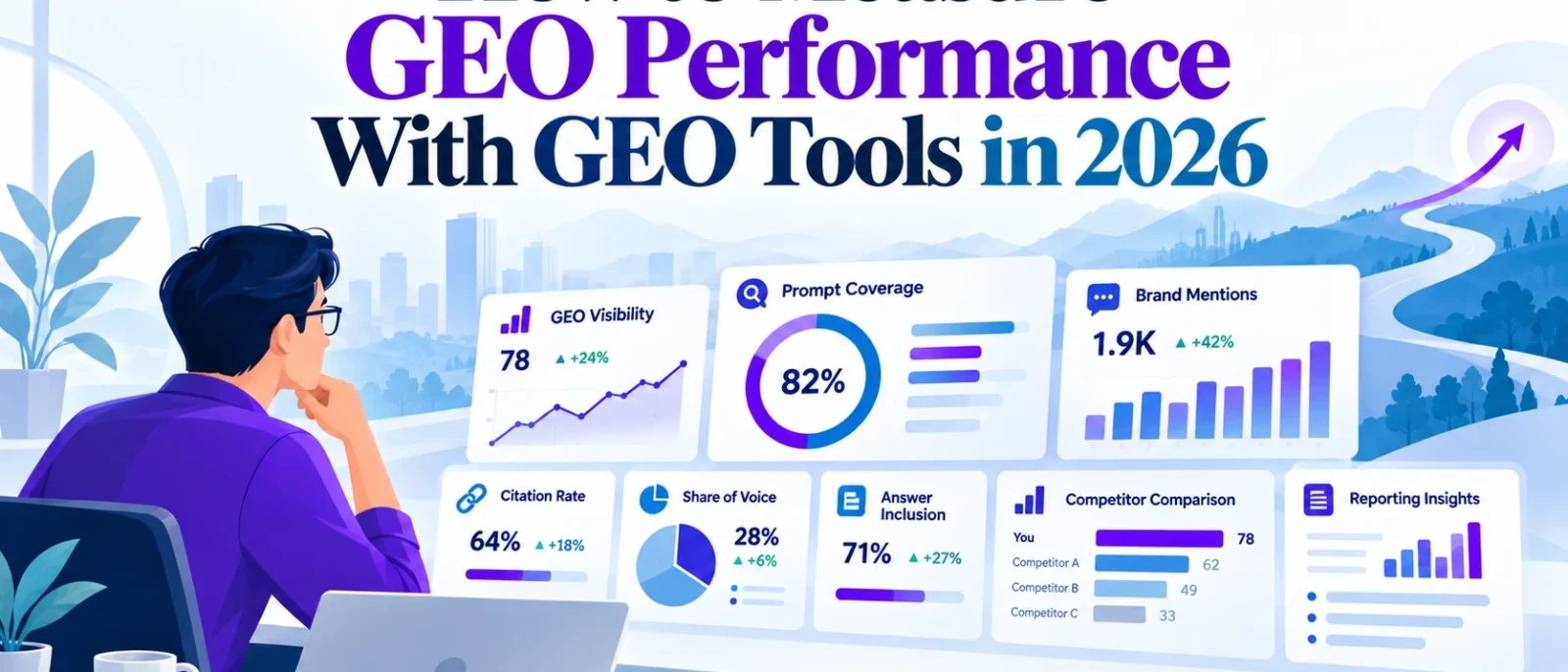
You’ve published AI-friendly content, improved your website’s structure, and started optimising for ChatGPT, Google AI Overviews, Perplexity, and other AI search platforms. Now comes the question that’s surprisingly difficult to answer: Is your GEO strategy actually working?
Traditional SEO gives you familiar metrics such as keyword rankings, organic clicks, impressions, and conversions. GEO, or Generative Engine Optimization, adds another layer because people can discover your business through AI-generated answers without ever clicking a website.
You might appear in ChatGPT’s recommendations but receive no referral traffic. Your website could be cited in Google AI Mode without your brand being explicitly recommended. Or your GEO dashboard might show a rising visibility score even though your actual customer enquiries haven’t changed.
That’s why measuring GEO performance requires more than checking one dashboard.
In this guide, we’ll explain which GEO metrics matter, what tools help measure them, and how to build a repeatable reporting process that connects AI visibility with your existing SEO and business performance data.
We’ll also walk through a practical example using sample data, so you can see exactly how to calculate GEO performance instead of relying entirely on a software-generated score.
The goal isn’t to prove that every AI mention produces a customer. It’s to understand where your brand appears, which sources AI platforms use, how visibility changes, and whether those changes are accompanied by meaningful business results.
What Is GEO Performance Tracking?
GEO performance tracking is the process of measuring how your business, website, or content appears in AI-generated search experiences over time.
Unlike traditional SEO rank tracking, which primarily monitors your position in search results, GEO tracking examines the answers produced by AI systems.
For example, imagine you operate a Singapore accounting software business.
A potential customer asks ChatGPT:
“What’s the best accounting software for a small business in Singapore?”
There are several possible outcomes.
Your company might be recommended in the answer. Your website might be cited as a source. A competitor might appear instead. Or your business might not appear at all.
Each outcome tells you something different about your visibility.
A GEO performance tracking tool can help capture those observations, compare them over time, and identify relevant topics where your business is missing.
However, those observations should not automatically be treated as actual search volume, website visits, or sales.
Our complete guide to GEO tools explains the broader software category. Here, we’re focusing specifically on how to measure GEO performance and interpret the results.
The Three Levels of GEO Performance Measurement
One of the biggest mistakes businesses make is treating AI visibility, website traffic, and business outcomes as interchangeable.
They’re connected, but they measure different things.
A practical GEO measurement framework has three levels.
| Measurement Level | What You’re Measuring | Example Metrics | Tools |
|---|---|---|---|
| AI visibility | Whether your brand and content appear in monitored AI-generated answers | Brand mention rate, citation rate, AI share of voice, prompt coverage | Ahrefs Brand Radar, Semrush, Peec AI, Otterly.AI |
| Search and website performance | Whether your website receives exposure or identifiable visits from supported AI search experiences | AI impressions, AI citations, AI-referred sessions, landing-page engagement | Google Search Console, Bing Webmaster Tools, Google Analytics 4 |
| Business outcomes | Whether identifiable visitors or leads contribute to your business goals | Enquiries, demo requests, purchases, qualified leads | GA4, CRM, form tracking, customer surveys |
These levels should be reported separately.
For example, an increase in brand mentions could suggest stronger visibility across your monitored prompts. But it doesn’t establish that more people visited your website or purchased your product.
Likewise, an increase in AI-referred sessions doesn’t necessarily mean your GEO optimisations caused that increase.
The strongest reporting process looks at all three levels while making the limitations clear.
Which GEO Performance Metrics Should You Track?
You don’t need to monitor every available metric. Start with a small group that answers useful questions about discovery, source visibility, and business performance.
1. AI Brand Mention Rate
Brand mention rate measures how frequently your business appears in a defined set of monitored AI responses.
For example, let’s say you monitor 40 relevant prompts across ChatGPT and Perplexity.
Each prompt is checked once on both platforms, producing 80 observations.
Your brand appears in 24 of those responses.
Your observed brand mention rate is:
Brand Mention Rate = Responses Mentioning Your Brand ÷ Total Monitored Responses × 100
24 ÷ 80 × 100 = 30%
That means your brand appeared in 30% of the responses collected under those testing conditions.
It doesn’t mean 30% of real ChatGPT or Perplexity users saw your brand.
Your result depends on the questions selected, the AI platforms monitored, and how the responses were collected.
What to track: Mention rate by platform, topic, and customer intent. Keep branded prompts separate from questions where customers are discovering unfamiliar providers.
2. AI Citation Rate
Citation rate measures how often AI responses reference your website as a source.
Suppose your domain appears as a cited source in 12 of the same 80 monitored answers.
Your observed citation rate would be:
Citation Rate = Responses Citing Your Domain ÷ Total Monitored Responses × 100
12 ÷ 80 × 100 = 15%
This tells you how frequently your website was cited within that particular test.
For consistency, count each response once when measuring the share of responses that cite your domain, even if several URLs from your website appear in the same answer.
You can separately record the number of citations or unique cited pages if your software supports those measurements.
Also remember that a citation isn’t the same as a brand recommendation.
An AI system might recommend a competitor while citing an article from your website.
Our AI citation tracking guide explains how to investigate cited sources, track individual URLs, and identify citation opportunities.
3. AI Share of Voice
AI share of voice measures your brand’s visibility relative to selected competitors.
It’s useful when you want to understand whether your business appears more or less frequently than other brands across the topics you’re monitoring.
However, not every tool calculates share of voice in the same way.
For instance, Ahrefs Brand Radar describes AI share of voice using impression-weighted visibility, while Semrush publishes its own definitions for AI visibility and share of voice.
This means a 20% share-of-voice score from one platform may not be directly comparable with a 20% score from another.
If you want a simple internal comparison, you can calculate an unweighted brand-mention share across a fixed competitor group.
For example:
| Brand | Observed Brand Appearances |
|---|---|
| Your brand | 20 |
| Competitor A | 35 |
| Competitor B | 25 |
| Competitor C | 20 |
| Total | 100 |
Your share of the recorded brand appearances would be 20%.
This is an illustrative share of mentions within your selected competitor group, not a measurement of the entire AI search market. Multiple brands may appear in one response, and real-world audience reach remains unknown.
What to track: The same competitor set, prompt categories, and platform settings over time.
4. Prompt-Level Visibility
An overall GEO visibility score is helpful for spotting trends, but prompt-level data tells you where those trends come from.
For example, your brand might appear frequently when people ask about your company directly but rarely appear in broader product recommendations.
That gives you two very different conclusions.
Your branded visibility could be strong, while your visibility among potential new customers remains weak.
This is why I recommend grouping prompts by intent.
| Prompt Type | Example | What It Helps Measure |
|---|---|---|
| Problem-solving | How can small businesses simplify bookkeeping? | Early-stage brand discovery |
| Category discovery | What are the best accounting tools for SMEs? | Visibility alongside other providers |
| Comparison | Xero vs QuickBooks for Singapore SMEs | Presence during evaluation |
| Purchase-focused | Affordable accounting software for 10 employees | Visibility for commercially relevant questions |
| Branded | Is Acme Accounting suitable for Singapore businesses? | How AI describes your company when named |
When reporting monthly GEO performance, compare these categories separately.
A campaign shouldn’t appear successful simply because you added more branded prompts to the monitoring list.
5. AI Referral Traffic
AI referral traffic measures identifiable website visits originating from supported AI platforms.
You can investigate these visits using Google Analytics 4, provided referral information is available and your tracking implementation is working correctly.
For example, GA4 may identify sessions associated with domains such as ChatGPT or Perplexity.
However, not every AI-influenced visit will appear as an AI referral.
Someone might discover your business through an AI answer, search for your brand on Google later, and then visit your website.
Analytics may attribute that session to Google organic search, not the AI interaction that influenced the decision.
Likewise, some visits may appear as direct traffic when a usable referral source isn’t available.
AI referral traffic is useful, but it is not a complete measurement of AI-driven discovery.
6. AI-Associated Conversions
Ultimately, many businesses want to know whether GEO contributes to enquiries, leads, or purchases.
GA4 can help measure conversions associated with identifiable AI-referral sessions, using your configured key events.
You can also use CRM data or optional customer questionnaires to gather additional information.
For example, a demo-request form could ask:
“How did you first hear about us?”
One available response might be ChatGPT, Perplexity, or another AI assistant.
This can provide useful self-reported discovery information, especially when AI influenced a customer who didn’t click directly from an AI answer.
However, self-reported responses are imperfect. Customers may forget where they first encountered a company, and a conversion may have been influenced by several channels.
Treat these figures as additional evidence, not exact causal attribution.
What Tools Help Measure GEO Performance?
Different tools answer different GEO measurement questions.
Some monitor AI-generated answers. Others provide first-party search data, website analytics, or technical optimisation information.
For most businesses, combining a small number of complementary tools is more useful than expecting one platform to provide everything.
| Tool | What It Helps Measure | Best Use |
|---|---|---|
| Google Search Console | Generative AI impressions and conventional search performance | First-party visibility for supported Google search experiences |
| Bing Webmaster Tools | AI citations, cited URLs, topics, and related performance insights | Understanding how your content appears in supported Microsoft AI experiences |
| Google Analytics 4 | Identifiable referral sessions, engagement and configured conversions | Connecting observable AI referral traffic with website behaviour |
| Ahrefs Brand Radar | Brand mentions, citations, estimated impressions and AI share of voice | Market visibility research and competitor comparisons |
| Semrush AI Visibility Toolkit | AI visibility, mentions, citations, competitor data and tracked prompts | GEO monitoring alongside existing SEO research |
| Peec AI | Prompt-level visibility, competitors, citations and AI answer analysis | Dedicated AI response monitoring |
| Otterly.AI | Prompt monitoring, citations and visibility trends | Recurring GEO tracking for selected prompts |
| Digimetrics | Integrated SEO, content, technical and GEO workflows | Investigating AI visibility alongside wider optimisation tasks, subject to available features |
This is a comparison of publicly described capabilities, not a ranking based on identical hands-on tests. Verify supported AI platforms, collection methods, plan limits and available exports before adopting any product.
Let’s look at how the first-party tools fit into a real GEO measurement workflow.
Step 1: Measure Google AI Visibility With Search Console
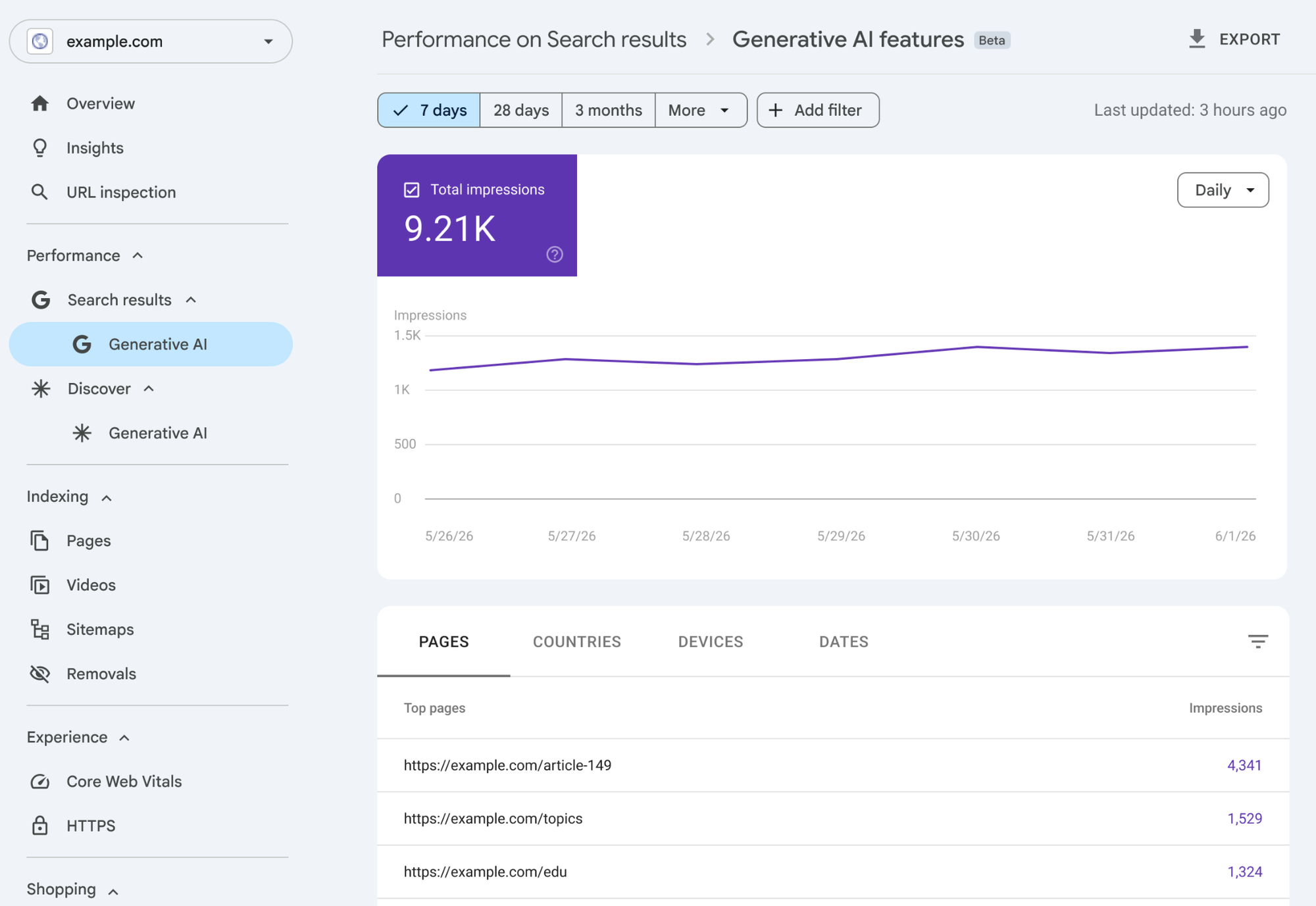
Google Search Console is an important starting point because it provides information directly from Google.
In June 2026, Google announced dedicated Generative AI performance reports for Google Search and Discover. The reports were rolled out worldwide by the end of August 2026.
The Search report covers supported generative AI experiences, including AI Overviews and AI Mode.
Unlike a third-party visibility estimate, this report provides first-party impressions associated with your verified website.
How to Check Your GEO Performance in Search Console
Open your verified property in Google Search Console, navigate to the Performance section, and look for the Generative AI performance report.
In the Search report, you can investigate impression data and available breakdowns such as pages, countries, devices, and dates.
Start by identifying which pages receive generative AI impressions, then compare their performance across consistent reporting periods.
For example, if a product-comparison guide begins receiving more AI impressions after you improve its content, that’s a useful observation.
But don’t immediately conclude that the content update caused the increase. Changes in search demand, AI feature availability, and Google’s systems may also affect visibility.
What Google Search Console Cannot Tell You
Google’s dedicated generative AI report focuses on impressions. It does not provide a complete picture of all AI platforms, and you should not treat its reported impressions as equivalent to visits or conversions.
Use the report alongside conventional Search Console performance data and GA4.
Google’s official Generative AI performance report documentation explains the available metrics and their limitations.
Best practice: Report Google AI impressions separately from third-party ChatGPT or Perplexity monitoring. They’re different datasets with different collection methods.
Step 2: Track Microsoft AI Citations With Bing Webmaster Tools
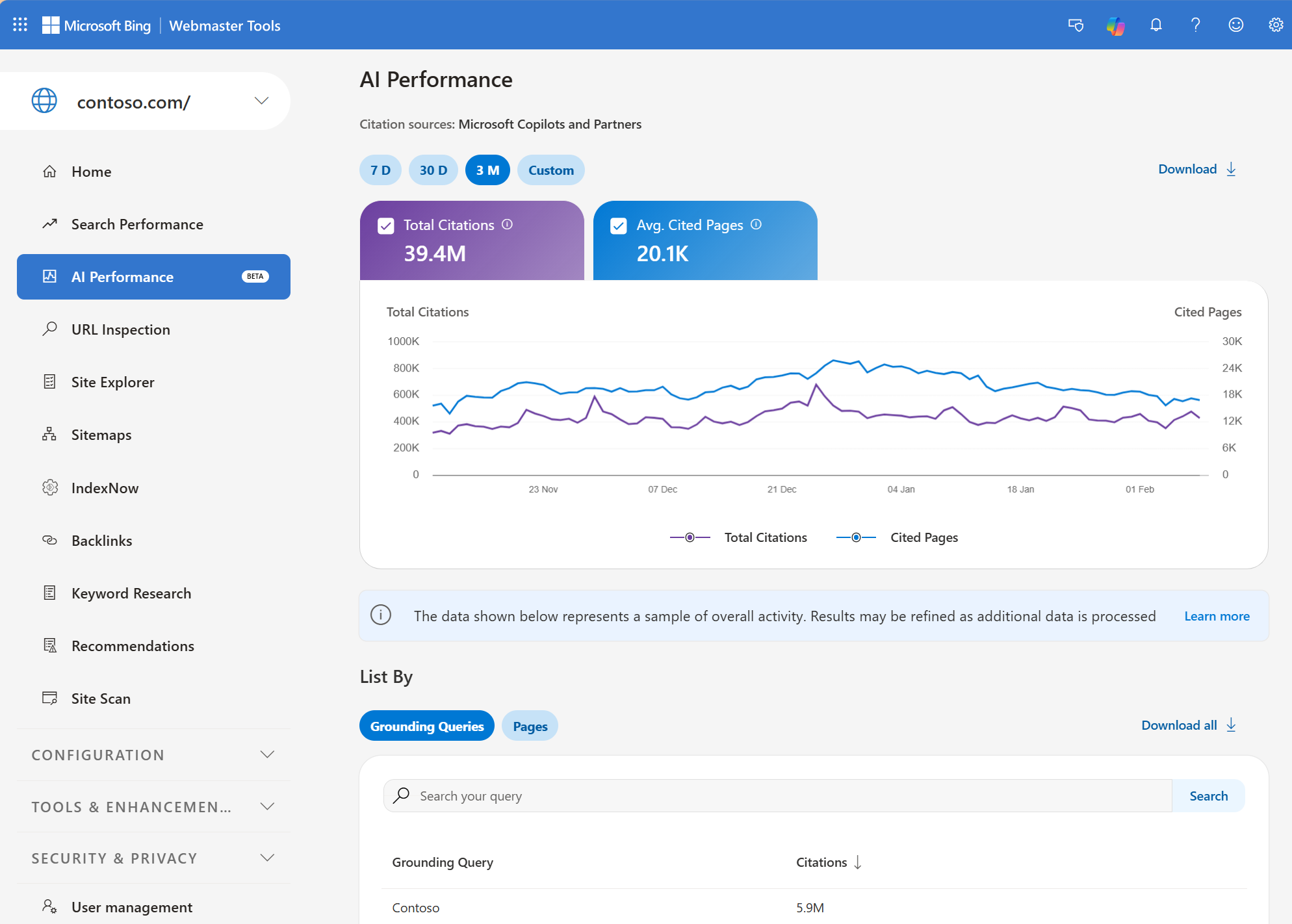
Bing Webmaster Tools provides another useful source of first-party GEO information.
In February 2026, Microsoft introduced its AI Performance report in public preview, showing how websites are cited across supported AI-powered experiences, including Microsoft Copilot and AI-generated Bing summaries.
Microsoft expanded the reporting in June 2026 with insights involving intents, topics, citation share, and comparisons.
In October 2026, Microsoft also introduced Topics Portfolio, a beta feature designed to help website owners understand their presence across thematic AI-search topics.
This makes Bing Webmaster Tools particularly useful for identifying how your content contributes to AI-generated answers within Microsoft’s supported ecosystem.
What to Measure
Within the AI Performance report, investigate the cited URLs, citation activity over time, and relevant topic information made available to your property.
If one of your guides is repeatedly cited while another important page never appears, that gives you a starting point for content research.
For example, you may discover that an educational article receives citations while a commercial service page does not.
This doesn’t necessarily mean your service page has a technical problem. AI answers may prefer different source types depending on the question.
Still, you can compare the information available on both pages and assess whether a relevant content gap exists.
Use Microsoft’s AI Performance documentation and announcements to understand the report’s current coverage.
Important: Bing AI citation counts shouldn’t be added directly to Google AI impressions. They use different measurement units and cover different platform experiences.
Step 3: Measure AI Referral Traffic and Conversions in GA4
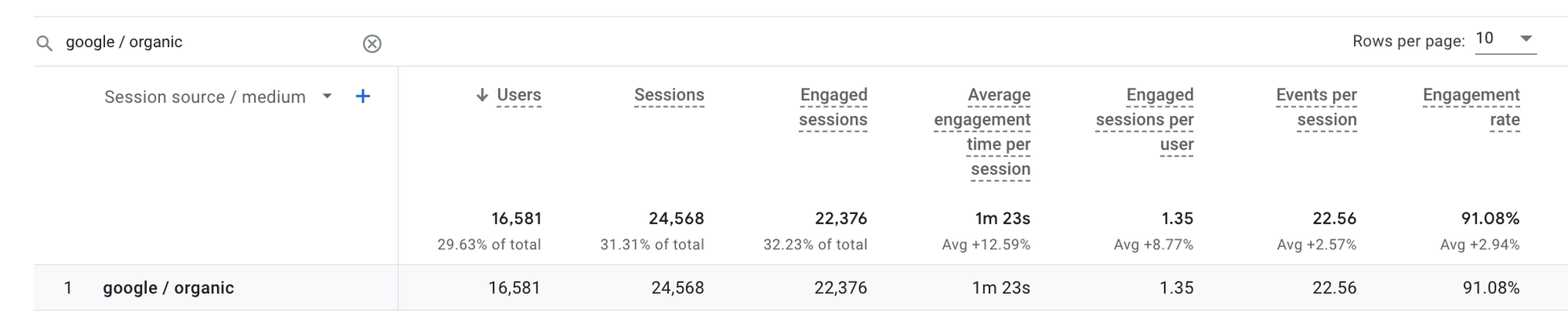
Now that you’ve investigated visibility and citations, the next step is to check whether identifiable visitors are reaching your website.
Open Google Analytics 4 and navigate to:
Reports → Acquisition → Traffic acquisition
Use the session source or session source/medium dimension to investigate visits associated with known AI referrers.
Depending on how your analytics property is configured, you may be able to create a custom exploration or report segment for recognised AI sources.
What to Include in Your AI Referral Report
Start with sessions, engaged sessions, key events, and any relevant conversion metrics.
| Metric | What It Tells You |
|---|---|
| Sessions | Visits attributed to the selected AI referral sources |
| Engaged sessions | Visits meeting GA4’s engagement criteria |
| Engagement rate | Share of sessions classified as engaged |
| Key events | Important actions recorded during relevant sessions |
| Session key event rate | Share of sessions with at least one specified key event, depending on report configuration |
| Landing pages | Pages receiving identifiable AI-referred visits |
For example, if your website receives 120 identifiable AI-referred sessions and six of those sessions include a demo-request key event, the session-based demo-request rate would be:
6 ÷ 120 × 100 = 5%
That tells you something useful about the observable visits.
It doesn’t establish that six customers were caused by GEO work, or that only six potential customers were influenced by AI.
Watch Out for Attribution Gaps
Not every AI platform passes referral information consistently, and some AI-influenced visitors arrive later through another channel.
Also, a source appearing as direct traffic may have many possible explanations. You shouldn’t reclassify all direct traffic as AI-generated traffic.
Google’s Traffic Acquisition documentation explains how GA4 reports session-based acquisition.
For more accurate reporting, combine analytics with relevant CRM information and optional self-reported discovery questions.
Step 4: Build a Consistent Prompt Tracking Baseline
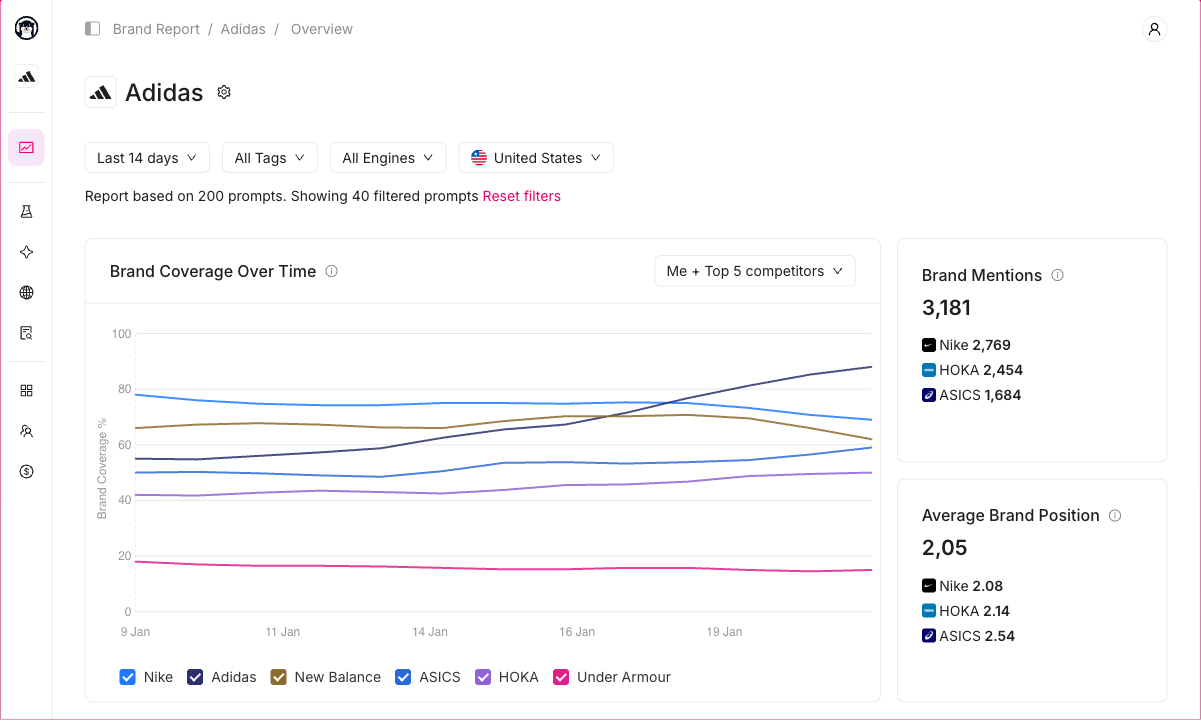
Third-party GEO performance tracking becomes more useful when you monitor the same relevant prompts over time.
Start with your customers’ actual questions rather than generating hundreds of generic prompts.
For a small business, a starting group of 20–30 carefully selected prompts can be enough to establish a working baseline.
For example, a project-management software company might track:
- Problems customers want to solve.
- Questions about project-management software categories.
- Comparisons involving established competitors.
- Questions about features and pricing.
- Branded questions about its own software.
Keep the exact prompts, countries, languages, AI platforms, and collection schedules documented.
Why Consistent Sampling Matters
Imagine you measure 20 prompts in October and 60 entirely different prompts in November.
Even if your visibility score increases, the comparison may not tell you whether your business became more visible or whether the new prompts were simply easier to appear in.
The same problem occurs when a tool adds new countries or AI engines to the reporting dataset without separating the results.
For reliable directional reporting, maintain a fixed set of prompts and treat newly added questions as a separate segment until you’ve built a comparable history.
Our AI brand mention tracking guide explains how to monitor mentions and investigate response changes.
Step 5: Calculate Your GEO Performance Over Time
Here’s a practical example showing how to interpret a month of GEO tracking.
Imagine you’re monitoring a software company’s AI search visibility.
You have:
- 20 relevant prompts.
- Three AI platforms.
- Four weekly collection runs.
That gives you 240 monitored responses per four-week period, assuming every planned collection succeeds and each prompt-platform combination produces one recorded answer per week.
Now compare the results for two equivalent reporting periods.
| GEO Metric | Previous Four Weeks | Latest Four Weeks | Change |
|---|---|---|---|
| Responses monitored | 240 | 240 | No change |
| Responses mentioning brand | 48 | 72 | +24 |
| Brand mention rate | 20% | 30% | +10 percentage points |
| Responses citing website | 24 | 36 | +12 |
| Citation rate | 10% | 15% | +5 percentage points |
| Identifiable AI referral sessions in GA4 | 80 | 110 | +37.5% |
| Demo requests attributed to those referral sessions | 4 | 5 | +1 |
Illustrative example. These figures are hypothetical and do not represent a real business or GEO platform test.
How to Interpret These Results
At first glance, the campaign looks promising.
Your observed brand mention rate increased from 20% to 30%. That’s an improvement of 10 percentage points, or 50% relative to the earlier rate.
Your citation rate also increased, and identifiable AI referral sessions grew.
However, the correct conclusion isn’t automatically that your GEO campaign generated 37.5% more traffic or produced an additional demo request.
Several other explanations remain possible.
AI platforms could have changed their responses. Search interest may have increased. Your brand might have received more attention from PR, social media, or other marketing activity.
Even if you made GEO-related content improvements during the period, the data alone doesn’t prove those changes caused the observed growth.
A useful conclusion would be: The brand appeared more frequently in the fixed monitored sample, received more website citations, and recorded more identifiable AI-referred sessions during the latest reporting period.
That’s a meaningful observation without overstating causation.
Step 6: Connect GEO Findings to Specific Pages and Topics
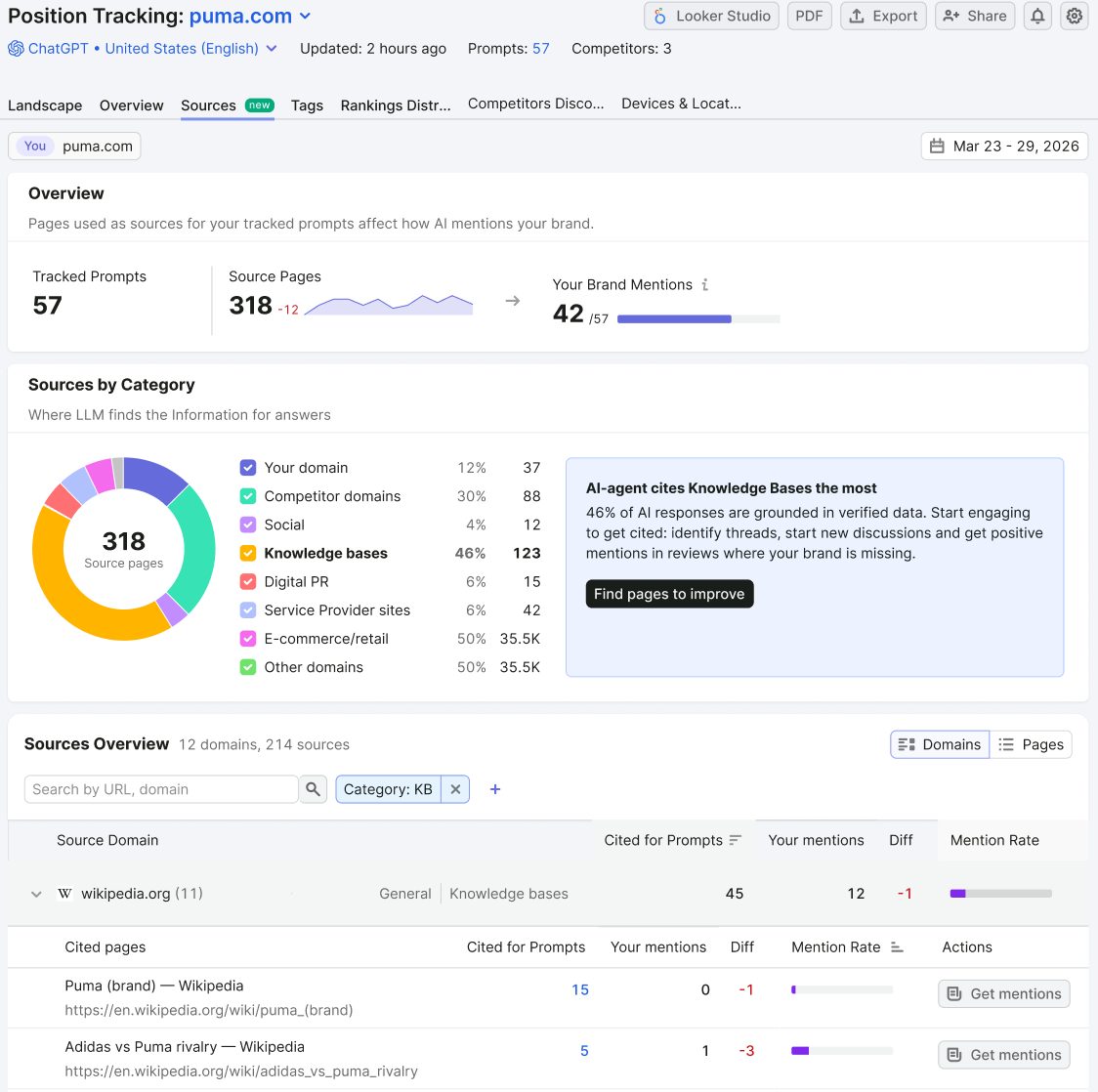
An overall GEO score tells you whether visibility is changing. Page-level and topic-level analysis helps you investigate what to do next.
Suppose your tracking data shows that competitors are frequently recommended for “best accounting software for freelancers,” but your company rarely appears.
Start by examining the content competitors publish around that topic.
Do they explain freelancer-specific features? Are their product comparisons more detailed? Do they offer clearer pricing or integrations? Are third-party review sites being cited?
Then review your own relevant pages.
You might discover that your product page lists features but doesn’t explain how freelancers can use them. Or perhaps your website has several overlapping articles that don’t clearly address the main decision.
Those findings can guide more useful content improvements.
However, avoid treating every missing AI citation as evidence that you need another article.
Sometimes the problem involves outdated information, unclear product descriptions, inaccessible pages, or source material published elsewhere.
A strong GEO workflow combines visibility data with traditional SEO analysis.
For more context, see our guide to choosing the right GEO tool, which covers different categories of optimisation and measurement software.
Step 7: Build a Monthly GEO Performance Report
Once you’ve established your baseline, use a consistent monthly reporting format.
You don’t need a complicated dashboard with 30 metrics.
A useful GEO report should answer four questions:
Where did our brand appear? What changed? What does the evidence suggest? What should we do next?
Here’s a reporting template you can adapt.
Monthly GEO Performance Report Template
| Reporting Area | Metrics to Include | Questions to Answer |
|---|---|---|
| AI visibility | Mention rate by AI platform, topic, and prompt type | Are we appearing more frequently in relevant AI answers? |
| Citations | Citation rate, cited domains and pages | Which website pages are AI platforms referencing? |
| Competitive visibility | Competitor mentions and share of voice under a defined methodology | Which brands appear where we don’t? |
| Google AI Search | Generative AI impressions by page and market | Which pages are visible in Google’s supported AI features? |
| Microsoft AI Search | Bing AI citations and relevant topic information | Which pages and themes appear in Microsoft’s supported AI experiences? |
| Website traffic | AI-referral sessions, landing pages and engagement | Are identifiable visitors reaching the website? |
| Business outcomes | Enquiries, demo requests and sales associated with observed journeys | Are there meaningful business outcomes to investigate? |
| Next actions | Content updates, technical fixes and follow-up research | What should we prioritise next? |
You can create this in Google Sheets, Looker Studio, a GEO analytics platform, or your existing marketing reporting environment.
The format matters less than having clear definitions and consistent reporting periods.
Add an Evidence and Confidence Column
One improvement I’d recommend is recording how confident you are in each measurement.
For example:
| Finding | Evidence | Interpretation |
|---|---|---|
| Brand mention rate increased | Same prompts, platforms and sampling schedule | Directional improvement in monitored AI responses |
| Google AI impressions increased | Search Console first-party report | More reported exposure in supported Google generative features |
| AI referral sessions increased | GA4 identifiable source data | More observable visits from recognised AI referrers |
| A sale was influenced by ChatGPT | Customer self-report | Possible influence; not independently proven causal attribution |
This prevents a report from presenting every number as equally reliable.
It also makes it easier for business owners and stakeholders to understand what the measurements do and don’t establish.
How Often Should You Measure GEO Performance?
GEO measurement works best when you separate frequent monitoring from longer-term evaluation.
AI answers can vary from one collection run to another. A single daily change may be noise rather than a meaningful shift.
Here’s a practical reporting schedule.
| Frequency | What to Review | Why |
|---|---|---|
| Weekly | Prompt-level mentions, citations, missing responses and major technical issues | Spot changes and check for obvious data problems |
| Monthly | Topic-level visibility, competitors, AI impressions, referrals and leads | Evaluate broader patterns and choose priorities |
| Quarterly | Business outcomes, content improvements, workflow efficiency and tracking costs | Decide whether the GEO programme should change direction |
More frequent tracking can be useful for businesses operating in rapidly changing markets, but daily dashboards don’t automatically provide better decisions.
The key is to avoid making large strategic changes because your brand disappeared from one AI answer on one day.
Five GEO Performance Tracking Mistakes to Avoid
1. Treating a GEO Visibility Score Like Google Rankings
A GEO visibility score is generally a calculated metric based on a particular dataset or monitoring setup.
It isn’t equivalent to ranking number one on Google, nor does it necessarily represent the percentage of actual AI users who saw your business.
Always review the methodology behind the score.
2. Combining Data From Different Tools Into One Percentage
Ahrefs, Semrush, Peec AI and other platforms may use different prompts, data sources, weights and definitions.
Adding their visibility scores together or averaging them without understanding those differences creates a misleading result.
Compare trends within the same tool and measurement configuration unless you’ve established a valid common methodology.
3. Confusing Citations With Brand Recommendations
A website citation means your content appeared as a referenced source.
A brand mention means your business appeared in the generated answer.
These outcomes can occur independently, so report them separately.
4. Assuming AI Visibility Increases Caused More Revenue
Even if AI citations, referral sessions and sales all increase during the same month, correlation isn’t proof of causation.
Other marketing activities, seasonality, website improvements and market changes can contribute.
Use GEO performance data to form and investigate hypotheses rather than make unsupported revenue claims.
5. Ignoring Traditional SEO and Technical Problems
A business can invest in GEO tracking while overlooking indexing issues, poorly organised content or inaccessible product pages.
These are still important.
Google’s AI features documentation continues to emphasise established SEO practices for visibility in its AI search experiences.
GEO tracking should complement your existing SEO measurement, not replace it.
What GEO Performance Tracking Setup Do You Actually Need?
Not every business needs an expensive enterprise platform.
For a small business, a practical starting stack might include Google Search Console, Bing Webmaster Tools, GA4 and one GEO monitoring tool for a limited prompt set.
That gives you first-party search data, identifiable website traffic and observations from additional AI platforms.
For an agency handling several clients, more advanced GEO software may become useful for managing multiple projects, standardising reports and exporting prompt-level evidence.
Larger organisations may also need multi-country tracking, more extensive competitor analysis and integrations with their internal reporting systems.
If your team already uses SEO software, check the GEO capabilities available in that platform before paying for another subscription.
Tools such as Ahrefs Brand Radar and Semrush AI Visibility Toolkit can combine certain AI-search measurements with traditional search research, while dedicated tools such as Peec AI and Otterly.AI focus more specifically on AI visibility monitoring.
Digimetrics is another platform to evaluate when considering an integrated SEO and GEO workflow, although you should confirm the current tracking features and reporting allowances before selecting it.
You can explore additional choices in our best GEO tools comparison.
Frequently Asked Questions
What Tools Help Measure GEO Performance?
Google Search Console, Bing Webmaster Tools, GA4, Ahrefs Brand Radar, Semrush AI Visibility Toolkit, Peec AI, and Otterly.AI can help measure different aspects of GEO performance.
Search Console and Bing provide first-party information for supported search experiences, GA4 measures identifiable website visits, and third-party GEO platforms monitor selected AI-generated responses and competitor visibility.
What Is the Most Important GEO Performance Metric?
There isn’t one metric that answers every question.
For brand discovery, a consistent non-branded mention rate can be useful. For publishers, citation visibility may matter more. For businesses focused on enquiries, identifiable referral conversions and CRM information provide additional context.
A good GEO report uses several complementary metrics.
How Do I Measure ChatGPT Visibility?
Use an AI visibility tracking tool that supports relevant ChatGPT experiences, create a fixed set of customer prompts, and monitor how frequently your brand appears.
Record the AI platform configuration, dates, location settings and underlying responses. The results describe the monitored sample, not every private ChatGPT conversation.
Can Google Analytics Measure GEO Performance?
GA4 can help identify website sessions associated with recognised AI referral sources and measure related engagement or conversions.
However, it cannot directly measure every AI brand mention or citation, and it won’t capture all journeys influenced by AI-generated answers.
Can I Measure GEO Performance for Free?
Yes, to a degree. Google Search Console, Bing Webmaster Tools and GA4 provide useful data without requiring a separate paid GEO subscription.
You can also manually sample selected AI prompts, although manual checks are difficult to scale and may be affected by location, personalisation and response variability.
Our free GEO tools guide covers additional starting options.
How Many Prompts Should I Monitor?
A small business can start with approximately 20–30 relevant prompts covering customer problems, product discovery, comparisons and branded searches.
The right number depends on your products, markets and reporting needs. A smaller, consistent and relevant set is often more useful than hundreds of loosely related questions.
How Long Does It Take to Measure GEO Performance?
You can establish an initial baseline after your first complete collection cycle.
However, several weeks of consistent monitoring generally provide a better basis for evaluating trends than one collection run.
Meaningful performance evaluation may require months of data, especially when connecting AI visibility with customer enquiries or business outcomes.
Does Improving GEO Performance Guarantee More Website Traffic?
No. An AI assistant can mention or recommend your brand without generating a website visit.
Increases in monitored mentions or citations should therefore be treated as visibility signals rather than guaranteed increases in traffic, leads or sales.
Final Verdict: Measure GEO Performance Across Visibility, Traffic, and Business Outcomes
Measuring GEO performance isn’t about finding one perfect AI visibility score.
It’s about collecting useful evidence from several sources and understanding what each measurement represents.
Start with a consistent set of relevant prompts to monitor your brand’s appearance in AI-generated answers. Use citation tracking to understand which pages and sources appear, then compare those observations with Google Search Console, Bing Webmaster Tools and GA4.
From there, investigate whether the changes are accompanied by useful website visits, enquiries or other business outcomes.
The best GEO performance tracking setup is one that gives you a clear baseline, repeatable measurements, access to supporting evidence and practical next steps.
That approach won’t eliminate every attribution limitation, but it will help you make better decisions than relying on an unexplained visibility score alone.
Disclosure: digitalmarketingtools.ai is sponsored by Digimetrics.ai. Sponsored Highlights are clearly labelled advertising. Our reviews, comparisons and guides are written to be useful and fair regardless of who sponsors the site. Read the full disclosure.


